- Semiconductor BusinessHOME
- Products and Services of Macnica,Inc.
-
technical information

-
Events and Seminars
- Handling Manufacturer
- Support
- Inquiry
- Click here to purchase products
- Semiconductor business e-mail magazine registration


 Narrow down by specifying conditions
現在2247件がヒットしています。check


hello.
My name is Hanako Altera and I provide technical support for Altera® FPGA products at Macnica.
This time, Altera ® FPGA Development Software Quartus ® Prime About paid license types Let me explain.
Quartus ® Prime is available in three editions.
|
Quartus® Prime |
Pro Edition |
Standard Edition |
Lite Edition |
|
license |
requirement |
requirement |
unnecessary |
|
Paid/Free |
Paid |
Paid |
free of charge |
[Related information] "Fourth edition, known only to those in the know"
For the paid version of Quartus ® Prime, you can select one of the following license forms when applying for a license, depending on the installation environment of the personal computer used for development.
Each feature is explained below.
FIXED license
It's a so-called "standalone license".
The platform is Windows or Linux.
The operating system (so-called OS) at that time is limited to the OS supported by Quartus ® Prime.
Decide which computer you will use Quartus ® Prime on, and apply for and issue a license for the NIC ID installed on that computer.
Since one license is used on one computer, the computer on which Quartus ® Prime is used is fixed.
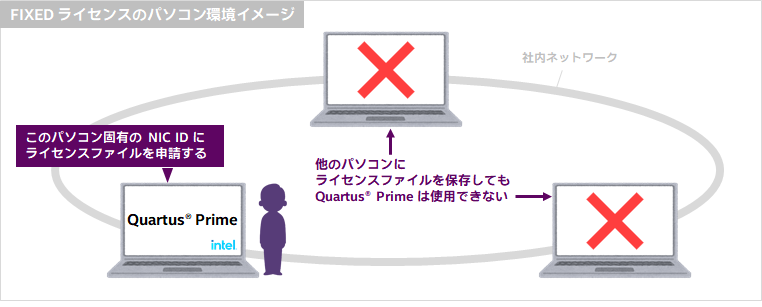
[merit]
・ Quartus® Prime can be used even in environments not connected to the company network (portability is excellent)
・License file setup is easy!
<Reference> How to set up a fixed license for Quartus® Prime, IP, and Questa* - Altera® FPGA Edition
[Demerit]
・License file cannot be shared
・If the target PC is taken out and is not there, another user cannot use it.
FLOAT license
It 's called a "network license".
You are entitled to use Quartus ® Prime on any computer that is connected to your corporate network.
However, the number of computers that can use the tool at the same time is less than or equal to the number of contracted licenses.
(There is no limit to the number of computers on which Quartus ® Prime can be installed.)
A FLOAT license requires a computer (commonly known as a license server) to manage licenses within the same network.
Install and operate FLEXlm software.
In this case, the personal computer using Quartus ® Prime (commonly known as the client machine) can also serve as the license server.
The platform of license server and client machines is Windows or Linux.
At that time, if the OS of the license server is a Debian-based distribution such as Ubuntu,
Requires Linux Standard Base (LSB) 3.0 or higher to be installed.
The OS of the client machine is limited to the OS supported by Quartus ® Prime.
A license file is applied for and issued to the NIC ID of the computer that is the license server (HOST ID if the server is Linux).
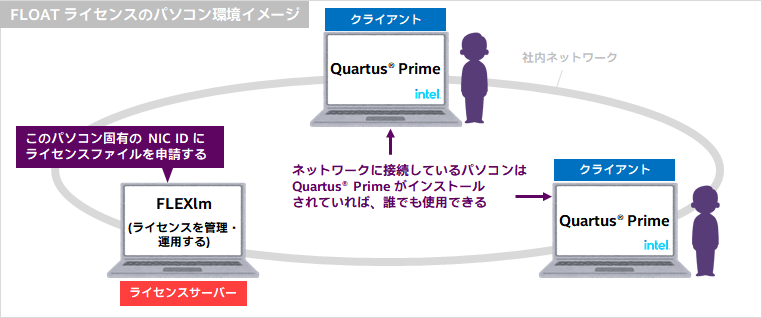
[merit]
・Quartus ® There is no limit to who can use Prime (Quartus ® unlimited number of Prime installations)
- No need to share your computer with others
・Quartus within the contract number ® Can use Prime at the same time
・Administrators can understand the usage status of licenses
[Disadvantages]
If you are not connected to the network, Quartus ® Prime is unavailable
If a network failure occurs, Quartus ® Prime is unavailable
If the license server goes down, Quartus ® Prime is unavailable
・Editing the license file and configuring the license management tool FLEXlm are required
<Reference> How to set up FLOAT licensing for Quartus® Prime, IP, and Questa* - Altera® FPGA Edition
Please understand the above characteristics and consider using the license type that is suitable for your environment.
Click here for recommended articles/materials
How to manage network licenses for Quartus Prime and third-party software on the same server machine
How to set up a fixed license for Quartus® Prime, IP, and Questa* Altera® FPGA Edition
How to setup FLOAT licensing for Quartus® Prime, IP and Questa* - Altera® FPGA Edition
How to register for an Altera® account
How to obtain new licenses for Quartus® Prime, IP and Questa* - Altera® FPGA Edition
How to obtain Quartus® Prime, IP and Questa* - Altera® FPGA Edition licenses for maintenance renewal
How to reissue license files for existing Quartus® Prime, IP and Questa* - Altera® FPGA Edition licenses
How to change the NIC ID (Host ID) associated with the Quartus® Prime, IP and Questa* - Altera® FPGA Edition licenses
How to obtain and set the Questa* - Altera® FPGA Starter Edition license file