- Semiconductor BusinessHOME
- Products and Services of Macnica,Inc.
-
technical information

-
Events and Seminars
- Handling Manufacturer
- Support
- Inquiry
- Click here to purchase products
- Semiconductor business e-mail magazine registration


 Narrow down by specifying conditions
現在2247件がヒットしています。check

Hello. I'm Hanako Altera, who provides technical support for Altera® FPGA products at Macnica.
In “Part 2”, we will look at the items necessary for FPGA development.
Note: Intel's Programmable Solutions Group became Altera®, an Intel company, in January 2024.
What you need for FPGA development

What should I prepare for FPGA development?
The following six items are required for development.
- PC to install the tool
- Quartus® Prime
- Questa* - Altera® FPGA Edition
- Evaluation board
- Altera® FPGA Download Cable II (or Altera® FPGA Download Cable)
- Development software operation manual, Altera® FPGA documentation (if necessary)
Please prepare your own PC, evaluation board, and Altera® FPGA download cable.
Quartus® Prime and Questa* - Altera® FPGA Edition can be downloaded from the Altera® website.
Quartus® Prime
Altera® FPGA development software. Quartus® Prime has three editions.
| [New] Quartus® Prime | Quartus® II | |
| version | 15.1 and later | 15.0 and earlier |
| Paid type |
Quartus® Prime Pro Edition Quartus® Prime Standard Edition |
Quartus® II Subscription Edition |
| Free type | Quartus® Prime Lite Edition | Quartus® II Web Edition |
Quartus® Prime Pro Edition and Standard Edition are fee-based software that require a license. After signing a contract and purchasing the software, obtain a license on the web and use it after setup.
Quartus® Prime Lite Edition is a free software that can be used indefinitely. Although there are some restrictions on the lineup of devices that can be developed and optimization options, it covers the minimum functions required for FPGA development. Since you can work from inputting the design of the logic circuit to operating the device on the board, the Lite Edition is sufficient for FPGA development. In addition, since it does not require a license, you can use it immediately after downloading it from the Altera® homepage and installing it on your PC.
You can check the difference between each edition on the following page.
- Comparison of Quartus® Prime design software editions (manufacturer's site)
Quartus® Prime Editions can be downloaded here.
- Altera® FPGA Development Tool Download Center (manufacturer's site)
Please see the following page for how to download.
After the download is finished, start the installation. A wizard-style installer will start, so follow the instructions to proceed.
For the installation destination, use a folder path that does not contain double-byte characters or spaces. (NG example: C:\Program Files) The tool may not start normally.
Please see the following page for the installation method.

"Fourth edition, known only to those in the know?"
In addition to the Pro Edition, Standard Edition, and Lite Edition, Quartus® Prime actually has another “Evaluation Mode”.
Evaluation mode is a 30-day free evaluation tool that allows you to use all features of the paid Quartus® Prime edition.
For example, you may want to try out the features that are limited in the Lite Edition with the Standard Edition, or try using the Pro Edition.
To use the software in evaluation mode, install Quartus® Prime Standard Edition or Pro Edition on your PC.
When you launch Quartus® Prime, the following dialog Box will appear.
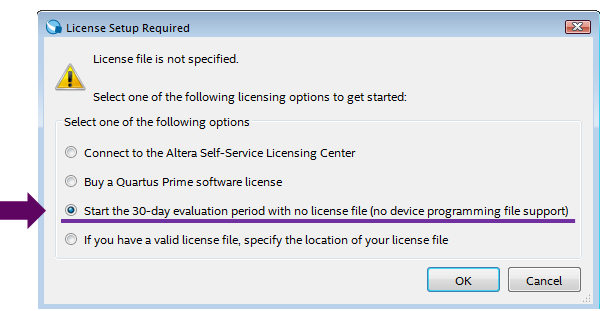
If you select "Start the 30-day evaluation period with ..." here, you can use Quartus Prime in Evaluation mode. If you are interested, please try it.

Questa* - Altera® FPGA Edition
Questa* - Altera® FPGA Edition is a simulator tool that uses Siemens EDA's Questa software, specifically for Altera® devices, to verify in software whether your designed digital logic circuits are functioning as intended. In FPGA development, it is used in the logic simulation (also known as "RTL-level simulation") stage of the workflow.
While we are introducing Questa* - Altera® FPGA Edition here, if you already own an HDL-only simulator that supports Altera® FPGAs and its version is recommended for your Quartus® Prime version, please use your existing simulator.
For Quartus® Prime EDA tool interface information, see "EDA Interface Information" in the release notes for your edition and version.
- Quartus® Prime Standard Edition Software and Device Support Release Notes (Manufacturer's website)
- Quartus® Prime Pro Edition Software and Device Support Release Notes (Manufacturer's website)
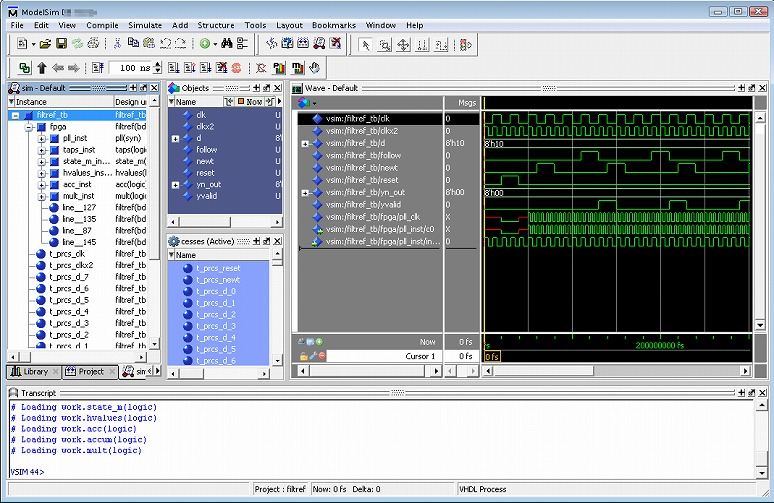
Questa* - Altera® FPGA Edition comes in two versions: a paid version, "Questa* - Altera® FPGA Edition,"and a free version, "Questa* - Altera® FPGA Starter Edition."
Check out the features of each edition here.
You can download the installation files for Questa* - Altera® FPGA Edition from the following link.
After the download is finished, start the installation. A wizard-style installer will start, so follow the instructions to proceed.
For the installation destination, use a folder path that does not contain double-byte characters or spaces. (NG example: C:\Program Files) The tool may not start normally.
Evaluation board
Usually, the user manufactures an FPGA-mounted board that meets the user's specifications. However, it takes time, effort and cost to make the board. Therefore, let's start by running the FPGA on the evaluation board and get a feel for how to use the tools and the features of the FPGA.
This is the recommended evaluation board for FPGA beginners!
[MAX® 10 FPGA Development Kit]
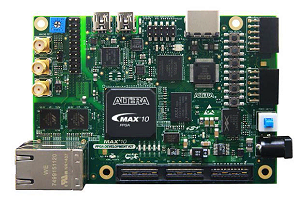
The MAX® 10 is a non-volatile FPGA with significantly improved speed and density over the previous MAX® series CPLDs. Equipped with PLL (Phase Locked Loop), DSP, built-in memory blocks, etc. that were not found in the MAX® CPLD series up to now, and external memory (boot memory) for configuration required for FPGAs such as Stratix® and Cyclone® series. This is a new type of built-in one-chip type FPGA device.
See the manufacturer's site for the MAX® 10 devices on each board.
This board has built-in Altera® FPGA download cable USB-Blaster™II functionality, so you can use it immediately by simply connecting the Mini USB cable included in the package.
Please contact our staff for the price and delivery time of the MAX® 10 FPGA development kit.
Alternatively, you can request it here.
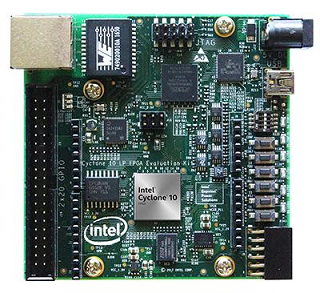
[Cyclone® 10 LP FPGA Evaluation Kit]
The Cyclone® 10 LP FPGA Evaluation Kit provides a comprehensive, general-purpose evaluation platform for a wide range of markets and applications, including industrial, medical, and automotive.
This board incorporates the functionality of the Aletra® FPGA Download Cable USB-Blaster™ II, so you can use it immediately by connecting the included Mini USB cable.
See the manufacturer's site for the Cyclone® 10 LP device that is included.
Please contact our staff for the price and delivery time of the Cyclone® 10 LP FPGA evaluation kit.
Alternatively, you can request it here.
If you are looking for an FPGA evaluation board for beginners, please refer to the following selection points.
✔ Equipped with an Altera® FPGA (preferably a newer family!)
✔ FPGA operation can be confirmed with just a PC and an evaluation board (no special equipment required)
✔ Reference designs (sample circuits) are included and can be designed with Quartus Prime
✔ The evaluation board has built-in Altera® FPGA download cable functionality
→ If not built-in, please purchase separately USB-Blaster™ II Buy
✔ There are many I/O pins that can be accessed from the outside of the FPGA, and there are expansion connectors that correspond to the interface you want to evaluate.
Please take these into consideration when deciding on a purchase.
Altera® FPGA Download Cable II
Using a dedicated download cable called Altera® FPGA Download Cable II (also known as USB-Blaster™ II), you transfer the data of your digital logic circuit designed with Quartus® Prime (a personal computer) to the target Altera® device. The interface with the computer is a USB port, and the utility for transferring data is a tool called Programmer that comes with Quartus® Prime.
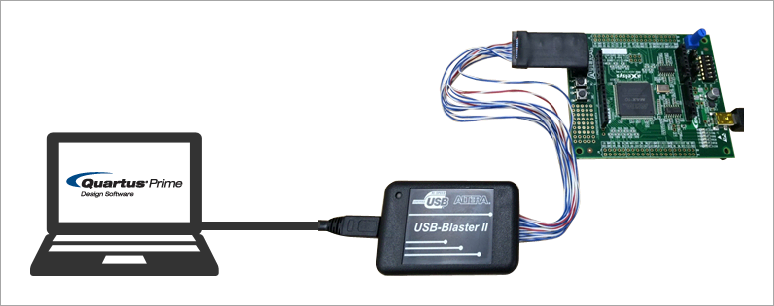
Many of the latest evaluation boards are equipped with the USB-Blaster™ II function, in which case this dedicated cable is not necessary. (Connect the PC and the board with the USB cable attached to the board to transfer data.) Therefore, it is not essential at this time, but this USB-Blaster™ II is always required to transfer data to Altera® devices implemented on user-specification fabricated boards.
You can also purchase this here.
Development software operation manuals, FPGA documentation
You can't start designing without knowing how to use Quartus® Prime or Questa* - Altera® FPGA Edition. Various documents are available for free viewing and download from the website.
- Questa* Altera® FPGA Edition Quick-Start: Altera® Quartus® Prime Standard Edition
- Questa* Altera® FPGA Edition Quick-Start: Altera® Quartus® Prime Pro Edition
Macnica group 's technical support team has also released original materials. Of course, in Japanese!
Rather than a direct translation of the English materials, the content is tailored to the "problems customers face" that are experienced in daily support, and the materials are presented in an easy-to-understand format that corresponds to each function of the tool and the development flow. Please see below for Macnica 's original materials.
The environment is now ready!
Now, I'd like to go to the end... but in order to develop, you have to have the minimum knowledge. We'll see what you need next time.
Notes:
In order to familiarize readers with this article, we have introduced many Japanese pages on the manufacturer's website, but please be sure to check the USA page as well. Please note that the Japanese page may be delayed in updating information. You can switch the language of the manufacturer's homepage from the pull-down menu on the top right of the page. Please note that even if you switch languages, not all pages will be in Japanese.
Click here for recommended articles
The real introduction Part 1. Creating an environment to start development
The real introduction Part 2. What to prepare to start development
The real introduction Part 3. Necessary knowledge to start development
Real introduction Part 4. Development flow
The real introduction Part 5. Introduction of useful content