- Semiconductor BusinessHOME
- Products and Services of Macnica,Inc.
-
technical information

-
Events and Seminars
- Handling Manufacturer
- Support
- Inquiry
- Click here to purchase products
- Semiconductor business e-mail magazine registration


 Narrow down by specifying conditions
現在2247件がヒットしています。check

The Altera® homepage may require you to sign in to access certain pages, and an Altera account is required to sign in.
This guidewill show youhow to create a new Altera account.
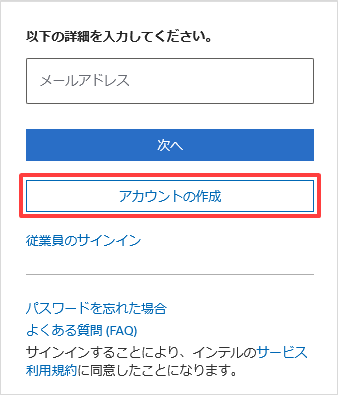
1. Altera's homepage Access the website and click the "person icon" in the upper right corner of the screen to bring up the email address input screen.
Enter your email address and click the [Next] button.

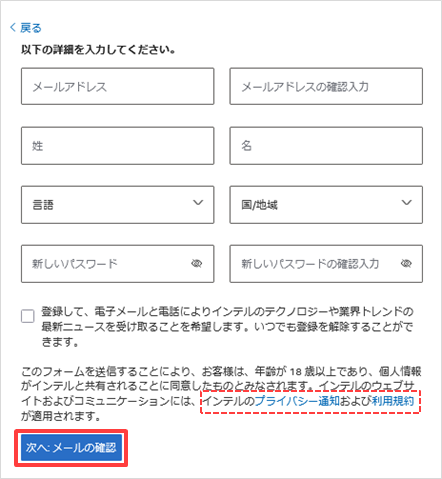
2. Your email address will be verified, and if it is not registered, a screen for entering your personal information will be displayed.
Please fill in the required information.
[Notes]Customers (license administrators) who have purchased Quartus® Prime licenses or Altera® IP licenses should contact the Self Service Licensing Center and
To link your accounts,please register the same email addressyou used when you purchased your license to your Altera account.
Once you have finished entering the information, click the [Create Account] button.
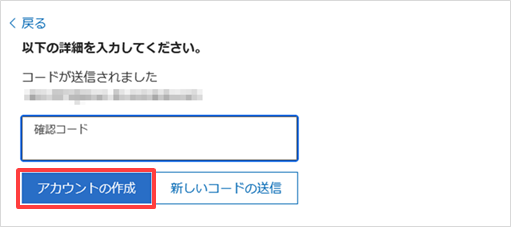
3. The next screen will appear. Click the [Send Activation Token] button to send the Activation Token to the email address you registered.
4. You will receive an email from Altera with the subject line "Verify your email to activate your Altera account".
Click the "Verify your email" banner, or enter the token provided in the email into the previous screen.
5. A page titled "Welcome to MyAltera" (My Dashboard) will be displayed.
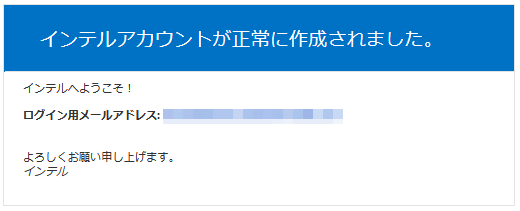
Additionally, the MyAltera button in the upper right corner of the Altera homepage will turn blue, indicating that you are signed in.

This completes the creation of your Altera account (MyAltera).
If you are prompted to sign in on the Altera® website, please use the email address you registered with your account.
To use the Self Service Licensing Center (SSLC)
To use the Self Service Licensing Center (SSLC), you need to register for the Self Service Licensing Center separately from your Altera account.
See the content below for details.
If you have trouble signing in

If you are having trouble signing in to your Altera account, please contact us via Contact Altera (Submit your Inquiry).
Click here for recommended articles/materials
Altera® FPGA Development Flow
How to obtain new licenses for Quartus® Prime, IP, and Questa* - Altera® FPGA Edition
How to obtain Quartus® Prime, IP and Questa* - Altera® FPGA Edition licenses for maintenance renewal
How to obtain and set up a Questa* - Altera® FPGA Starter Edition license file