- Semiconductor BusinessHOME
- Products and Services of Macnica,Inc.
-
technical information

-
Events and Seminars
- Handling Manufacturer
- Support
- Inquiry
- Click here to purchase products
- Semiconductor business e-mail magazine registration


 Narrow down by specifying conditions
現在2164件がヒットしています。check
Contents of this time
In recent years, advances in generative AI have led to the rapid adoption of "local LLMs (large-scale language models)" by companies and research institutions. As cloud-based AI services become more common, operating LLMs in a local environment has become an extremely effective option from the perspectives of ensuring security, improving customization, and optimizing costs.
In this second article, we will provide a detailed practical explanation of the overall system needed to build a local LLM, the hardware and software requirements, representative OSS tools, and support information provided by Macnica.
[Introduction to Local LLM]
Part 1: A complete guide to the basics and application of local LLMs
Episode 2: How to actually build a local LLM?
Overview of the overall system
Building a local LLM requires a system design that integrates multiple technological elements. The main components are as follows:
- Computational resources: GPU servers for model training and inference
- Data management: Storage for saving and managing training data and model files (e.g., S3 compatible)
- Network environment: Network switches that enable communication between multiple nodes and external collaboration
- Control and operation software: Tools for model execution, tracing, agent configuration, etc.
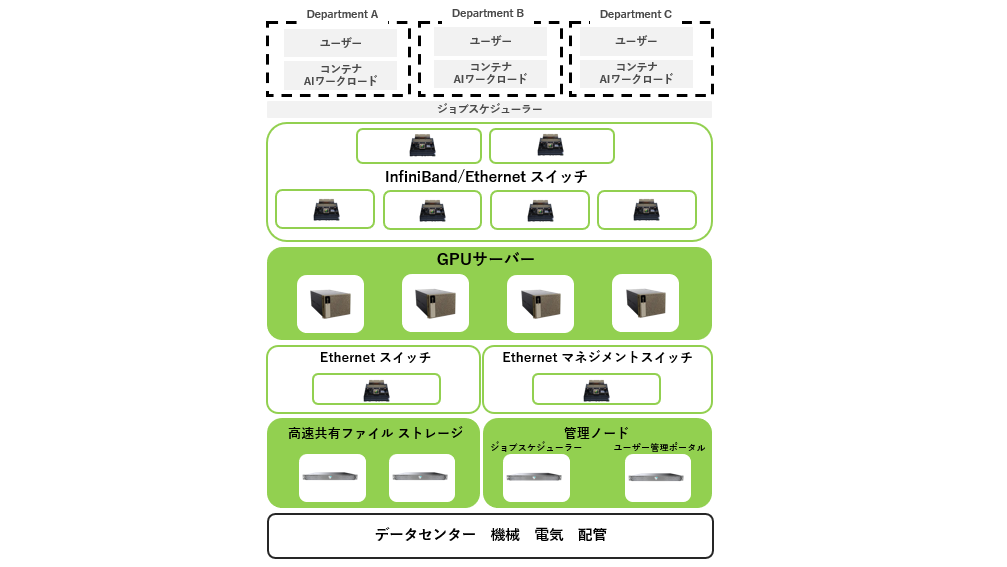
Combining these features enables flexible LLM operation according to the application. Designing according to the purpose is important, from a lightweight configuration dedicated to inference to a high-performance configuration that also enables learning. In particular, when considering fine-tuning using in-house data or a RAG (Retrieval-Augmented Generation) configuration, it is necessary to consider integration with databases and search engines.
Required Hardware
The GPU server is the core of local LLM. While CPU and RAM are important, GPU performance in particular is directly linked to the model processing speed and accuracy. If you are only performing inference, a relatively lightweight configuration will suffice, but if you are handling a 70B-scale model, you will need multiple high-performance GPUs (e.g., NVIDIA H200/B200) and large amounts of memory.
Additionally, model quantization can be used to achieve highly accurate inference while reducing the required resources. Quantization includes formats such as INT4 and INT8, which can significantly reduce model size while maintaining practical accuracy.
Depending on the application, the introduction of S3-compatible storage and high-speed network switches may also be considered. Optimizing bandwidth and latency is especially important when performing distributed inference and training across multiple nodes.
By referring to the products below as configuration examples, you can smoothly select the hardware that suits your purpose.
The following page introduces server configurations optimized for different uses, which can be useful when considering implementation.
See the table below for an example of GPU requirements by model.
|
Model |
GPUs |
Precision |
Profile |
# of GPUs |
Disk Space |
|
DeepSeek R1 DistillLlama 8B RTX |
RTX 6000 Ada Generation |
INT4 AWQ |
Throughput |
1 |
5.42 |
|
GeForce RTX 5090 |
INT4 AWQ |
Throughput |
1 |
5.42 |
|
|
GeForce RTX 5080 |
INT4 AWQ |
Throughput |
1 |
5.42 |
|
|
GeForce RTX 4090 |
INT4 AWQ |
Throughput |
1 |
5.42 |
|
|
GeForce RTX 4080 |
INT4 AWQ |
Throughput |
1 |
5.42 |
|
|
Llama 3.2 1B Instruct |
L40S |
FP8 |
Throughput |
1 |
1.47 |
|
FP8 |
Throughput LoRA |
1 |
2.89 |
||
|
BF16 |
Throughput |
1 |
2.9 |
||
|
BF16 |
Throughput LoRA |
1 |
1.97 |
||
|
Llama 3.2 3B Instruct |
L40S |
FP8 |
Throughput |
1 |
4.17 |
|
FP8 |
Throughput LoRA |
1 |
4.17 |
||
|
FP16 |
Throughput |
1 |
6.79 |
||
|
FP16 |
Throughput LoRA |
1 |
6.79 |
|
Model |
GPUs |
Precision |
Profile |
# of GPUs |
Disk Space |
|
Llama 3.3 70B Instruct |
H200 |
FP8 |
Throughput |
1 |
67.88 |
|
FP8 |
Latency |
2 |
68.23 |
||
|
BF16 |
Throughput |
2 |
68.23 |
||
|
FP8 |
Throughput |
2 |
68.1 |
||
|
FP8 |
Throughput LoRA |
2 |
68.22 |
||
|
BF16 |
Latency |
4 |
68.82 |
||
|
FP8 |
Latency |
4 |
68.68 |
||
|
BF16 |
Throughput |
4 |
68.76 |
||
|
Llama 3.1 405B Instruct |
H100 SXM |
FP8 |
Latency |
8 |
388.75 |
|
FP16 |
Latency |
16 |
794.9 |
||
|
A100 SXM |
PP16 |
Latency |
16 |
798.2 |
*NVIDIA NIM™ for Large Language Models (LLMs): See Supported Models
*Other: See https://docs.nvidia.com/nim/large-language-models/latest/supported-models.html#llama-3-3-70b-instruct
*As of August 2025
Techniques to reduce memory usage and computational load: quantization and data type innovations
Inference and training of LLMs (large-scale language models) require large amounts of memory and computational resources. For this reason, several techniques are used to improve efficiency. First, the weight data (parameters) of LLMs are typically represented as 16-bit (BF16) or 32-bit floating-point numbers. Especially during training, high-precision data types tend to be used to maintain a certain level of accuracy.
On the other hand, a technique called "quantization" is sometimes used to reduce memory usage during inference and improve processing speed. This is a technology that compresses the size of a model by further reducing the number of bits in the weight data. For example, by converting 16-bit weights to 8-bit or 4-bit weights, the amount of memory required can be reduced to 1/2 and 1/4, respectively.
However, quantization also has trade-offs. Reducing the number of bits may slightly reduce the accuracy of the model, so a balance must be found depending on the application. In particular, for tasks that require high accuracy, it is important to thoroughly evaluate the impact of quantization before introducing it.
By utilizing these techniques, it becomes possible to operate large-scale models even with limited GPU resources. Understanding and utilizing these optimization methods is key to designing a practical system for building local LLMs.
Required software
Software that supports model management, execution, and collaboration is essential for operating a local LLM. Typical OSS (open source software) tools include the following:
LangChain: A Python-based framework that allows you to build flexible and advanced interactive applications by linking multiple language models and external tools (search, calculation, database, etc.). Agent functions and chain structures allow complex processing to be executed in stages.
・Llama.cpp and vLLM: OSS that provides a lightweight inference environment. It works well with quantized models and is suitable for high-speed inference in a local environment.
These OSS are highly flexible and scalable, allowing for integration with in-house systems and the addition of unique functions. However, because operating OSS requires a certain level of technical knowledge, some companies choose to use products with commercial support.
In that case, one option is to use the following tools (SDK) that use OSS and NVIDIA's own technology:
NeMo: NVIDIA 's LLM development and operation framework. It provides pre-trained models and fine-tuning functions, enabling stable operation in commercial environments.
NIM: Provides inference APIs as Microservices, enabling scalable operation. It is highly compatible with Kubernetes environments and supports cloud-native configurations.
Blueprint: Provides design templates for LLM applications, supporting rapid development and facilitating the transition from PoC to production.
・Agent Toolkit: A set of tools that allows you to easily build agent configurations. It allows you to design AI agents that fit your business workflow.
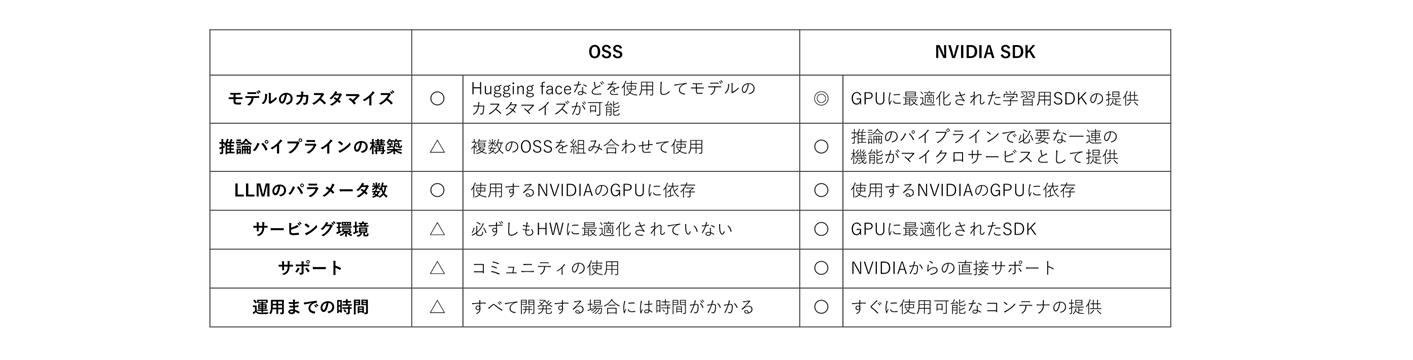
Building a local LLM is not just about introducing technology, but also an opportunity to fundamentally rethink business processes and how data is used. A comprehensive perspective is required, from hardware selection, software configuration, security measures, and the establishment of an operational system.
If you have any issues or concerns about the setup, please take advantage of the support provided by Macnica. We will support you in a safe and reliable implementation through setup support and technical consultations, mainly using NVIDIA products. For more information, please see the following page.
Next time, we will explain the overall system required to build a local LLM!
In this article, we have explained the overall system needed to build a local LLM, the hardware and software requirements, representative OSS tools, and the support information provided by Macnica.
In the next issue, we will take a closer look at LoRA, a lightweight fine-tuning method, RAG (Search Augmentation Generation) using in-house data, and technical considerations for security and operation.
For quotes/inquiries click here