- Semiconductor BusinessHOME
- Products and Services of Macnica,Inc.
-
technical information

-
Events and Seminars
- Handling Manufacturer
- Support
- Inquiry
- Click here to purchase products
- Semiconductor business e-mail magazine registration


 Narrow down by specifying conditions
現在2183件がヒットしています。check

With the Remote System Upgrade feature, Altera® FPGAs can receive new configuration data from a remote source, update the contents of the flash memory, and reconfigure the FPGA with the new configuration data, helping to shorten design cycles, keep up with evolving standards, and overcome the challenges of system deployment in remote locations.
What is Remote System Upgrade (RSU)?
A general term for upgrading (rewriting) the data contents of the memory device that stores the configuration data of Altera FPGAs.
The diagram below illustrates how it works.
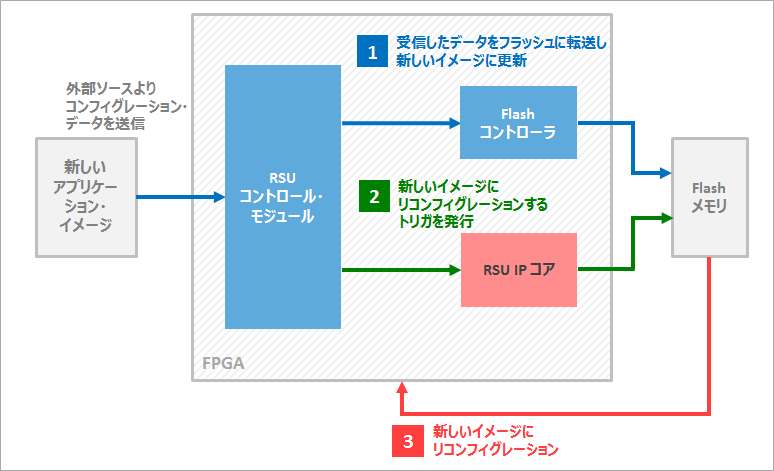
Remote system upgrades are performed according to the following workflow:
0. The FPGA operates with existing configuration data.
1. Transfer and update new configuration data to Flash memory via FPGA from an external source.
2. The IP within the FPGA accesses the updated configuration data in the Flash memory.
3. Reconfigure the FPGA with the new image.
The diagram below shows the FPGA and configuration flash memory configuration for enabling remote system upgrades.
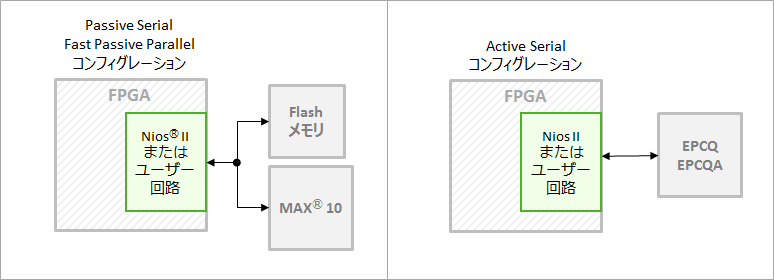
Eligible device family
|
FPGA family |
Stratix® V, Stratix® IV, Arria® 10, Arria® V, Cyclone® 10, Cyclone® V, MAX® 10 |
|
Configuration ROM |
EPCQA, EPCQ, EPCS |
RSU must have remote update capability
To implement remote system upgrade, store two types of files in the FPGA's configuration ROM:
|
factory image |
Configuration data that is loaded into the FPGA at startup or in the event of a system error. Depending on the device, there are families where initial boot is determined to load the factory image. |
|
application image |
Data to be reconfigured into the FPGA. Multiple holdings possible. Stored in pages excluding factory images. May be renewed upon RSU. |
Normally, FPGA operation can be updated by switching between the factory image and the application image while the system is running. This function is called remote updating.
[Related Information] How to switch FPGA configuration data (HDL version)
This remote update process is further extended to remote system upgrade, which involves rewriting the existing application image in the Flash memory where the configuration data is stored. Implementing remote system upgrade and remote update functionality requires integrating dedicated IP into the user's design.
|
FPGA Family |
feature |
IP |
|
Arria 10 Cyclone 10GX |
Optionally specify configuration data (factory/application) to use at startup |
Remote Update IP
Generic Serial Flash Interface IP |
|
Stratix V Stratix IV Arria V Cyclone V |
Start from factory design. When transitioning from one application design to another application design, it is necessary to return to the factory design once. |
|
|
Cyclone 10 LP |
||
|
MAX 10 |
Optionally specify configuration data (factory/application) to use at startup |
On-Chip Flash IP
Dual Configuration IP |
Image of switching configuration data
Below is a simple chart for each family.
Arria 10, Cyclone 10 GX Remote Update Mode
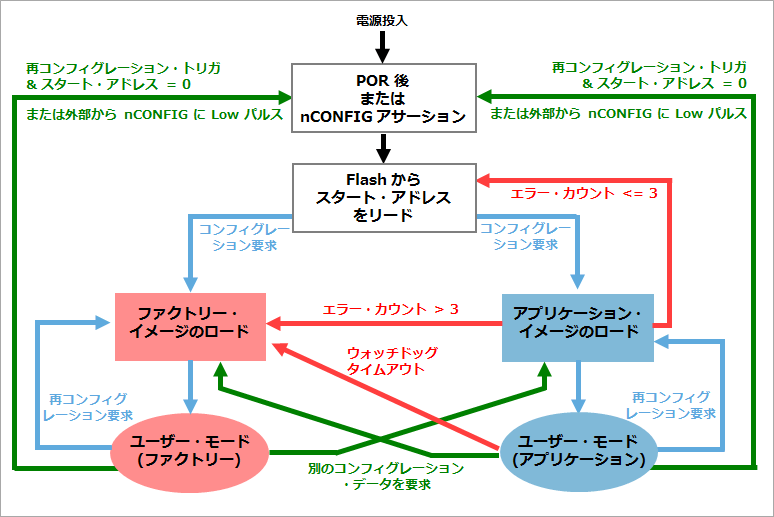
Remote update mode for Stratix V, Stratix IV, Arria V, Cyclone V
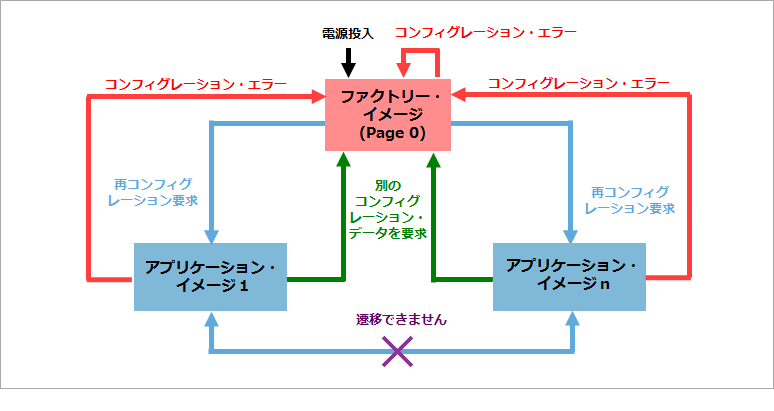
Cyclone 10 LP Remote Update Mode
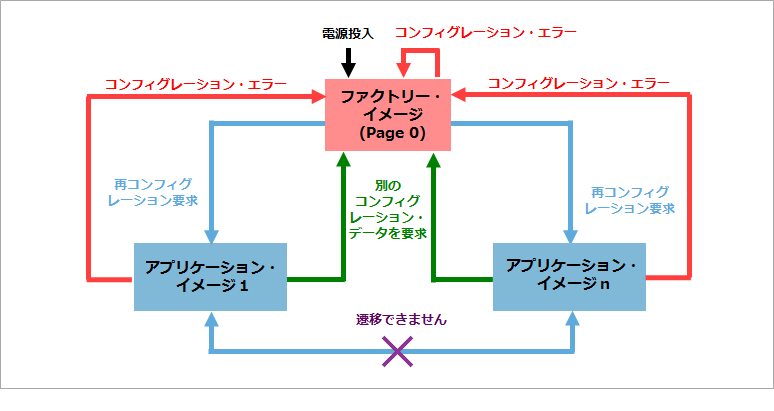
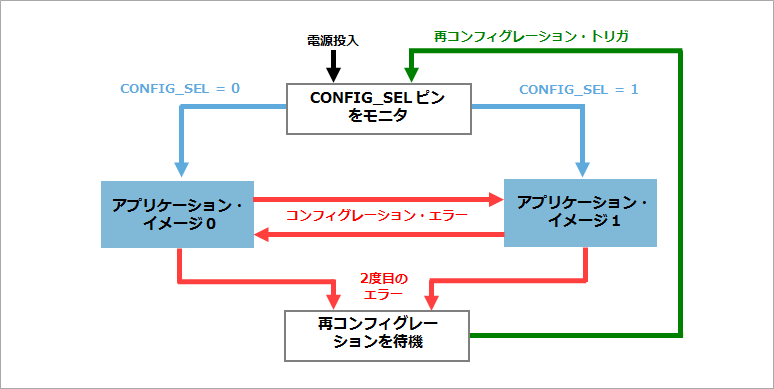
Remote Update Mode in MAX 10
General Procedure for Remote System Upgrade
- Each user design includes and compiles IP for RSU
- Create programming data for RSU
- Write to the configuration ROM (or flash memory).
- Configure FPGA, FPGA works
- Update configuration ROM (or Flash memory) data externally while FPGA is running
- Reconfigure FPGA
At the end
A video about remote system upgrade is available on YouTube below.
Sample designs are available below. (For the Design Store, see this page.)