- Semiconductor BusinessHOME
- Products and Services of Macnica,Inc.
-
technical information

-
Events and Seminars
- Handling Manufacturer
- Support
- Inquiry
- Click here to purchase products
- Semiconductor business e-mail magazine registration


 Narrow down by specifying conditions
There are currently 4342 results.
Microchip FPGA: Is there an option to run multiple place and route passes for optimization? Where can I see the results?
<Location of option settings>
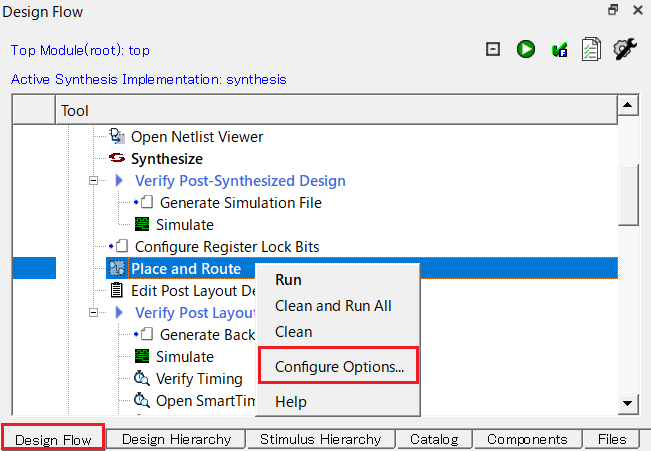
(1) Right-click "Place and Route" and select "Configure Options..."
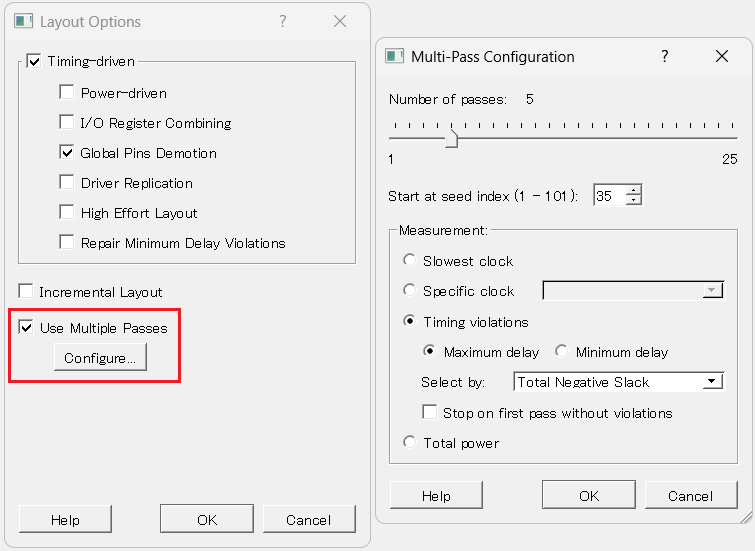
(2) Check "Use Multiple Passes" to enable the option.
(3) Select the "Configure…" button and configure the following in the Multi-Pass Configuration window.
Number of passes: 1-25, default is 5
Start at seed index(1-101): Can be set from 1 to 101
Measurement: Select the standard to compare the layout results
<Result>
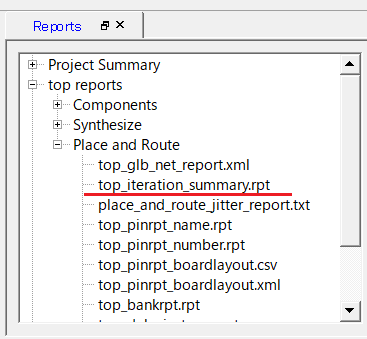
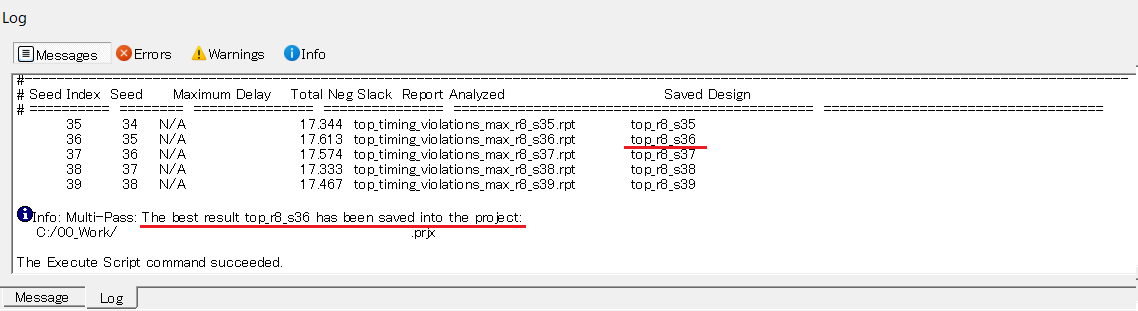
Please check the Log at the bottom of Libero SoC or Report > Place and Route > top_iteration_summary.rpt.
The placement and routing results will be saved in the log and marked as "best result."
Info: Multi-Pass: The best result xxxxx has been saved into the project:
C:/xxx/xxxx/xxxx.prjx
*For details, please refer to the "Multiple Pass Layout Configuration" section of the "Libero SoC Design Flow User Guide."
The Libero SoC Design Flow User Guide can be found under the Documentation > User Guides tab.
https://www.microchip.com/en-us/products/fpgas-and-plds/fpga-and-soc-design-tools/fpga/libero-software-later-versions#Documentation
* Only the best design will be saved.
Quote: "Note: There is no option to save the design files from all the passes. Only the (Timing or Power) result reports from all the passes are saved."
https://onlinedocs.microchip.com/oxy/GUID-AFCB5DCC-964F-4BE7-AA46-C756FA87ED7B-en-US-16/GUID-15AAF951-BC04-4E80-9C4E-7EFD7F5F8FA6.html
 Experienced FAE
Free consultation is available.
From specific product specifications to parts selection, the Company FAE will answer your technical concerns free of charge. Please feel free to contact us.