- Semiconductor BusinessHOME
- Products and Services of Macnica,Inc.
-
technical information

-
Events and Seminars
- Handling Manufacturer
- Support
- Inquiry
- Click here to purchase products
- Semiconductor business e-mail magazine registration


 Narrow down by specifying conditions
There are currently 4342 results.
Microchip FPGA: Where can I check the register status of the PolarFire SoC's MSS (Microprocessor Sub-System)?
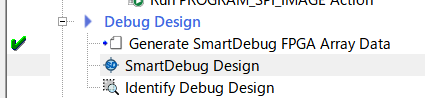
The Libero SoC's SmartDebug Design allows you to check the register state, including reset.
(1) Double-click SmartDebug Design.
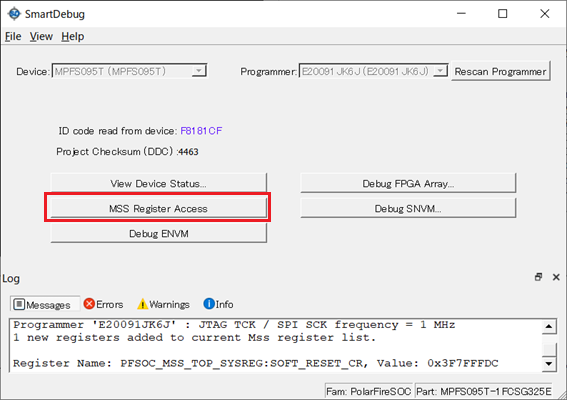
(2) Click MSS Register Access.
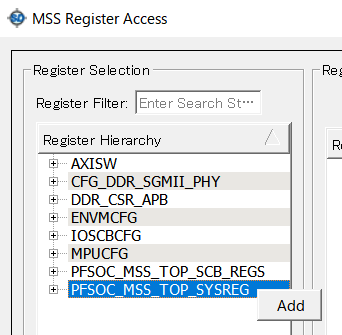
(3) Select the register you want to check from the left side and click Add.
(4) Click the Read button below to check the register status in the Read Value column.
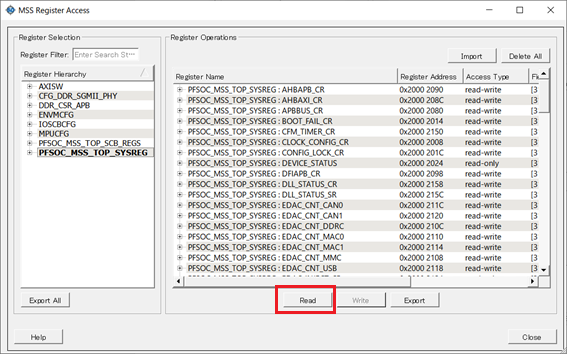
*If a read error occurs, check to see if the device has been reset.
*For details on how to use it, please refer to the Debugging PolarFire SoC - Smart Debug video.
https://www.youtube.com/watch?v=7-hmSy-TdPI
*For details on the registers, please download the PolarFire SoC Device Register Map.
The PolarFire SoC Device Register Map is available on the PolarFire SoC page > Documentation > Data Sheets tab.
https://www.microchip.com/en-us/products/fpgas-and-plds/system-on-chip-fpgas/polarfire-soc-fpgas#Documentation
 Experienced FAE
Free consultation is available.
From specific product specifications to parts selection, the Company FAE will answer your technical concerns free of charge. Please feel free to contact us.