- Semiconductor BusinessHOME
- Products and Services of Macnica,Inc.
-
technical information

-
Events and Seminars
- Handling Manufacturer
- Support
- Inquiry
- Click here to purchase products
- Semiconductor business e-mail magazine registration


 Narrow down by specifying conditions
現在2168件がヒットしています。check

Last time, I introduced the specifications of Silicon Labs' EFM32PG /JG. EFM32PG /JG is a very unique product that inherits the feature of "low power consumption" common to EFM32 and has built-in encryption hardware. (Previous article here)
This time, I would like to look at the performance of the encryption hardware (CRYPTO), which is its characteristic function.
What kind of sample code is available?
Software called Simplicity Studio is provided as a development environment for EFM32PG /JG. In SimplicityStudio, in addition to the functions of a general integrated development environment (IDE) such as compiling, debugging, and programming, it also has a current consumption measurement tool (Energy Profiler), a peripheral setting tool (Configurator), product documentation, sample code, etc. Fully loaded with features and information.
There is a wealth of sample code available, ranging from flashing lights to Invader games (laughs).
- AES (project name: SLSTK3401A_aescrypt)
- ECDSA (project name: SLSTK3401A_ecdsa)
Reading the sample code readme file, it seems that the AES sample code uses AES and a SHA hash function. It seems that ECDSA (elliptic curve DSA) can be evaluated by switching between P-192, P-224 and P-256.
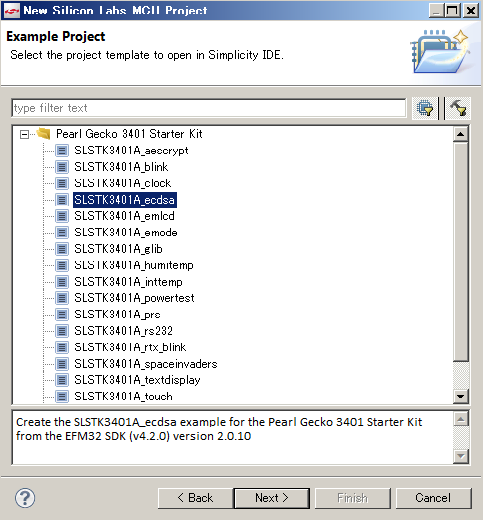
Starting with ECDSA...
Let's start by relying on the information in the readme file.
This sample code is coded using the API for ECDSA, but it is simple to count the time required for the processing and output the result from the virtual COM port.
Connect the starter kit (SLSTK3401A) to your PC and launch Simplicity Studio. SLSTK3401A is a common starter kit for Pearl Gecko and Jade Gecko, and the microcontroller is Pearl Gecko.
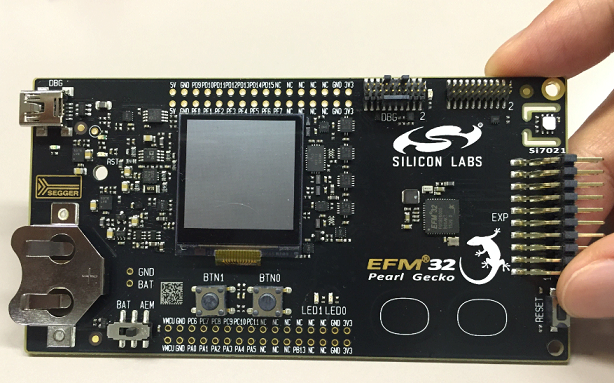
EFM32 Pearl Gecko Starter Kit SLSTK3401A
Now load the ECDSA sample code (SLSTK3401A_ecdsa), build it, and download the resulting binary to the EFM32PG, but before that, set the build setting to “Release”. If it is set to “Debug”, compression will not be applied during logic synthesis, so fair comparison cannot be performed.
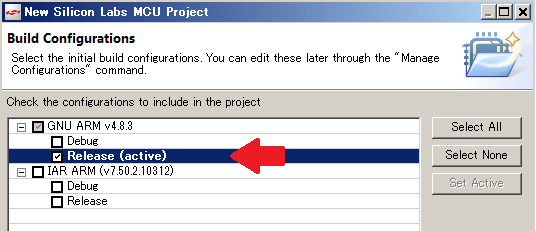
In addition, you can select whether to enable or disable cryptographic hardware (CRYPTO) by setting parameters at build time. Disable the cryptographic hardware as follows:
Procedure: Select project -> Right click -> Property -> C/C++ Build -> Setting -> GNU ARM C Compiler -> Add "-DNO_CRYPTO_ACCELERATION" to Expert Setting
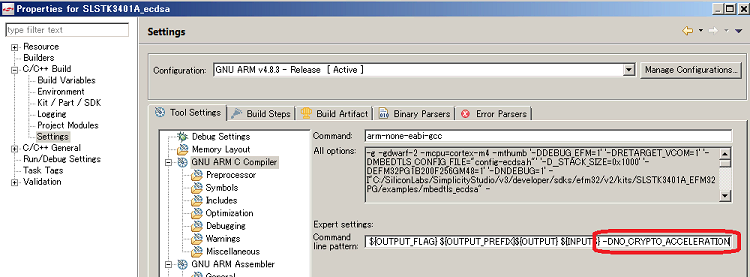
After setting, build and download.
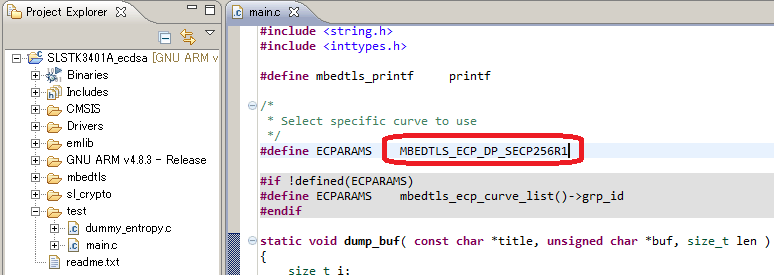
In addition, if you look at the sample code main, it is set to use ECC P-256, so if you change this declaration, you can also use P-192 or P-224 for evaluation.
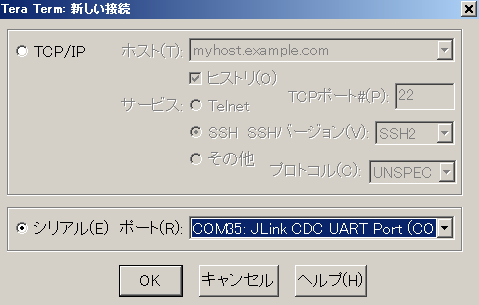
Settings on the PC side
The result (processing time) is sent via the virtual COM port, so you need to use terminal software to receive the data. I will use Tera Term this time. Select JLink CDC UART Port and set the communication settings to 115200-8-N-1 (baud rate 115200, data length 8bit, no parity, stop bit 1bit).
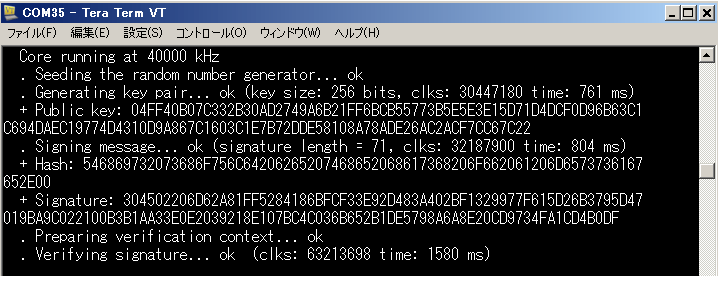
Result of software processing (Cortex-M4F, 40MHz operation, encryption hardware = disabled)
When you press the reset button on the starter kit, the sample code will run and the results will be displayed in TeraTerm.
Hardware processing result (Cortex-M4F, 40MHz operation, encryption hardware = enabled)
Now enable the encryption hardware and see the results as well.
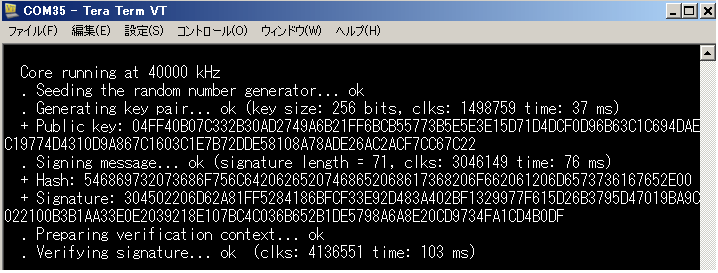
A comparison of the results is shown in the table below. Each processing time is calculated by reading the timestamp (counter value), performing API processing (key generation, etc.), reading the timestamp (counter value) again, and obtaining the difference between the timestamps. It seems that there are some processing time other than encryption.
Note that this is the result using the Cortex-M4F. If you use a powerless microcomputer, the difference may increase further.
| Soft processing (encryption hardware disabled) | Hard processing (encryption hardware enabled) | |
| key generation | 761ms | 37ms |
| signature generation | 804ms | 76 ms |
| signature verification | 1580ms | 103ms |
Next time I would like to try the AES sample code.
If you are interested in the EFM32 series microcontrollers, please also see here
Related article
- Finally equipped with a security engine! IoT era microcomputers have come so far! (1)
- Finally equipped with a security engine! IoT era microcomputers have come so far! (2)
- Finally equipped with a security engine! IoT era microcomputers have come so far! (3)
- Finally equipped with a security engine! IoT era microcomputers have come so far! (4)