- Semiconductor BusinessHOME
- Products and Services of Macnica,Inc.
-
technical information

-
Events and Seminars
- Handling Manufacturer
- Support
- Inquiry
- Click here to purchase products
- Semiconductor business e-mail magazine registration


 Narrow down by specifying conditions
現在2213件がヒットしています。check

Useful iPerf options
In the previous article, I introduced the actual behavior of frequently used options. Most people who actually use iPerf are probably satisfied with these options.
The options introduced here are useful options to know in order to work more efficiently. I think there is no loss in knowing how to measure devices with multiple interfaces, and how to specify input/output data and formats.
This time, among those options, it will be a common option for Client/Server.
* Information for iperf 3.1.3.
Client/Server common options
Below are the common options for Client/Server.
You can check it with "iperf3 -h".
| option | Default value | explanation |
| f |
a (The displayed value is automatically adjusted so that it is 1000 or less + bit display) |
Change the unit of Bnadwidth displayed in the result. Units are K/M/G, and Bytes/bits are switched with uppercase/lowercase. In the case of "m", it is "Mbits", and in the case of "M", it is "MBytes". |
| F | unspecified |
Specify input/output data in a file. If "-F test.txt" is specified for both sending and receiving, test.txt on the sending side will be sent as sending data, and the receiving side will record the received data in test.txt. |
| A |
unspecified (Available only if HAVE_CPU_AFFINITY is enabled) |
Specifies the logical processor to use. If "-A 3" is specified, the logical processor whose processor is 3 in /proc/cpuinfo is specified. Maximum performance is achieved if no other threads are assigned to the processor. |
| B | unspecified |
Bind the send and receive addresses. For "iperf3 -s -B 192.168.1.10", the server will listen on 192.168.1.10. |
| V | Displays detailed information about the results. | |
| J | Output the result in JSON format. | |
| d | Displays debugging information for developers. | |
| v | Display iperf version information. |
I actually used it
I tried using some of them to see how they work.
"-f" option
The default Mbits/sec has been changed to KBytes/sec with the "-f K" option.
If not set, the display will be adjusted to a value of 1000 or less, so in the case of Wi-Fi, it will be approximately “M + bits (default)”.
test@test-ThinkPad-T430:~$ iperf3 -c 192.168.11.11 Connecting to host 192.168.11.11, port 5201 [ 4] local 192.168.11.100 port 42652 connected to 192.168.11.11 port 5201 [ ID] Interval Transfer Bandwidth Retr Cwnd [ 4] 0.00-1.00 sec 68.5 MBytes 574 Mbits/sec 0 1.34 MBytes [ 4] 1.00-2.00 sec 73.8 MBytes 619 Mbits/sec 0 1.34 MBytes ^C[ 4] 2.00-2.42 sec 32.3 MBytes 642 Mbits/sec 0 1.34 MBytes - - - - - - - - - - - - - - - - - - - - - - - - - [ ID] Interval Transfer Bandwidth Retr [ 4] 0.00-2.42 sec 174 MBytes 604 Mbits/sec 0 sender [ 4] 0.00-2.42 sec 0.00 Bytes 0.00 bits/sec receiver iperf3: interrupt - the client has terminated test@test-ThinkPad-T430:~$ iperf3 -c 192.168.11.11 -f K Connecting to host 192.168.11.11, port 5201 [ 4] local 192.168.11.100 port 42656 connected to 192.168.11.11 port 5201 [ ID] Interval Transfer Bandwidth Retr Cwnd [ 4] 0.00-1.00 sec 73.6 MBytes 75320 KBytes/sec 0 2.14 MBytes [ 4] 1.00-2.00 sec 76.0 MBytes 77811 KBytes/sec 0 2.14 MBytes [ 4] 2.00-3.00 sec 76.3 MBytes 78159 KBytes/sec 0 2.14 MBytes ^C[ 4] 3.00-3.19 sec 14.4 MBytes 75736 KBytes/sec 0 2.14 MBytes - - - - - - - - - - - - - - - - - - - - - - - - - [ ID] Interval Transfer Bandwidth Retr [ 4] 0.00-3.19 sec 240 MBytes 77014 KBytes/sec 0 sender [ 4] 0.00-3.19 sec 0.00 Bytes 0.00 KBytes/sec receiver iperf3: interrupt - the client has terminated"-A" option
I tried it in an environment with 4 logical processors, but I didn't see any advantage when only iperf was running.
Number of logical processors
$ grep processor /proc/cpuinfo | wc -l
Four
Specifying a nonexistent logical processor is an error.
test@test-ThinkPad-T430:~$ iperf3 -c 192.168.11.11 -A 2 Connecting to host 192.168.11.11, port 5201 [ 4] local 192.168.11.100 port 42694 connected to 192.168.11.11 port 5201 [ ID] Interval Transfer Bandwidth Retr Cwnd [ 4] 0.00-1.00 sec 70.1 MBytes 588 Mbits/sec 0 1.51 MBytes [ 4] 1.00-2.00 sec 67.1 MBytes 563 Mbits/sec 0 1.51 MBytes [ 4] 2.00-3.00 sec 69.1 MBytes 580 Mbits/sec 0 1.51 MBytes [ 4] 3.00-4.00 sec 76.3 MBytes 640 Mbits/sec 0 1.51 MBytes [ 4] 4.00-5.00 sec 77.0 MBytes 645 Mbits/sec 0 1.51 MBytes [ 4] 5.00-6.00 sec 64.8 MBytes 543 Mbits/sec 0 1.51 MBytes [ 4] 6.00-7.00 sec 73.1 MBytes 613 Mbits/sec 0 1.51 MBytes [ 4] 7.00-8.00 sec 68.9 MBytes 579 Mbits/sec 0 1.51 MBytes [ 4] 8.00-9.00 sec 68.4 MBytes 573 Mbits/sec 0 1.51 MBytes [ 4] 9.00-10.00 sec 71.8 MBytes 603 Mbits/sec 0 1.51 MBytes - - - - - - - - - - - - - - - - - - - - - - - - - [ ID] Interval Transfer Bandwidth Retr [ 4] 0.00-10.00 sec 707 MBytes 593 Mbits/sec 0 sender [ 4] 0.00-10.00 sec 707 MBytes 593 Mbits/sec receiver iperf Done. test@test-ThinkPad-T430:~$ iperf3 -c 192.168.11.11 -A 3 Connecting to host 192.168.11.11, port 5201 [ 4] local 192.168.11.100 port 42702 connected to 192.168.11.11 port 5201 [ ID] Interval Transfer Bandwidth Retr Cwnd [ 4] 0.00-1.00 sec 67.6 MBytes 567 Mbits/sec 0 1.34 MBytes [ 4] 1.00-2.00 sec 71.2 MBytes 598 Mbits/sec 0 1.34 MBytes [ 4] 2.00-3.00 sec 72.1 MBytes 605 Mbits/sec 0 1.34 MBytes [ 4] 3.00-4.00 sec 67.0 MBytes 562 Mbits/sec 0 1.34 MBytes [ 4] 4.00-5.00 sec 70.6 MBytes 592 Mbits/sec 0 1.34 MBytes [ 4] 5.00-6.00 sec 73.0 MBytes 612 Mbits/sec 0 1.34 MBytes [ 4] 6.00-7.00 sec 73.9 MBytes 620 Mbits/sec 0 1.34 MBytes [ 4] 7.00-8.00 sec 73.3 MBytes 615 Mbits/sec 0 1.34 MBytes [ 4] 8.00-9.00 sec 75.2 MBytes 631 Mbits/sec 0 1.34 MBytes [ 4] 9.00-10.00 sec 72.1 MBytes 605 Mbits/sec 0 1.34 MBytes - - - - - - - - - - - - - - - - - - - - - - - - - [ ID] Interval Transfer Bandwidth Retr [ 4] 0.00-10.00 sec 716 MBytes 601 Mbits/sec 0 sender [ 4] 0.00-10.00 sec 716 MBytes 601 Mbits/sec receiver iperf Done. test@test-ThinkPad-T430:~$ iperf3 -c 192.168.11.11 -A 10 iperf3: error - unable to set CPU affinity: Invalid argument"-B option"
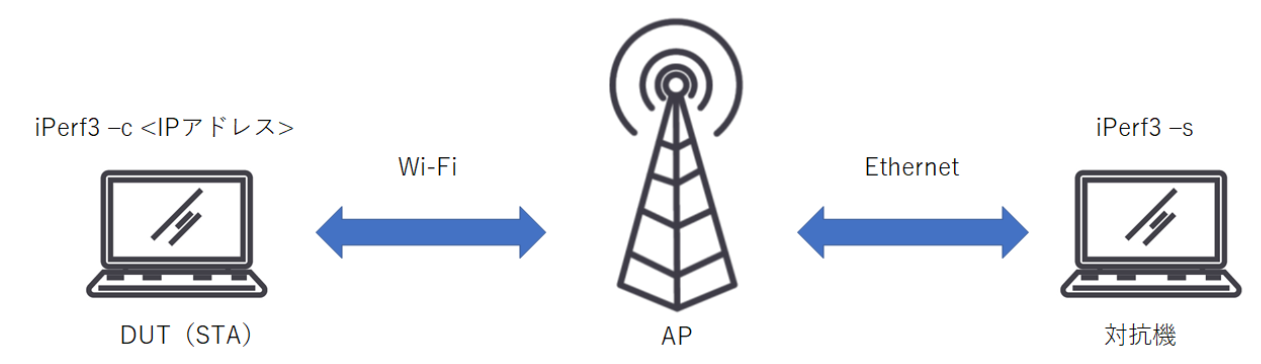
Below is the behavior of ”iperf3 -c 192.168.11.11” when the server side is set with ”iperf3 -s -B 192.168.11.11” (Ether) / ”iperf3 -s -B 192.168.11.9” (Wi-Fi) respectively. is.
The connection is failing if 192.168.11.9 is set.
Specifies the interface to use if you have multiple interfaces.
test@test-ThinkPad-T430:~$ iperf3 -c 192.168.11.11
Connecting to host 192.168.11.11, port 5201
[  4] local 192.168.11.100 port 34804 connected to 192.168.11.11 port 5201
[ ID] Interval           Transfer     Bandwidth       Retr  Cwnd
[  4]   0.00-1.00   sec  14.9 MBytes   125 Mbits/sec   17   43.8 KBytes
[  4]   1.00-2.00   sec  10.7 MBytes  89.5 Mbits/sec   11   39.6 KBytes
^C[  4]   2.00-2.38   sec  3.40 MBytes  75.0 Mbits/sec    3   48.1 KBytes
- - - - - - - - - - - - - - - - - - - - - - - - -
[ ID] Interval           Transfer     Bandwidth       Retr
[  4]   0.00-2.38   sec  29.0 MBytes   102 Mbits/sec   31             sender
[  4]   0.00-2.38   sec  0.00 Bytes  0.00 bits/sec                  receiver
iperf3: interrupt - the client has terminated
test@test-ThinkPad-T430:~$ iperf3 -c 192.168.11.11
iperf3: error - unable to connect to server: Connection refused
test@test-ThinkPad-T430:~$
"-V" option
Added iPerf version information, kernel version information, time information, connection information, and result details.
test@test-ThinkPad-T430:~$ iperf3 -c 192.168.11.11 -V iperf 3.0.11 Linux test-ThinkPad-T430 4.9.11-qca6174-qca9377+ #1 SMP Thu Sep 22 22:11:03 JST 2022 x86_64 x86_64 x86_64 GNU/Linux Time: Sat, 24 Sep 2022 01:39:41 GMT Connecting to host 192.168.11.11, port 5201 Cookie: test-ThinkPad-T430.1663983581.808015 TCP MSS: 1448 (default) [ 4] local 192.168.11.100 port 42678 connected to 192.168.11.11 port 5201 Starting Test: protocol: TCP, 1 streams, 131072 byte blocks, omitting 0 seconds, 10 second test [ ID] Interval Transfer Bandwidth Retr Cwnd [ 4] 0.00-1.00 sec 69.6 MBytes 582 Mbits/sec 0 1.37 MBytes [ 4] 1.00-2.00 sec 70.5 MBytes 593 Mbits/sec 0 1.37 MBytes [ 4] 2.00-3.00 sec 75.1 MBytes 630 Mbits/sec 0 1.37 MBytes [ 4] 3.00-4.00 sec 75.2 MBytes 631 Mbits/sec 0 1.37 MBytes [ 4] 4.00-5.00 sec 77.6 MBytes 650 Mbits/sec 0 1.37 MBytes [ 4] 5.00-6.00 sec 74.3 MBytes 624 Mbits/sec 0 1.37 MBytes [ 4] 6.00-7.00 sec 74.5 MBytes 625 Mbits/sec 0 1.37 MBytes [ 4] 7.00-8.00 sec 76.0 MBytes 638 Mbits/sec 0 1.37 MBytes [ 4] 8.00-9.00 sec 72.9 MBytes 611 Mbits/sec 0 1.37 MBytes [ 4] 9.00-10.00 sec 75.4 MBytes 633 Mbits/sec 0 1.37 MBytes - - - - - - - - - - - - - - - - - - - - - - - - - Test Complete. Summary Results: [ ID] Interval Transfer Bandwidth Retr [ 4] 0.00-10.00 sec 741 MBytes 622 Mbits/sec 0 sender [ 4] 0.00-10.00 sec 741 MBytes 622 Mbits/sec receiver CPU Utilization: local/sender 22.4% (0.1%u/22.3%s), remote/receiver 0.3% (0.1%u/0.3%s) iperf Done."-J" option
Display the result in JSON format.
File output is useful for processing the resulting data.
test@test-ThinkPad-T430:~$ iperf3 -c 192.168.11.11 -J { "start": { "connected": [{ "socket": 4, "local_host": "192.168.11.100", "local_port": 42686, "remote_host": "192.168.11.11", "remote_port": 5201 }], "version": "iperf 3.0.11", "system_info": "Linux test-ThinkPad-T430 4.9.11-qca6174-qca9377+ #1 SMP Thu Sep 22 22:11:03 JST 2022 x86_64 x86_64 x86_64 GNU/Linux
", "timestamp": { "time": "Sat, 24 Sep 2022 01:42:10 GMT", "timesecs": 1663983730 }, "connecting_to": { "host": "192.168.11.11", "port": 5201 }, "cookie": "test-ThinkPad-T430.1663983730.090391", "tcp_mss_default": 1448, "test_start": { "protocol": "TCP", "num_streams": 1, "blksize": 131072, "omit": 0, "duration": 10, "bytes": 0, "blocks": 0, "reverse": 0 } }, "intervals": [{ "streams": [{ "socket": 4, "start": 0, "end": 1.00014, "seconds": 1.00014, "bytes": 71954872, "bits_per_second": 5.75561e+08, "retransmits": 0, "snd_cwnd": 1404560, "omitted": false }], "sum": { "start": 0, "end": 1.00014, "seconds": 1.00014, "bytes": 71954872, "bits_per_second": 5.75561e+08, "retransmits": 0, "omitted": false } }, { "streams": [{ "socket": 4, "start": 1.00014, "end": 2.00012, "seconds": 0.999979, "bytes": 74911528, "bits_per_second": 5.99305e+08, "retransmits": 0, "snd_cwnd": 1404560, "omitted": false }], "sum": { "start": 1.00014, "end": 2.00012, "seconds": 0.999979, "bytes": 74911528, "bits_per_second": 5.99305e+08, "retransmits": 0, "omitted": false } }, { "streams": [{ "socket": 4, "start": 2.00012, "end": 3.00012, "seconds": 1, "bytes": 70855624, "bits_per_second": 5.66843e+08, "retransmits": 0, "snd_cwnd": 1404560, "omitted": false }], "sum": { "start": 2.00012, "end": 3.00012, "seconds": 1, "bytes": 70855624, "bits_per_second": 5.66843e+08, "retransmits": 0, "omitted": false } }, { "streams": [{ "socket": 4, "start": 3.00012, "end": 4.00011, "seconds": 0.99999, "bytes": 74146232, "bits_per_second": 5.93176e+08, "retransmits": 0, "snd_cwnd": 1404560, "omitted": false }], "sum": { "start": 3.00012, "end": 4.00011, "seconds": 0.99999, "bytes": 74146232, "bits_per_second": 5.93176e+08, "retransmits": 0, "omitted": false } }, { "streams": [{ "socket": 4, "start": 4.00011, "end": 5.00008, "seconds": 0.999969, "bytes": 73204416, "bits_per_second": 5.85653e+08, "retransmits": 0, "snd_cwnd": 1404560, "omitted": false }], "sum": { "start": 4.00011, "end": 5.00008, "seconds": 0.999969, "bytes": 73204416, "bits_per_second": 5.85653e+08, "retransmits": 0, "omitted": false } }, { "streams": [{ "socket": 4, "start": 5.00008, "end": 6.00013, "seconds": 1.00006, "bytes": 76420208, "bits_per_second": 6.11327e+08, "retransmits": 0, "snd_cwnd": 1404560, "omitted": false }], "sum": { "start": 5.00008, "end": 6.00013, "seconds": 1.00006, "bytes": 76420208, "bits_per_second": 6.11327e+08, "retransmits": 0, "omitted": false } }, { "streams": [{ "socket": 4, "start": 6.00013, "end": 7.00125, "seconds": 1.00112, "bytes": 71285712, "bits_per_second": 5.69649e+08, "retransmits": 0, "snd_cwnd": 1404560, "omitted": false }], "sum": { "start": 6.00013, "end": 7.00125, "seconds": 1.00112, "bytes": 71285712, "bits_per_second": 5.69649e+08, "retransmits": 0, "omitted": false } }, { "streams": [{ "socket": 4, "start": 7.00125, "end": 8.00011, "seconds": 0.99886, "bytes": 71156048, "bits_per_second": 5.69898e+08, "retransmits": 1, "snd_cwnd": 1404560, "omitted": false }], "sum": { "start": 7.00125, "end": 8.00011, "seconds": 0.99886, "bytes": 71156048, "bits_per_second": 5.69898e+08, "retransmits": 1, "omitted": false } }, { "streams": [{ "socket": 4, "start": 8.00011, "end": 9.0001, "seconds": 0.999992, "bytes": 76592272, "bits_per_second": 6.12743e+08, "retransmits": 0, "snd_cwnd": 1404560, "omitted": false }], "sum": { "start": 8.00011, "end": 9.0001, "seconds": 0.999992, "bytes": 76592272, "bits_per_second": 6.12743e+08, "retransmits": 0, "omitted": false } }, { "streams": [{ "socket": 4, "start": 9.0001, "end": 10.0001, "seconds": 1.00002, "bytes": 71015152, "bits_per_second": 5.68109e+08, "retransmits": 0, "snd_cwnd": 1404560, "omitted": false }], "sum": { "start": 9.0001, "end": 10.0001, "seconds": 1.00002, "bytes": 71015152, "bits_per_second": 5.68109e+08, "retransmits": 0, "omitted": false } }], "end": { "streams": [{ "sender": { "socket": 4, "start": 0, "end": 10.0001, "seconds": 10.0001, "bytes": 731542064, "bits_per_second": 5.85226e+08, "retransmits": 1 }, "receiver": { "socket": 4, "start": 0, "end": 10.0001, "seconds": 10.0001, "bytes": 731511656, "bits_per_second": 5.85202e+08 } }], "sum_sent": { "start": 0, "end": 10.0001, "seconds": 10.0001, "bytes": 731542064, "bits_per_second": 5.85226e+08, "retransmits": 1 }, "sum_received": { "start": 0, "end": 10.0001, "seconds": 10.0001, "bytes": 731511656, "bits_per_second": 5.85202e+08 }, "cpu_utilization_percent": { "host_total": 23.79, "host_user": 0.158389, "host_system": 23.5999, "remote_total": 0.28546, "remote_user": 0.0507977, "remote_system": 0.234662 } } }
Summary
This time, I introduced options common to iPerf Client/Server.
In the next installment, we will introduce options specific to each of the Client and Server.
Inquiry
If you have any questions about Qualcomm products, please contact us from the link below.
To Qualcomm manufacturer information Top
If you want to return to Qualcomm manufacturer information top page, please click below.