- Semiconductor BusinessHOME
- Products and Services of Macnica,Inc.
-
technical information

-
Events and Seminars
- Handling Manufacturer
- Support
- Inquiry
- Click here to purchase products
- Semiconductor business e-mail magazine registration


 Narrow down by specifying conditions
現在2247件がヒットしています。check
Contents of this time
[Getting started with NVFP4 inference on NVIDIA DGX™ B200]
Episode 1: What is NVFP4?
Episode 2: Quantization using the NVIDIA® TensorRT™ Model Optimizer
Episode 3: Inference with Multi-LLM NIM
Episode 4: Benchmarking NVFP4 and FP8
Episode 5: Deploying Llama-3.1-405B-Instruct
What is NVIDIA NIM™?
Easy-to-use Microservices designed to accelerate the deployment of generative AI models across data centers, workstations, and the cloud.
NIM enables IT and DevOps teams to easily self-host large language models (LLMs) in their own managed environments, providing developers with industry-standard APIs that enable them to build powerful AI agents, chatbots, and AI assistants that can transform their businesses. NIM leverages NVIDIA's cutting-edge GPU acceleration and scalable deployment to deliver unparalleled performance.
Currently, NIMs include the Multi-LLM NIM, which allows users to self-host a wide range of open models and in-house fine-tuned models, as well as the LLM-specific NIM optimized by NVIDIA. This allows users to obtain a GPU-optimized inference environment with NIM, whether they prioritize performance or flexibility.
|
|
Multi-LLM NIM
|
LLM-specific NIM
|
|
Recommended use
|
If NVIDIA does not provide a container for the model you want to deploy
|
If NVIDIA provides a container for the model you want to deploy
|
|
performance
|
Optimized engines are built on the fly to provide baseline performance
|
NVIDIA provides pre-optimized engines forspecific model/GPU combinations to deliver maximum performance.
|
|
flexibility
|
Supports various models, formats, and quantization types, including NGC, HuggingFace, and local disks
|
One model per container
|
For more information on NIM, please read this article.
Inference on Multi-LLM NIM
Multi-LLM NIM supports a wide range of model architectures, as shown in this link.
This time we will use Meta's Llama3.3-70B-instruct, which was converted in Episode 2.
# Choose a container name for bookkeeping
export CONTAINER_NAME=LLM-NIM
# Choose the multi-LLM NIM image from NGC
export IMG_NAME="nvcr.io/nim/nvidia/llm-nim:1.12.0"
# Choose a HuggingFace model from NGC
export NIM_MODEL_NAME=<path to local model>
# Choose a served model name
# Highly recommended to set this to a custom model name. By default, NIM will pick the path to local model inside the container as model name
export NIM_SERVED_MODEL_NAME=macnica/test
# Choose a path on your system to cache the downloaded models
export LOCAL_NIM_CACHE=~/.cache/nim
mkdir -p "$LOCAL_NIM_CACHE"
# Add write permissions to the NIM cache for downloading model assets
chmod -R a+w "$LOCAL_NIM_CACHE"
# Start the LLM NIM
docker run -it --rm --name=$CONTAINER_NAME \
  --runtime=nvidia \
  --gpus all \
  --shm-size=16GB \
  -e NIM_MODEL_NAME=$NIM_MODEL_NAME \
  -e NIM_SERVED_MODEL_NAME=$NIM_SERVED_MODEL_NAME \
  -v "$LOCAL_NIM_CACHE:/opt/nim/.cache" \
  -u $(id -u) \
  -p 8000:8000 \
  $IMG_NAME
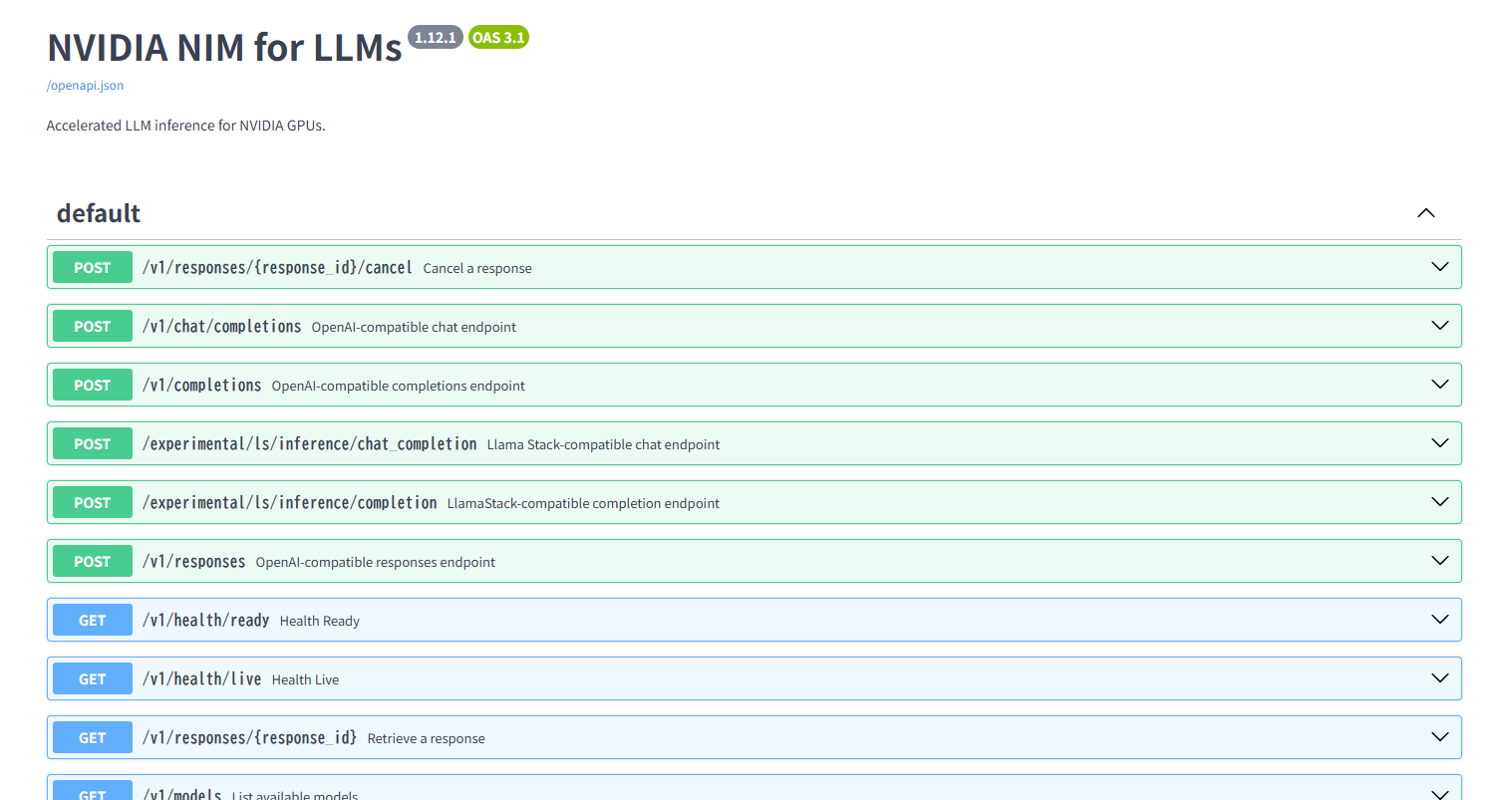
Access the URL http://localhost:8000/docs in a web browser and if the following GUI, which allows you to access the NIM API, is displayed, then the installation was successful.
Now let's check the startup log.
You can see that the directory created in Episode 2 is loaded and the local model is being used.
INFO 2025-07-28 04:13:19.864 utils.py:125] Found following files in /data/llama-33-70B-Instruct-nvfp4
INFO 2025-07-28 04:13:19.865 utils.py:129] ├── config.json
INFO 2025-07-28 04:13:19.865 utils.py:129] ├── generation_config.json
INFO 2025-07-28 04:13:19.865 utils.py:129] ├── model.safetensors.index.json
INFO 2025-07-28 04:13:19.865 utils.py:129] ├── special_tokens_map.json
INFO 2025-07-28 04:13:19.865 utils.py:129] ├── tokenizer.json
INFO 2025-07-28 04:13:19.865 utils.py:129] ├── tokenizer_config.json
INFO 2025-07-28 04:13:19.865 utils.py:129] └── trtllm_ckpt
INFO 2025-07-28 04:13:19.865 utils.py:125] Found following files in /data/llama-33-70B-Instruct-nvfp4/trtllm_ckpt
INFO 2025-07-28 04:13:19.865 utils.py:129]     ├── config.json
INFO 2025-07-28 04:13:19.865 utils.py:129]     ├── rank0.safetensors
INFO 2025-07-28 04:13:19.865 utils.py:129]     ├── special_tokens_map.json
INFO 2025-07-28 04:13:19.865 utils.py:129]     ├── tokenizer.json
INFO 2025-07-28 04:13:19.865 utils.py:129]     └── tokenizer_config.json
Also, if you check the quantization format, you can see that it has been quantized to NVFP4.
 "quantization": {
        "quant_algo": "NVFP4",
If we check the size of the inference engine, we can see that the memory usage has been reduced to about half, to 43GB.
INFO 2025-07-28 04:15:36.732 utils.py:603] Engine size in bytes 42798834748Now we are ready to run inference on NVFP4.
Langchain-based inference
Finally, let’s try to perform inference on Llama3.3-70B-instruct, which was deployed to Multi-LLM NIM in this article, using Langchain, a Python framework.
In this case, the MODEL_NAME is set to macnica/test in the environment variables, so we will use this.
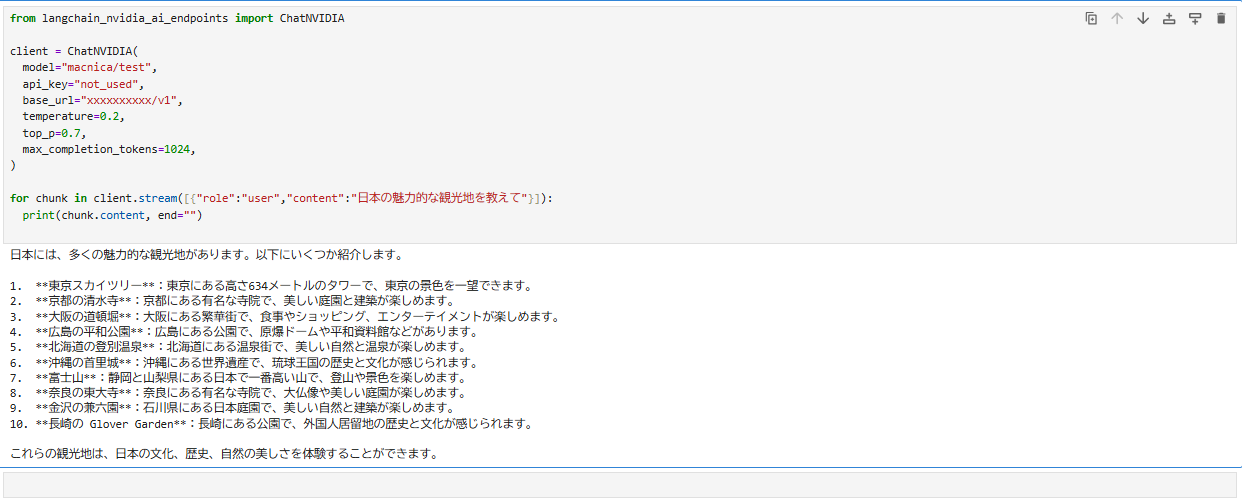
You can see that they can answer questions in Japanese without any problems.
We have also published technical articles about RAG's Chatbot that utilizes NIM, which we hope you will find useful.
In addition, by combining the NeMo Agent Toolkit and various Blueprints with Multi-LLM NIM, it is possible to build AI-Agents etc. that are specialized for your company's use cases.
Summary
In Part 3, we introduced how to perform inference with NIM using the model quantized in Part 2.
This allows users to quantize and infer models that support Multi-LLM NIM, enabling more flexible use of GPU-optimized inference environments.
There are two types of NIMs: LLM-specific NIMs optimized by NVIDIA, and Multi-LLM NIMs that allow users to flexibly change the model themselves.
Multi-LLM NIM is likely one of the best options when using a model that you have tuned yourself.
Next time, benchmarking with Genai-perf!
In this article, we explained how to deploy to Multi-LLM NIM and perform inference. What did you think?
In the next episode, Part 4, we will use Genai-perf to measure the NVFP4 and FP8 benchmarks.
In addition, in Episode 5, we will explain how to utilize the large memory capacity of the B200 to perform inference on the huge LLM, Llama-3.1-405B-Instruct.
Please fill out the form below to access "Episode 4: Benchmarking NVFP4 and FP8" and "Episode 5: Deploying Llama-3.1-405B-Instruct."
Clicking the button will take you to a simple form entry screen, and once you have completed the entry, we will send you a URL via email.
Quote / Inquiry