- Semiconductor BusinessHOME
- Products and Services of Macnica,Inc.
-
technical information

-
Events and Seminars
- Handling Manufacturer
- Support
- Inquiry
- Click here to purchase products
- Semiconductor business e-mail magazine registration


 Narrow down by specifying conditions
現在2240件がヒットしています。check
![[Comprehensive Explanation] MIPI is not difficult! Newbies learn the MIPI standard from scratch ~ Basics Part 2 DSI ① ~](/business/semiconductor/articles/0004ee9b117a10887cf6e5889a1888cc_25.png)
Hello! I'm Hiromin from Lattice team rookie FAE!
This blog is my study process about MIPI standards.
What is MIPI? What are the differences between the DSI/CSI-2 standards? How to design with Lattice FPGA?
From the basics to applications, I would like to tell you everything I have learned!
Now, this time, I would like to learn about MIPI DSI according to the table of contents below.
You can also go directly to the part you want to learn by the links below, please check it out!
[What you can learn from this article]
Learn about DSI!
・ Let's understand from the video frame diagram!
・ Packet configuration for MIPI transmission
• Packet Details - What is the packet format?
You can see the previous article about MIPI D-PHY from the link below!
Let's understand from the video frame diagram!
First, I would like to use a video frame diagram to see how MIPI packets are transferred in what order.
A video frame diagram can be divided into a gray part and a blue part.
The gray area is composed of blanking and is the area where the image is not displayed.
On the other hand, the blue part consists of Packet Header/Footer and Data and is the part where the image is displayed.
It is sent in order of Blanking → Packet Header → Valid Data → Packet Footer → Blanking.
This will be 1 line. It seems that one image is completed by sending several lines of this line.
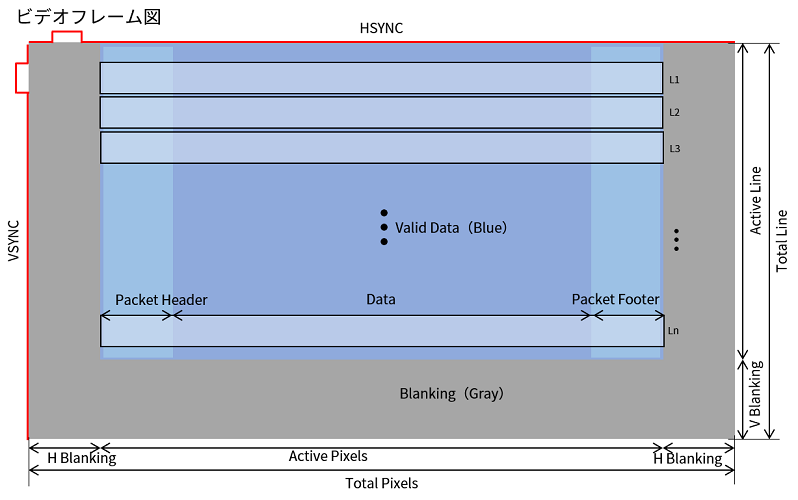
The size of a single image is called resolution. It seems that there is also a way to say the angle of view.
This refers to the size of the area where the video is displayed, expressed as horizontal pixels x vertical pixels, and is expressed as SD, HD, full HD, 4K. (I have heard of it!)
It seems that if you switch this one image like a flipbook, it will become a video!
There is also a rule for the speed of flipping.
The unit that indicates how many images constitute one second of video is called Frame Rate (fps).
(I saw it in the camera settings...)
The video is constructed as described above. Since MIPI is a communication standard, there is of course the concept of Data Rate.
To calculate the total data rate,
Horizontal pixel x Vertical pixel x Frame Rate (fps) x Data Format (bit)
can be calculated with
Regarding Data Format, I would like to explain later. The data format is called RBG or RAW.
There is a lot of information from the beginning, and it is difficult, but next, I would like to take a look at the packet structure of MIPI!
Packet structure for MIPI transmission
From now on, in order to understand DSI, I would like to divide it into the following four segments and learn.
Let's start with the packet structure.
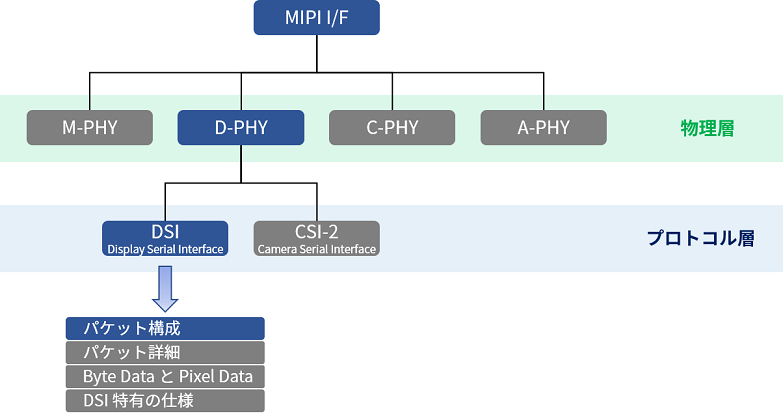
Even if it is said to be a packet configuration? ? ? So, when I checked it, the MIPI data was
It seems to be transmitted in a packet format divided into short packets and long packets.
This configuration has the same configuration as DSI/CSI-2.
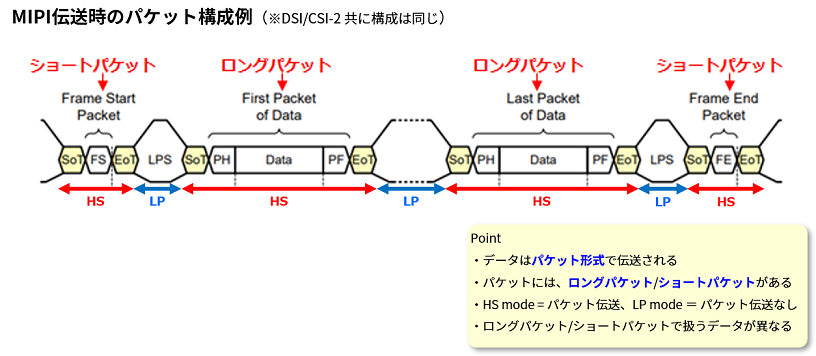
The data handled by short packets and long packets are different.
This is where the term Frame Start/End comes into play. What is this?
When I looked into it, I found that it was related to the video frame diagram I mentioned earlier, so
We will look at the details based on the previous video frame diagram.
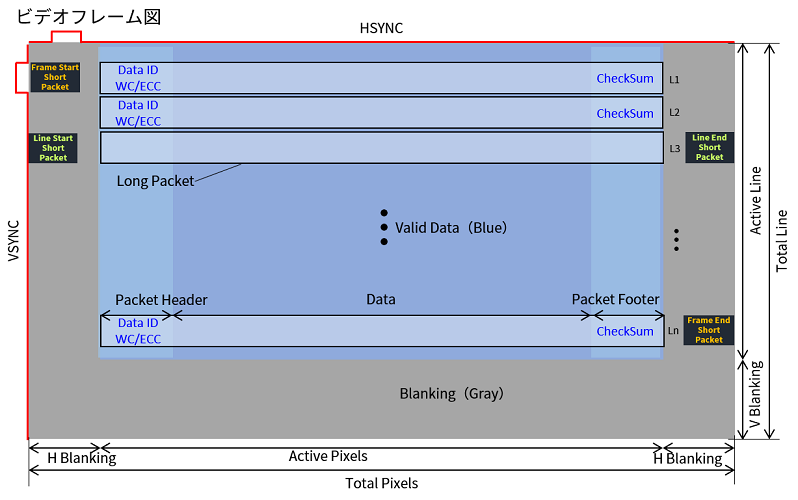
I summarized the previous video frame diagram in more detail.
Video = image flipbook, so the first step is to create an image.
In order to make an image, the image is output for each line. If you output multiple lines of it, it becomes an image.
Frame Start/End determines the range and vertical range of the image.
Line Start/End seems to determine the horizontal range.
So, Frame Start/End, Line Start/End, etc.
Information related to video timing is stored in short packets,
The actual valid image data seems to be stored in long packets!
The video we actually see is what is being transmitted by long packets,
It seems that the timing of outputting long packets is controlled by short packets!
From the next chapter, I would like to see the details of the packet!
Packet Details - What is the packet format?
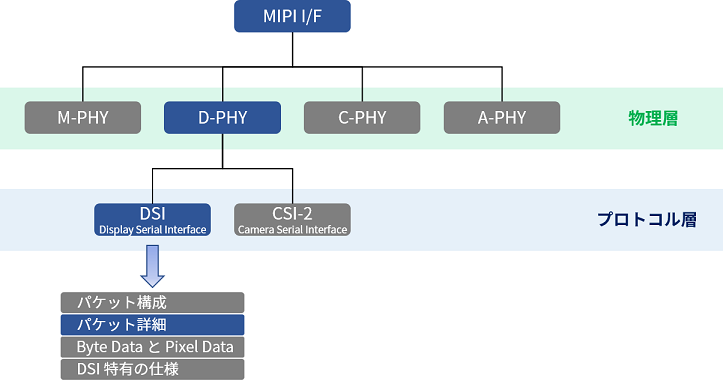
Now, let's learn about packet details!
The image of DSI short packet and long packet is as follows.
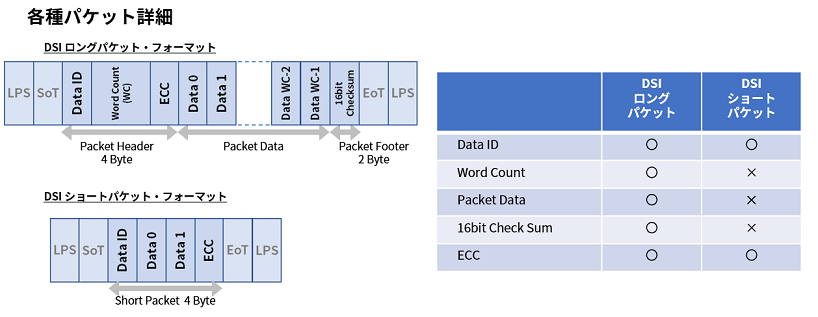
A DSI short packet consists of Data ID, Data0, Data1, and ECC.
In addition, Data 0 and 1 of the short packet are 8-bit configuration, and it is like an empty box with no data.
There are no particular restrictions, and it is a part that users can use freely.
On the other hand, the DSI long packet is a little more complicated, consisting of Data ID, Wrod Count (WC), Data, Check Sum, and ECC.
Let's see what it looks like.
Packet Details - Data ID
First is the Data ID.
This Data ID exists in common for DSI short packets/long packets.
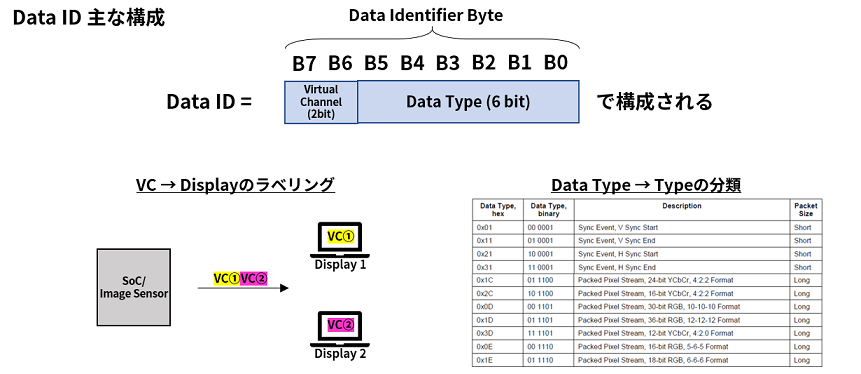
The main configuration of Data ID consists of Virtual Channel (VC) 2bit and Data Type 6bit, a total of 8bit.
VC is used for display labeling purposes. For example, if there are two displays, label them as VC1 and VC2 respectively with the VC in the Data ID.
Data Type is literally used to identify the Data Type of the effective image data (Packet Data) part. The type in the bottom right table determines what data will be sent.
Now you understand the main structure of Data ID!
Then, what is the difference between DSI long packet and short packet in Data ID?
Data ID Difference in short packet/long packet
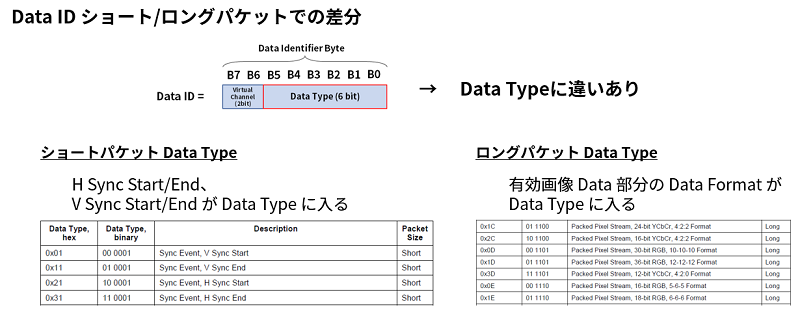
As a difference, there seems to be a difference in the contents of Data Type.
Video timing information such as H Sync Start/End and V Sync Start/End is stored in Data Type in DSI short packet.
Also, the Data Type in the DSI long packet contains the Data Format of the effective image Data part.
Somehow, I understand the Data ID!
Next, I would like to look at the details of WC and ECC/Check Sum.
Packet Details - WC
Next, I would like to take a look at WC, Error Correction Code (ECC), and Check Sum.
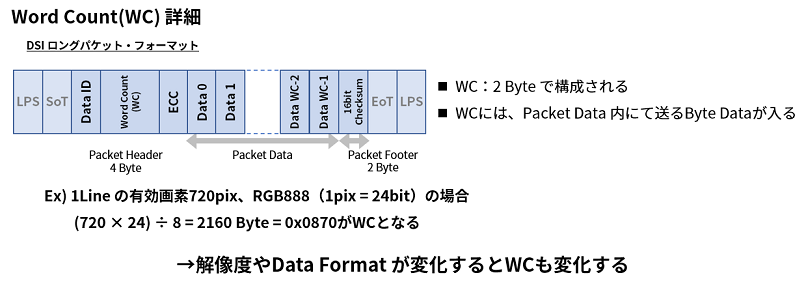
WC is composed of 2 bytes. How many bytes are there in Packet Data to send?
I play an informing role.
So, this WC is variable by Packet Data, so it is variable by resolution and Data Format.
Packet Details - ECC/Check Sum
ECC and Check Sum mainly perform error detection and correction to check whether the information sent is correct.
Error detection and error correction are used to detect and correct erroneous data when erroneous data is sent and received due to the effects of noise and other factors.
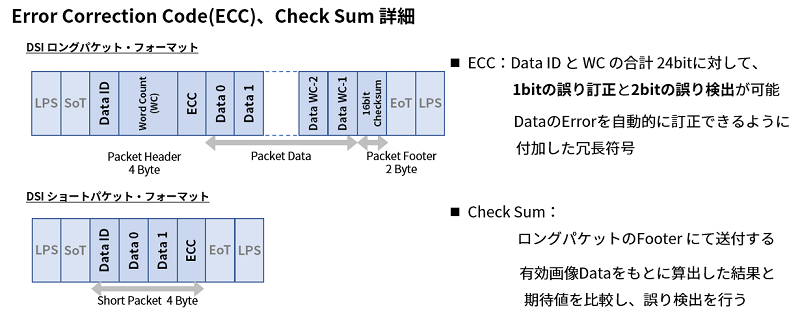
ECC is capable of detecting and confirming whether or not garbled bits have occurred for a total of 24 bits of Data ID and WC.
1bit error correction and 2bit error detection are possible.
Also, Check Sum is an error detection used in Footer of long packet,
It is possible to detect and confirm whether bit garbling occurs in the effective image data part.
The above is the details of the packet. How was it?
In the next article, I would like to learn the rest of Byte Data, Pixel Data, and DSI-specific specifications!
At the last:
The impression is honest, there is a lot of information, and I am full. (smile)
As expected, I can't remember everything in one session, so I would like to review it many times to improve my understanding.
Well, see you next time in Part 3, DSI Part 2! Bye!

New Engineer's Struggle ~MIPI Standard Version~
The MIPI standard is a communication standard often used in recent years for display interfaces and image sensor output interfaces.
I know the name of the standard, but what is the communication band? What protocol are you using?
Among MIPI, this article focuses on DSI/CSI for newcomers to study from scratch.
We are creating articles about the MIPI standard with the motto of making it easier to understand and more fun than other articles.
Would you like to study with a newcomer?