- Semiconductor BusinessHOME
- Products and Services of Macnica,Inc.
-
technical information

-
Events and Seminars
- Handling Manufacturer
- Support
- Inquiry
- Click here to purchase products
- Semiconductor business e-mail magazine registration


 Narrow down by specifying conditions
There are currently 4331 hits.
Silicon Labs CP210x: How to Debug USB with UVCView
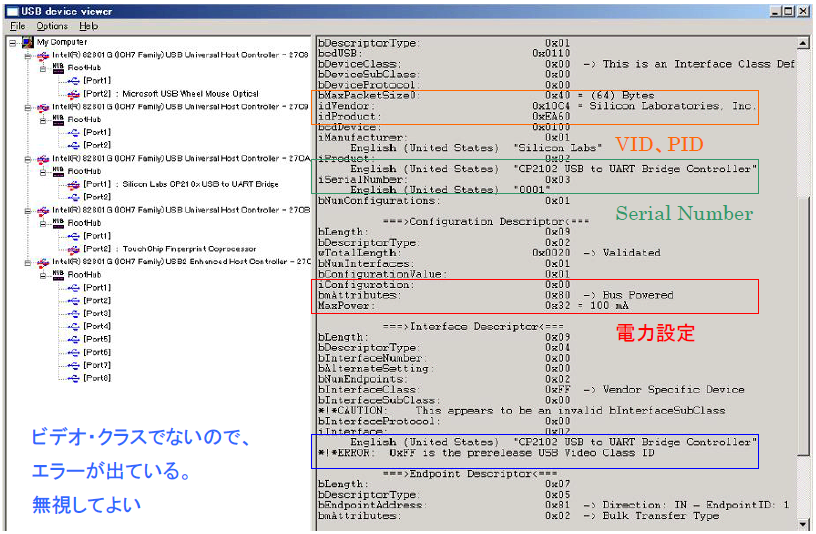
UVCView is a verification tool for USB provided by Microsoft. By using UVCView, you can check whether the PC recognizes the CP210x hardware. Originally provided for the audio and video classes, it is also very useful for validating the CP210x.
Easy to use, just connect the CP210x to your PC and launch UVCView. The figure below shows the UVCView screen, where you can check Vendor ID (VID), Product ID (PID), serial number, power settings, etc.
Get UVCView from the Silicon Labs website.
http://community.silabs.com/t5/Interface-Knowledge-Base/Troubleshooting-a-Product-Using-a-CP210x-USB-to-UART-Bridge/ta-p/131318
 Experienced FAE
Free consultation is available.
From specific product specifications to parts selection, the Company FAE will answer your technical concerns free of charge. Please feel free to contact us.