- Semiconductor BusinessHOME
- Products and Services of Macnica,Inc.
-
technical information

-
Events and Seminars
- Handling Manufacturer
- Support
- Inquiry
- Click here to purchase products
- Semiconductor business e-mail magazine registration
Previously, we introduced the detection principles of ultrasonic sensors, capacitive sensors, and inductive sensors as sensors that can detect without contact, and what each sensor can detect. This time, I will introduce a gesture sensor that can be used as a user interface (UI).
Gesture sensor as user interface (UI)
In many embedded devices, the user interface (UI) can be said to be the "face" of the product.
A nifty UI helps users master their equipment, creates fans, and has the power to keep users coming back. On the other hand, a difficult-to-use UI may lower the product's rating. In other words, the UI is one of the points that make a difference in equipment.
There are various methods for UI, so we must pay attention to the selection of UI when designing devices. The technology used in the UI is also advancing day by day.
Mechanical buttons and membrane switches have been replaced with capacitive touch switches, touch panels have appeared, and recently, products using voice recognition as a user interface have also appeared. It seems that the popularization of capacitive touch switches is largely driven by the "benefits of the manufacturing side" such as the failure rate, cost, and flexibility in housing design (waterproofing, etc.). The touch panel, which became popular after that, brought "convenience" to users by being able to use it intuitively. In addition to convenience, the trend is shifting to things that are conscious of "user experience", such as voice recognition. However, no matter how technically advanced a method is used, it can be said that it depends on the idea whether it will be valuable (= sophisticated) for the user.
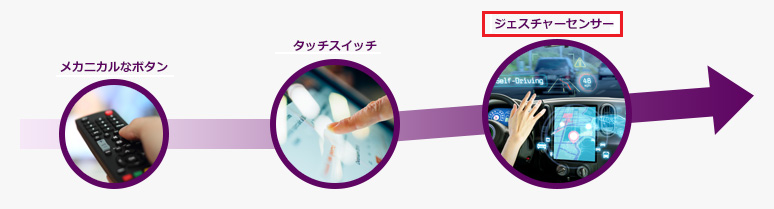
If you want to make the UI of the device valuable, I think it is better to choose a UI that has "room" to make use of your ideas.
The touch panel and voice recognition mentioned above are also good, but this is not the only UI that can be used. What I would like to introduce this time is a UI called a gesture sensor.
Identify gestures with LEDs
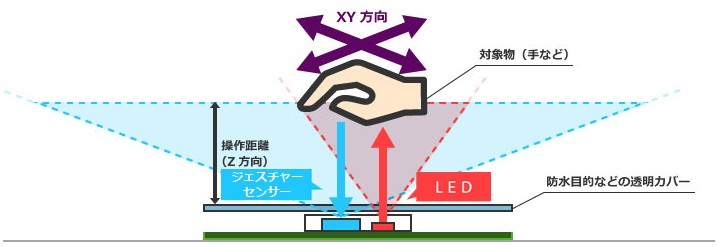
This gesture sensor can detect gesture recognition and proximity by detecting the intensity and incident angle of the incident light reflected by the target object.
Functions required for gesture recognition
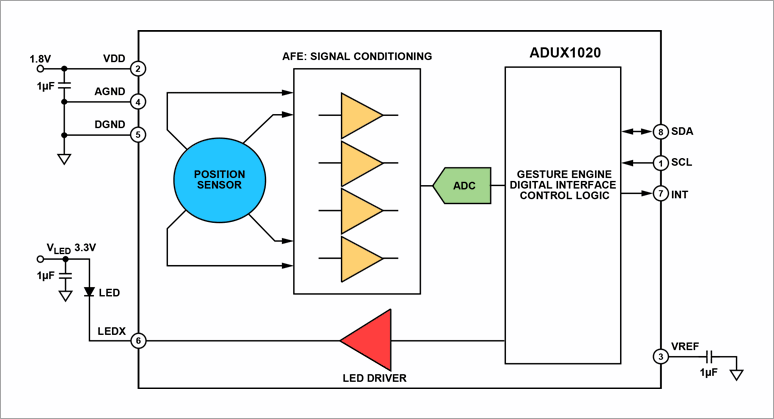
The figure below is a functional block diagram of a gesture sensor. An LED is placed outside and the LED is illuminated by the built-in LED Driver. The reflection is detected by a position sensor (photodiode), amplified by an amplifier, and captured by an analog-to-digital conversion circuit (ADC). Data of X1, X2, Y1 and Y2 come out from the gesture sensor. Since it is a gesture (moving object) detection, the relationship with time is also important. So for simultaneous samples, there are four amplifiers.
Read position from X1, X2, Y1, Y2
As for the relationship between X1, X2, Y1, and Y2, please see the figure below.
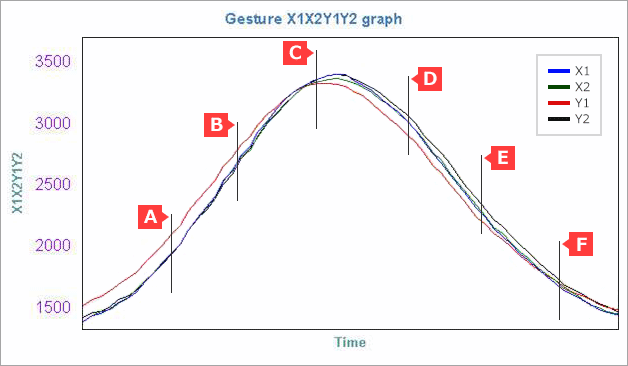
The figure plots the respective values of X1, X2, Y1, Y2 when swiping in the Y direction (left to right) (X1-blue, X2-green, Y1-red, Y2-black).
You can see that only the red (Y1) trajectory is different from the other three. Considering X and Y here, there is almost no difference when comparing X1 and X2, but there is a difference when comparing Y1 and Y2.
Y1 > Y2 at points A and B, Y1 = Y2 at points C, and Y1 < Y2 at points D and E.
Since the horizontal axis is the passage of time, the displacement of the output data X1, X2, Y1, and Y2 is analyzed in the process to determine the gesture.
Gesture sensors can detect the movement of objects without contact, but to use the sensors, it is necessary to create a discrimination algorithm that takes into account factors such as movement speed, direction, and distance.
We have gesture recognition algorithms developed by Macnica available, so if you are interested, please feel free to contact us.
Inquiry
For companies that are considering digitizing their products and services and IoT in order to develop new markets and develop new products, we will provide easy-to-understand explanations from optimal product selection to introduction methods. I'll enjoy having this. Please feel free to contact us.