- Semiconductor BusinessHOME
- Products and Services of Macnica,Inc.
-
technical information

-
Events and Seminars
- Handling Manufacturer
- Support
- Inquiry
- Click here to purchase products
- Semiconductor business e-mail magazine registration


 Narrow down by specifying conditions
現在2240件がヒットしています。check

Main functions of Nios II IDE
The Nios II IDE is part of the Nios II Embedded Design Suite (EDS). (You can download it from the link.)
- Project Manager
- editor and compiler
- debugger
- C-to-Hardware (C2H) accelerated compiler
- flash programmer
- Nios II software build tools
| Project Manager |
|
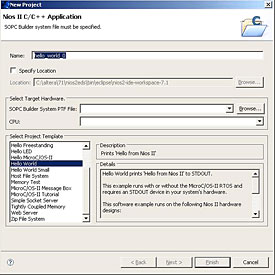
The Nios II IDE offers several project management features that accelerate the development of embedded applications. The Nios II IDE provides a new Project Wizard (see Figure 1) that automates the setup of C/C++ application projects and system library projects. A new project wizard makes setting up a new project very easy within the Nios II IDE. In addition to project setup wizards, the Nios II IDE also provides software code examples in the form of project templates to help software engineers get a working system up and running as quickly as possible. increase.
|
|
Figure 1 Nios II IDE New Project Wizard |
 |
| editor and compiler | ||||||||
|
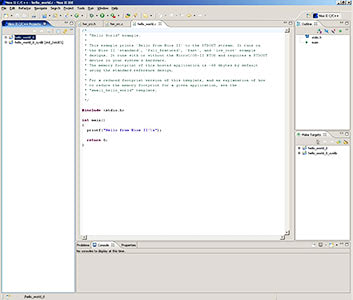
Intel's Nios II IDE provides a versatile source editor and C/C++ compiler. The Nios II IDE Text Editor is a complete and versatile source editor. Features are:
The Nios II IDE provides a graphical user interface for the GCC compiler, based on industry-standard GNU tools. The Nios II IDE environment is designed to simplify software development for Intel's Nios II processors, providing an easy-to-use push-button flow while also enabling advanced build capabilities. |
||||||||
| Figure 2. Basic Editing Features Provided by the Nios II IDE | ||||||||
 |
 Syntax highlighting ¯ C/C++
| debugger | |||||||||||||||
|
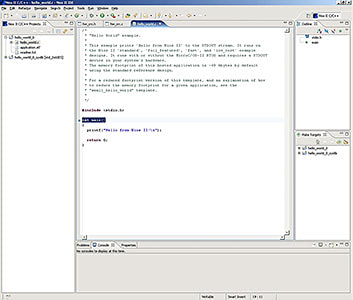
The Nios II IDE features a powerful software debugger based on the GNU Debugger (GDB). This debugger has many basic debug features and a variety of advanced debug features not typically found in low-cost processor development kits. The Nios II IDE debugger has the following basic debugging features:
|
|||||||||||||||
| Figure 3. Nios II IDE Debugger Breakpoint | |||||||||||||||
 |
| C-to-Hardware acceleration | |||
|
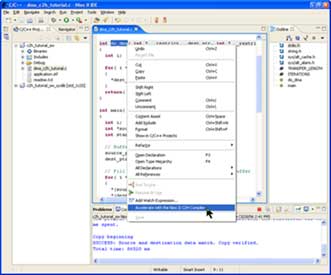
The Nios II IDE includes plugins for the Nios II C-to-Hardware (C2H) Acceleration Compiler, a productivity tool for embedded system designers using Intel's popular Nios II embedded processors. A new Inn has been added. Features of the Nios II C2H Compiler include:
The Nios II C2H Compiler is easy to use. Performance-oriented software with a right click of the mouse |
|||
| Figure 4. Nios II C2H Compiler | |||
 |
| flash programmer | ||||||
|
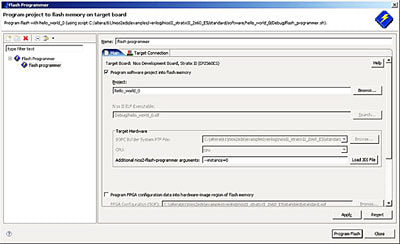
Many designs using the Nios II processor also include flash memory on the board as a means of storing FPGA configuration and Nios II program data. The Nios II IDE has a convenient way to program this flash memory. Any CFI (common flash interface) compliant flash device connected to the FPGA can be programmed using the Nios II IDE flash programmer. In addition to CFI flash devices, the Nios II IDE flash programmer can program any Intel serial configuration device connected to the FPGA. Types of content commonly programmed into flash memory
The Nios II IDE Flash Programmer is pre-configured to work with all boards available in the Nios II development kit, but can be easily ported to any custom hardware. |
||||||
| Figure 5. Flash Programmer Interface | ||||||
 |
| Nios II software build tools |
|
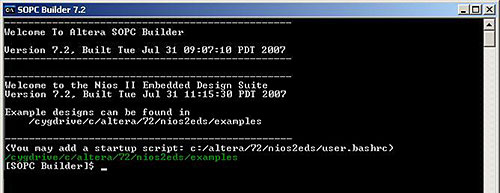
The Nios II Software Build Tools allow you to create, modify, and build entire Nios II programs from the command line or scripts. Supported project types include C/C++ application projects, library projects, and board support package (BSP) projects. For more information, see the Nios II Software Build Tools (PDF) chapter in the Nios II Software Development Handbook. |
| Figure 6. Nios II Software Build Tools |
 |