- Semiconductor BusinessHOME
- Products and Services of Macnica,Inc.
-
technical information

-
Events and Seminars
- Handling Manufacturer
- Support
- Inquiry
- Click here to purchase products
- Semiconductor business e-mail magazine registration


 Narrow down by specifying conditions
現在2147件がヒットしています。check

Introduction
hello! I'm Kurami.
From October, I was assigned to a team that mainly supports Intel® SoC and Nios® II.
I used only hardware language (HDL) during production training, but I am currently studying to learn software languages such as C language.
So this time, I would like to write an article about an event that impressed me while learning the C language.
What is getchar()
The other day I learned about a function called "getchar()". This is a function that "returns one character input from the keyboard".
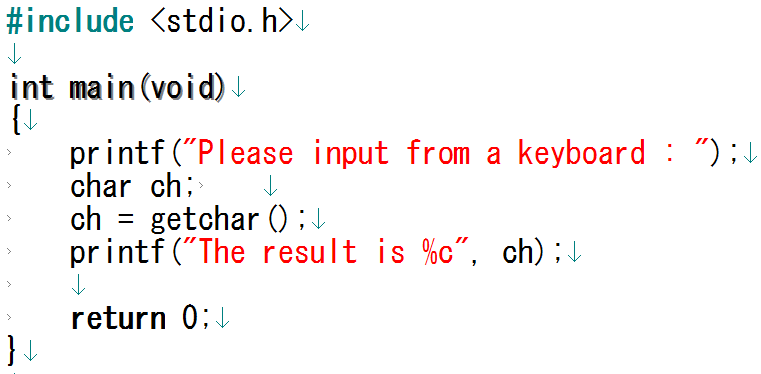
Figure 1 is a program that returns one character from the keyboard input, assigns it to the char type variable ch, and then prints the character stored in ch on the screen using printf().
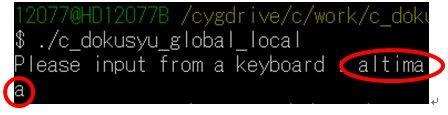
For example, if you enter " altima " as shown in Figure 2, the letter displayed on the screen will be " a ". (Fig.3)

Using a loop statement...
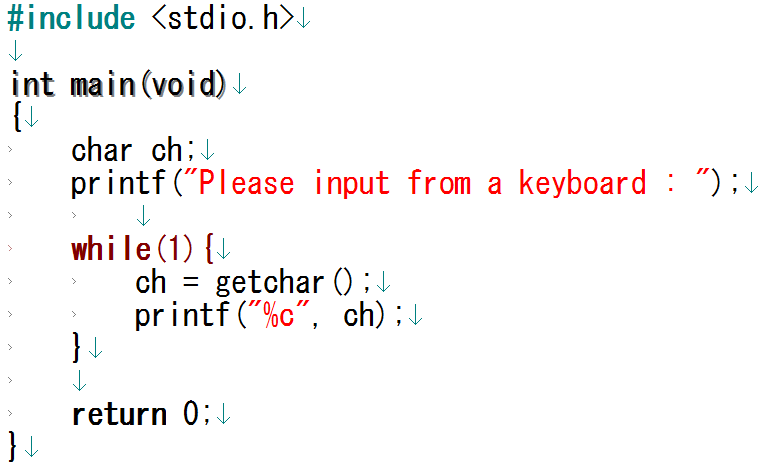
This time, I tried to use a loop statement to input characters many times, so I created the code shown in Figure 4.
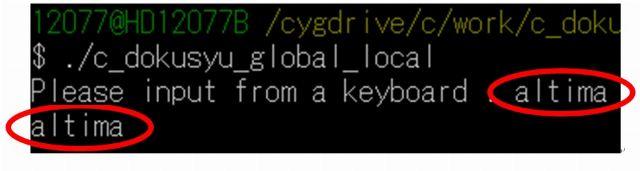
Now that I have the code, I just typed in "altima" and it worked!
A string of characters is displayed on the screen, not just a single character! ! (Fig.5)
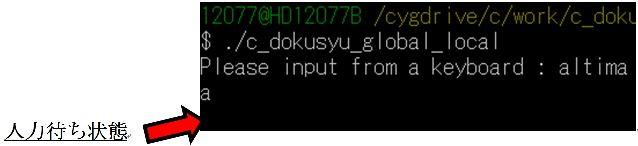
I expected that even if I typed "altima", it would only display "a" and wait for input from the keyboard (Fig. 6).
I just couldn't figure out why looping allowed me to display multiple characters. So, when I asked Poki-senpai from the same team, I found out that he was benefiting from something called a "line buffer".
I would like to explain what I was taught about what a line buffer is.
Thanks to the line buffer...!
A line buffer is a memory that temporarily stores data until a newline code is entered.
When using getchar() , the string entered from the keyboard is temporarily stored in the line buffer until ENTER is pressed. In this case, the string " altima " is saved in the line buffer. (Fig.7)
Then when you try to print it to the screen with printf () it will print the first character you type. Since you typed altima, an "a" will appear on the screen.


By repeating this process, the line feed code " \n " entered last is output and waiting for input.
As a result, the code in Figure 4 will output something like Figure 5.
Summary
By looping the code "return a character using getchar() and print that character with printf()", it is as if "return all the input strings and print them with printf()". I was able to do it. Thank goodness for line buffers. When I was immersed in the excitement, a word from Poki-senpai of the same team.
"Well, if you use the scanf() statement and choose %s as the format specifier, you can return the string entered from the keyboard."
Furthermore, I learned that the range of values that can be handled by scanf() is -32768 to 32767, while the range that can be handled by getchar() is -128 to 127. The range that can be handled by scanf() is also wider.
From now on, when I want to return a string, I will use scanf() . .
The C language is deep.
Please take a look at the next article!