- Semiconductor BusinessHOME
- Products and Services of Macnica,Inc.
-
technical information

-
Events and Seminars
- Handling Manufacturer
- Support
- Inquiry
- Click here to purchase products
- Semiconductor business e-mail magazine registration


 Narrow down by specifying conditions
現在2237件がヒットしています。check
Previous articleLet 's use LTspice-Frequency analysis using "FFT"! So, I explained FFT analysis using Behavioral Voltage Sources (BV) and "a circuit (adder) that combines three types of voltage sources" as the theme. This time, I will introduce how to use the Behavior Voltage Source (BV).
If you are just starting LTspice, we recommend that you look at the "basics" from the list below.
Let's use LTspice series list is here
Also, if you would like to see a video on how to write a basic circuit and how to execute it, there is an on-demand seminar that does not require you to enter personal information, so please take a look if you are interested. Detailed information about the seminar is also provided to those who fill in the questionnaire.
LTspice On-Demand Seminar - Function check with RC circuit -
What can a behavioral voltage source do?
By using a behavioral voltage source, it is possible to incorporate functions and arithmetic operators that can be used in Excel and scientific calculators into the signal source. It can also be combined with multiple voltage and current sources to model adders and complex signals.
For available functions and arithmetic operators, please refer to "B. Arbitrary behavioral voltage or current sources." from LTspice [Help Topics].
Instructions for use
We will explain how to use the behavioral power supply by taking "a signal that combines a pulse waveform and a sine wave" as an example.
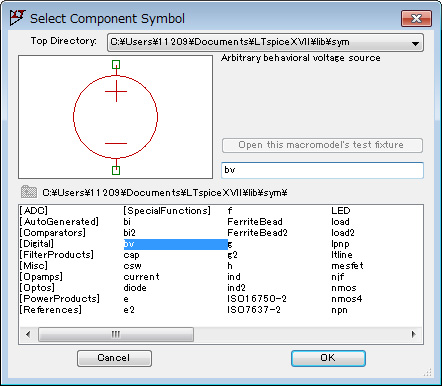
First select "bv" in the "Select Component Symbole" dialog Box.
Next, type the expression directly where "V=F(...)" is written.
Move the cursor to the component (B1) and right-click, or right-click on the character "V=F(...)" to open the editor, so use functions and operators at "Value" Write an expression.
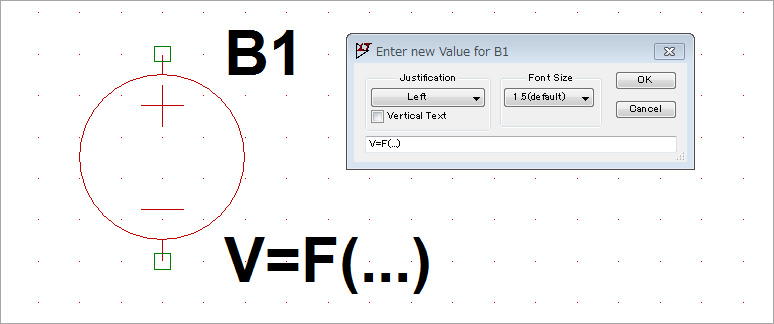
This time, write "V = 0.5*SIN( 2*pi*1k*time) + V(IN)".
This formula is "a waveform obtained by adding a sine wave with a frequency of 1 kHz and an amplitude of 0.5 Vp-p and a PUSLE waveform created by an independent voltage source with the '+' operator", and the result is as shown in Fig. 3. increase.
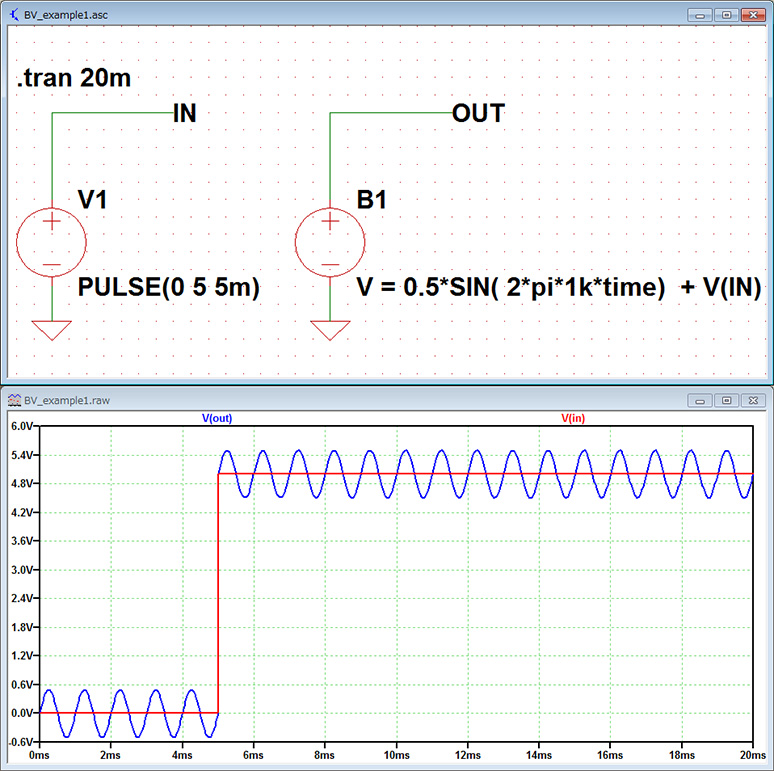
In this way, behavioral voltage sources can create arbitrary signals because they can use functions and operators.
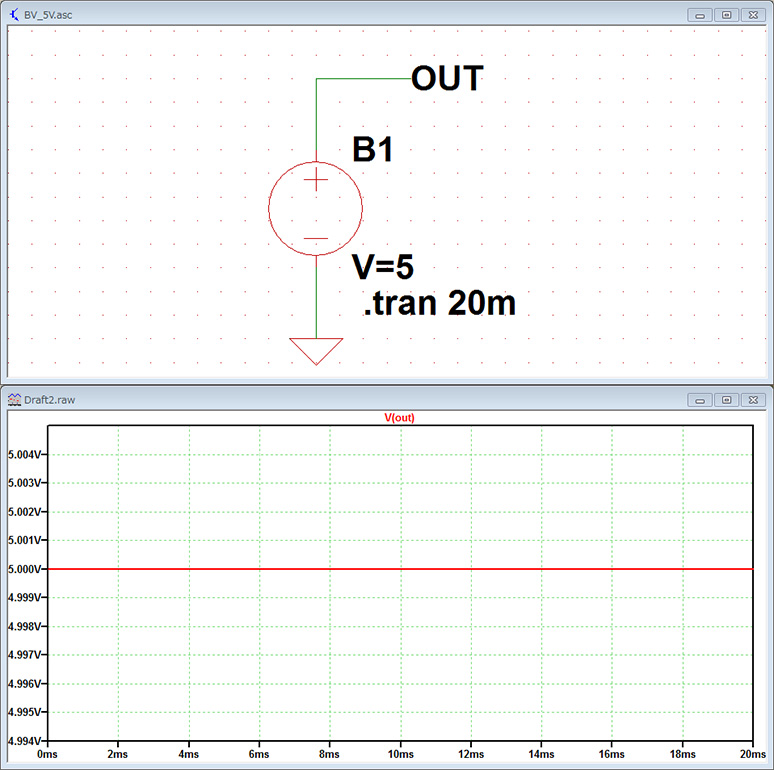
In addition, if you set "V = 5" in the formula, a voltage of DC 5V will be output in the same way as an independent voltage source.
Let's make a white noise signal!
The behavioral voltage source can use various functions. Here we use the white(x) function to generate a pseudo-noise signal
Let's try generating it.
The explanation page in the Help menu for the white(x) function is as follows:
"Random number between -.5 and .5smoothly transitions between values even more smoothly than random()."
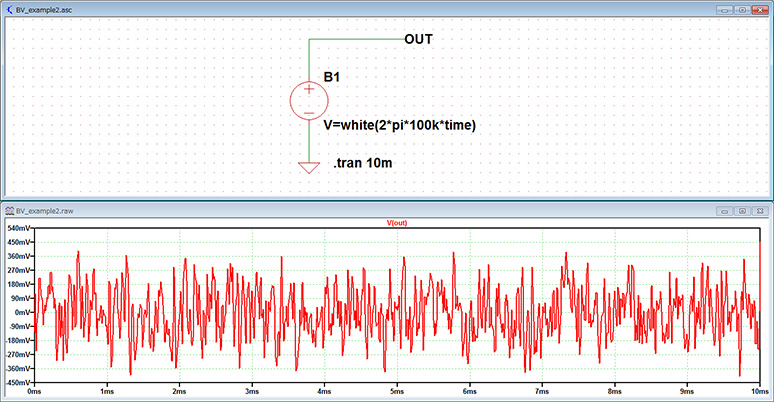
In other words, it is a function that generates random values between 0.5V and -0.5V (i.e., the amplitude is 1Vp-p), and generates random values more smoothly than the rand() function.
Let's check it out with a simulation right away.
Note that the x in while(x) is written as "2*pi()*f*time". f is the signal generation frequency. Here, f=100kHz. The circuit diagram and simulation waveform are shown in Figure 5.
One possible application is to use the white function to generate pseudo-noise signals and perform transient analysis (time axis analysis) to verify filter circuits.
Additionally, if you wish to define functions for analysis, you can use the user-defined function command (.func). For detailed instructions on how to set this up, please refer to the article on the user-defined function command (.func).
LTspice demo file verified this time
The two simulation files that were performed this time are stored. Please try!
At the end
This time, I introduced how to create an original waveform using a behavioral voltage source!
If you haven't used LTspice yet, please download LTspice from the link below!
Please try once.
Download LTspice here
We also hold regular LTspice seminars for beginners. You can learn the basic operation of LTspice, so please participate.
Click here for LTspice seminar information
Click here for recommended articles/materials
List of articles: Let's use LTspice Series
Command Explanation:Master LTspice!
LTspice FAQ: FAQ list
List of technical articles: technical articles
Manufacturer introduction page: Analog Devices, Inc.
Click here for recommended seminars/workshops
Inquiry
If you have any questions regarding this article, please contact us below.
Analog Devices Manufacturer Information Top
Analog Devices Manufacturer Information If you would like to return to the top page, please click below.