- Semiconductor BusinessHOME
- Products and Services of Macnica,Inc.
-
technical information

-
Events and Seminars
- Handling Manufacturer
- Support
- Inquiry
- Click here to purchase products
- Semiconductor business e-mail magazine registration


 Narrow down by specifying conditions
現在2225件がヒットしています。check

What is LTspice
LTspice, provided free of charge by Analog Devices, Inc., is a SPICE simulator that can handle an unlimited number of nodes, and simulations of switching regulators in particular are significantly faster than other SPICE simulators.
It also includes a circuit/symbol editor and waveform viewer, as well as an extensive library of passive components and macro models of numerous Analog Devices products, including steady-state detection, step response analysis, and You can also perform high-speed simulations such as efficiency calculations and power calculations.
In this article, I will introduce the installation method and the benefits of using LTspice based on my experiences using LTspice.
How to get started with LTspice?
Download and install
To use LTspice, first download it from Analog Devices' official website.
Downloading is as simple as follows:
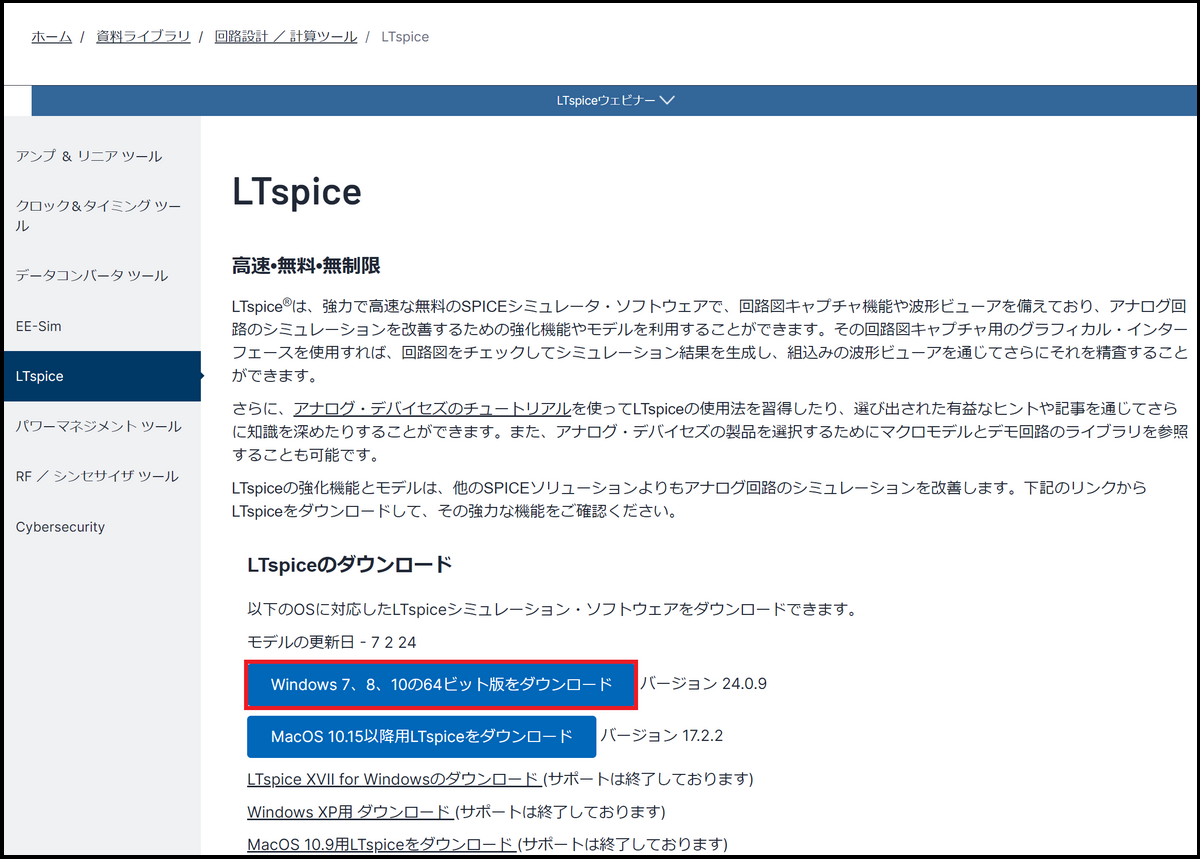
1. Open the Analog Devices LTspice page (link).
*How to access from the Analog Devices top page.
Design resources → Document library → Circuit design/design tools → LTspice
2. Click "Download 64-bit version for Windows 7, 8, 10"
3. An installer called "LTspice64.msi" will be downloaded, so click on it to install it on your PC.
update
■LTspice update
We recommend that you always update after downloading.
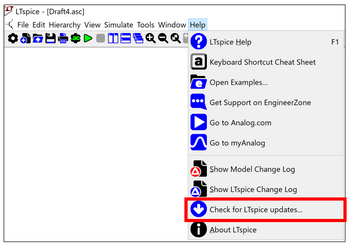
First, to update LTspice, select Update from Help on the toolbar.
Select “Help” → “Check LTspice updadtes…” to start updating LTspice.
Please update and use it regularly.
■Component updates
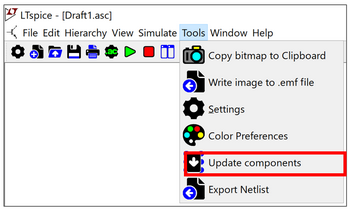
To update macro models and sample circuits related to Analog Devices components, perform a component update using the following method.
Select Update from Tools on the toolbar.
The latest model will be added by selecting "Tools" → "Update components".
Let's start using LTspice now!
For learning electric circuit knowledge
LTspice allows you to simulate various electrical circuits, which is also useful when learning about electrical circuits.
For example, the cutoff frequency of a low-pass filter composed of RC is:
fc = 1/(2πRC)
You'll probably learn that in your textbooks.
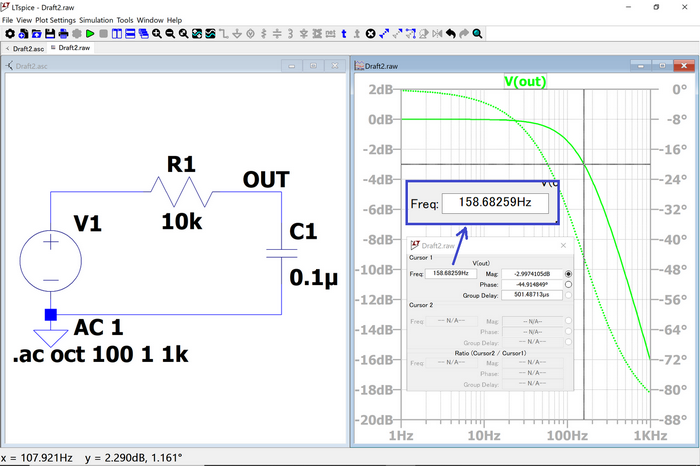
The cutoff frequency fc when configuring a low-pass filter with R=10kΩ and C=0.1uF is:
fc = 1/(2 x π x 10k x 0.1u) = 159.15Hz
You can calculate that.
When this is actually simulated using LTspice, it looks like this:
Calculated!
The cutoff frequency with -3dB gain reduction is now 159Hz even with LTspice.
By verifying the theory through simulations using LTspice, our understanding can be further deepened.
If you want to know how to set up AC analysis,AC analysis (.ac)Please refer to the article.
For pre-verification of circuit design
In addition, by simulating circuits designed using Analog Devices products with LTspice, you can check and verify in advance whether the circuit is working as designed. An example is shown below.
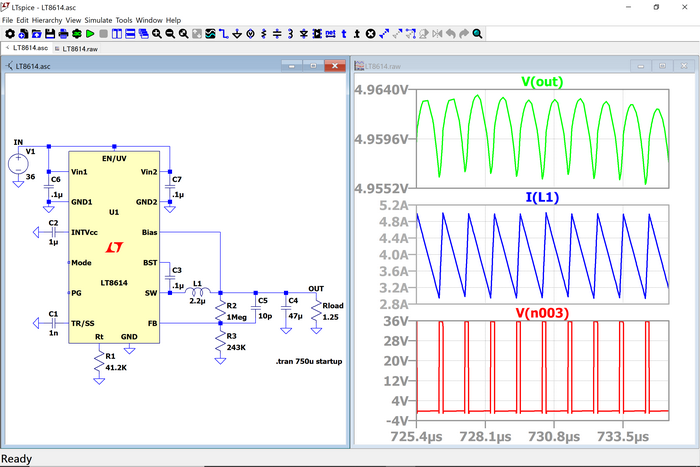
The example LT8614 is a synchronous step-down regulator that can output 4A for an input voltage of 3.4V to 42V. This simulation circuit and results confirm that a 3.3V/4A output is obtained from a 12V input.
At the end
In this way, LTspice allows you to check the operation of various analog circuits through simulation. However, please note that the parameters of the peripheral component model used in the simulation are ideal values, so there may be differences from the actual machine. However, if you understand its characteristics and use LTspice's rich functions correctly, you will definitely get great results in terms of work efficiency!
What did you think? If you have never used LTspice, please try installing it on your PC.
Click here to download LTspice
We also regularly hold LTspice seminars for beginners. You can learn the basic operations of LTspice, so please take a look.
Click here for information on LTspice seminar
Click here for recommended articles/materials
LTspice List of articles: Let's use LTspice series
Command Explanation:Master LTspice!
LTspice FAQ : FAQ list
List of Technical Articles : Technical Articles
Manufacturer introduction page: Analog Devices, Inc.
Click here for recommended seminars/workshops
Inquiry
If you have any questions regarding this article, please contact us below.
Analog Devices Manufacturer Information Top
Analog Devices Manufacturer Information If you would like to return to the top page, please click below.