product
Application for evaluation machine
SONiC Workshop: Building an EVPN multihoming environment with Broadcom SONiC
Introduction
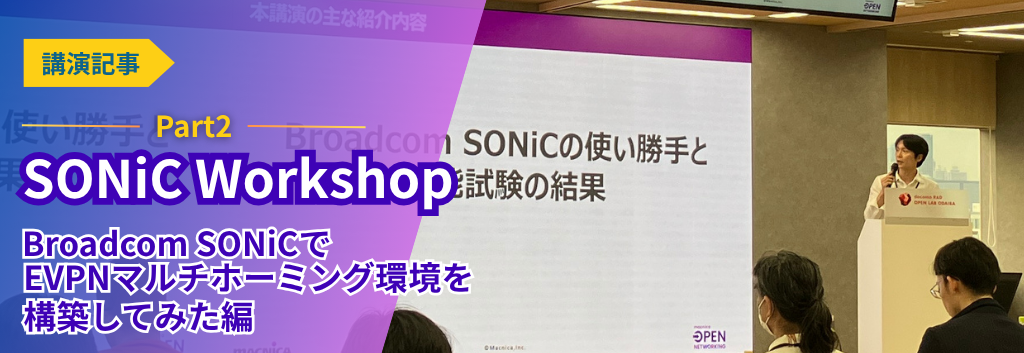
This article is a summary of a talk given at the SONiC workshop held on May 16, 2025.
Obtained through verification Broadcom SONiC We will share usability and test results.
If you would like to receive the presentation materials, please download them below.
I tried to build an EVPN multihoming environment using Broadcom SONiC
About Broadcom SONiC
Commercial versions of SONiC have been released by several vendors, but the reason we selected Broadcom SONiC for this verification is as follows:
While the majority of current white Box switches are equipped with Broadcom switch devices,
The initial motivation for starting this project was to see how much performance we could actually extract from Broadcom SONiC, which has high compatibility with devices.
First of all, Broadcom SONiC is a commercial version of SONiC that Broadcom customizes and provides to users.
Features
1: Supports network equipment from multiple vendors, and currently supports a wide lineup of 1G to 800G from major vendors.
2: It has a wide range of enhancement functions and can be used for a variety of purposes.
There are several different packages available depending on the purpose of use, and it is also expanding for enterprise and campus use.
3: Broadcom provides full, end-to-end support.
Our ability to provide end-to-end support, from the upper layers of the user interface to SAI,SDK drivers and lower layers, is a unique feature of our role as a switch device vendor.
4: Detailed operation over a wide range has also been verified.
In addition to improving the quality of our software, we also conduct advance verification of compatibility with various transceivers and cables.
function
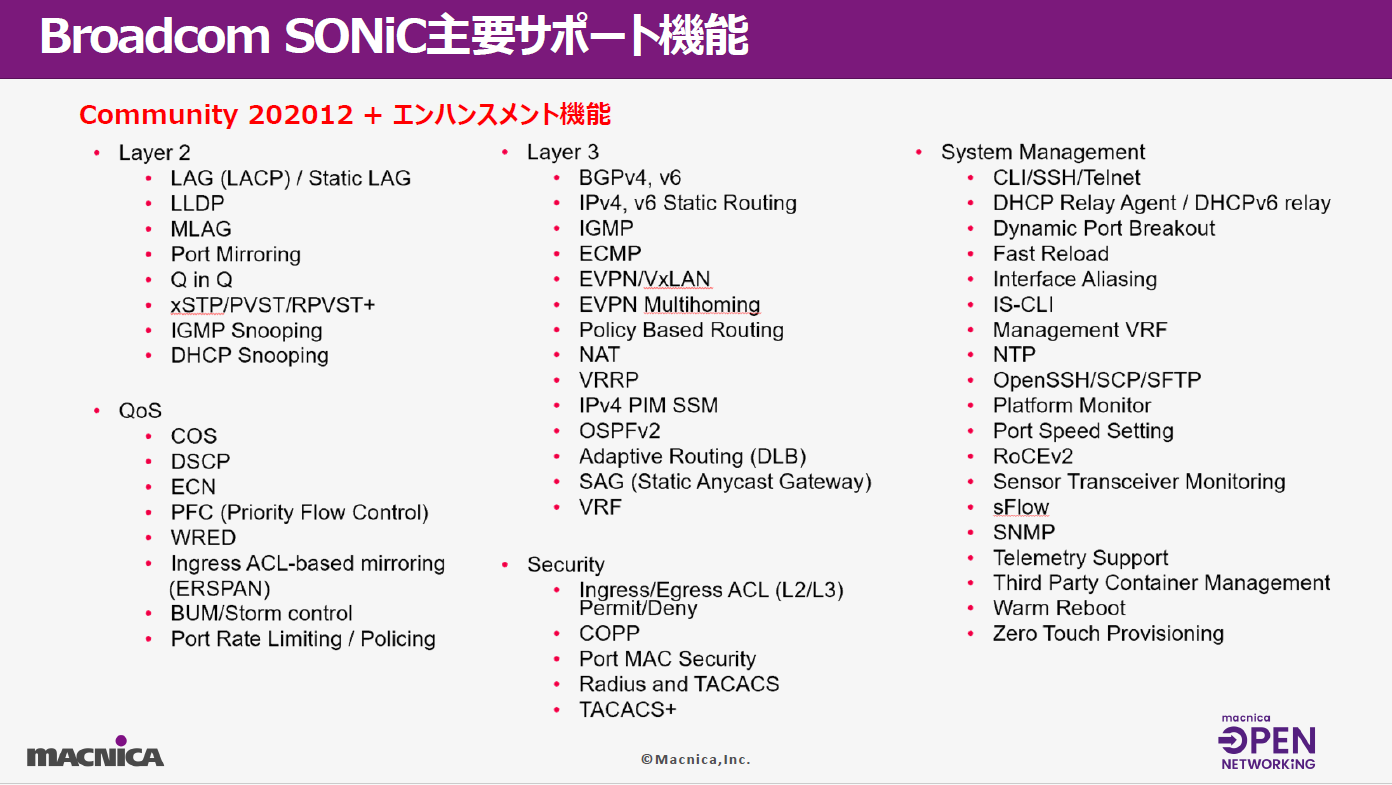
The current latest version, 4.4.2, is based on the 202012 branch of Community SONiC.
It includes enhanced functions developed by Broadcom, such as L2ACL, port security function, and combined use with MLAG functions.
The 202012 branch is not that new, but Broadcom SONiC tends to continue development on specific branches to ensure long-term, stable quality.
Test configuration and settings
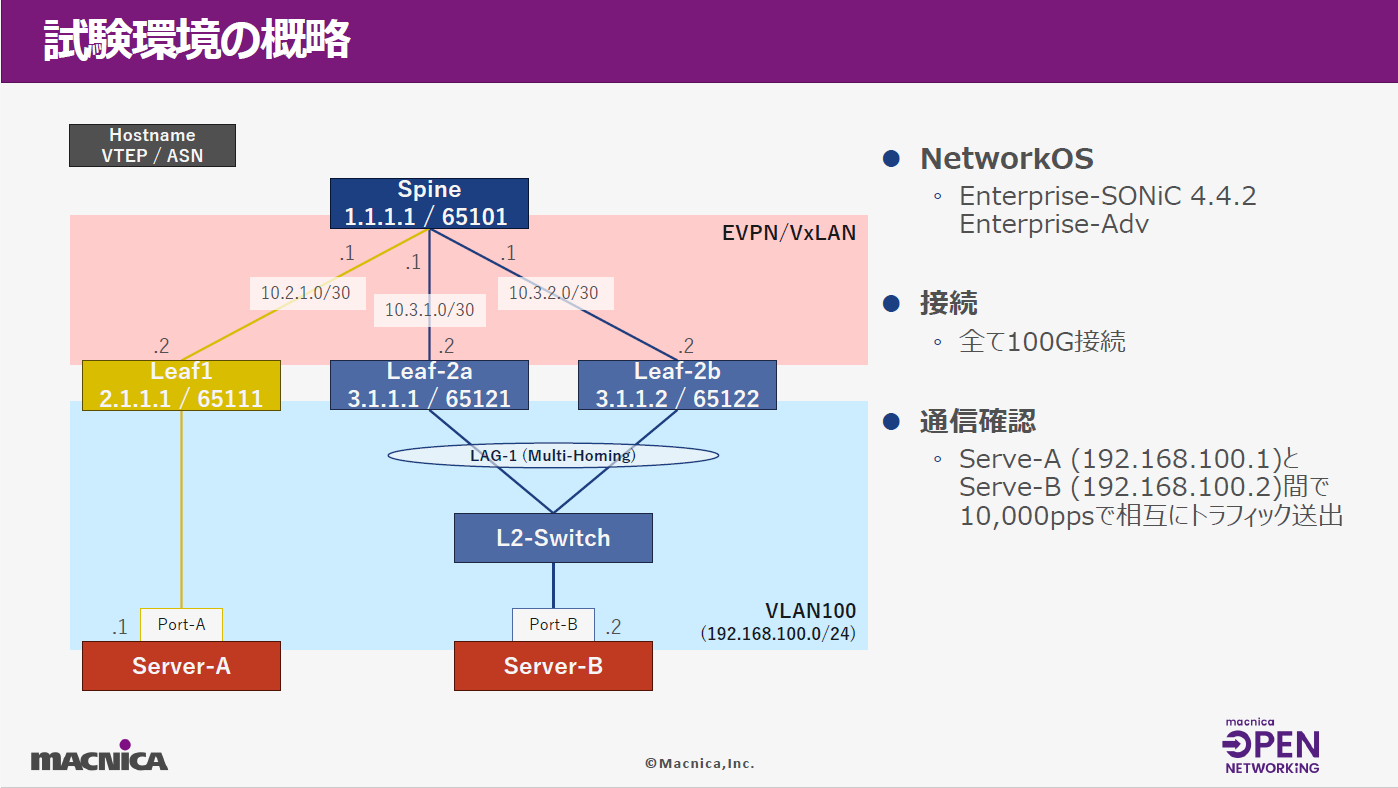
The test environment is configured as Spine-Leaf as shown in the diagram below, with Broadcom SONiC running on each switch. All connections are 100G.
The Leaf-2a and 2b switches on the right are configured in a redundant manner with EVPN multihoming for both the underlay and overlay, with Server-A and B located under them and configured to be able to communicate with each other.
The L2-Switch placed between Server-B and Leaf-2a/2b was placed to provide redundancy for the connection to the Server using LAG.
The purpose of setting up the EVPN multihoming configuration this time was to verify whether the redundancy function trending in data centers works as expected with Broadcom SONiC, and how much performance can actually be achieved in a failover scenario.
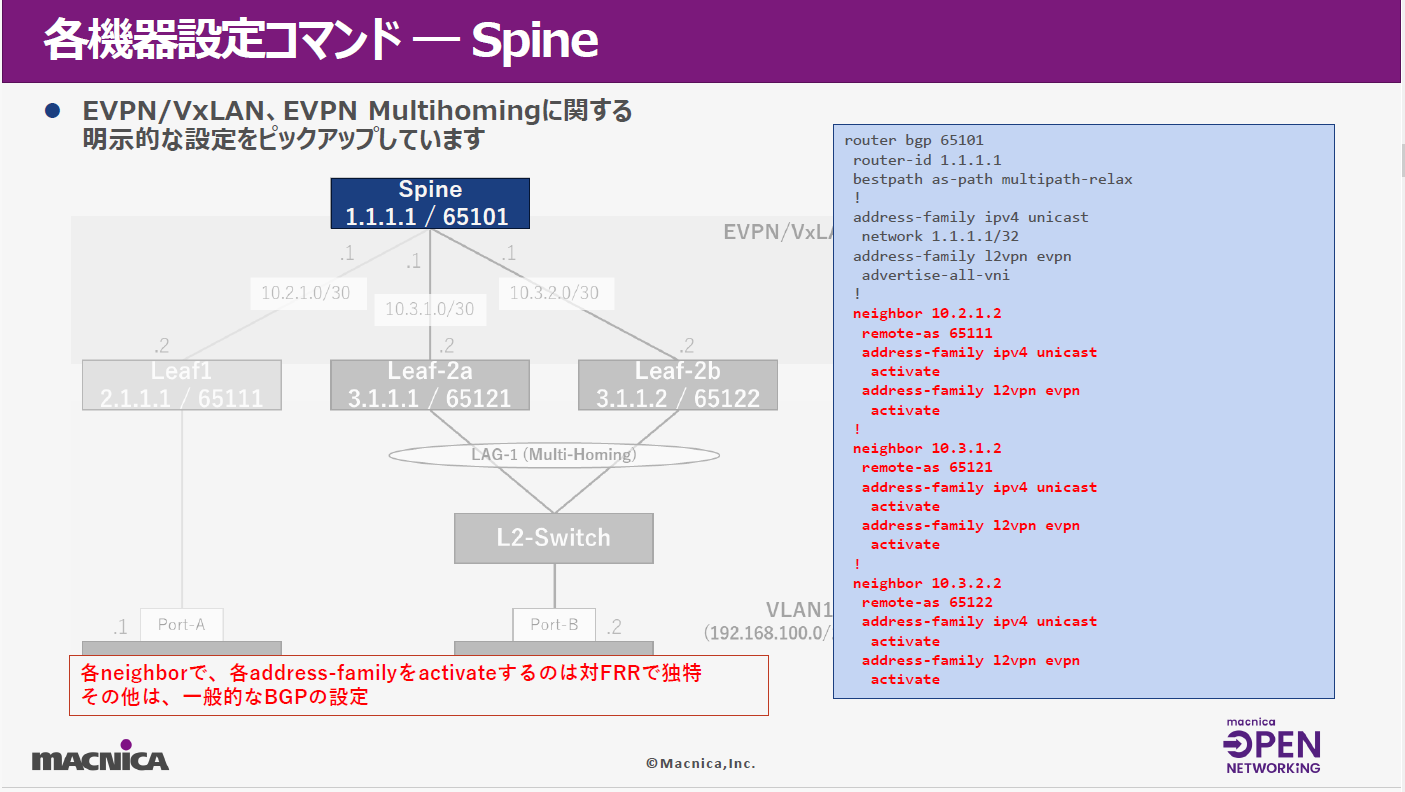
From here, we will introduce some EVPN, VXLAN, and multihoming configurations for each spine and leaf switch.
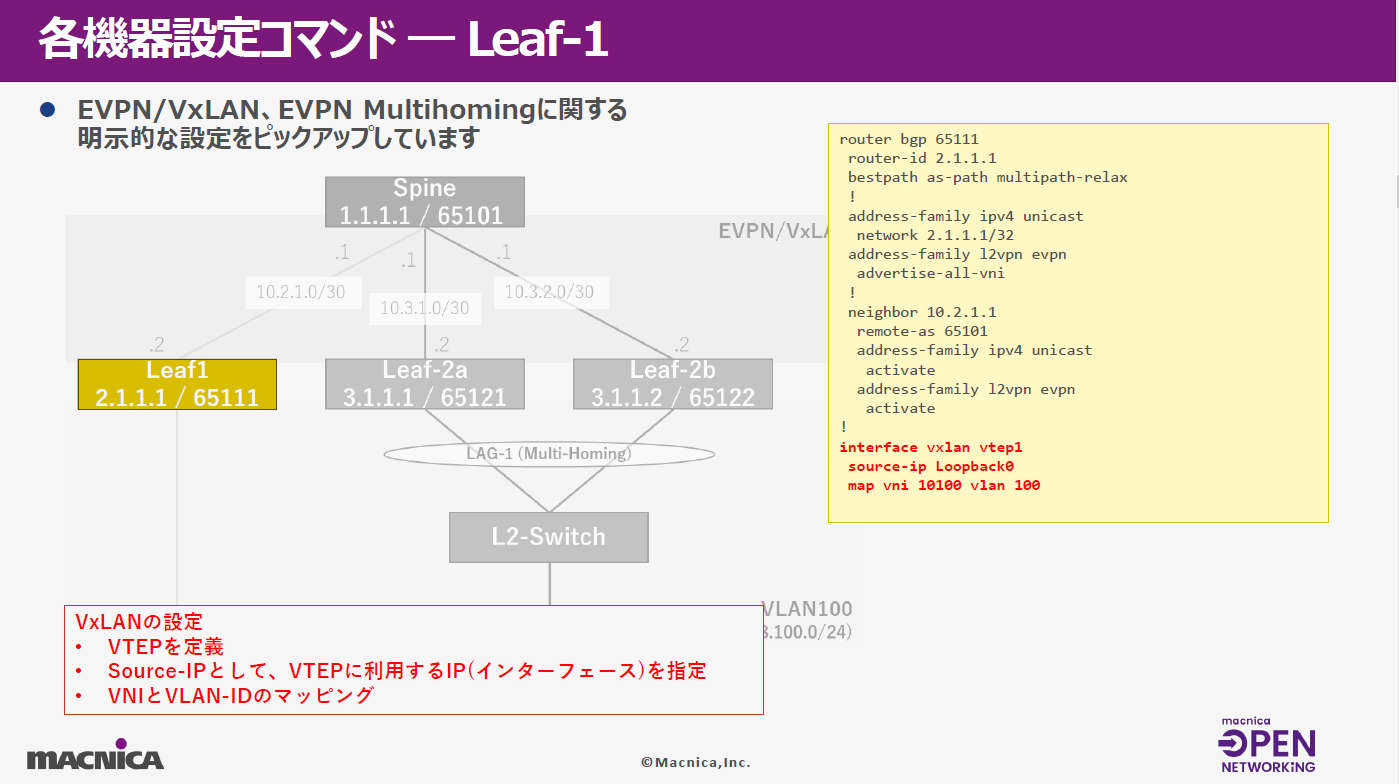
First, regarding the Spine, the BGP settings are, from the top, the router ID and enabling VNI advertisement, and in the red section, the AS number to which each neighbor leaf switch belongs and the activation settings for each address family are specified.
Next, let's look at the settings for Leaf1. Leaf1 is similar to the Spine mentioned earlier, and in addition to the BGP settings, it also contains VXLAN-related settings, which are common to all Leaf switches.
VXLAN defines a dedicated interface called VTEP, specifies the IP address used for VXLAN communication as a loopback, and sets up mapping between VNI and VLAN.
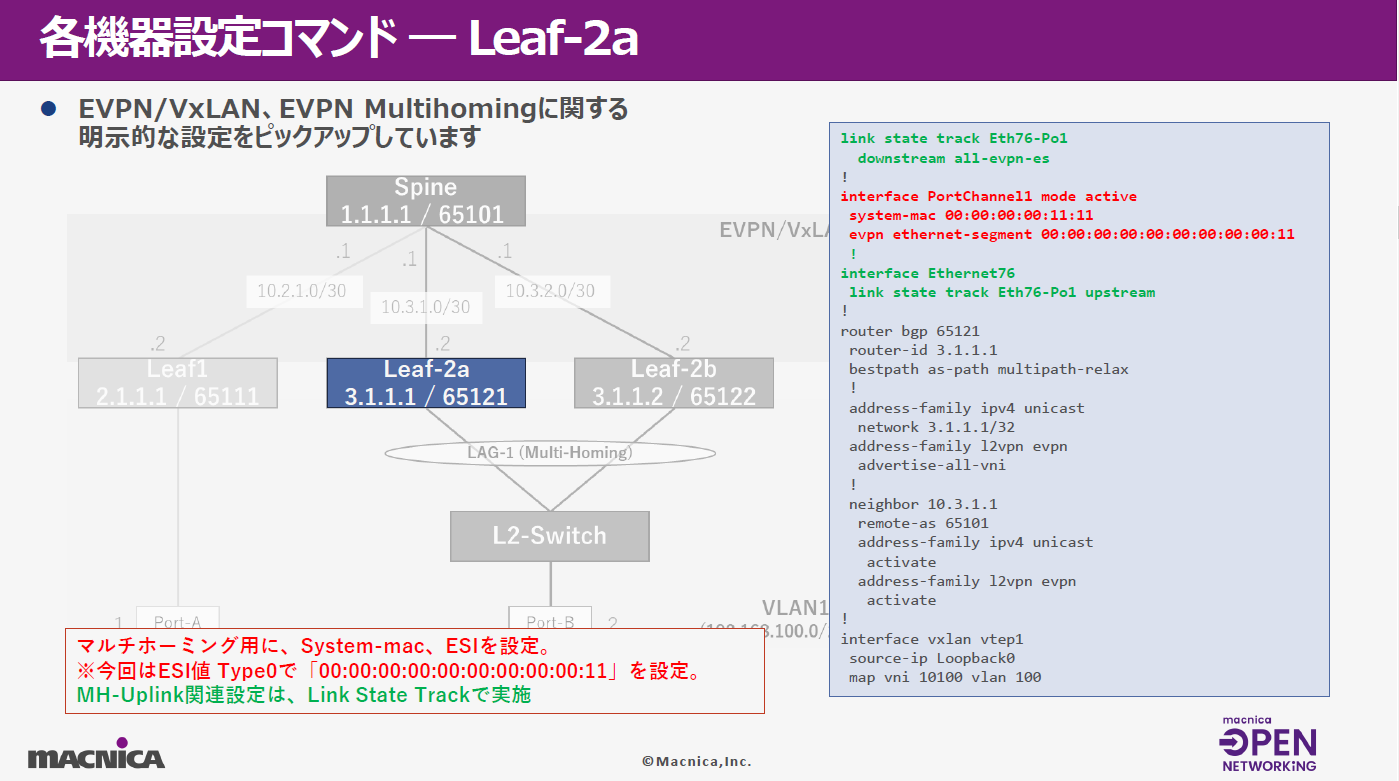
For Leaf2, we will focus on the green and red parts in the configuration command.
The red part is the so-called downlink port. It contains the system MAC and ESI settings related to EVPN multiforming.
The green part is the uplink port setting, and the Link State Track is used to link the downlink port and set it as an upstream port.
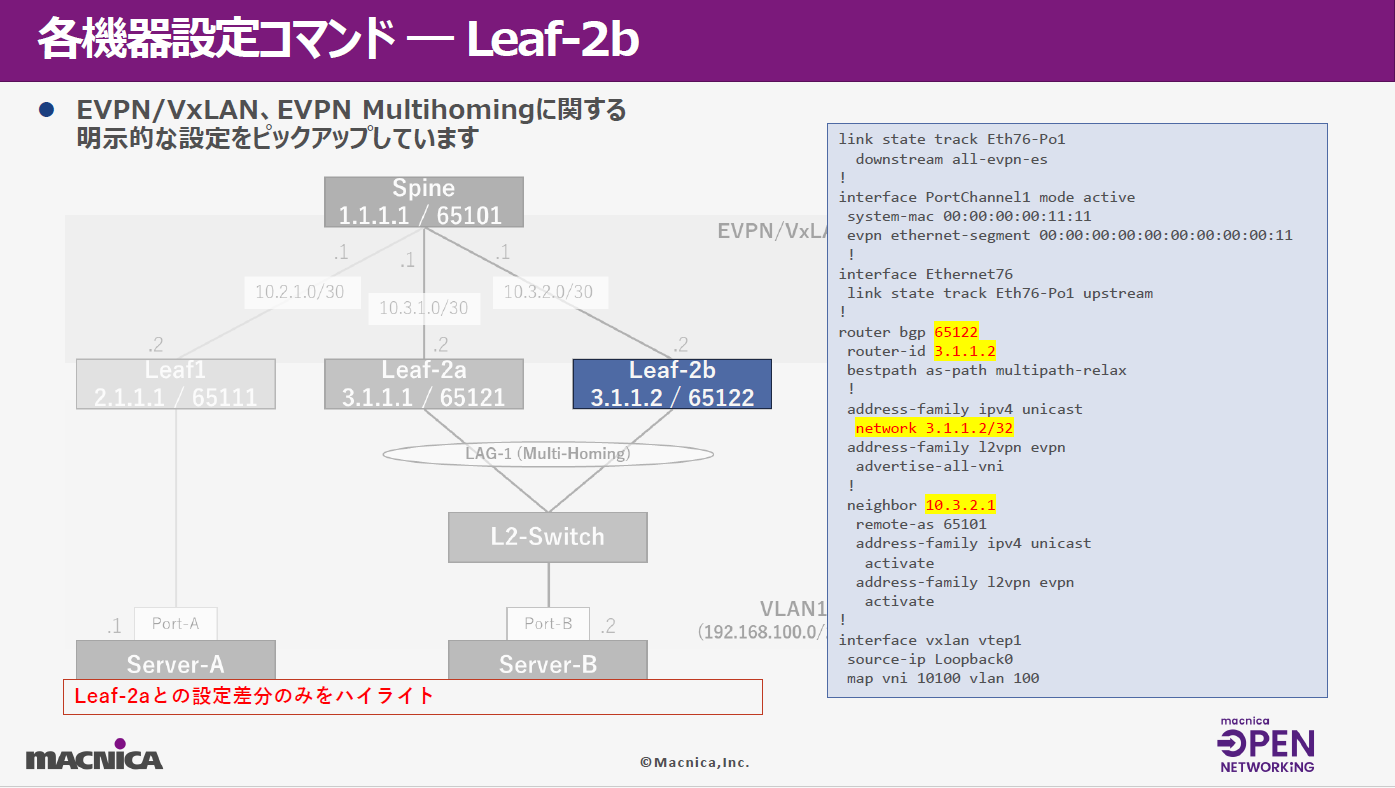
As for Leaf2b, the settings are almost the same as 2a above, with only the minor parameter differences highlighted in yellow.
In the case of Community SONiC, I think that the configuration is set using Linux-based commands or FRR,
In addition to the conventional command method, Broadcom SONiC also supports the industry standard Cisco-like command system, which allows you to complete a whole series of settings without complexity, making it very user-friendly.
Test results
It's about normal testing.
This time, communication was checked by verifying mutual communication between Servers A and B.
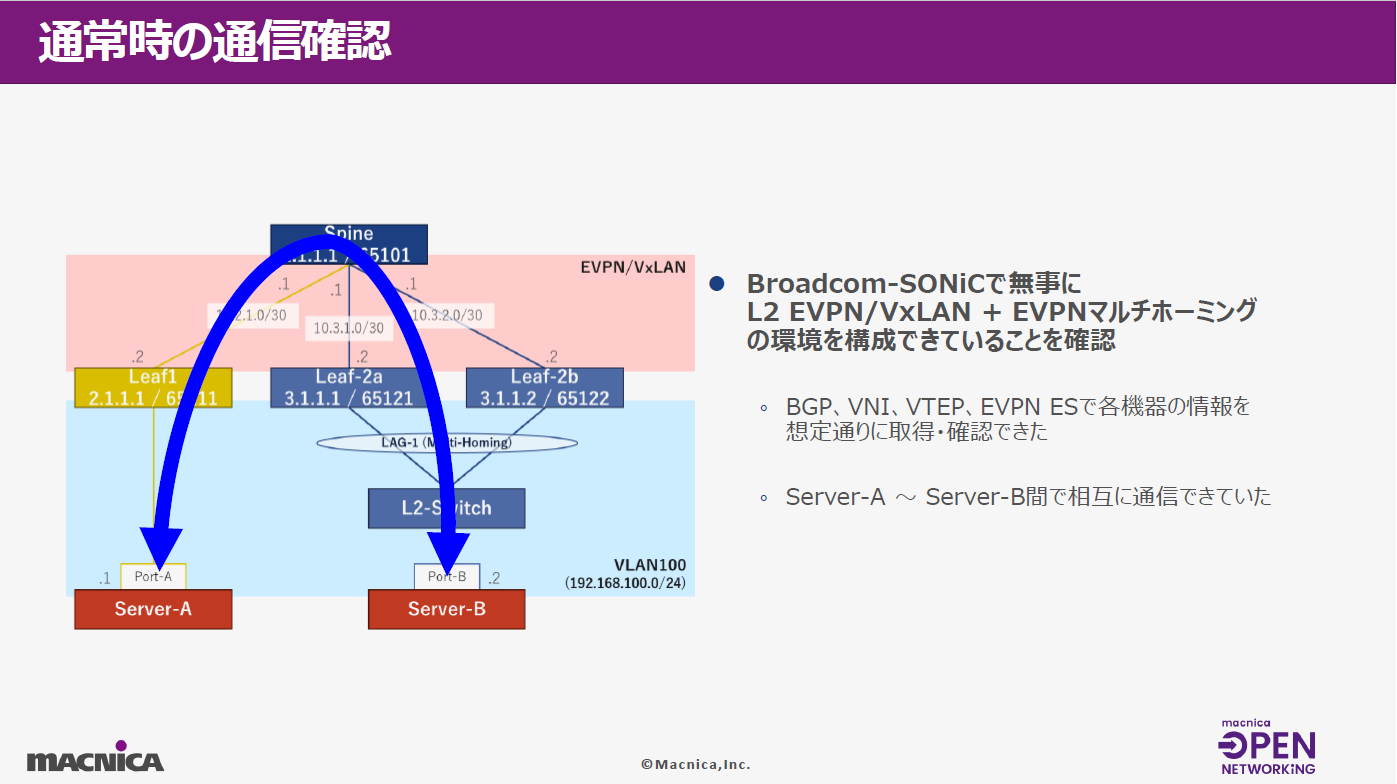
We were able to confirm that the verification environment was set up without any problems, as information such as BGP, VNI, VTEP, and EVPN was obtained as expected from each device.
This is about the results of the performance test.
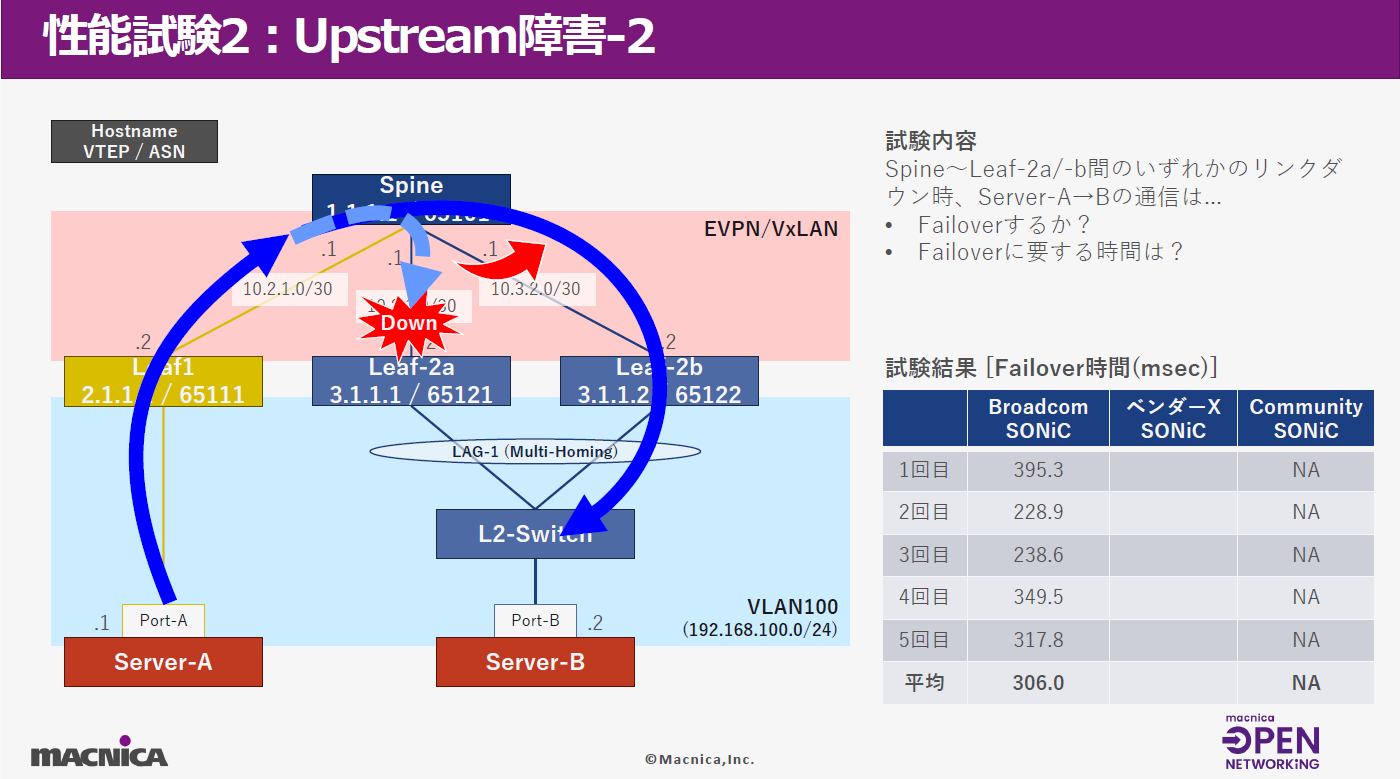
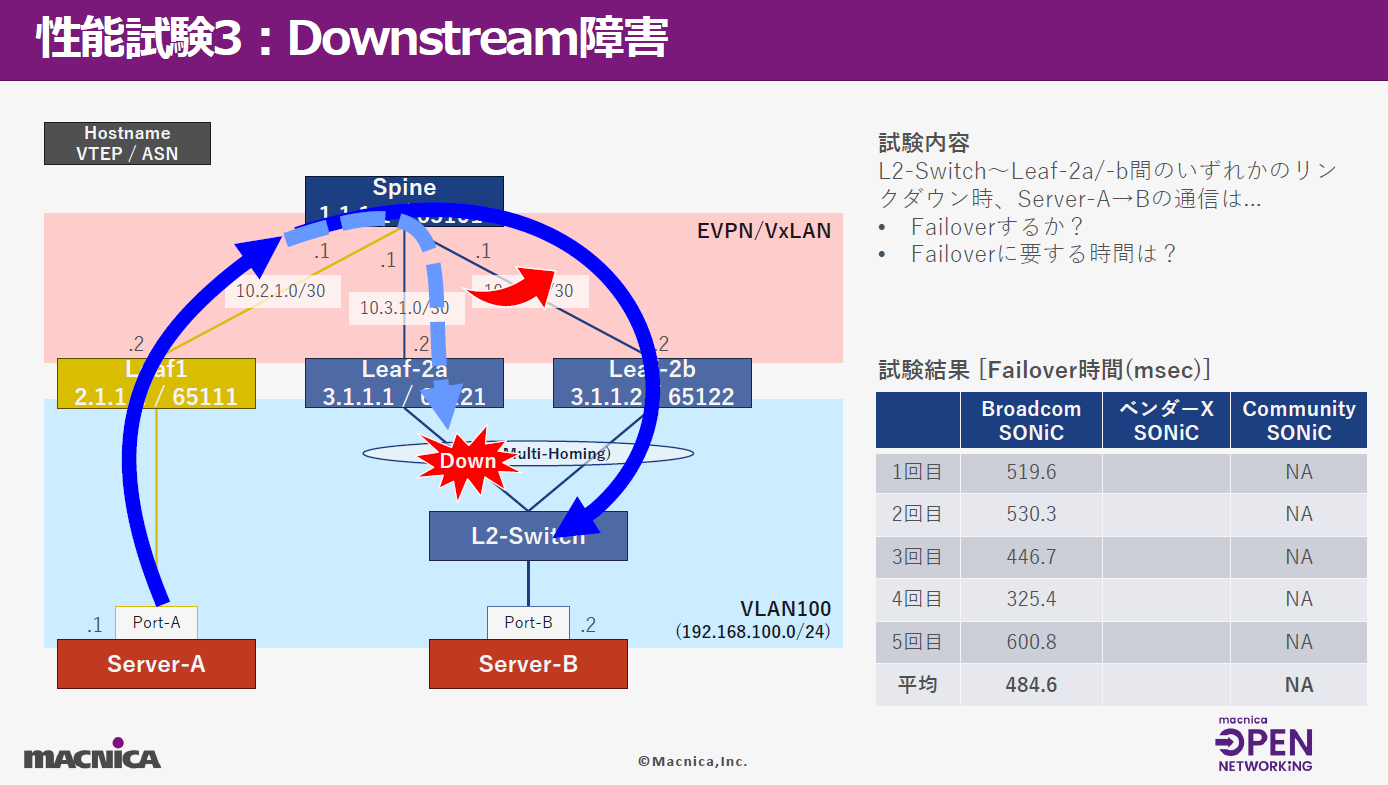
The performance test basically involved communicating between Server A and B at 10,000PPS while causing a link failure on a specific communication path.
The focus was on whether the failover would occur as expected, and how long it actually took to complete the failover.
Tests were conducted under three scenarios, with Broadcom SONiC and others SONiC We compared the verification results and calculated the failover time using the method described below.
1st: Scenario 1 Performance testing of upstream failures
This is the communication path Server-B From Server-A During normal communication, Leaf2a It is a route for communication via a switch, Leaf2a Switch The test involves checking whether communication on the underlying overlay side switches to the right side as expected when a cable failure occurs on the uplink.
The results are shown in the table below right.
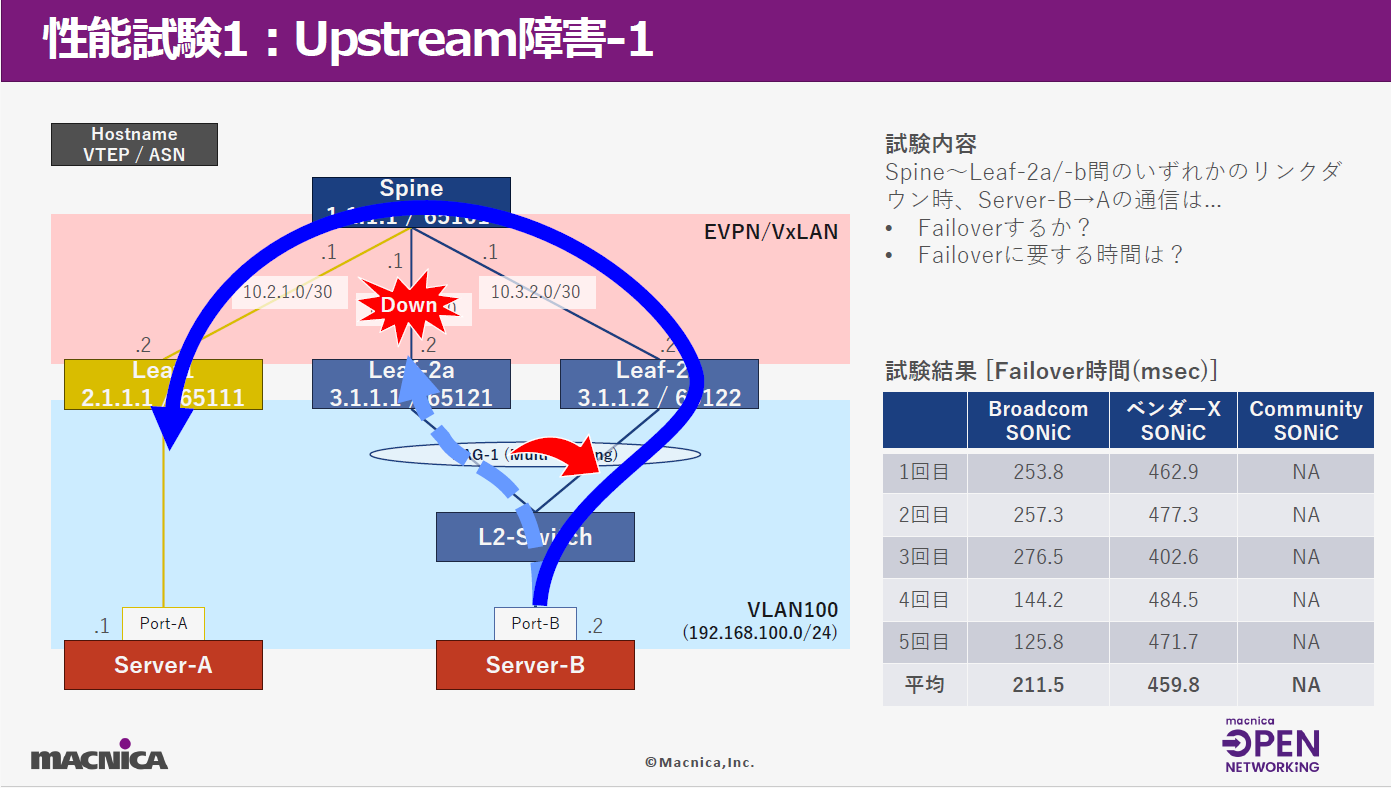
With BroadcomSONiC, we performed the test a total of five times, and obtained an average result of just over 200 ms.
As for results for other SONiCs, a commercial vendor's SONiC took approximately 450 ms, while Community SONiC did not support EVPN multihoming, so it was deemed untested.
Second: This is a similar scenario to the first, except that the communication path has changed from Server-A to Server-B.
The average failover time for Broadcom SONiC was approximately 300 ms.
And finally, the third: downstream impairment performance testing.
The results showed that the average time required for failover with Broadcom SONiC was 480 ms.
Summary
-Settings can be completed using the industry standard command system
Broadcom SONiC already supports most of its functions in a Cisco-like command system, so I think it is very convenient for users to be able to complete the settings using familiar commands according to their own situation.
・Functionality and stability of performance
During this testing, we had some initial difficulties due to improper command settings, but by properly configuring the settings, we were able to complete the testing without any major issues. We were also able to achieve results in the millisecond order in the performance testing, which really demonstrated the stability of Broadcom SONiC.
・Pursuit of user friendliness
The display commands and the way the logs are displayed have also been well thought out, and I got the impression that it really addresses all the needs.
Related information


![[What is Open Networking? - Comparing the advantages and disadvantages with conventional networks - thumbnail image]](/business/network/columns/d24f0af437a2a014d072daa10d0e8052_1.png)
Click here for list of materials

In addition to introducing products handled by Macnica,
We publish materials related to open networking, such as BGP cross network automatic construction files and network operation test evaluation reports.
Click here for details
Product Page Top

Aviz Networks
We are pioneers of SONiC, an open source network operating system, providing observability, configuration automation tools and support from a team of SONiC experts.

Edgecore Networks
We continue to be a pioneer in open networking by developing and selling products related to OpenNetworking/white Box switches.

IP Infusion
As a market leader among open networking providers, we provide reliable network solutions to over 600 customers, including carriers, service providers, and data centers.
Inquiry/Document request
In charge of Macnica Edgecore Networks
- TEL:045-470-9831
- E-mail:projectmonstar@macnica.co.jp
Weekdays: 9:00-17:00