product
Application for evaluation machine
White Box switch interoperability test - Edgecore SONiC x Catalyst (Symmetric IRB/Asymmetric IRB edition) -
Introduction
Following on from last time, we conducted an interconnection test between a white Box switch (hereinafter referred to as WBS) and Cisco switch products, so in this article we will introduce the settings and the test results.
For this interoperability verification, we imagined a data center network and built a small-scale Leaf-Spine configuration using Symmetric IRB/Asymmetric IRB.
Simple design information
We will summarize simple design information for interconnection verification.
Used equipment
The equipment used is as follows.
| SpineSW | LeafSW-1 | LeafSW-2 | |
|---|---|---|---|
|
Vendor |
Edegecore |
Edgecore |
Cisco |
|
Platform |
AS7726-32X |
AS7326-56X |
C9300-48T |
|
ASIC |
Trident III |
Trident III |
(not clear) |
|
Network OS(Ver) |
ecSONiC |
ecSONiC |
IOS |
Configuration information
The configuration information is as follows.
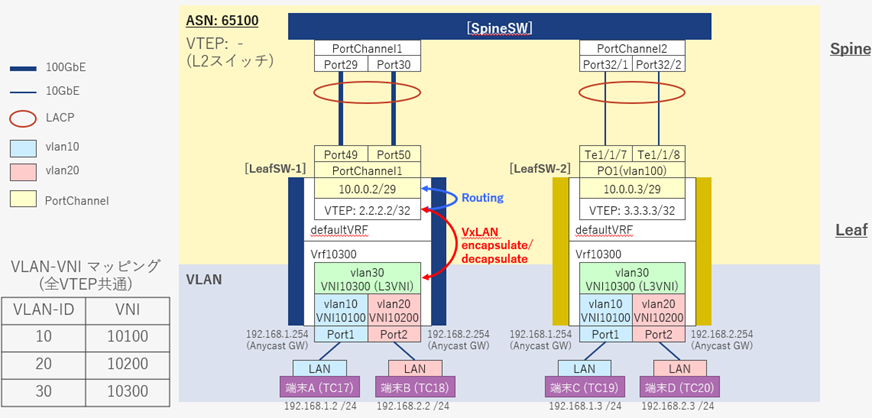
Setting Contents Overview (Simple Parameter Sheet)
The settings are summarized below.
| SpineSW | LeafSW-1 | LeafSW-2 | |
|---|---|---|---|
|
VRF |
Not set |
Default VRF |
Default VRF |
|
■Default VRF |
|||
|
VLAN |
- |
- |
Vlan100 |
|
VTEP |
- |
2.2.2.2/32 |
3.3.3.3/ 32 |
|
LACP |
■PortChannel1 |
■PortChannel1 |
■Po1 |
|
BGP (iBGP) / EVPN related |
|||
|
ASN |
- |
65100 |
65100 |
|
Router ID |
- |
2.2.2.2 /32 |
3.3.3.3 /32 |
|
neighbor |
- |
10.0.0.3 |
10.0.0.2 |
|
VNI notification |
- |
All VNIs |
All VNIs |
|
■Vrf10300 |
|||
|
VLAN/VxLAN related |
|||
|
VLAN/VNI |
- |
vlan10 / VNI 10100 |
vlan10 / VNI 10100 |
|
Static Anycast Gateway |
- |
MAC: 00:11:22:33:44:55 |
MAC: 00:11:22:33:44:55 |
|
BGP (iBGP) / EVPN related |
|||
|
ASN |
- |
65100 |
65100 |
|
Route Information Redistribution |
- |
connected |
connected |
Setting details
Here is a summary of the commands that were actually set on the switch.
*We assume that management functions and interface speed settings have been completed and will omit them here.
(Host name, management account, management IP, SSH/Telnet, speed settings, breakout settings, etc.)
*The following content will not be included in this post. (It will be included in the downloadable materials.)
\ The full version of the document, which includes all the commands and settings, is here! /
SpineSW settings
As a premise, the interface names and physical port numbers of SpineSW (AS7726-32X) correspond as follows.
|
Interface name |
Physical port number |
|
Ethernet112 |
Port29 |
|
Ethernet116 |
Port30 |
|
Ethernet124 |
Port32 (Breakout Lane 1) |
|
Ethernet125 |
Port32 (Breakout Lane 2) |
[SpineSW settings]
The configuration details for SpineSW are as follows:
Configuring LACP
LeafSW-1 settings
As a premise, the interface names and physical port numbers of LeafSW-1 (AS7326-56X) correspond as follows:
|
Interface name |
Physical port number |
|
Ethernet0 |
Port1 |
|
Ethernet11 |
Port2 |
|
Ethernet124 |
Port49 |
|
Ethernet125 |
Port50 |
The details of each setting are summarized below.
VLAN configuration
LACP configuration
VRF, Static Anycast Gateway (SAG), IP settings
MAC Address Settings
Enabling IPv4 addresses for SAG
(Used as VTEP and BGP router ID)
### Creating VRF and mapping VRF to VLAN
admin@LeafSW-1:~$ sudo config vrf add Vrf10300
admin@LeafSW-1:~$ sudo config interface vrf bind Vlan10 Vrf10300
admin@LeafSW-1:~$ sudo config interface vrf bind Vlan20 Vrf10300
admin@LeafSW-1:~$ sudo config interface vrf bind Vlan30 Vrf10300
### Static Anycast Gateway configuration
admin@LeafSW-1:~$ sudo config sag mac_address add 00:11:22:33:44:55
admin@LeafSW-1:~$ sudo config sag ipv4 enable
### IP address settings
admin@LeafSW-1:~$ sudo config interface sag ip add Vlan10 192.168.1.254/24
admin@LeafSW-1:~$ sudo config interface sag ip add Vlan20 192.168.2.254/24
admin@LeafSW-1:~$ sudo config interface ip add Loopback0 2.2.2.2/32
admin@LeafSW-1:~$ sudo config interface ip add PortChannel1 10.0.0.2/29
VxLAN, VNI configuration
### VTEP configuration
admin@LeafSW-1:~$ sudo config vxlan add vtep 2.2.2.2
### Create NVO and link it to vtep(2.2.2.2)
admin@LeafSW-1:~$ sudo config vxlan evpn_nvo add nvo vtep
### VLAN-VNI mapping with NVO
admin@LeafSW-1:~$ sudo config vxlan map add vtep 10 10100
admin@LeafSW-1:~$ sudo config vxlan map add vtep 20 10200
admin@LeafSW-1:~$ sudo config vxlan map add vtep 30 10300
### VNI settings used for inter-VRF communication
admin@LeafSW-1:~$ sudo config vrf add_vrf_vni_map Vrf10300 10300
BGP/EVPN Settings (Default VRF)
Setting the Router ID
Setting the neighbor address (LeafSW-2)
Set 10.0.0.3 (AS65100 / LeafSW-2) as neighbor
Advertise your Router ID to Naver
Advertise all of your VNIs to your neighbors
*In ecSONiC, BGP settings are configured in FRRouting.
### Transition to FRRouting mode, Configuration mode
admin@LeafSW-1:~$ vtysh
Hello, this is FRRouting (version 8.0).
Copyright 1996-2005 Kunihiro Ishiguro, et al.
LeafSW-1# configure terminal
### Create BGP (AS 65100 / DefaultVRF) and enter configuration mode
LeafSW-1(config)# router bgp 65100
### Router ID, Neighbor, and VTEP Advertisement Settings
LeafSW-1(config-router)# bgp router-id 2.2.2.2
LeafSW-1(config-router)# neighbor 10.0.0.3 remote-as 65100
LeafSW-1(config-router)# address-family ipv4 unicast
LeafSW-1(config-router-af)# network 2.2.2.2/32
LeafSW-1(config-router-af)# exit-address-family
### Configuring EVPN to advertise all VNIs to neighbors
LeafSW-1(config-router)# address-family l2vpn evpn
LeafSW-1(config-router-af)# neighbor 10.0.0.3 activate
LeafSW-1(config-router-af)# advertise-all-vni
LeafSW-1(config-router-af)# exit-address-family
LeafSW-1(config-router)# exit
BGP/EVPN settings (Vrf10300)
Directly connected route re-advertisement settings
Configuring IPv4 address notification in EVPN
### Map Vrf10300 and VNI10300
LeafSW-1(config)# vrf Vrf10300
LeafSW-1(config-vrf)# vni 10300
LeafSW-1(config-vrf)# exit
### Create BGP (AS 65100 / Vrf10300) and enter configuration mode
LeafSW-1(config)# router bgp 65100 vrf Vrf10300
### Configuring Directly Connected Routes and IPv4 Unicast Table Advertisement in EVPN
LeafSW-1(config-router)# address-family ipv4 unicast
LeafSW-1(config-router-af)# redistribute connected
LeafSW-1(config-router-af)# exit-address-family
LeafSW-1(config-router)# address-family l2vpn evpn
LeafSW-1(config-router-af)# advertise ipv4 unicast
LeafSW-1(config-router-af)# exit-address-family
LeafSW-1(config-router)# end
LeafSW-2 configuration
Details of each setting are as follows:
VRF configuration
Interface Settings (VLAN/LACP)
* vlan100 teeth SpineSW, LeafSW-1 For connection to VLAN
Static Anycast Gateway (SAG), IP, VRF settings
VRF Mapping
MAC address setting for SAG
IP processing settings for loopback interface in L3VNI
EVPN configuration
Set to Ingress-Replication
Specify the router ID as Loopback0.
Default GW advertisement setting
VNI notification settings
VxLAN usage settings, Ingress replication settings
NVE Interface Settings
BGP usage setting
Binding Loopback0, VNI 10100, 10200, and Ingress-Replication usage settings
Link L3 VNI to VRF
BGP Configuration
Communication test/status confirmation
This summarizes the results of the communication test and status check.
Test results
By passing traffic between each terminal, we were able to confirm that terminals in the same VLAN and different VLANs were able to communicate with each other, as shown below.
|
address sender |
Terminal A |
Terminal B |
Terminal C (vlan10) |
Terminal D |
|
Terminal A |
- |
Yes (different VLAN) |
Yes (same VLAN) |
Yes (different VLAN) |
|
Terminal B |
Yes (different VLAN) |
- |
Yes (different VLAN) |
Yes (same VLAN) |
|
Terminal C |
Yes (same VLAN) |
Yes (different VLAN) |
- |
Yes (different VLAN) |
|
Terminal D |
Yes (different VLAN) |
Yes (same VLAN) |
Yes (different VLAN) |
- |
Interface information
You can check the interface information with the following command.
ecSONiC / IOS common: show interfaces status
Click here for details
[Supplementary Note] ecSONiC's Symmetric IRB/Asymmetric IRB automatic selection mechanism
In ecSONiC (as of November 8, 2021), whether to use Symmetric IRB or Asymmetric IRB is automatically selected using the destination VNI as a key.
Symmetric IRB/Asymmetric IRB selection criteria
The selection criteria for ecSONiC 's Symmetric IRB/Asymmetric IRB are as follows:
*In this verification, since the VNI held by ecSONiC and the Cisco switch was the same, communication from ecSONiC to the Cisco switch was carried out via asymmetric IRB.
Concrete example
A specific example is given below based on the above selection criteria.
For the VNIs configured on the source device (ecSONiC) and destination device (optional), ecSONiC will select the following:
|
VNI |
Sender (ecSONiC) |
Destination (optional) |
Selection Results |
|
VNI 10100 |
With setting |
With setting |
Asymmetric IRB |
|
VNI 10200 |
Not set |
With setting |
Symmetric IRB |
|
VNI 20000 (L3 VNI) |
- |
- |
- |
Summary
This time, we created a Symmetric IRB/Asymmetric IRB environment between WBS (ecSONiC) and Cisco switch products.
We also learned the selection criteria for Symmetric IRB/Asymmetric IRB in ecSONiC.
Following on from last time, we were able to once again confirm the high quality of WBS through the WBS-Cisco switch interconnection.
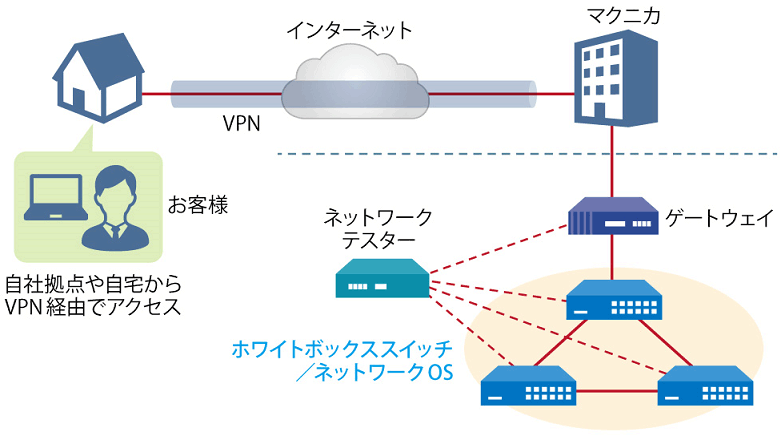
Remote verification service image diagram
It is a service that allows you to easily test open networking, and the basic configuration is free of charge.
You can check the downloadable materials for available network OS and white Box switches, specific use cases, and how to apply. The materials can be downloaded from the URL listed in the information email by answering the questionnaire from the "Macnica Network OS Remote Verification Service" below.
These people are using the remote verification service.

Here are some testimonials from people who have actually used the service.
Furukawa Network Solution Co., Ltd.
"Remote service environments are on the rise these days, but I was impressed with how easy it was to access the evaluation equipment.
The materials provided were easy to understand, and we were able to smoothly carry out our intended verification."
Related information
![[Part 9] SNMP visualization of white Box switches using SONiC - Grafana x InfluxDB - Thumbnail image](/business/network/columns/84d7a7525020782725001d27311eddde_1.png)
![[Part 13] Thumbnail image of network visualization of SONiC-enabled white Box switches using Aviz ONES](/business/network/7d0fc1563364ef02c61d514469c3f49f.png)
Click here for list of materials

In addition to introducing products handled by Macnica,
We publish materials related to open networking, such as BGP cross network automatic construction files and network operation test evaluation reports.
Click here for details
Product Page Top

Edgecore Networks
We continue to be a pioneer in open networking by developing and selling products related to OpenNetworking/white Box switches.

Aviz Networks
We are pioneers of SONiC, an open source network operating system, providing observability, configuration automation tools and support from a team of SONiC experts.

IP Infusion
As a market leader among open networking providers, we provide reliable network solutions to over 600 customers, including carriers, service providers, and data centers.
Inquiry/Document request
In charge of Macnica Edgecore Networks
- TEL:045-470-9831
- E-mail:projectmonstar@macnica.co.jp
Weekdays: 9:00-17:00