Okta
Octa
What is "passwordless function"? Explaining how to prevent incidents
Okta's passwordless feature
Okta originally offered passwordless login in the sense of not needing a password, but due to configuration issues, users were still required to have a password.
Okta's passwordless feature described here not only allows users to authenticate without using a password when logging into Okta, but also allows users to have no password in the first place.
This feature enables the following three things:
- An administrator creates a user without a password.
- Create an account without creating a password during user self-service registration.
- For users who already have a password, remove the password later.
First of all, why adopt a passwordless system?
Many security incidents are caused by password leaks.
Therefore, efforts to log in to cloud services using authentication methods other than password authentication have been promoted in recent years.
Furthermore, if a passwordless system is not adopted, users must create a password when registering an account, which can lead to a poor user experience and account drop-off during the registration process.
As the number of cloud services used for work increases, the number of passwords users need to manage also increases. Creating separate passwords for each cloud service in accordance with their respective password policies is a significant burden for users.
Since password creation is a user-initiated task, maintaining a high level of password management is difficult. Users may create simple passwords or write them down on paper, which can lead to security incidents.
Furthermore, having passwords can lead to password resets, which can be a significant burden on a company's IT department.
For these and other reasons, passwordless systems are increasingly being adopted.
User experience when adopting a passwordless system
This time, we will introduce the user experience in two scenarios: when an administrator creates a user account, and when a user registers an account themselves.
When an administrator creates a user
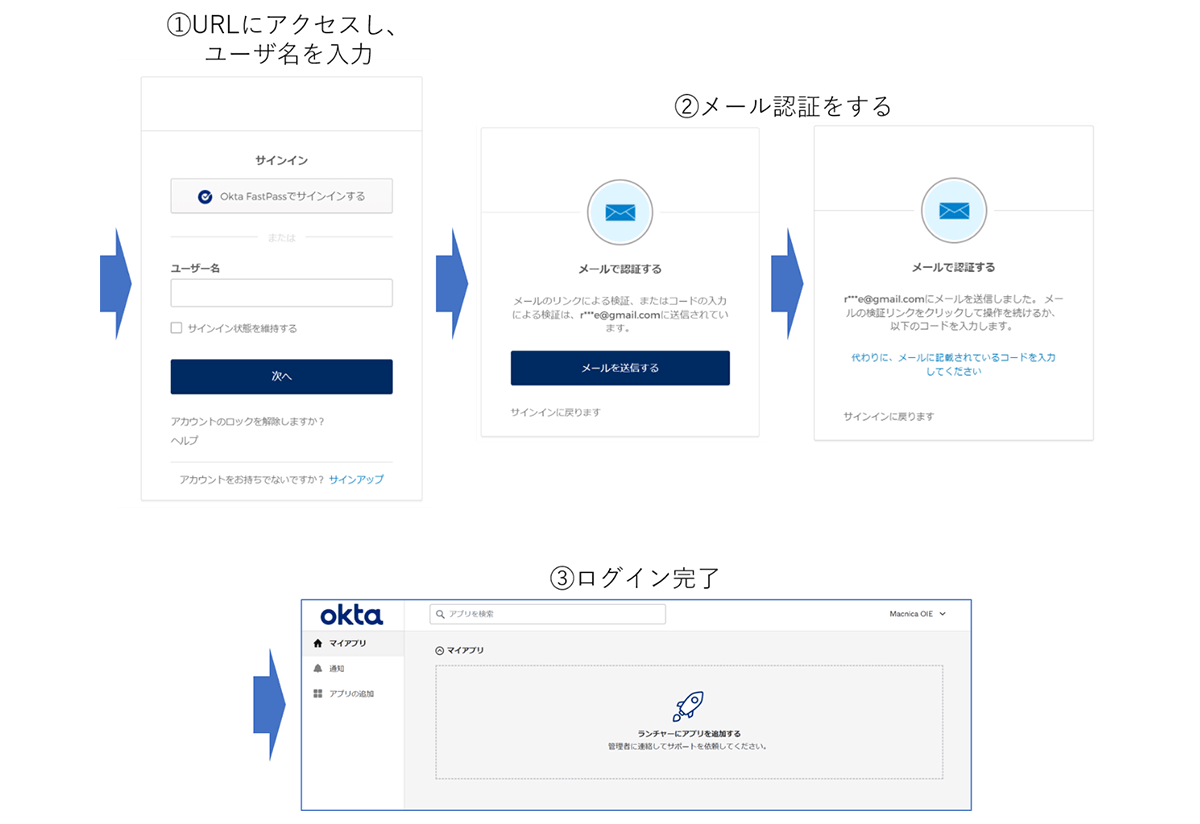
Typically, when a user logs in for the first time, they either use an activation link or authenticate with a password.
When using the passwordless feature, the user's first login will be authenticated via email, rather than using an activation link.
The user's screen will follow the flow shown in the diagram below.
- Since there is no activation link, access the URL directly from your browser.
- The administrator will perform email verification using the registered email address.
- Initial login complete.
When a user registers an account
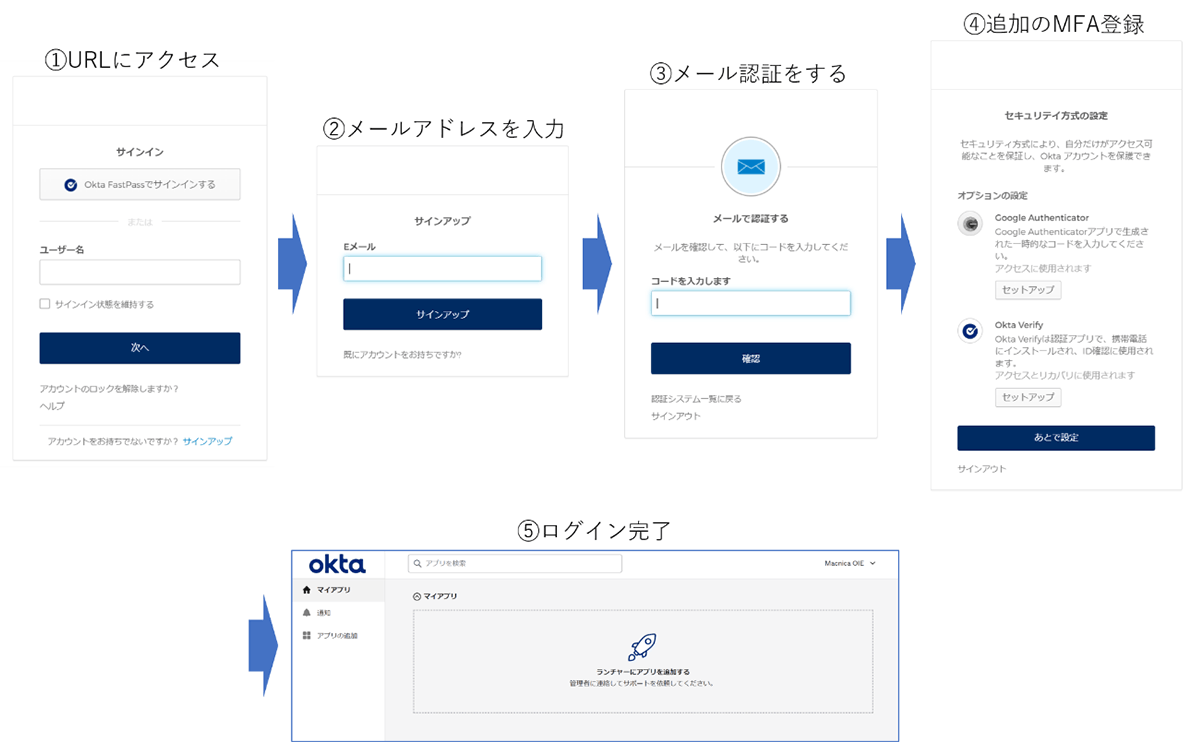
If passwordless authentication is adopted, account registration can be easily done using only email verification.
The user's screen will follow the flow shown in the diagram below.
- Access the URL and click "Sign Up" to enter the account registration page.
- Enter your email address
- Perform email verification
- Register for multi-factor authentication (MFA)
If multi-factor authentication registration is optional, you can select "Set up later". - Initial login complete.
Points to note regarding the passwordless function
Only Okta-sourced users can remove passwords.
Therefore, users on the AD master or LDAP master cannot exclude passwords.
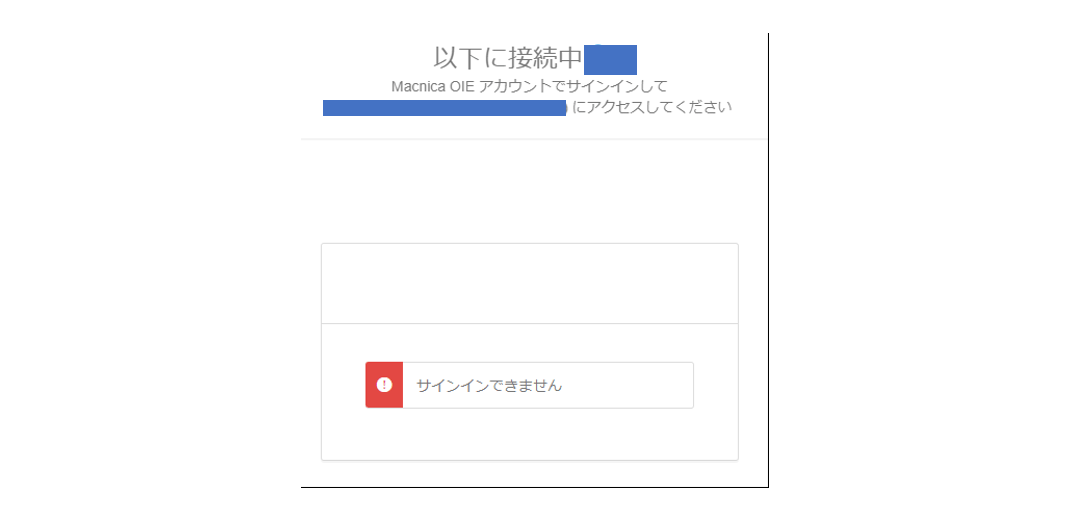
If a user does not have a password, and some applications have a sign-on policy that requires password authentication, that user will be unable to log in.
Therefore, you need to set up a sign-on policy for all applications that users use that allows authentication without a password.
For example, if you require password authentication in the application's sign-on policy, an error will occur when accessing the application, as shown in the diagram below.
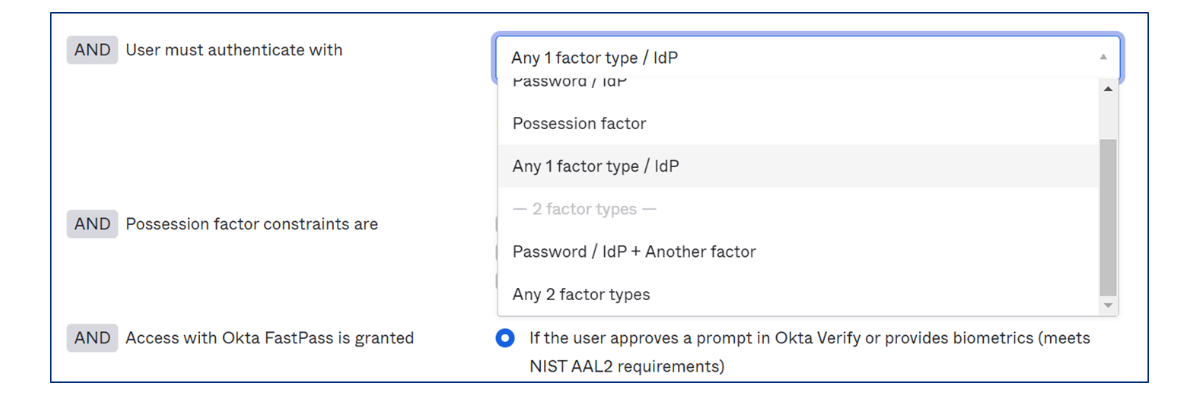
Therefore, in the application's sign-on policy, you need to select either "Any 1-factor type / IdP" or "Any 2-factor types" for the "User must authenticate" setting, as shown in the diagram below.
Summary
The ability to create Okta users without passwords is expected to resolve various password-related issues.
Since you can also set passwordless access for specific groups, you can keep passwords for users who need them while making only those users passwordless, allowing for appropriate use in various situations.
If you are interested in Okta's passwordless functionality, please contact Macnica.
Inquiry/Document request
In charge of Macnica Okta Co., Ltd.
- TEL:045-476-2010
- E-mail:okta@macnica.co.jp
Weekdays: 9:00-17:00