"I prefer to take notes by hand during business negotiations and meetings. But then it's a hassle to transcribe them neatly on a computer and share them later..."—Many people probably have this problem.
This article compares and explains five methods fordigitizinghandwritten notes and memos from the perspectives of accuracy, cost, and effort. Italso introduces the latest AI-powered methods for automating the entire process, from digitization to final transcription and sharing.
Benefits of digitizing handwritten notes
It can achieve both memory retention and efficient sharing.
It is said that handwriting uses a wide range of the brain, and a major advantage is that looking at handwritten text makes it easier to recall what you were thinking and what you were talking about at the time. Digitizing allows you to retain this memory-retaining quality unique to handwriting while also gaining the ease of organizing and sharing later. It's not a choice between "handwriting or digital," but rather you can get the best of both worlds.
It will become searchable and reusable.
Finding notes on paper becomes a real struggle once time passes. Converting them to text data allows for instant searching by date or keyword, making it easy to quickly retrieve past business negotiation details or meeting decisions. It also makes it easy to transfer and reuse the information in other documents such as meeting minutes or reports.
Reduces the risk of loss and reliance on specific individuals.
Paper notebooks are always at risk of being lost or deteriorated. Furthermore, when information is "personalized" and only exists in the possession of the person who wrote it, team information sharing becomes difficult. By digitizing and storing information in the cloud or internal tools, the right people can access it when they need it, transforming personal notes into organizational assets.
5 ways to digitize handwritten notes
There are fivemain methods for digitizing handwritten notes and memos. Let's look at the characteristics and points to note for each method in turn.
① Take a picture and convert it to text using your smartphone camera and an OCR app.
The easiestmethod is to take a picture of your notes with your smartphone camera and convert them to text usingOCR (Optical Character Recognition) functionality. There are plenty of free apps and features available, such as Google Keep,Microsoft Lens, andthe iPhone'sbuilt-in "Text Recognition Display." While you can start today without any additional cost, it's important to note that the accuracy of handwriting recognition depends on the handwriting style and how the notes are written.
② Convert to PDF using a scanner/multifunction printer.
This method involves scanning notes using an office multifunction printer or document scanner and saving them as PDFs. It's suitable for scanning large notebooks in bulk or when you want to preserve diagrams and layouts as they are in the original document. However, simply saving as an image doesn't allow for searching the content; if you want to convert it to text, you'll need to useOCR processing in conjunction with this method.
③ Use a smart pen or electronic notebook to digitize data on the spot.
This method involves using a device that records what you write in a special pen or notebook directly as digital data. The biggest advantage is that you can digitize your writing without changing the experience of "writing," but you should consider the cost of purchasing the dedicated device and the fact that it may be difficult to use in workplaces where bringing in personal devices is restricted.
④ Load the image into the generation AI and convert it into text.
This method involves uploading photos of handwritten notes to generative AIsuch asChatGPTorGeminiand instructing them to "transcribe it into text." It offers better context-aware recognition and formatting than traditionalOCR, and its ability to simultaneously provide instructions like "organize it into bullet points" is a significant advantage. Since a free plan is available,it's worth trying if you're dissatisfied with the accuracy of your currentOCR app. However, when inputting business information into external AI services, it's essential to review your company's security policy.
⑤ Automate the entire process of "note-taking → final transcription" using voice input and generation AI.
This method involves simply speaking the contents of handwritten notes, andthe AIwill transcribe, summarize, and format them into a report or meeting minutes. Because it takes an approach of "rephrasing" rather than "reading handwritten text," the problem of accuracy in handwriting recognition does not arise in the first place. It can also reflect supplementary information that couldn't be included in the notes and the atmosphere of the situation, making it particularly suitable for sharing business notes. Specific tools will be introduced later in the article.
Comparison of 5 Methods | Choose Based on Accuracy, Cost, and Effort
Comparing the five methods based on "text conversion accuracy," "cost," and "who they are best suited for," we get the following results:
| Method | accuracy | cost | Suitable people |
|---|---|---|---|
| ① OCR app | It depends on the handwriting. | free~ | For those who want to try it out easily first |
| ② Scanner/Multifunction Printer | Images are reproduced faithfully (text conversion requires separate OCR). | Free if you have a multifunction printer. | People who want to store a large number of notebooks |
| ③ Smart pens and electronic notebooks | high | Several thousand yen to tens of thousands of yen | People who don't want to change their writing experience |
| ④ Generating AI (image loading) | Relatively high (with contextual adjustments) | free~ | People who are dissatisfied with the accuracy of OCR |
| ⑤ Voice Input × Generation AI | High (no influence from handwriting) | Tools | People who want to automate the creation of reports and meeting minutes. |
If you simply want to try it for free right now, then option ①or④ is a good choice. If you want to save time not only on text conversion but also on finalizing and sharing, then option ⑤is a strong contender. In the next chapter, we will delve into the challenges that option ⑤addresses beyond just text conversion.
Sharing created notes presents challenges...the limitations of OCR and the blind spot of "time until sharing."
The accuracy of handwritten character recognition is not perfect.
Here, Macnica 's "MHere are some examples of "department heads."
Manager M had previously tried using an OCR tool that automatically reads text from a photograph and converts it into text. However, it was not practical because the accuracy of reading handwritten text was poor, making it difficult to use, and corrections took a lot of time. While the accuracy can be improved to some extent by writing neatly in block letters and leaving space between lines, it is difficult to reconcile this with the "speed of note-taking."
It's not over once you've transcribed it—the real bottleneck is "final drafting and sharing."
Whether handwritten or digital, in order to share notes you have created with the relevant parties, you must first organize what you have written. For reference, when I asked Manager M how much time it took him to organize his handwritten notes, he said, "About two hours for five business meetings a day." If you add in the time it takes to register cases in CRM and input data into Excel, it takes even more time.
In other words, more than a quarter of my workday is spent just organizing notes. I'm sure many others face similar challenges.
They were also aware of tools such as Google Docs that can transcribe voice input directly into text, but they didn't use these either because they still needed to edit the text neatly afterwards.
In other words, simply "transcribing" handwritten notes into text using OCRor transcription is not the goal. The real challenge in digitizing handwritten notes lies in the entire process of organizing them into reports and meeting minutes and sharing them with relevant parties.
The savior was "generative AI"! There's even a way to complete business reports just by "talking" to handwritten notes.
"The Summary Ninja" automatically turns what you say into a report or meeting minutes.
The tool that can completely solve this "cleaning and sharing" problem is the aforementioned⑤"voice inputxgenerationAI" type tool.It was this type of tool, called "Omatome Ninja," that significantly changed ManagerM 's work. "Omatome Ninja" is a tool that transcribes what you say in real time, automatically summarizes it, and creates reports and meeting minutes. You just speak the main points while looking at handwritten notes, and a clean, finished text is produced.
Of course, it is not only possible to input text by voice, but also to copy and paste text that you have prepared in advance and have it summarized. In other words, the user's action is either "just speaking" or "just copying and pasting".

I can't concentrate on important work...

It's easy to get bogged down in details...
It's a pain to read them all separately...


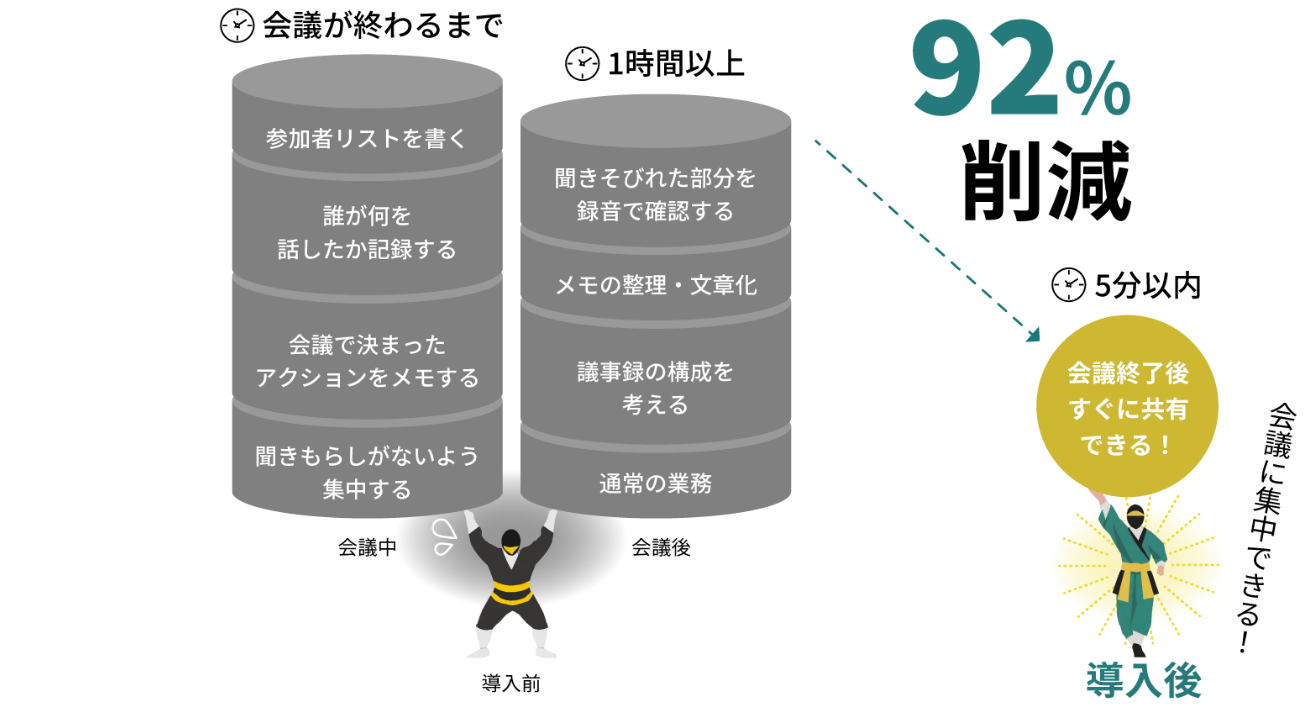
The time it takes to organize notes has been reduced from "more than 2 hours" to "5 minutes".
One of the biggest advantages of "Omatome Ninja" is that it can be launched immediately on either a PC or a smartphone, and the entire process can be completed using just that one app, without the need to use multiple software programs or tools.
Manager M used to spend over two hours organizing his notes, but since using "Omatome Ninja," it now takes him justfiveminutes. That's a reduction of over 90% in his work time.
We can share even the information that we couldn't fully convey before.
Furthermore, a major change was the elimination of the need to "select and filter" information to share. Previously, it was necessary to select and share only the information deemed important from the information obtained during business negotiations, and some of the information that was discarded may have actually been needed by other members. With Omatome Ninja, you simply speak the information you've obtained as you see fit, and the organized text is shared as is. Information that might have been lost in handwritten notes will now reach the colleagues who need it.
Frequently Asked Questions about Digitizing Handwritten Notes
Summary
In this article, we explained five waystodigitize handwritten notes, including some real-life examples.
Both handwritten and digital methods have their own advantages. What I especially want to convey to everyone today is that "you don't need to drastically change your current methods." If you prefer handwriting like Manager M, that's perfectly fine. What needs to be changed is the process *after* you take notes.
If you're someone who spends a lot of time organizing and sharing notes, try choosing one of the five methods introduced in this article that suits you best. Especially for business notes, using a generation AI like "Omatome Ninja" in conjunction with these methods may significantly improve your work efficiency. As the saying goes, "seeing is believing," so why not take this opportunity to give it a try?
 Latest Information
 Case Study
 Blog
Blog Document List