"According to calculations in Excel, we should be able to achieve our goals, but when we actually run the project, the results are completely different." This "discrepancy" in line design is the biggest cause of rework and additional investment.
The term "digital twin" is gaining attention in the context of Digital Manufacturing and factory DX, and the most immediately effective practical entry point is production line simulation. Siemens' Plant Simulation is a tool that uses a discrete event simulation (DES) engine to digitally recreate a production line, allowing for comprehensive verification of complex factors such as equipment, work in progress, personnel, and transportation.
This article introduces the process of validating production processes using Plant Simulation, based on real-world examples of five equipment and serial lines. We will explain, with specific numerical examples, why discrepancies arise between theoretical calculations and simulation results, and how to derive the optimal buffer capacity.
You can see the verification process explained in this column on actual screens.
INDEX
-
1. Verification Premise: 5 Equipment/Serial Production Line and Target Conditions
-
2. Results and pitfalls of calculations performed using Excel.
-
3. Results of reproducing the same conditions of the production line using Plant Simulation
-
4. Why can only 472 be produced? – The impact of work-in-progress as revealed by the digital twin.
-
5. Optimize production line buffer capacity – Space saving using genetic algorithms
-
6. Three Values Gained from Utilizing Digital Twins of Production Lines
-
Summary: The first step in incorporating digital twins into production line design
1. Verification Premise: 5 Equipment/Serial Production Line and Target Conditions
Plant Simulation is a simulation software for production lines that employs a Discrete Event Simulation (DES) engine. By building a digital twin of the production line on a PC and dynamically reproducing elements such as equipment, transportation, personnel, and failure rates, it allows for highly accurate verification of production capacity before actually installing the equipment.
The production line used in this demonstration has a simple configuration with equipment 1 through 5 arranged in series. Products are processed sequentially from left to right, and are counted as finished products once they have passed the final stage.

| equipment | Cycle time | Utilization rate | remarks |
|---|---|---|---|
| Equipment 1 |
36 seconds
|
90%
|
-
|
| Equipment 2 |
45 seconds
|
80%
|
◀ Neck process (longest CT)
|
| Equipment 3 |
36 seconds
|
80%
|
-
|
| Equipment 4 |
40 seconds
|
95%
|
-
|
| Equipment 5 |
40 seconds
|
90%
|
-
|
The operating conditions are 10 hours of continuous operation and a target production of 620 units. The starting point of our verification is whether this configuration can truly achieve the target.
2. Results and pitfalls of calculations performed using Excel.
First, let's try calculating it using conventional Excel. Using equipment 2, which has the longest cycle time and is the bottleneck, as the baseline, we can calculate it using the following formula.
At first glance, it seems like the goal can be achieved without any problems. However, this calculation is missing a certain element that inevitably occurs in the field.
3. Results of reproducing the same conditions of the production line using Plant Simulation
The same equipment specifications and operating conditions are modeled on Plant Simulation, and a 10-hour simulation is run at high speed. The process of products flowing sequentially from equipment 1 is visualized, showing how they are processed according to the processing conditions and operating rate of each piece of equipment.
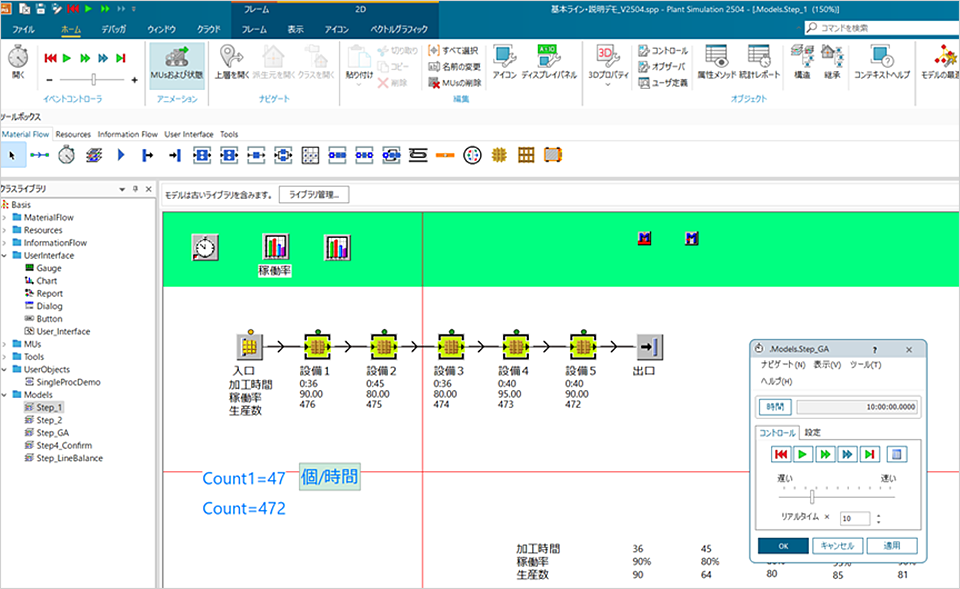
Simulation ①: Modeling the same equipment specifications and operating conditions on Plant Simulation.
The results of the initial simulation (without a work-in-progress storage area) were 472pieces. Excel From the calculations 168One (approximately 26%) fewer This is a surprising result.
4. Why can only 472 be produced? – The impact of work-in-progress as revealed by the digital twin.
The reason for this difference lies in the presence or absence of a "work-in-progress storage area between pieces of equipment."
In actual production environments, products that have finished processing on one piece of equipment are not always immediately fed into the next piece of equipment. Depending on the availability and timing of the next process, they may temporarily remain as work in progress. This "waiting" blocks the equipment and significantly reduces the overall throughput of the line.
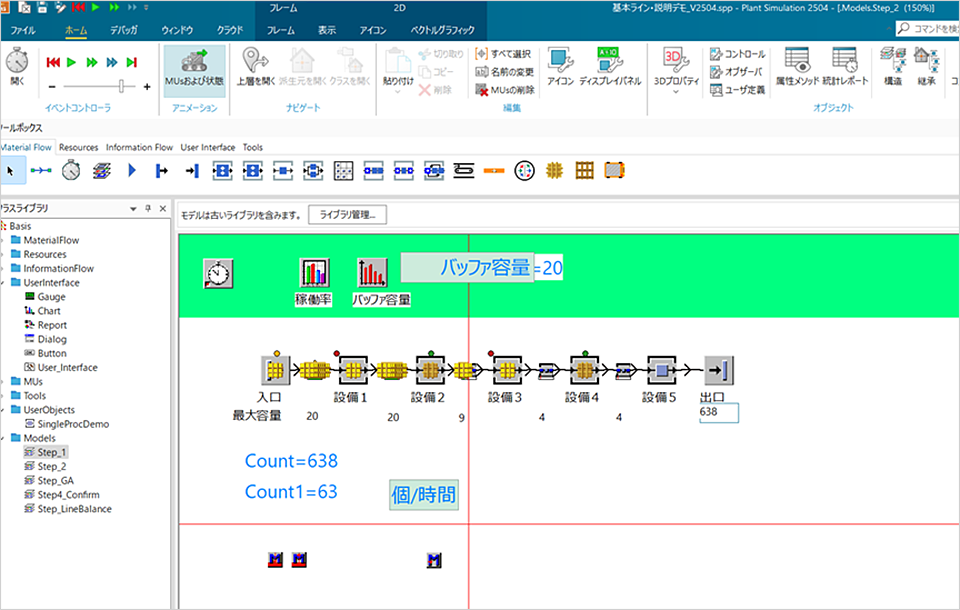
Simulation ②: Model with added temporary storage area for work in progress
In the second simulation, which included a work-in-progress storage area, we achieved 638 units. This result was close to the theoretical value. It shows that the presence or absence of a work-in-progress storage area makes a difference of approximately 35% in production quantity.
The target of 620 items is expected to be achieved.
No place to store work in progress
There is a storage area for work in progress.
5. Optimize production line buffer capacity – Space saving using genetic algorithms
The problem of "excess/shortage" of work-in-progress storage.
Work-in-progress storage areas consume space. Too much wastes factory area, while too little causes line congestion. In this example, we assumed a maximum capacity of 20 units between each process, but simulation analysis revealed that a significant imbalance occurs between processes.
| Process 1→2 | Process 2→3 | Process 3→4 | Process 4→5 | Process 5→Exit | Total | |
|---|---|---|---|---|---|---|
| Simulation results (Maximum number of rigs) |
20
|
20
|
9
|
4
|
4
|
57
|
Simulation analysis revealed a significant imbalance between processes, particularly in the upstream processes (process 1→2, process 2→3), where a large amount of work-in-progress (WORK) accumulates, while only a small amount accumulates in the downstream processes. The fact that the buffer in the upstream processes is effectively filled to its "maximum limit" indicates that this is where the bottleneck is occurring.
How GA (Google Analytics) automates optimization
Using the genetic algorithm (GA) optimization function included in Plant Simulation, we searched for the minimum buffer capacity under the following conditions.
- Constraint: Production quantity must not fall below the target of 620 units.
- Optimization goal: Minimize the total capacity of the work-in-progress storage area.
The simulator rapidly and repeatedly explores hundreds to thousands of patterns, automatically deriving the optimal solution.
Optimization results
| Process 1→2 | Process 2→3 | Process 3→4 | Process 4→5 | Process 5→Exit | Total | |
|---|---|---|---|---|---|---|
| Initial settings (provisional) |
20
|
20
|
20
|
20
|
20
|
100
|
| Before GA optimization (Simulation results) |
20
|
20
|
9
|
4
|
4
|
57
|
| After GA optimization |
1
|
5
|
7
|
1
|
1
|
15
|
The optimized production quantity was 625 units (meeting the target of 620 units). The total buffer size was reduced by 85%, from the initial 100 units to 15 units. This conclusion represents a value unique to simulation that cannot be derived through human experience or Excel calculations.
6. Three Values Gained from Utilizing Digital Twins of Production Lines
While "digital twins" are often discussed as an ideal when promoting manufacturing DX and factory DX, the most realistic approach as a first step is production simulation. Even before establishing a large-scale IoT infrastructure, Plant Simulation (Tecnomatix) allows you to build a virtual model of your equipment and begin verification that directly impacts investment decisions.
By eliminating the risk of "realizing after the fact" before actually installing the equipment, we were able to discover in advance that without a work-in-progress storage area, we would fall 26% short of our target.
It allows for the analysis of phenomena involving multiple factors such as equipment performance, work-in-progress, transportation, personnel, and failure rates, at a level of granularity that cannot be handled in Excel.
We support decision-making with numerical data, rather than relying on intuition and experience. We can present concrete results, such as an 85% reduction in buffers, to relevant departments and management.
Summary: The first step in incorporating digital twins into production line design
Through this demonstration, the following points became clear:
Simulation is a means of discovering such "oversights" during the design phase.
The demo video explains this process step-by-step using actual screenshots from Plant Simulation. Please use it to check the user interface and visualize its application to your own production line as the first step in building a digital twin of your production line.
demo video
Please watch the video to see the full details of the verification process explained in the column.
Inquiry
If you've read this column and are interested in applying it to your own production line, please feel free to contact us.
Go to product page
For an overview of Plant Simulation's features, functions, and application scenarios, please click here.
Go to the assignment page
This document outlines the challenges in design and manufacturing, and how virtual commissioning can provide solutions, presenting them in an overall flow.