- Semiconductor BusinessHOME
- Products and Services of Macnica,Inc.
-
technical information

-
Events and Seminars
- Handling Manufacturer
- Support
- Inquiry
- Click here to purchase products
- Semiconductor business e-mail magazine registration


 Narrow down by specifying conditions
現在2249件がヒットしています。check

Purpose of this course
Overview
In this seminar, we will introduce how to use MAX®10 FPGA in embedded devices for FPGA beginners that even software engineers can understand.
We also publish the exercise manual and exercise data as hands-on.
If you use the development board during the exercise, you can experience the exercise while operating it on the actual machine.
<Seminar content>
Section 1: FPGA Overview
Section 2: How to make a custom microcontroller using FPGA
Target audience
We are looking for system, software, and hardware engineers interested in custom microcontroller design using Altera® FPGAs.
goal of attending
・Understand the basics and functional overview of FPGA
・Understand the overview of the FPGA development environment
・Understand the design flow of custom microcomputers using FPGA (hands-on users only)
agenda
Section 1: FPGA Fundamentals
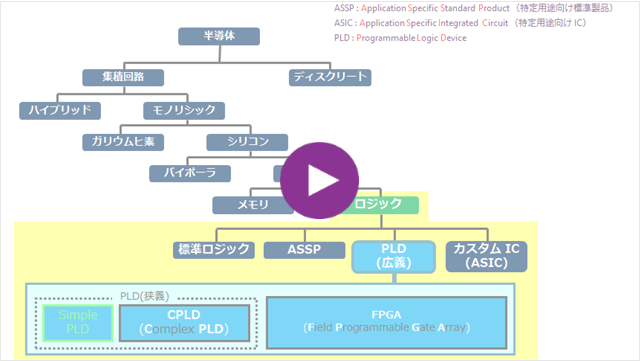
This chapter provides an overview of general FPGAs.
(Duration: 5 minutes 48 seconds)
Section 1: MAX 10 FPGAs

This chapter will focus on the MAX 10 from Altera® FPGAs.
Describe the features and functions of the device.
(Duration: 12 minutes 05 seconds)
Section 1: Hardware Development Environment

This chapter covers the software and other resources required when developing Altera® FPGAs.
I will introduce the operation flow roughly.
(Duration: 4 minutes 08 seconds)
Section 2: Processor Nios II Overview

This chapter provides a brief overview of the features of the "Nios II" soft-core processor IP, which can be integrated into Altera® FPGAs.
(Duration: 3 minutes 47 seconds)
Section 2: Implementing Nios II with Platform Designer

This chapter describes the tools for designing Nios II.
Introducing the "Platform Designer".
(Duration: 4 minutes 10 seconds)
Section 2: Introduction to software development tools

This chapter introduces the integrated environment "Nios II Software Build Tools for Eclipse" that allows you to edit, build, and debug programs executed by Nios II.
(Duration: 1 minute 16 seconds)
Introducing Altera® FPGA Training & Macnica Website

This chapter covers Altera® FPGA training and
Introducing Macnica 's website.
(Duration: 1 minute 40 seconds)
For technical training and seminars on Altera® FPGA products, please visit the Altera® FPGA Seminars & Training homepage.
practice content
We will guide you through the environment required to conduct the exercises.
| development software |
Altera® Quartus® Prime development software Standard Edition or Lite Edition ・Nios ® II Software Build Tools for Eclipse (used in exercises 2 and 3) |
[Related information]
・ Quartus ®- Supported Windows ® OS Compatibility Table
・ Quartus ®- Supported Devices Table
How to download Altera® Quartus® Prime development software and Questa* - Altera® FPGA Edition
• How to install Altera® Quartus® Prime development software and Questa* - Altera® FPGA Edition
Manuals and exercise data for conducting exercises.
|
FPGA to use |
MAX®10 |
|
|
development board
For consideration and purchase, please give me. |
(Also available at Macnica Mouser.) |
(Also available at Macnica Mouser.) |
|
USB-Blaster II
For consideration and purchase, please give me. |
requirement (Also available at Macnica Mouser.) |
unnecessary (Because it is an onboard USB-Blaster II compatible board) |
|
exercise manual |
<For MAX 10 Evaluation Kit> |
<For MAX 10 Development Kit> |
|
exercise data |
<For MAX 10 Evaluation Kit> |
<For MAX 10 Development Kit> |


![Custom MCU Design Trial Exercise Manual [MAX 10 Evaluation Kit Edition]](/business/semiconductor/articles/id134657_img10.png)
![Custom MCU Design Trial Practice Data [MAX Evaluation Kit Edition]](/business/semiconductor/articles/id134657_img11.png)