- Semiconductor BusinessHOME
- Products and Services of Macnica,Inc.
-
technical information

-
Events and Seminars
- Handling Manufacturer
- Support
- Inquiry
- Click here to purchase products
- Semiconductor business e-mail magazine registration


 Narrow down by specifying conditions
現在2249件がヒットしています。check


hello.
My name is Hanako Altera and I provide technical support for Altera® FPGA products at Macnica.
During development of Altera FPGAs, some users may need to repeatedly compile and run Quartus® Prime.
The most frustrating thing about running compilations over and over again is probably the “waiting time during compilation”.
This time, I will introduce a method to shorten the compilation time that will release you from such stress.
Normal compilation flow
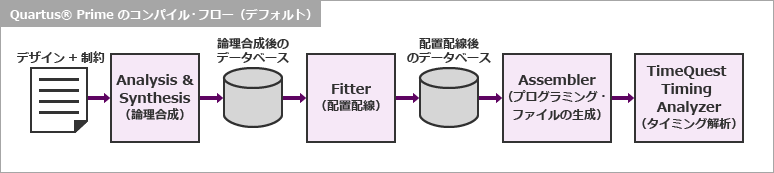
The figure below shows the compilation flow normally followed by Quartus® Prime.
The main process consists of the following four steps. Of these, Analysis & Synthesis and Fitter (placement and routing) occupy most of the compilation run time.
In other words, shortening the processing time of this step leads to shortening the total compilation time.
Here's how to reduce compilation time!
Quartus® Prime has three main compilation methods:
Both of these are effective when a project that has been compiled is modified and then recompiled.
1. Smart Compilation
2. Rapid Recompile
3. Incremental Compilation
These compilation time savings are (small) 1 < 2 < 3 (large).
Here, we will take up the smart compilation function and rapid recompilation function that are easy to use among them.
Hanako's Tweet
The third, “incremental compilation,” is the most effective, but somewhat more technical. Therefore, we will guide you on another page. Please read the following.
⇒ How to recompile only part of the FPGA design
⇒ Try to use incremental compilation
What are the characteristics of these functions?
The table below outlines the features of Smart Compilation and Rapid Recompilation.
| smart compilation | Rapid recompile | |
| Target device | in Lite and Standard Editions Supported devices (Except Arria® 10, MAX® 10) |
Stratix® 10, Stratix® V, Arria® 10, Arria® V, Cyclone® 10 GX, Cyclone® V |
| handle Quartus® Prime edition |
Lite Edition Standard Edition |
Standard Edition (excluding Arria® 10) Pro Edition (Deprecated since ver.20.3) |
| feature | A function that allows the compiler to automatically determine compilation items that do not need to be re-executed (e.g., Analysis & Synthesis, Fitter, etc.) and skip those steps. Applies to the entire design. | A function that enables high-speed compilation processing of small-scale design changes by reusing information on the results of once logic synthesis and placement and routing. Applies to the entire design. |
| merit | Easy to operate! Compilation time can be shortened because steps are skipped. |
Easy to operate! Since the previous compilation result is reused, logic synthesis and placement and routing are performed only for the necessary parts. Compile time can be reduced if there are few design changes. |
| Demerit | When you make a partial change to the design, the entire design (including unchanged parts) is recompiled (rerun from Analysis & Synthesis) without reapplying the results of the previous processing. | Target devices are limited. Doesn't work in Lite Edition. |
Example of execution flow for each compilation
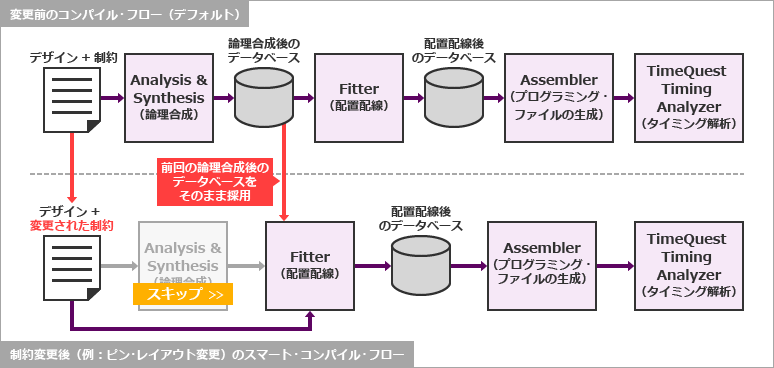
For smart compilation
For example, after the compilation has already completed (with the smart compilation option applied beforehand):
- Changed pin layout
- The device model number has changed (but the device family remains the same)
- You set an option that affects the internal layout (because the timing is not met, etc.)
When smart compilation is applied in such cases, the compiler behaves as shown below.
(* For Stratix® V, Arria® V, Cyclone® V, we recommend using Rapid Recompile.)
For rapid recompilation
[For projects targeting Stratix® V, Arria® V, Cyclone® V]
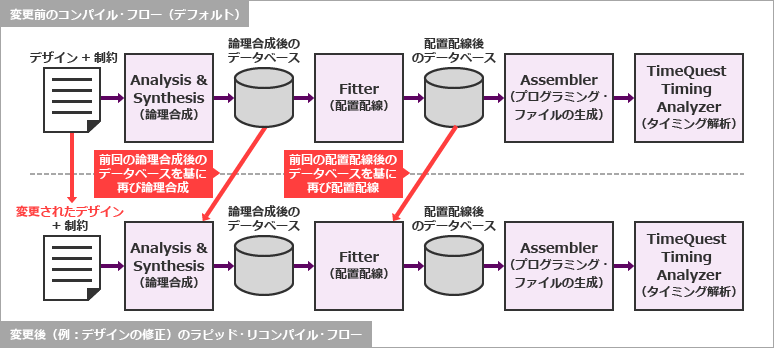
For example, after already compiling
- There was a minor design modification (e.g. adding a register)
- New function module added
- Changed pin layout
- The device model number has changed (but the device family remains the same)
- You set an option that affects the internal layout (because the timing is not met, etc.)
- Added a SignalTap® II logic analyzer or changed its debug conditions
Rapid recompilation can be applied in such cases.
The figure below shows the processing behavior of the compiler when applying rapid recompilation when the design is modified.
How do you do that? (smart compilation)
It's that easy! !
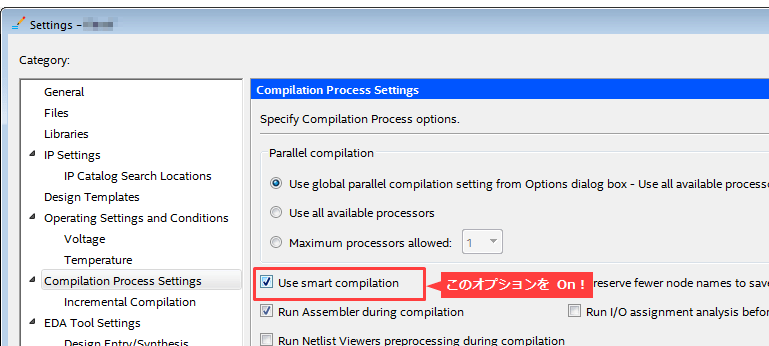
First, set the options before compiling for the first time.
Select the Assignments menu > Settings > Compilation Process Settings category and set the Use smart compilationoption = On!
Then start compilation with Processing menu > Start Compilation.
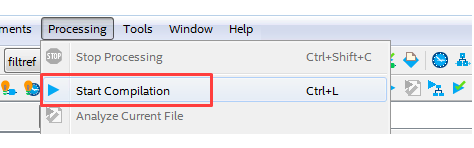
The compilation performed at this time is not yet a smart compilation.
Compilation is performed while preserving the database so that subsequent recompilations can be performed using smart compilation. (This will take some processing time.)
Then there was a layout change that required recompilation.
After changing the layout with Pin Planner, start compilation with Processing menu > Start Compilation.
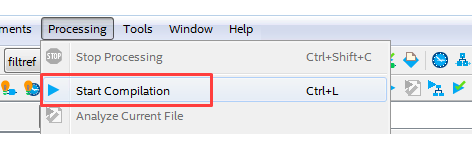
This compilation is truly a “smart compilation”!
Note that even with this option applied, Analysis & Synthesis is automatically run if Quartus® Prime determines that synthesis is needed again. The execution status and time can be checked in the Tasks window or Flow Elapsed Time in the compilation report.
That's how smart compilation works.
How do you do that? (rapid recompile)
It's also super easy! !
Click Processing menu > Start > Start Rapid Recompile!
This is all you need to recompile for Rapid Recompilation.
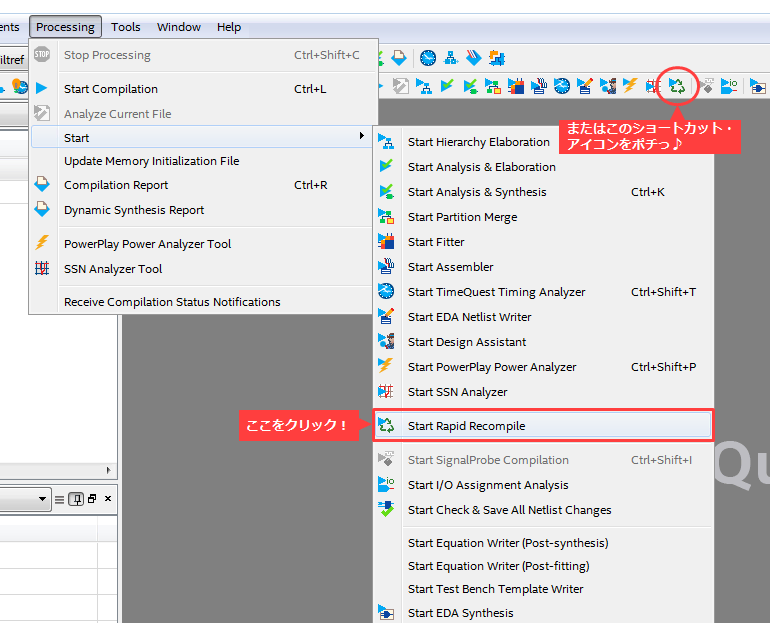
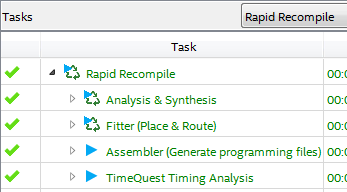
The execution status and time can be checked in the Tasks window (display automatically changes to Rapid Recompile mode) or Flow Elapsed Time in Compile Report.
Although it depends on the size of the design and the status of the changes, if the HDL before synthesis is changed (5% or less is recommended), the compilation speed can be increased by up to 3 times, and the SignalTap® II logic after placement and routing (fitting) can be improved. In the case of condition changes in signal analysis using an analyzer, you can expect speedups of up to four times.
That's all for how to run Rapid Recompile.
Hanako's little point!
The conclusion I would like to make here is, "When using Rapid Recompile, basically turnoff the Smart Compile feature."
Even though I've been running Rapid Recompile until now, if I run normal compilation (Processing menu > Start Compilation) after changing the layout, the following error may occur.
ID:14608 You have completed a Rapid Recompile incremental compilation. Please run the Rapid Recompile Fitter to re-iterate your Rapid Recompile incremental compilation, or run Analysis & Synthesis (quartus_map) to start a Full Compilation.
"Smart Compile" and "Rapid Recompile" have different processing algorithms for the previous compilation result (database), so this kind of error occurs.
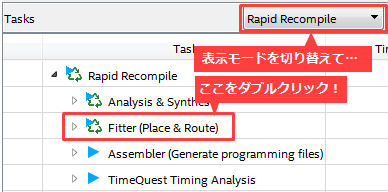
The workaround for the above error is to run Rapid Recompile Fitter independently (see the figure on the right) and then run Rapid Recompile again.
This error is only an example, other errors may occur due to database incompatibilities.
I wrote "basically" because if you understand the characteristics of Quartus® Prime and follow proper procedures, errors can be avoided and functions can be used together. …But if you ask me, it doesn't make much sense to use these two options together (even though I'm using Rapid Recompile).
At the end
Don't you think it's groundbreaking to be able to reduce compilation time with such a simple operation?
Please try it!
Click here for recommended articles/materials
How to recompile only part of the FPGA design
Quartus® Getting Started Guide - How to Read the Compilation Report File
Quartus® Guide - Using Design Space Explorer II
General development flow for FPGA / CPLD