- Semiconductor BusinessHOME
- Products and Services of Macnica,Inc.
-
technical information

-
Events and Seminars
- Handling Manufacturer
- Support
- Inquiry
- Click here to purchase products
- Semiconductor business e-mail magazine registration


 Narrow down by specifying conditions
現在2249件がヒットしています。check
This article is part of a series about the dot commands available in SPICE. In this eighth installment, we will explain the dot model command (.model) used when defining SPICE models within LTspice.
By completing the final survey, you can download supplementary materials for the dot model command found in LTspice Help. While the Help documentation is netlist-based, if you would like to obtain explanatory materials and sample circuits that perform schematic-based simulations, as in this article, please cooperate by completing the survey.
The `.model` command (dot)
The `.model` command is used to define the characteristics of electronic components such as diodes, transistors, and switches. Semiconductor devices such as transistors have numerous electrical parameters (amplification factor, threshold voltage, internal resistance, etc.). Since it would be cumbersome to set these for each individual component every time, LTspice defines common characteristics together as a Model.
.model syntax
This explains the netlist notation for models. The syntax for LTspice is as follows: < > represents,
These are required fields during setup. Items in brackets [ ] are optional.
① .model <modname> <type>[(<parameter list>)]
Replace `<modname>` with the model name. `<type>` specifies the model type. `<parameter list>` defines the model's electrical parameters.
② .model <modname1> ako: <modname2> [<type>] [(<parameter list>)]
<modname1> specifies the name of the new model to be defined. AKO stands for A Kind Of, and it is a function that creates an alias model based on an existing model. Using this command, you can call the model <modname2> defined in the library and use it as a model named <modname1>.
Furthermore, if you want to change the parameters of the called model, you can specify the parameters to change and their values using `<parameter list>`. This makes it easy to create a model that inherits the characteristics of the original model while changing only some of its parameters.
How to obtain and use a diode model
Here, we will examine how to use the `.model` command, specifically how to obtain a diode model written in `.model` and use it in LTspice.
There's a short video explaining how to obtain a SPICE model, load the file, and use the diode model, but here we'll explain how to use the contents of the .model file you obtained by writing them directly onto the circuit in LTspice.
Calling the JIG circuit
Open the JIG circuit for the LT3980 used here. For instructions on how to open the JIG circuit, please refer to "Easy! How to draw a circuit diagram in 5 steps."
This time, we will try simulating the JIG circuit by changing the ON Semiconductor MBRS360 diode to an SS39 diode.
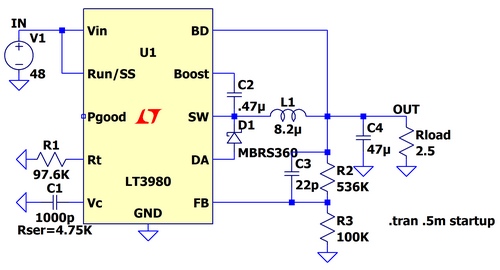
Figure 1: JIG circuit of LT3980
Obtaining a model of diode SS32
Download the PSPICE model from ON Semiconductor's SS39 diode page. Open the downloaded file with LTspice. In the red box in Figure 2, you will find the PSPICE model described as .model.
Copy the section within the red box, and then return to the LT3980 JIG circuit that you opened earlier.
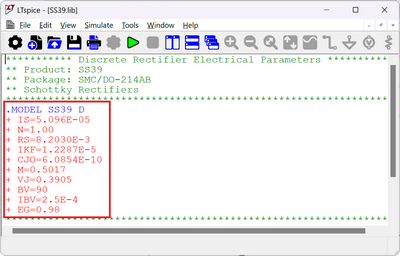
How to use a simulation model (.model) and run a simulation.
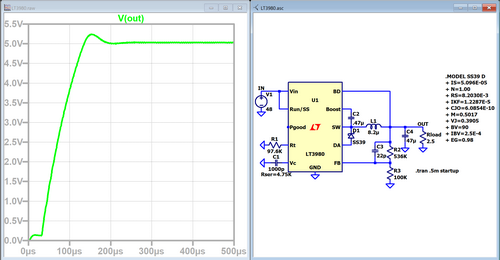
On the JIG circuit, click Spice Directive from the toolbar. Edit Text on the Schematics will open, so paste the copied content (.MODEL~ + EG=0.98) there and click OK. Next, change the name of the diode on the circuit diagram from MBRS360 to SS39.
The simulation results are as follows, and as expected, an output of 5V was obtained.
As shown above, SPICE models provided in .model format can also be used by pasting them into a schematic in LTspice.
You can improve your workflow by adding frequently used SPICE models to your library. If you'd like to learn how to add models to your library, please consider taking the "Let's Learn the Basics! Analog Circuit Technology Seminar: Learn How to Import Component Models into LTspice!" course.
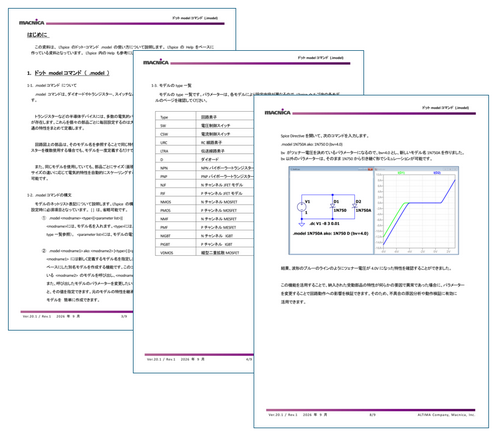
The Help documentation provided by Macnica explains the .model configuration using circuit diagrams. If you would like to obtain the documentation and sample circuits, please complete the survey.
,Model configuration examples
1. How to use diodes that are not included in the LTspice diode model library (using the .model command)
2. Modify and use the properties of a model within the LTspice library (using the .model ~ ako command).
Download supplementary materials for the .model command.
You can download explanatory materials and sample circuits for the `.model` command (.model) from the LTspice Help. After completing the survey, we will send you an email with a URL to download the supplementary materials.
If you have any requests, such as what kind of seminars you would like us to hold in the future or what kind of technical materials you would like us to provide, please write your opinions in the free-form section of the survey. We would like to use your opinions to hold seminars and provide technical materials that will be useful to you.
At the end
If you have not used LTspice yet, please download it from the link below!
Please try once.
Click here to download LTspice
If you are just starting LTspice, we recommend that you look at the "Basic Edition" from the list below.
Click here for the list of Let's try using LTspice series
Also, if you would like to see a video on how to write a basic circuit and how to execute it, there is an on-demand seminar that does not require you to enter personal information. Detailed information about the seminar is also provided to those who fill in the questionnaire.
LTspice On-Demand Seminar - Function check with RC circuit -
We also regularly hold LTspice seminars for beginners. We hope you will join us as you will be able to learn the basic operations of LTspice.
Click here for information on LTspice seminar
Click here for recommended articles/materials
List of articles: Let's use LTspice Series
LTspice FAQ: FAQ list
List of technical articles: technical articles
Manufacturer introduction page: Analog Devices, Inc.
Click here for recommended seminars/workshops
Inquiry
If you have any questions regarding this article, please contact us below.
Analog Devices Manufacturer Information Top
Analog Devices Manufacturer Information If you would like to return to the top page, please click below.