- Semiconductor BusinessHOME
- Products and Services of Macnica,Inc.
-
technical information

-
Events and Seminars
- Handling Manufacturer
- Support
- Inquiry
- Click here to purchase products
- Semiconductor business e-mail magazine registration


 Narrow down by specifying conditions
現在2191件がヒットしています。check

Hello, 3 I studied chemistry in college until the moon and forgot about Ohm's law mountain fudo is.
I joined Macnica as a technician and learned the basics of electrical and electronics while building a line tracing car through practical training. Production training We did this.
This will be a four-part series that will share what I learned and experienced through this production workshop, so I hope you will read it with a kind eye.
This is the fourth blog entry. It is a continuation of the "Building a Line Trace Car from a Power Supply (Line Trace Car Circuit Implementation)" series.
Completion of the board
Looking back
In the previous article, we implemented a DC/DC converter called LT1765 on a universal board and were able to successfully reduce the voltage from 9V to 6V.
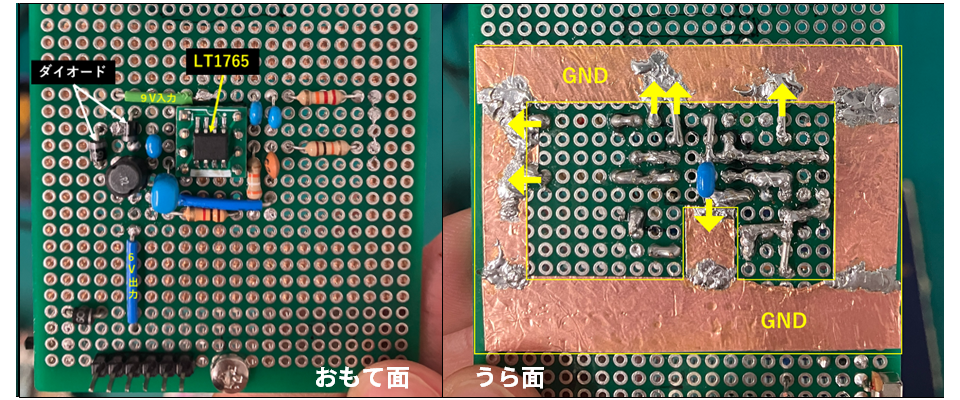
Figure 1: DC/DC converter board layout
We also considered the need to add various wiring to the board in Figure 1 in order to realize the functions in Figure 2.
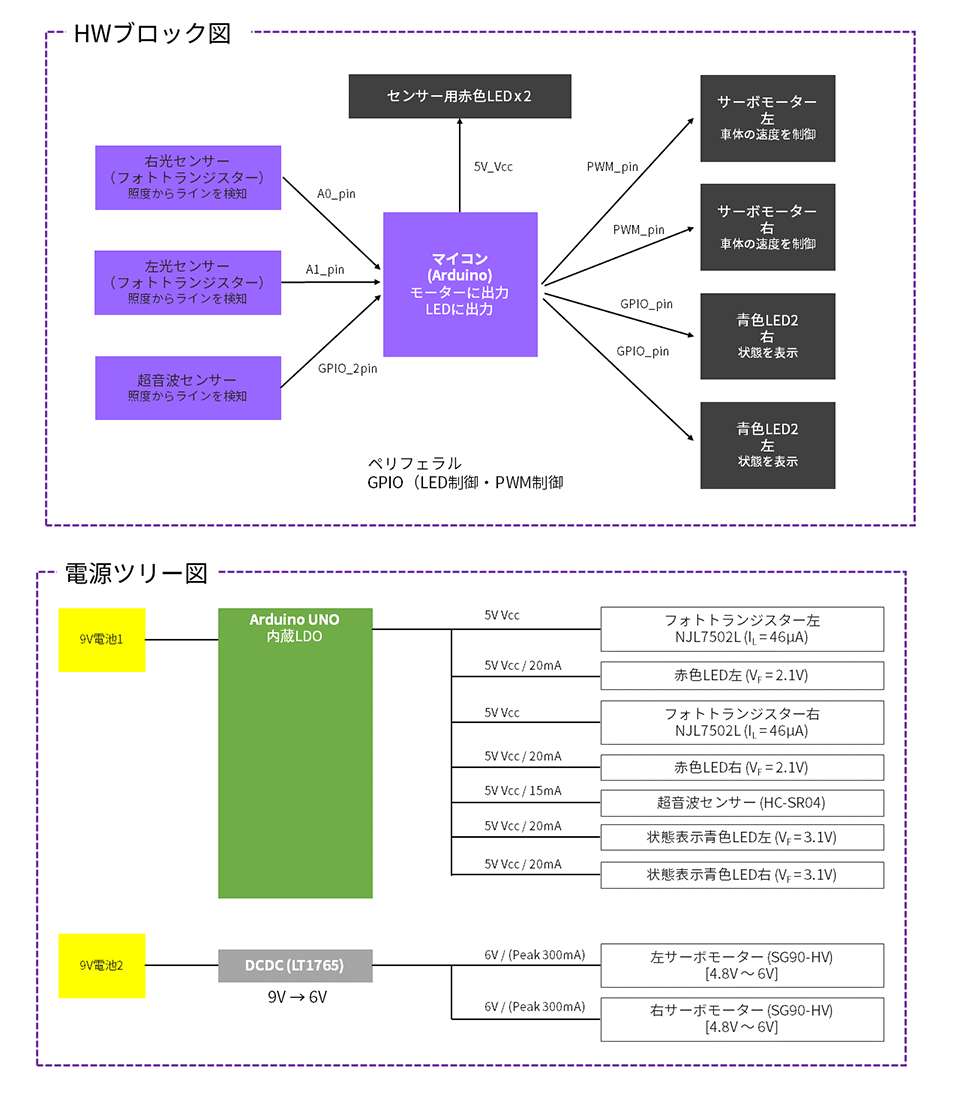
Figure 2: Hardware (HW) block diagram, power tree diagram
About line tracing operation
First of all, how do you trace a line? I used the following site as a reference and created an exact copy.
・ Even beginners can do it! Making a line tracing car with Arduino [Part 2] Assembling a light sensor and attaching it to the car body
If you build it according to the instructions on this website, you will have completed the most important part of the line tracing car, the part that reads the lines! As you can see, a phototransistor is used to output the value of the light reflected from the LED as a voltage, but the amount of light reflected by the LED will differ depending on whether it is on a black line or on an empty space. This output voltage is input to Arduino to determine whether it is on a black line or on an empty space.
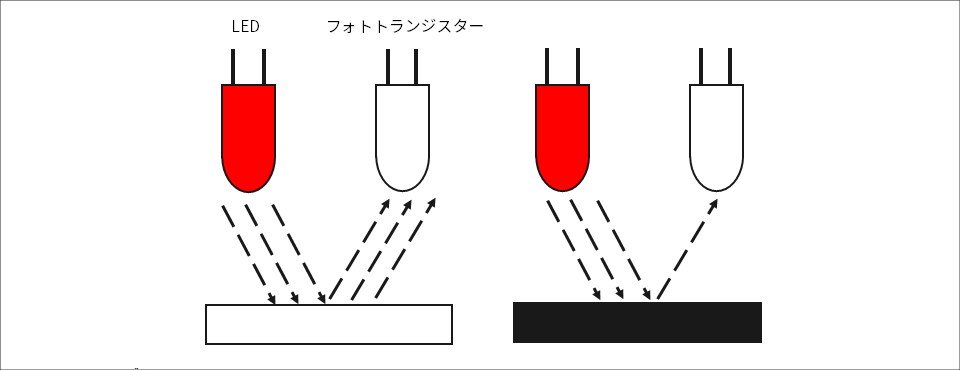
Figure 3: Image of a line race using a phototransistor
By attaching two combinations of LEDs and phototransistors to the main body, like a stag beetle, it repeatedly changes the motor rotation speed when it detects a black line!
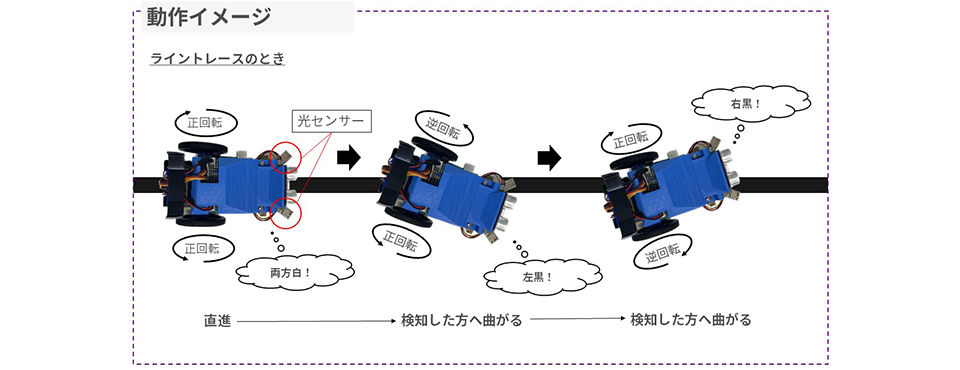
Figure 4: Operational image
Board Mounting
It took a long time to create the board that makes up the HW block diagram in Figure 2. This is it!

Figure 5: Finished board
The soldering is messy and awkward. There are explanations of the various parts written in white text, but on the front side you can see the following parts:
-An ultrasonic sensor is attached to the top to detect obstacles.
・Blue light on the left and right of the ultrasonic sensor LED displays the status
In the middle DC/DC Converter LT1765 Place
・ DC/DC Power supply for input to the converter Arduino UNO Adapter for connecting to two batteries for direct input
- A power supply system consisting of two batteries ON/OFF Switch to
On the other hand, on the back side you can see the following parts:
- A protruding enamel wire connected to a phototransistor for reading the black line
・GND made of copper foil
- Pin header that can be plugged directly into the female pin of the Arduino UNO
・The solder got dirty because of connecting too many things.
The lineup is as shown above!
I consolidated the wiring so much that it was hard even for me to understand, and used jumper pins, which made it very difficult to check the continuity. However, I feel that I did a pretty good job at the time! However, after this I did various operational checks, and of course not everything worked, so I had to debug many times. With that in mind, if I could give any advice to anyone who will be making circuit boards by hand soldering in the future, it would be
Consolidation is a good thing, but it’s better to spend time designing the layout.
⇒ This will make continuity checks and debugging much more difficult later on...
・It is best not to touch the circuit board with bare hands.
⇒It can cause poor contact and also get dirty...
I am embarrassed to say that I gave advice based on the circuit board I made this time.
Making the case
Connecting to Arduino UNO
Of course, a universal board with only analog components attached won't work, so we need to connect the Arduino UNO, which is the head of the board. As you can see on the back of Figure 5, we have prepared pin headers that can be connected directly to the Arduino UNO. The Arduino UNO is built as shown in Figure 6, and of the many pins, only the parts that will be used are indicated in a red frame.
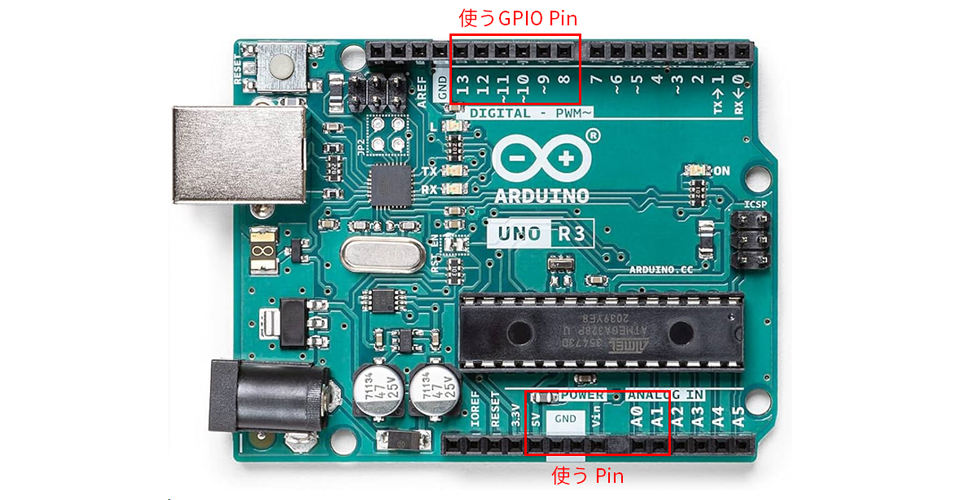
Figure 6: Arduino UNO pins used
I attached a pin header to the area enclosed in the red frame so that it can be directly connected to the universal board, and when you combine this with the board it looks like this! (Figure 7)
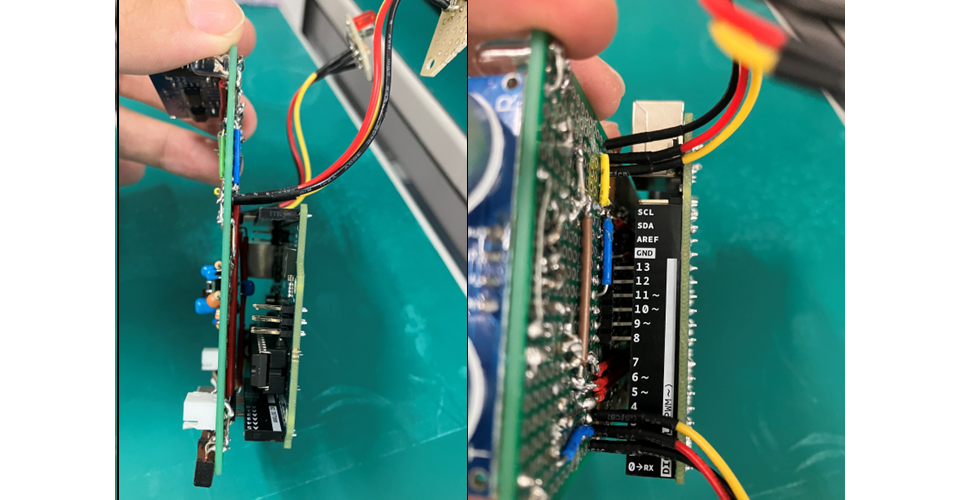
Figure 7: Connection between the universal board and Arduino UNO
It's connected nicely.
This was a point I paid a lot of attention to, and although the solder on the board is a bit messy, it's not just about consolidating the boards, it's also about making the whole case smaller and not cluttered with wires. The universal board and the Arduino UNO specifications don't match, but I was able to connect them. I wanted to make the board as small as possible while still having a variety of functions, so I think it turned out pretty well for my first board design.
Assembling the parts
The circuit board is done, but I still need to assemble the main body of the line tracer car. I've been making plastic models since I was little, but I've never made a main body without a blueprint, so even though I had an image of it, I was at a loss as to how to make it.
So, first of all, I decided to just copy the tank-like thing that appeared in the URL I used as a reference for the line tracing function.
・ Even beginners can do it! Making a line tracing car with Arduino [Part 3] Installing sensors, drivers, and a microcontroller into the car body to complete the line tracer
I bought all the parts shown in this URL...
This is the result (Figure 8).
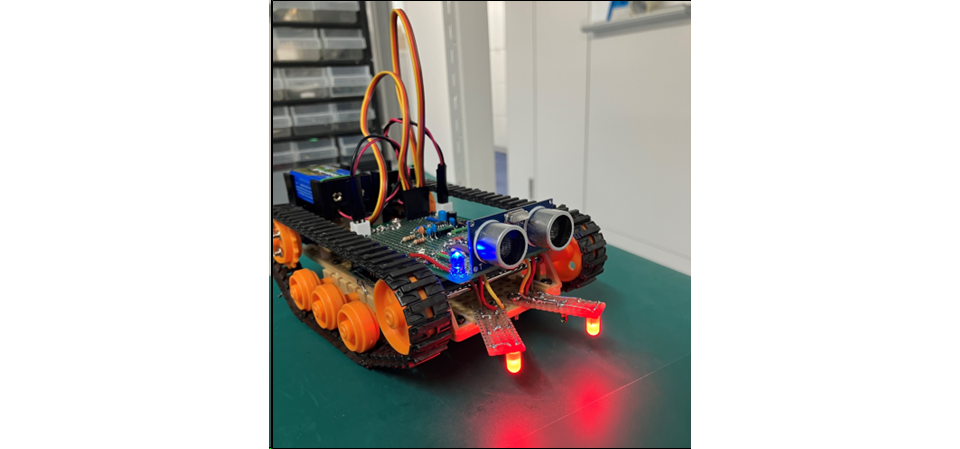
Figure 8: Completion of the first unit
I made this faithfully based on the website of my predecessor. I also made the line tracing program exactly as described on the website, so when I actually ran it over the black line, it traced the line properly. But it's true that I just copied it...
To completion
Creation of Unit 2
I was able to actually complete the chassis and run it, so the line tracing car was basically complete.
But!!! It's too late!!! Too late!!!
As it is a caterpillar, it seems that it takes a lot of force to rotate it. Also, it is not very maneuverable!!!
It's not maneuverable. To be honest, I was happy with the tank-like condition, but I wanted to upgrade it. I had to. I also wanted to pay attention to the appearance, so there was no way I could leave it at this state... I started modifying it with that impulse.
· The caterpillar is too big ⇒ Make it smaller
So after cutting the base and fastening it with screws, it looked like this (Figure 9).
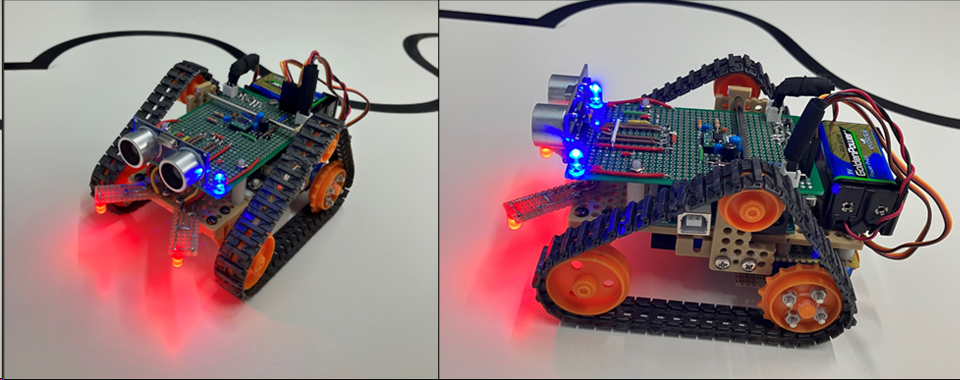
Figure 9: Completion of Unit 2
What a surprise! Isn't it so cute!?
It looks like a certain robot with two round eyes. The depth is about 2/3 the size of Figure 8. This makes the drive wheels smaller, so it is more maneuverable and faster. The movement itself has not been changed, so it just moves more nimbly with the same movements. I was very happy that the movement was improved by the casing and it became more compact.
But it can't end here either!
Since we are concerned about appearance, we would like to hide the circuit board!
So I decided to use the 3D printer at work to create a container to hide it.
Creating the look
This time I tried modeling using a free 3D CAD creation app called Fusion 360. I usually watch videos on YouTube about things printed with 3D printers, so I thought it was a great opportunity to actually learn modeling by using the software and create a 3D model. I carefully measured the size and made screw holes so that it could be attached to the line tracing car.
This is the screen (Figure 10).

Figure 10: Modeling with Fusion 360
It took me almost a whole day to create this model, but it may be hard to imagine what it looks like just by looking at it.
If you actually 3D print it and put it on...
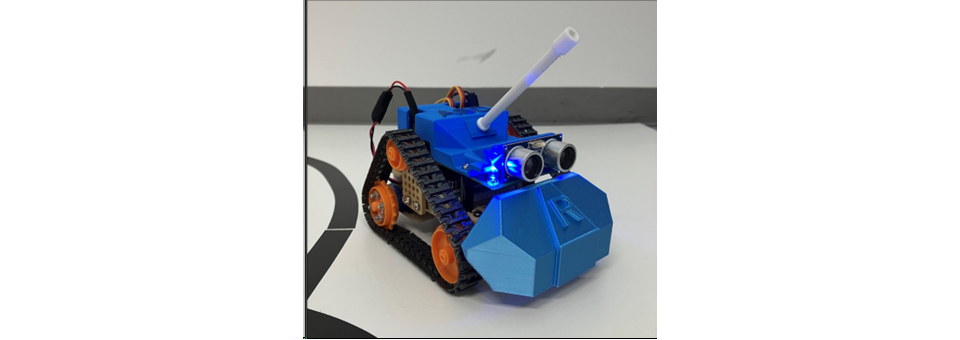
Figure 11: 3D printed line tracing car
What do you think? Doesn't it look great?
Some may have their own opinions on whether the design is cool or ugly, but I think that by hiding the circuit board it gives it a nice toy-like feel, and gives it a more finished look.
It's important to pay attention to the appearance as well!
I think I've been able to create something that I'm quite satisfied with.
That's it.
Summary
What did you think? This blog is a four-part series, and this will be the last one. I skipped over a lot of the content because there are so many details that I couldn't convey in four parts. I apologize for leaving out too many parts because it was difficult to read.
In particular, when it comes to making the case, carefully designing and assembling the case will make you feel a much stronger attachment to the product! (My theory)
I want to give this Unit 2 lots of love!!
This may end up sounding like I'm bragging, but we were able to successfully complete the production workshop in the line tracing car.
Without even a basic knowledge of electrical engineering, I came up with specifications, created circuit diagrams, selected parts, and implemented and assembled them. My life experiences helped me with the case, but I feel that I gained a lot of knowledge that I will be able to use in the future as this was my first practical training curriculum after joining our company.
I would like to continue to grow so that I can become an FAE who can provide proposals and answers that will earn the trust of customers.
Thank you for your continued support.
Thank you for reading to the end!
bonus
In fact, I made some further modifications after this.
If agility was required, I decided to change the caterpillar to tire drive. I rebuilt the model, changing the rear wheels to tires and the front wheels to casters.
This is it (Figure 12).
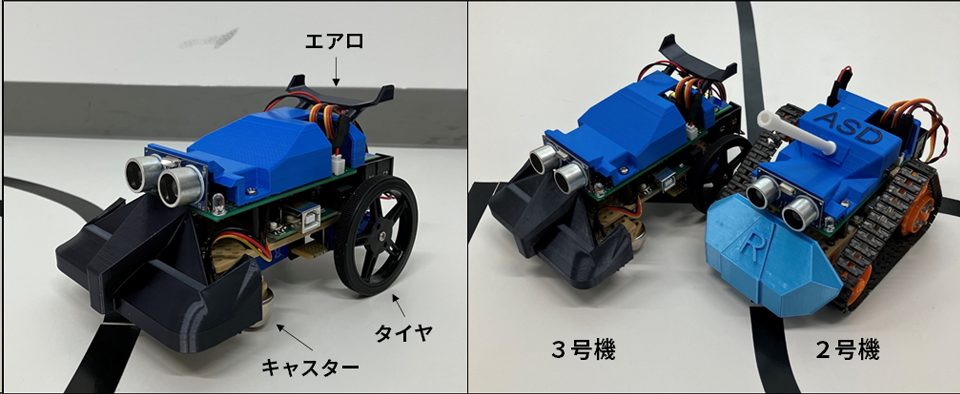
Figure 12: The third unit that was actually being built
What do you think? It has a solid cover and even an aerodynamic part.
In fact, it became so fast that the line tracing action could not keep up. Everyone should try to make a line tracing car with tires (^^)
List of articles on line tracing cars made from power supplies
・ DC/DC converter specification study
・ DC/DC converter implementation preparation edition
・ Line trace car circuit implementation
・Assembling the Line Trace Car