- Semiconductor BusinessHOME
- Products and Services of Macnica,Inc.
-
technical information

-
Events and Seminars
- Handling Manufacturer
- Support
- Inquiry
- Click here to purchase products
- Semiconductor business e-mail magazine registration


 Narrow down by specifying conditions
現在2149件がヒットしています。check

Hello, 3 I studied chemistry in college until the moon and forgot about Ohm's law mountain fudo is.
I joined Macnica as a technician and learned the basics of electrical and electronics while building a line tracing car through practical training. Production training We did this.
This will be a four-part series that will share what I learned and experienced through this production workshop, so I hope you will read it with a kind eye.
This is the third blog entry. It is a continuation of the "Making a Line Trace Car from a Power Supply (Preparation for DC/DC Converter Implementation)" series.
Creating the power supply board
Mounting! (Soldering)
Last time, I created a circuit like the one in Figure 1, and created a board layout like the one in Figure 2. I wasn't sure if this would work, but since the circuit itself is almost a complete copy of the evaluation board, it should work... so I began implementing it with a mysterious confidence.
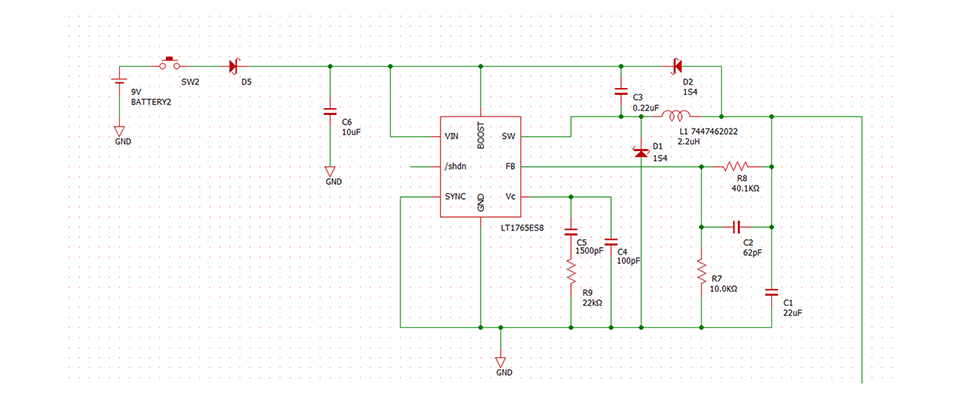
Figure 1: Circuit diagram
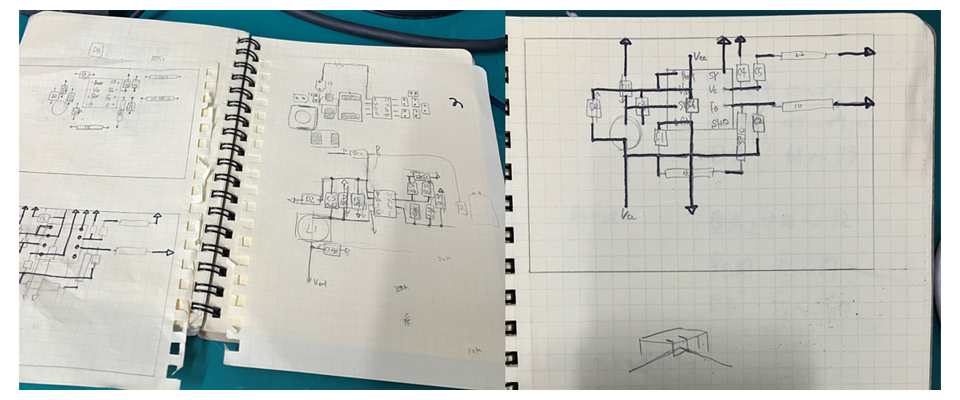
Figure 2: Board layout
First, place the parts, being careful not to make any mistakes in the squares. This is it (Figure 3). Just placing the parts, I think you've managed to place them as close to the space as possible.
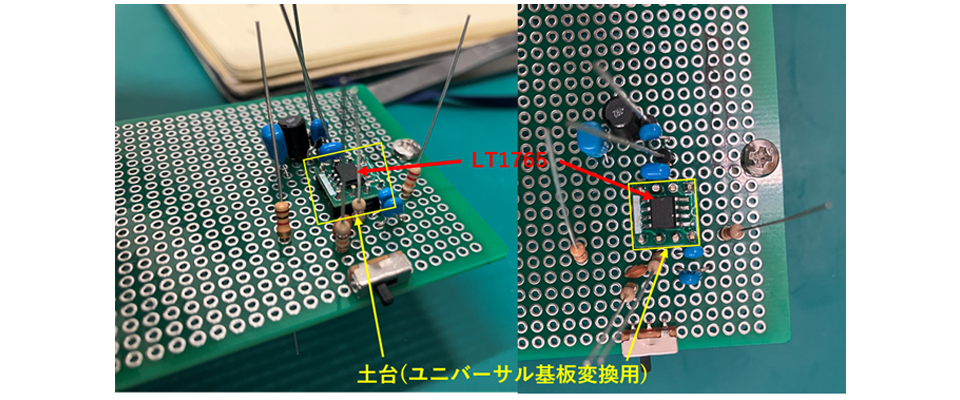
Figure 3: Placement on a universal board
The resistors (like the Kokeshi dolls in Figure 3) were carefully bent one by one with radio pliers to take up four squares of the universal board. The capacitors (like the Pucca snacks in Figure 3 painted blue) were also bent with radio pliers to take up three squares of the universal board. The inductor (like the black portable speaker in the back of Figure 3) is diagonally two squares long. Incidentally, the LT1765 indicated by the red arrow in Figure 3 is so small that it was soldered to the base in the yellow frame in Figure 3 and placed on the universal board. (The pin spacing of the LT1765 IC is 1.27mm, so the soldering is extremely fine...)
Once you've confirmed that this arrangement is correct, you can start soldering. Of course, if you turn it over like this, they'll all fall off, so you need to solder each one carefully.
And this is what we ended up with (Figure 4).
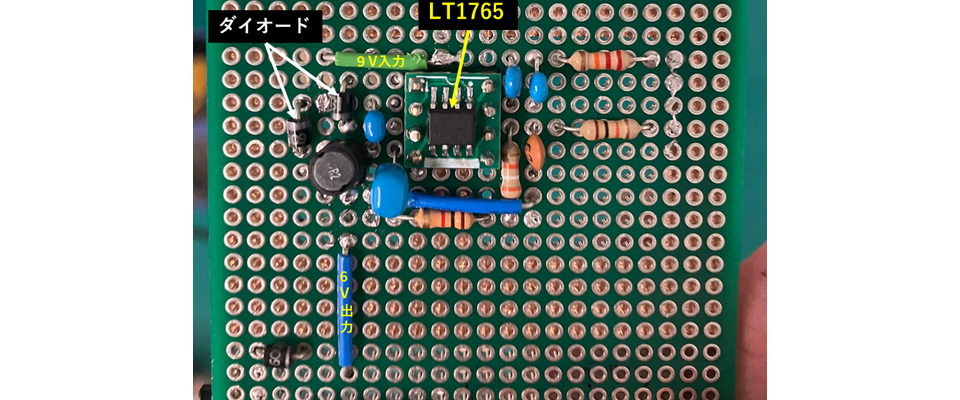
Figure 4: Front side of the circuit board
The soldering on the front side is surprisingly neat.
Since soldering is mainly done on the back side, I recommend placing the components on the front side, then fixing them one by one with tape and soldering the back side! The Schottky barrier diode (shown in the upper left of Figure 4) has a specific orientation, so if you get it wrong you will have to redo the soldering, so be careful. (I had to redo it several times...)
And here is the back side with the soldering done (Figure 5).
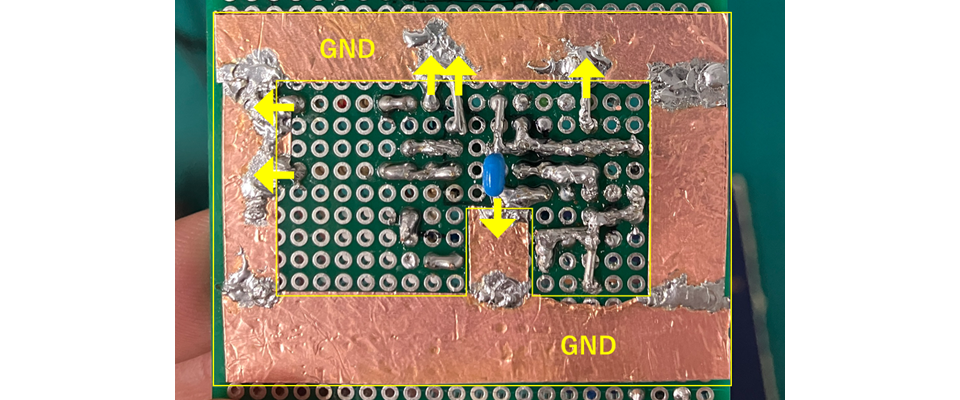
Figure 5: Back side of the circuit board
Well, it may be a picture that is quite confusing.
The solder is dirty, but when wiring, wires and other tools are used to connect resistors and capacitors as circuits, which was actually very difficult. The yellow frame is the ground (hereafter referred to as GND), and the yellow arrows indicate that the components are connected to GND. The GND is laid out using copper foil so that it circulates widely. GND is the reference (0V) for the circuit, and if it is placed thin and small, it will be affected by external factors and the GND value will fluctuate, which may cause all voltage values to fluctuate. For this reason, we placed it widely and tightly as shown in Figure 5, and laid out to be less susceptible to external factors (mainly noise).
This completes the soldering around the DC/DC converter of my line tracing car for now.
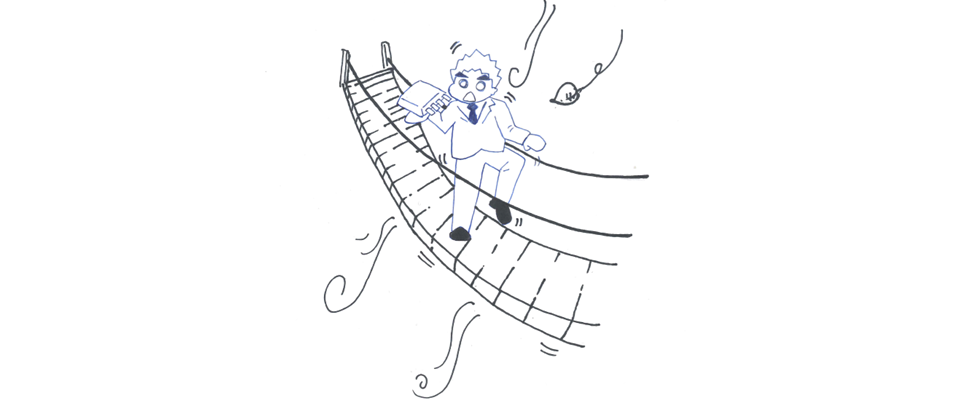
Figure 6: Image of the effect of an unstable GND (homemade)
Evaluation of homemade power supply board
So, does this actually work? I did an experiment.
Wow! I confirmed that 6V is being output!
In reality, there are items that need to be evaluated, such as noise and transient response, but I had no idea about these at the time, and I was extremely happy to see that there was no damage to the IC or circuit itself and that it was working properly!
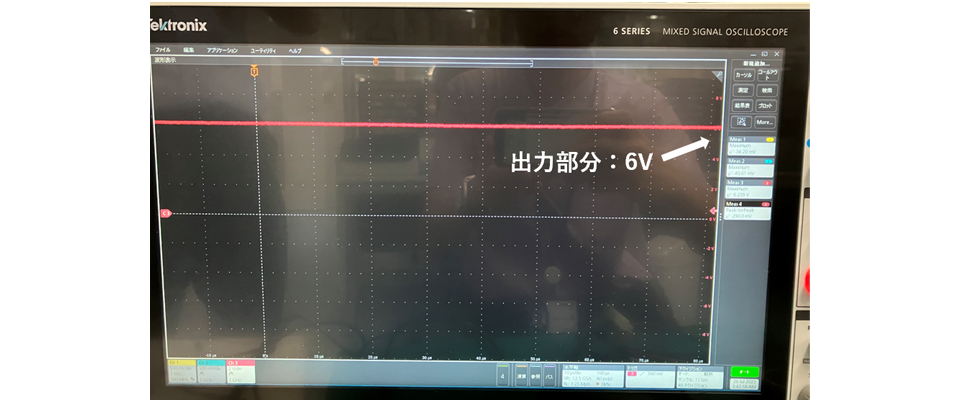
Figure 7: Experimental results
Creating peripheral circuits other than the power supply
Line Trace Car Specifications
My workshop is to make a line tracing car, so I need to implement many circuits, such as the circuit that lights up the LED, the circuit that connects to the microcomputer (the brain), the part that connects the motor, etc. I haven't talked about it in the past, but I'll explain the specifications of this line tracing car.
| Production | Line Trace Car | |
| Operational Overview | It follows the black line and takes action to avoid obstacles it detects. | |
| Used parts | DC/DC Converter | 9V → 6V step-down |
| 2 x 9V batteries | One for driving the motor and one for driving the microcomputer board. | |
| Arduino UNO | Microcontroller board, operating voltage 7V, with internal LDO | |
| LED ×2 | Decorative | |
| SG90-HV ×2 | Servo motor: Input to Arduino | |
| HC-SR04 | Ultrasonic sensor: Input to Arduino | |
| Phototransistor x 2 | For line detection: Input to Arduino | |
Some points in the above may be difficult to understand, so we have illustrated the power flow in Figure 8 and the signal system connections in Figure 9.
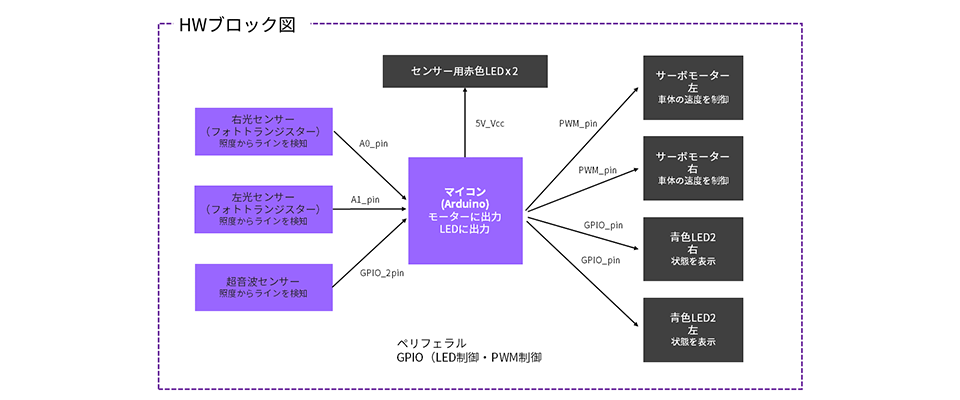
Figure 8: Hardware (HW) block diagram
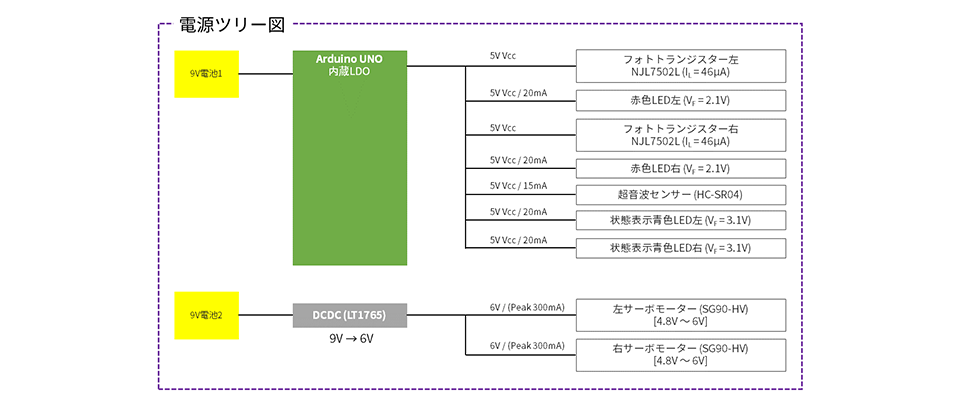
Figure 9: Power tree diagram
Line tracing car movement
I will briefly explain how this line tracing car moves.
The left and right phototransistors read the black line and input that information to Arduino. Based on that information, the speed of the left and right servo motors is adjusted by Arduino so that the robot moves along the black line. Obstacles are detected by ultrasonic sensors and the information is input to Arduino.
Of the two batteries, one is directly input to the Arduino and is used to drive the Arduino. The other is used to drive the servo motor. Although the power for the components can be supplied from various pins on the Arduino, it is not enough to drive the servo motor, so it is supplied from the battery.
Particulars in PCB Creation
My goal is to make the components shown in the image as small as possible by fitting them onto a single board. Since Arduino is a microcontroller board, it is already completed as a board. Therefore, I plan to mount all other peripheral components, connectors, etc. along with the power circuit. I hope to show you the board I created next time.
next time
Three out of four sessions have been completed. The power supply board is complete, and all that remains is to install the peripherals, write the program, and conduct an experiment to see if it actually works. All that remains for the line tracing car is to give it shape. At this stage, it was great to have been able to learn about power supplies by creating the power supply board from the production training. I have always loved crafting, so I am looking forward to enjoying the rest of the session.
This concludes the memorable third episode of Rookie Engineer Yama no Fudo.
List of articles on line tracing cars made from power supplies
・ DC/DC converter specification study
・ DC/DC converter implementation preparation edition
・Line trace car circuit implementation