- Semiconductor BusinessHOME
- Products and Services of Macnica,Inc.
-
technical information

-
Events and Seminars
- Handling Manufacturer
- Support
- Inquiry
- Click here to purchase products
- Semiconductor business e-mail magazine registration


 Narrow down by specifying conditions
現在2240件がヒットしています。check

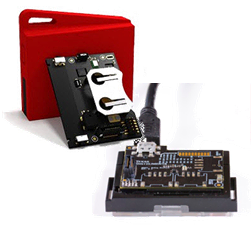
Texas Instruments (TI) sensor evaluation kit for IoT SensorTag is equipped with 10 types of sensors and supports multiple wireless communication standards such as Bluetooth Smart and Zigbee. It can also be operated as a beacon, so it is very popular with customers who are interested in the IoT field that combines location information and sensors.
This time, we used “Eddystone”, which is attracting attention as a standard for beacons using Bluetooth Smart, and changed the SensorTag to “Eddystone Beacon”.
We are working based on the procedure published by TI, so please refer to the link below for details.
http://processors.wiki.ti.com/index.php/CC2640_Eddystone_Beacon_Implementation
What is Eddystone?
It is a standard for beacons using Bluetooth Smart that can be used on multiple platforms that support Bluetooth Smart, such as Android and iOS. Program codes related to Eddystone are published on GitHub and can be redistributed under the Apache 2.0 license, so anyone can use it easily.
Eddystone specifies the following three types of data transmission methods:
・Eddystone-UID: Send ID
・Eddystone-URL: Send a URL
・Eddystone-TLM: Transmits information on temperature, time since startup, and remaining battery level
used this time
Sensor Tags
・CC2650STK Evaluation kit for transmitting various types of sensors via Bluetooth Smart
・CC-DEVPACK-DEBUG Debugger board that adds debugging functionality
software
・Bluetooth Smart stack provided on the TI website
BLE-STACK-2-1-1
・ Sample code for Eddystone Beacon (There is a link at the bottom of the Introduction of the procedure manual published by TI.)
・Integrated development environment Code Composer Studio 6.1.1 *Explained in CCS below
Build procedure
Two folders from the sample code published on GitHub,
・Simple Eddystone Beacon
・Profiles
Copy it under the following folder created by installing BLE-STACK-2-1-1.
C:\ti\simplelink\blecc26xx20100_44423\Projects\ble
Start CCS
C:\ti\simplelink\blecc26xx20100_44423\Projects\ble\SimpleEddystoneBeacon
Import and build the following two projects in .
・Simple Eddystone Beacon
・SimpleEddystoneBeaconStack
Although the procedure is not specified,
Open targetConfigs/CC2640F128.ccxml for both SimpleEddystoneBeacon and SimpleEddystoneBeaconStack and select the following Connection.
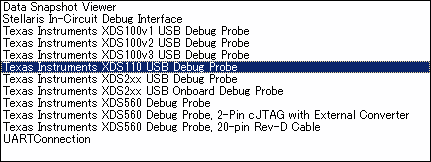
If the build is successful, it should work as Eddystone Beacon if you use CCS debug.
Now let's check the operation.
Execute (debug) SimpleEddystoneBeaconStack first and then execute (debug) SimpleEddystoneBeacon.
Operation confirmation at last!
The Android app Eddystone Validator can only work on Lollipop 5.1, and I didn't have a compatible device at hand, so I used Evothings Studio 2.0 beta 2 Examples "Eddystone Scan" to check the operation.
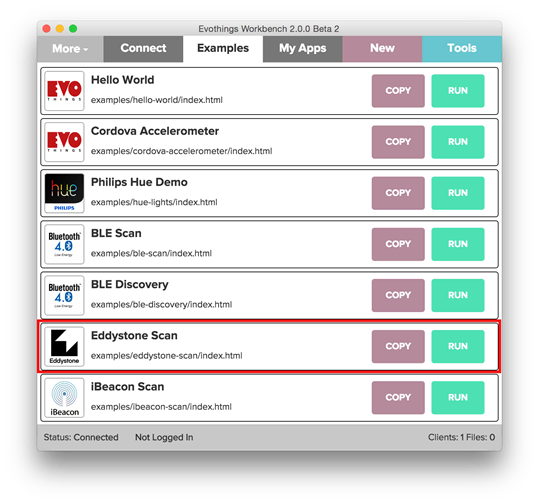
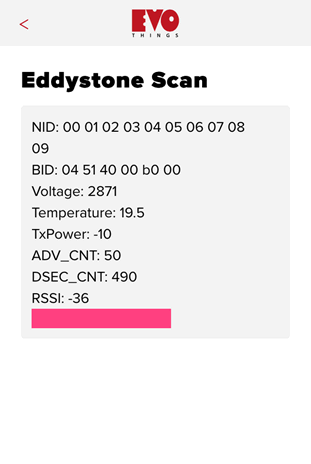
Two types of data, Eddystone-UID and Eddystone-TLM, could be viewed on one screen.
- Eddystone-UID (appeared immediately after connecting)
・NID: `NID: 10-byte Namespace`
・BID: `BID: 6-byte Instance`
- Eddystone-TLM (took a while to appear)
・Voltage : `VBATT : Battery voltage, 1mV/bit`
・Temperature: `TEMP: Beacon temperature` (19.5 fixed)
・ADV_CNT: `ADV_CNT: Advertising PDU count`
・DSEC_CNT : `SEC_CNT : Time since power-on or reboot`
Summary
It looks difficult if you just look at the procedure, but you can easily make an Eddystone Beacon just by copying files!
This time, we checked the operation on iOS, but you can also check the operation on Android, so anyone with a smartphone can easily see the movement of Eddystone.
Please try it!
Contact Us


Click here for recommended articles/materials
Recommended device for IoT development/evaluation! SensorTag Evaluation Kit
Three features of SensorTag (CC2650STK)
Let's update SensorTag to the latest F/W -CCS edition-
Related Information
Click here for detailed product information
Click here to purchase the product