- Semiconductor BusinessHOME
- Products and Services of Macnica,Inc.
-
technical information

-
Events and Seminars
- Handling Manufacturer
- Support
- Inquiry
- Click here to purchase products
- Semiconductor business e-mail magazine registration


 Narrow down by specifying conditions
現在2236件がヒットしています。check

Introduction
This time, MQTT using Quectel's communication moduleAn example of a communication evaluation procedure. We will introduce you to the following.
Procedures for powering on the device and connecting to the network via a carrier line are explained in a separate article below.
(▶For more details, please refer to the "Quectel Communication Module Connection Guide.")
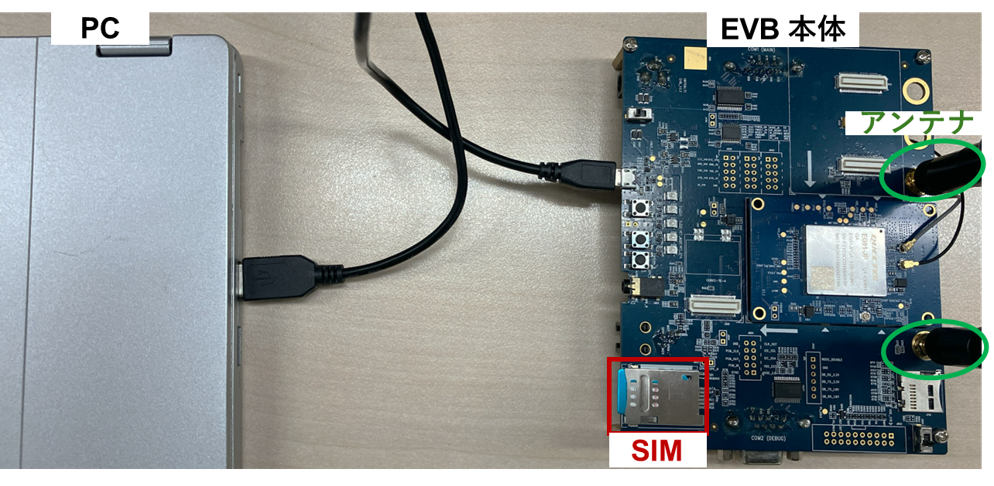
Introduction of equipment used
Quectel UMTS & LTE EVB Kit (board, EG95-JP TE-A board, compatible antennas)
- USB cable (USB-A to micro B)
- Notebook PC (for connecting the evaluation kit and controlling with AT commands)
+ Compatible USB driver (Please contact us for availability.)
+ AT command tools (TeraTerm, Quectel's QCOM tool, etc.)
・NTT docomo 5G nano SIM card
Checking Network Connectivity
AT+CEREG?
+CEREG: 0,1
AT+CGATT?
+CGATT: 1
+CEREG: 0,1: Indicates that the device is registered with the network.
+CGATT: 1: The device is already attached to the network.
MQTT communication procedure (responses up to "OK" for each command are omitted.)
Assigning IP addresses to communication modules
AT+QIACT? AT+QIACT=1 AT+QIACT? +QIACT: 1,1,1,"xx.xxx.xxx.xxx"// IPアドレス割当確認Linking MQTT and SSL
AT+QMTCFG="ssl",0,1,2 // MQTT クライアントとSSL,SSLコンテキストIDとの関連付けThis procedure associates SSL context D with the MQTT client.
TLS settings and CA (Certificate Authority) certificate upload and activation
The following describes the procedure for fixing TLS to TLS 1.2, uploading the CA certificate to UFS (Universal Flash Storage), and activating it.
// TLSバージョン設定 AT+QSSLCFG="sslversion",1,3 // 3=TLS1.2 // セキュリティレベル設定 AT+QSSLCFG="seclevel",1,1 // 0=認証なし(証明書不要, 非推奨)、1=CA証明書のみ必須、2=CA証明書+クライアント証明書+秘密鍵が必須 // UFS内のファイル一覧と空き容量の確認 AT+QFLST // UFSのファイル一覧を表示 AT+QFLDS="UFS:" // UFSの空き容量を照会 // 不要ファイルを削除 AT+QFDEL="UFS:<File name>" // 指定ファイルを削除 // CA証明書をUFSにアップロード AT+QFUPL="UFS:cacert.pem",<BYTES>,10000 // UFSにCA証明書(<BYTES> バイト)を書き込み AT+QSSLCFG="cacert",1,"UFS:cacert.pem" // CA証明書を有効化From uploading the client certificate and private key to activation
AT+QFUPL="UFS:clientcert.pem",<BYTES>,10000 // クライアント証明書(<BYTES> バイト)を書き込み AT+QSSLCFG="clientcert",1,"UFS:clientcert.pem" // クライアント証明書を有効化 AT+QFUPL="UFS:clientkey.pem",<BYTES>,10000 // 秘密鍵(<BYTES> バイト)を書き込み AT+QSSLCFG="clientkey",1,"UFS:clientkey.pem" // 秘密鍵を有効化 // 環境に応じて暗号スイートを設定 AT+QSSLCFG="ciphersuite",1,0xFFFF // 例:1,0xFFFF=利用可能な暗号スイートをすべて選択Check if the module time is different from the current time
// パターン1: 証明書の有効期限チェックをモジュール内の時刻で実施する場合 // モジュール内の現在時刻を確認 AT+CCLK? // 時刻がずれている場合は、適切な現在時刻を設定 AT+CCLK="yyyy/mm/dd,hh:mm:ss+xx" // パターン2: 証明書の有効期限チェックをモジュール内の時刻で実施しない場合 AT+QSSLCFG="ignorelocaltime",2,1Because the certificate expiration date is checked, if the time in the module is significantly out of sync, a certificate error may occur.
It is possible to disable certificate expiration date checks, but this will lower the security level.
From the start of MQTT communication to the end of communication after the Publish/Subscribe operation.
// MQTT Keep Alive タイマー設定 AT+QMTCFG="keepalive",0,0 // MQTTサーバーOpenからクライアントID接続 AT+QMTOPEN=0,<MQTTサーバーホスト名>,1883 AT+QMTCONN=0,"<クライアントID>" +QMTCONN: 0,0,0 // Publish動作 AT+QMTPUBEX=0,0,0,0,<pub_topic>,30 > This is test data, hello MQTT. // 任意のテキスト送信 +QMTPUBEX: 0,0,0 // Subscribe動作 AT+QMTSUB=0,1,<sub_topic>,2 +QMTSUB: 0,1,0,2 +QMTRECV: 0,0,<sub_topic>,30,"This is test data, hello MQTT" // トピックにPublishされたメッセージ確認 // MQTT 切断 AT+QMTDISC=0 +QMTDISC: 0,0 +QMTSTAT: 0,5This procedure is an example of verifying the basic operation of MQTT communication.
In this example, after disabling Keep Alive, a connection is made to the MQTT broker, and messages sent via Publish are received via Subscribe.
After confirming successful bidirectional communication for Publish and Subscribe, the MQTT communication will be disconnected.
in conclusion
If you are interested in the latest LPWA/LTE/5G communication modules based on the content of this article, please contact us.
Inquiry
For inquiries regarding Quectel products and communication modules, please use the link below.
Quectel Manufacturer Information Top
To return to the Quectel manufacturer information top page, please click below.