- Semiconductor BusinessHOME
- Products and Services of Macnica,Inc.
-
technical information

-
Events and Seminars
- Handling Manufacturer
- Support
- Inquiry
- Click here to purchase products
- Semiconductor business e-mail magazine registration


 Narrow down by specifying conditions
現在2240件がヒットしています。check

Introduction
AT commands are basically used to control Quectel's LPWA/LTE/5G communication modules.
In many cases, 3GPP-compliant AT commands can be used by all companies.
In addition to each AT command starting with "AT", there are also Quectel's own commands that start with "AT+Q...".
This time, we will introduce some useful commands from powering on to connecting to the network via a carrier line.
▶ Quectel communication module product lineup can be found here
Introduction of equipment used
Equipment used
・Quectel UMTS<E_EVB Kit (EVB main unit, EG91-JP TE-A board, compatible antenna, etc.)
- USB cable (USB-A to micro B)
- Notebook PC (for connecting the evaluation kit and controlling with AT commands)
+ Compatible USB driver (please contact us to obtain it)
+ AT command tools (TeraTerm, QCOM (Quectel tool), etc.)
・docomo 5G nano SIM card
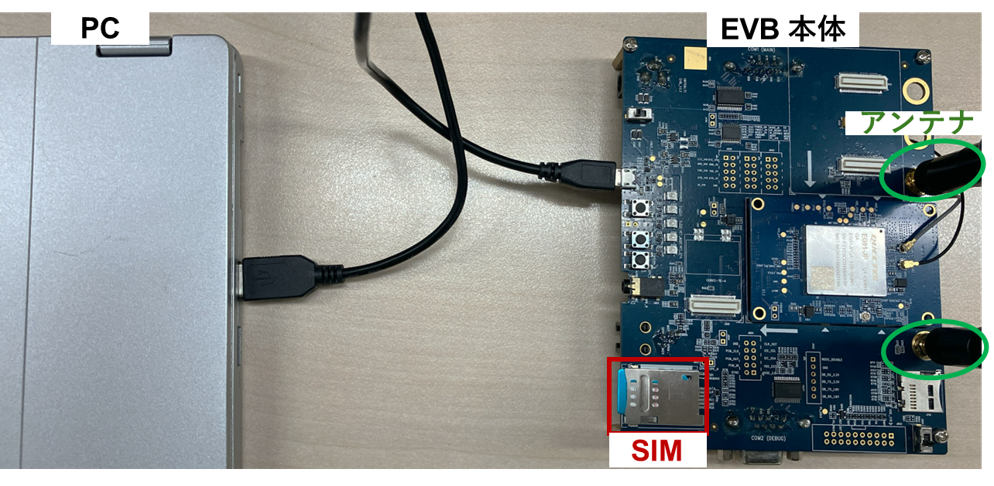
From powering on to connecting the network line
Pre-setup
1. SIM insertion and antenna connection
2. After connecting the PC and EVB via USB, the POWER (①) LED will turn ON and the POWER (②) LED will turn ON.
3. Press the PWEKEY (④) to power up the device and turn on the STATUS (③) LED.
* Check the network connection status by checking that the NET_STA (⑤) LED is on.

SIM recognition/antenna behavior check
AT+CIMI? //SIM IMSI表示 440************ OK AT+CPIN? +CPIN: READY //SIM認識OK OK AT+CSQ //アンテナの接続&電波強度確認, "99,99"はエラー +csq: **,99 OK[AT command supplement]
AT+CSQ (ideally a value between 10 and 31)
0: 113 dBm or higher
1: 111 dBm
2~30: -109 ~ -53 dBm
31: -51 dBm or less
AT+CPIN?
+CPIN: READY //SIM recognition OK
OK
+CME ERROR:xx //SIM not inserted or SIM connection failed
[Terminology Supplement]
IMSI: A unique number for each SIM card
Connect to base station/Check network connectivity
AT+CEREG? //EPSネットワーク登録状況確認 AT+CFUN=0 //最小限機能のみ(通信OFF) AT+QICSGP=1,1,"APN","unsername","password",3 // APN/ユーザー名/パスワード 設定 OK AT+CFUN=1 //セルラー通信機能すべてON AT+CGATT? //応答が1→ネットワークアタッチ済 AT+COPS=? //周辺の接続可能な基地局検索 AT+COPS=1,2,"PLMN番号" //基地局の指定 (期待する回線接続済みの場合不要) AT+COPS? //現在接続中の基地局確認 AT+QCFG="band",0,0,14 //接続LTEバンド設定 {ex.14 = B3(=4)+B5(=10)} AT+QCFG="lte/bandprior",03 //LTEバンド {ex.B3(=03)} 接続を優先 AT+QPING=1,"xxx.xxx.xxx.x" //指定のIPアドレスへ、Ping疎通確認[AT command supplement]
AT+CEREG?
+CEREG: 0,1 //Registration successful
+CEREG: 0,2 // Not registered, searching for operator
+CEREG: 0,3 //Registration refusal
+CEREG: 0,4 //Unknown error
+CEREG: 0,5 //Registered,Roaming
AT+CFUN?
0 // Only the minimum functionality is maintained
1//All functions ON
4// Only RF transmission/reception function is OFF (Airplane mode)
[Terminology Supplement]
APN: Access Point Name
PLMN: Abbreviation for Public Land Mobile Network, a five-digit number.
The first three digits are the country code, MCC (Mobile Country Code).
The last two digits are the MNC (Mobile Network Code)
in conclusion
If you are interested in the latest LPWA/LTE/5G communication module products, please feel free to contact us.
Inquiry
For inquiries about Quectel products and communication modules, please contact us from the link below.
(Detailed information regarding the evaluation environment introduced in this article is also available.)
Quectel Manufacturer Information Top
To return to the Quectel manufacturer information top page, please click below.