- Semiconductor BusinessHOME
- Products and Services of Macnica,Inc.
-
technical information

-
Events and Seminars
- Handling Manufacturer
- Support
- Inquiry
- Click here to purchase products
- Semiconductor business e-mail magazine registration


 Narrow down by specifying conditions
現在2247件がヒットしています。check

In recent years, the demand for edge AI has been growing rapidly. The ability to process data in real time on edge devices and make quick, intelligent decisions is becoming increasingly important. In this article, we will use NVIDIA's innovative software and NXP's edge device, i.MX 8M Plus, as an example of cutting-edge technology, to explain in detail the entire process from model training to deployment for edge AI. Rather than simply creating an AI model, we will develop an AI model using synthetic data as a new attempt. This method aims to create an AI solution that can flexibly respond to various data scenarios and is both accurate and versatile.
[Edge AI made possible by NVIDIA x NXP]
Episode 1: Process Overview
Episode 2: Creating a Dataset (NVIDIA Omniverse™)
Episode 3 AI model learning (NVIDIA TAO Toolkit)
Episode 4: Deployment and Inference on Edge Devices (i.MX 8M Plus EVK)

Episode 1 Process overview
This time, I created the following demo application. It is a demo where a no-entry area is set, and if a miniature doll enters it, a red warning is displayed. This was created with factories and commercial facilities in mind. It is a miniature demo that is a bit unique (I think).
Model creation process
Place 3D assets in NVIDIA Omniverse
Prepare the 3D asset you want the AI to detect and import it into NVIDIA Omniverse. This time, we used a 3D doll asset provided as a free asset. By using free assets, you can create prototypes quickly. There are also many assets available in Omniverse, so you can start from there.

Create a script and create a dataset
We create a script that randomly places 3D assets and cameras to create a dataset. With Omniverse Replicator, you can freely change the position, angle, texture, etc. of 3D assets, so you can generate synthetic data that can be used in a variety of scenarios.

Creating an AI model using the NVIDIA TAO Toolkit
The NVIDIA TAO Toolkit is a transfer learning tool provided by NVIDIA. Even beginners can easily create AI models, and the models can be output in ONNX format, making it easy to deploy to edge devices. Create an original AI model using the dataset and pre-trained model created in Omniverse.

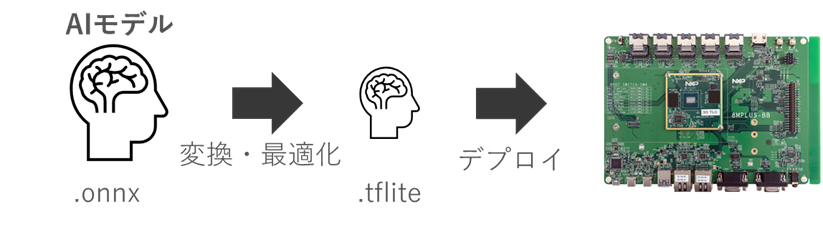
Convert and deploy AI models to edge devices
AI models are expected to use large-scale resources such as GPUs. However, because edge devices have limited resources, it is necessary to make the model lightweight. In this article, we will convert the ONNX format model to TensorFlow Lite to make the model lightweight for edge devices, which will enable real-time inference on edge devices.
In Episode 2, we explain how to create a dataset.
This article explained the process of realizing edge AI. By utilizing the NVIDIA Omniverse platform, it is possible to automatically generate a dataset in a photorealistic virtual space without taking pictures at the actual site. In addition, transfer learning is possible with the TAO Toolkit, and output is possible in ONNX format. Since ONNX is a standard model format, it is no exaggeration to say that models can be converted to any edge device.
In the next episode, Episode 2, we will dig deeper into creating a dataset and explain the execution steps in detail.
If you are considering Omniverse, TAO Toolkit, or Edge AI, please contact us.


Related information


