- Semiconductor BusinessHOME
- Products and Services of Macnica,Inc.
-
technical information

-
Events and Seminars
- Handling Manufacturer
- Support
- Inquiry
- Click here to purchase products
- Semiconductor business e-mail magazine registration


 Narrow down by specifying conditions
現在2259件がヒットしています。check

Contents of Episode 3
In episodes 1 and 2, we presented our routing performance (402 out of 411 cases were completed on-premises), actual performance measurements (50 simultaneous AgentX MVPs passed), and cost estimates (break-even point is approximately 45-60 users). Some of you may be wondering what kind of environment these figures were measured and compiled in, and whether you can try the same thing in your own environment.
Let me just confirm one premise. Our team runs the openwait LLM GLM-5.3-Flash (NVIDIA 's quantized version: nvidia/GLM-5.3-Flash-NVFP4) on a single GPU server (NVIDIA DGX ™ B200) as vLLM, and we are using this on-premises to support the use of AI agents by approximately 30 people in-house. Furthermore, we use NVIDIA NeMo™ Switchyard to create a route to escalate only tasks that are difficult to handle on-premises to Claude (Opus 5.5). The "402 out of 411" in Episode 1 represents the results of this routing, and the "50 simultaneous pass rate" in Episode 2 is a measurement of the server's performance.
This article will introduce the contents of that environment in the following order:
1. Mechanism and configuration of model routing (NVIDIA NeMo Switchyard)
2. How to run a reproducible benchmark (AIPerf)
3. Selection of Serving Configuration (Comparison of FP8 / NVFP4)
4. Cost estimation calculation process
5. Steps to set up the same environment
This is based on AIPerf 0.13.0 and the specifications of NeMo Switchyard v0.2.0 as of September 2026. Both are actively developed open-source software, and command names, option names, and configuration schemes may change in future versions. When actually trying it out, please check the latest information in the official documentation.
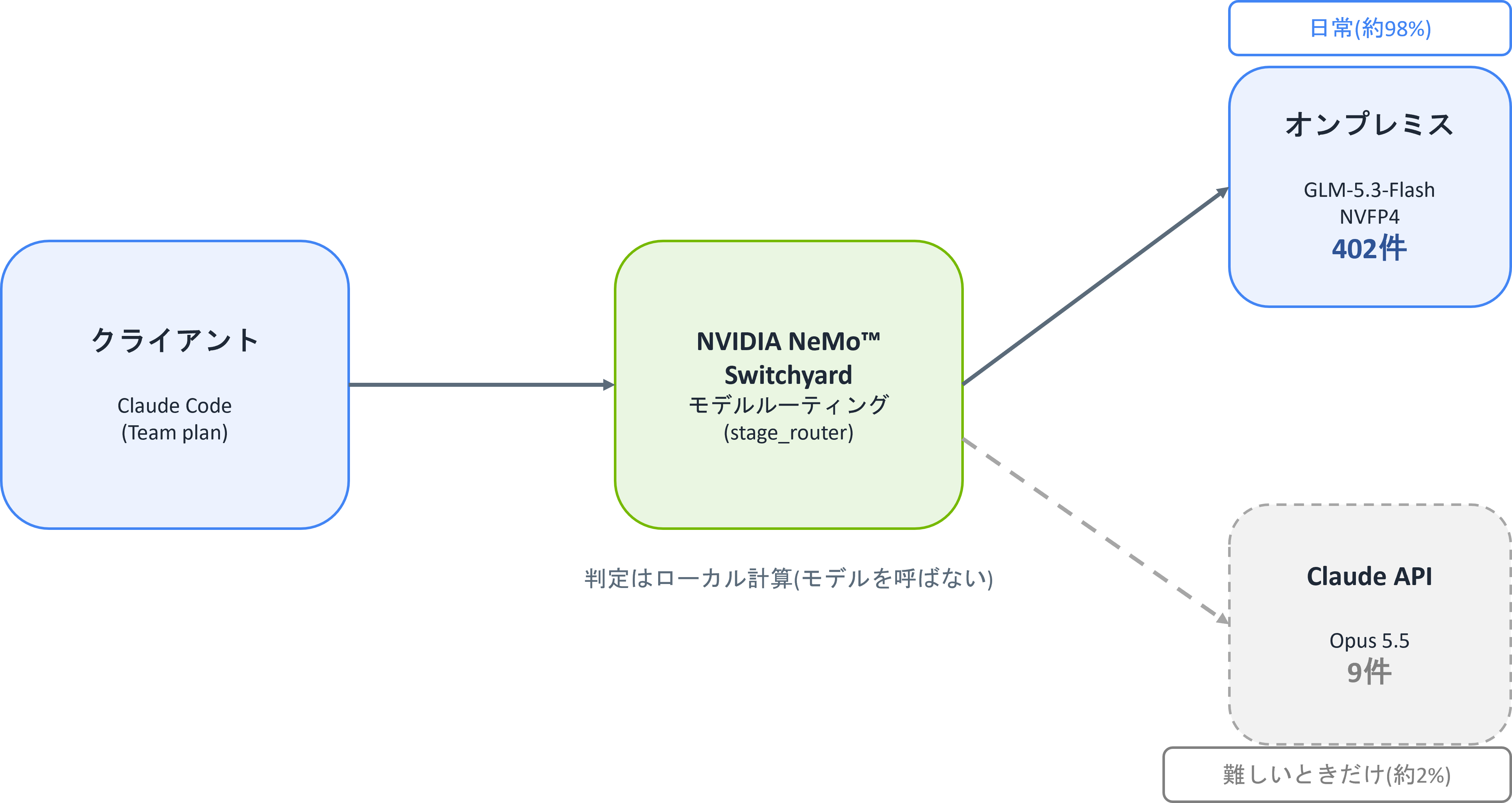
The overall architecture is as shown in the diagram above.
The client (Claude Code) routes requests through Switchyard to be distributed between the on-premises system and the Claude API. Routine business requests are handled on the on-premises side, and only complex tasks that cannot be handled there are sent to the Claude API. The Grafana dashboard introduced in Episode 1 visualizes the metrics of this routing.
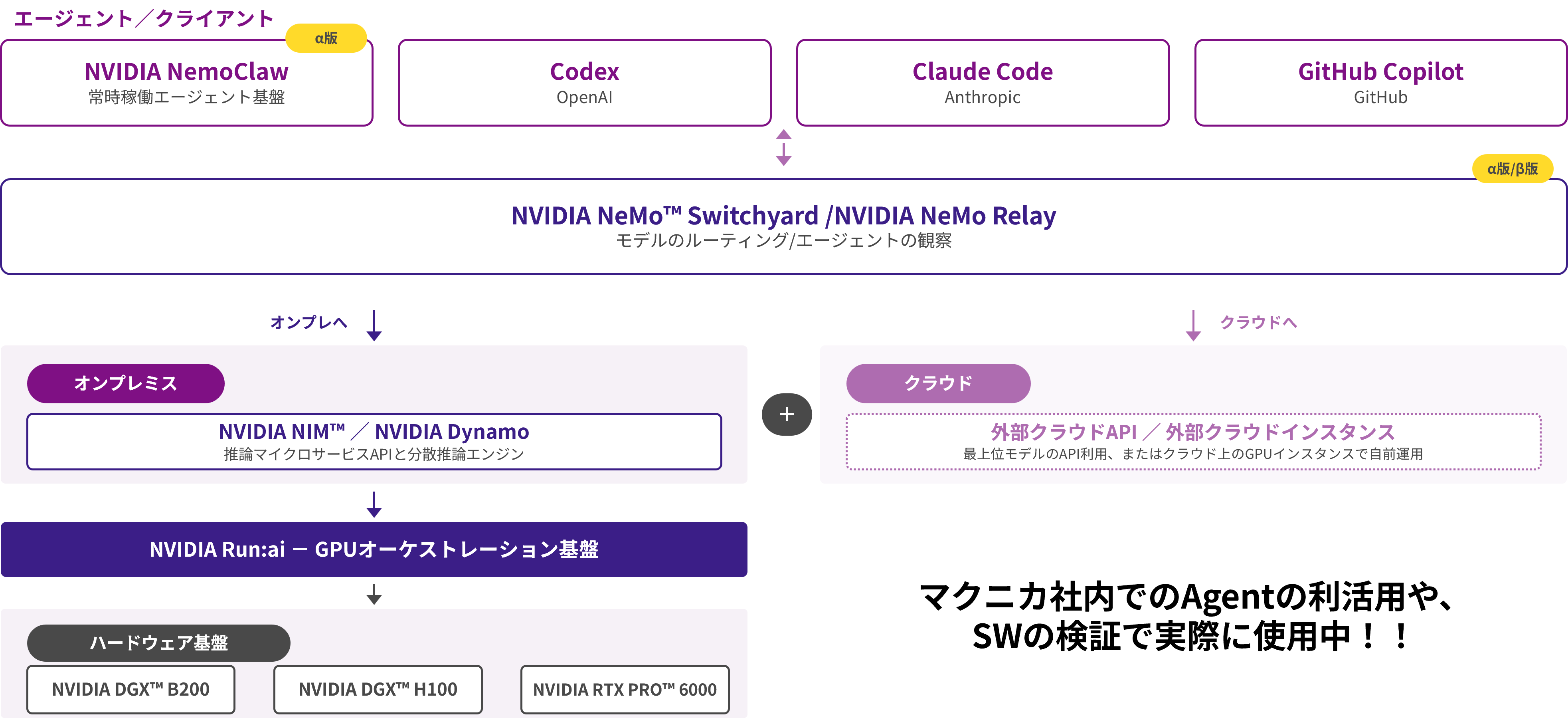
The overall testing environment for the department is as shown in the diagram above, which was introduced in Episode 1.
In addition to Claude Code, GitHub Copilot, and Codex, the always-on agent infrastructure (NVIDIA NemoClaw) also uses the same network path. On-premises, NVIDIA NIM™ and NVIDIA Dynamo inference Microservices are run using NVIDIA Run:ai GPU orchestration. The hardware is NVIDIA DGX™ B200.
NVIDIA NeMo Switchyard: The Core of Model Routing
Roles and actions
Switchyard [1][2] is an orchestration platform that accepts OpenAI/Anthropic-compatible APIs at a single endpoint and distributes models according to the request and the progress of the work. The official GitHub repository describes it as follows:
Switchyard is an open-source library that helps an AI agent choose which model handles each request. It combines efficient models with more capable models so you can balance task success, cost, and latency on your workload.
(Translation: Switchyard is an open-source library that helps AI agents choose which model to use for each request. By combining efficient and high-performance models, it helps balance task success rate, cost, and latency across workloads.)
The process can be summarized in three steps, according to the "How it works" section of the official README.
(1) Set the available models and select the routing method.
(2) The method checks the request or the agent's most recent tool activity (some methods may call a model for determination).
(3) The gateway or application sends a request to the selected model.
Routing may change as the agent's work progresses.
The workflow can be broadly divided into three stages, following the "How it works" section in the official README.
1. First, configure the model you will be using and select the routing method.
2. The method checks the request or the agent's most recent tool activity (some methods may call a model for determination).
3. Finally, the gateway or application sends a request to the selected model.
Routing may change as the agent's work progresses.
Routing method selection
There are multiple routing methods. The official README lists four entry points: Auto, Task, Execution (Stage), and Composite, and the routing overview document contains a complete catalog including Plan/Execute, escalation, advisor, sub-agent, and random [2]. The method adopted here is stage_router (described as Execution (Stage) in the official README). It estimates the status of the task from the history of tool execution results and selects a model for each turn.
We chose this approach because the performance of our on-premises models has also improved. As introduced in the first episode, the OpenWait models have reached the same level as the previous generation Frontier models, and most of our daily operations can be handled on-premises. Therefore, we determined that a method that first processes tasks on-premises and only escalates to the cloud when bottlenecks are detected based on the progress of the work is best suited to the capabilities of this environment. We do not use a model for judgment. Score calculation is a local process of less than a few milliseconds, so there is no cost for judgment, and the system will not stop due to failures of the judgment model.
The following four signals will be used as criteria for judgment:
|
signal |
direction |
meaning |
|
severity |
Opus-oriented |
Error severity (critical errors can be promoted even if they occur alone) |
|
spinning |
Opus-oriented |
They don't read or write, and they keep making the same mistakes. |
|
exploring |
Opus-oriented |
I'm just reading and planning, but I'm not seeing any results. |
|
production_intensity |
GLM |
The proportion of writing and editing is high (progressing smoothly). |
The judgment will be made in the following order:
1. Repeated failures If there is a critical error or context compression, force Opus(override).
2. If you have recently reached Opus status, you can maintain Opus status for a maximum of 2 turns (capable_hold; release sooner if tests pass cleanly).
3. If the signal score exceeds the threshold of 5, Opus(dimensions)
4. Otherwise (when it's ambiguous, or when there's no tool history), it will be dropped to the default tier (fall_open).
Since the picker is "efficient_first", the default is on-premises.
In the individual verification for Episode 1 (411 cases), out of 129 judgments, fall_open occurred 120 times, capable_hold occurred 6 times, and dimensions occurred 3 times.
The three score increases and the six subsequent transfers match the nine items sent to Opus 5.5.
The breakdown of the decision can be found in Switchyard 's GET /v1/stats, under algorithm_stats.stage_router.routing_decisions.
Configuration File
The main parts of the configuration file (local-claude-glm.toml) that I actually use are as follows:
schema_version = 1 [llm_clients.claude] format = "anthropic_messages" base_url = "https://api.anthropic.com" forward_auth = true # Claude CodeのOAuthトークンをAnthropic行きにだけ転送 [llm_clients.runai] format = "openai_chat" base_url = "http://<Run:ai上のvLLM>:30778/v1" [targets.claude] id = "claude-opus-5-5" # Claude Opus 5.5 llm_client = "claude" [targets.glm] id = "local" # GLM-5.3-Flash NVFP4版(Run:ai上のオンプレミス) llm_client = "runai" [routes.auto] id = "switchyard/auto" type = "stage_router" capable_target = "claude" efficient_target = "glm" picker = "efficient_first" # 曖昧なときはオンプレミスに倒す confidence_threshold = 0.5 # 下げるほどClaudeへ上がりやすい [routes.auto-1m] id = "switchyard/auto[1m]" # 1Mコンテキスト用([1m]サフィックス付きの別ルート) type = "stage_router" # autoと同じ内容 + context_window = 1000000 capable_target = "claude" efficient_target = "glm" picker = "efficient_first" confidence_threshold = 0.5 context_window = 1000000 [routes.fast] id = "switchyard/fast" # タイトル生成などの裏方処理はGLMに直行 type = "passthrough" target = "glm"# Claude Codeのデフォルトモデル名での救済ルート(ANTHROPIC_MODEL未設定の # セッションやバックグラウンド処理が404にならないようにする)。 [routes.alias-opus] id = "claude-opus-5-5" # デフォルトの上位名はOpus行き type = "passthrough" target = "claude" [routes.alias-sonnet] id = "claude-sonnet-5" type = "passthrough" target = "glm"Setting `forward_auth = true` in `[llm_clients.claude] ` forwards the OAuth token held by the caller (Claude Code) only to requests destined for Anthropic. No authentication information is passed to the GLM side. Since Claude Code handles all token issuance and renewal, server-side authentication management is completely unnecessary.
Anthropic Messages and OpenAI Chat formats are converted between each other via an Intermediate Representation (IR). This means that the client, Claude Code, only needs to be aware of the Anthropic format, and the on-premises vLLM only needs to be aware of the OpenAI format, with Switchyard handling the differences between the two formats.
Design points
Let's start by explaining the meaning of the threshold. `confidence_threshold = 0.5` is the recommended starting point calibrated using a coding benchmark (SWE-bench Pro). Since a single signal can contribute a maximum of approximately 0.46, an Opus will only be triggered when multiple signals overlap; a single error alone will not escalate the issue. Lowering this value will make it easier for an Opus to be triggered.
Understanding the branching of the backend processing from the perspective of Claude Code will help you understand the structure more quickly.
Background calls:
Small, one-off tasks that don't require any tools, such as generating conversation titles.
Switchyard/fast (direct to GLM) will be in charge of the ANTHROPIC_SMALL_FAST_MODEL.
Sub-agents:
An independent agent with its own tools, operating for multiple turns. It's responsible for the main model and is routed by switchyard/auto (it also triggers a promotion check to Opus if exploration stalls).
How to start
The Switchyard server is installed using cargo and then started by specifying the aforementioned configuration file.
(If you don't have Rust, you can install it using curl https://sh.rustup.rs | sh)
cargo install --locked switchyard-server
switchyard-server --config local-claude-glm.toml --port 31001
This will set up an OpenAI/Anthropic-compatible endpoint listening on port 31001. Instructions for changing the client-side connection destination are provided at the end of the article under "For those who want to build the same environment."
Benchmark: Play a real Claude Code session.
This section explains how to run AIPerf, which was used for performance testing in Episode 2. AIPerf is NVIDIA's inference benchmarking tool that measures the performance of generative AI models provided on any inference server and outputs metrics in command line view and detailed reports [3][4]. It is available on PyPI and can be installed in a virtual environment using uv.
uv venv
source .venv/bin/activate
uv pip install aiperf
AgentX MVP (SemiAnalysis InferenceX)[5] is a public benchmark that plays back 393 actual Claude Code sessions in the order and intervals they were recorded. The execution conditions are fixed by the tool, prohibiting output truncation and cache inflation, and the user cannot change the conditions afterward. It is provided as one of the AIPerf scenarios. The official tutorial "InferenceX AgentX MVP" explains how to use--scenario inferencex-agentx-mvp [4][6].
aiperf profile --scenario inferencex-agentx-mvp # これだけでルールがロックされるThe actual execution command is as follows:
aiperf profile \ --scenario inferencex-agentx-mvp \ -m local --tokenizer zai-org/GLM-5.3-Flash --url <推論エンドポイント> \ --endpoint-type chat \ --public-dataset semianalysis_cc_traces_weka_062126 \ --concurrency 50 \ --benchmark-duration 1800 \ --random-seed 42 \ --use-server-token-count \ --workers-max 256 \ --artifact-dir benchmark/results/agentx-mvp/c50 \ --goodput "output_token_throughput_per_user:50 time_to_first_token:2000" \ --streaming --extra-inputs ignore_eos:true \ --cache-bust first_turn_prefix \ --system-idle-gap-cap-seconds 10The main options have the following meanings:
|
option |
meaning |
|
--scenario inferencex-agentx-mvp |
Specifying the scenario. This single setting locks the execution conditions (ignore_eos, streaming, cache-bust, interval maintenance, etc.), and the result is stamped with a submission_valid stamp. |
|
--public-dataset |
Corpus specification: semianalysis_cc_traces_weka_062126 (393 Claude Code sessions) [7] |
|
--concurrency |
The number of conversations happening simultaneously (see below) |
|
--benchmark-duration |
Measurement time in seconds. Default: 1,800 seconds |
|
--random-seed |
Random seed. Fixing it allows the disk cache of the reconstructed dataset to be utilized, resulting in faster startups from the second time onwards. |
|
--use-server-token-count |
Count the number of tokens using the server's reported value, not the client's estimate. |
|
--goodput |
Criteria for determining "comfortable": output_token_throughput_per_user: 50 (at least 50 tokens per user per second) and time_to_first_token: 2000 (within 2 seconds to the first character). |
AgentX MVP only locks the execution conditions (such as the session playback order and interval), and the measurer determines "what is considered comfortable." The criteria for comfort mentioned in Episode 2 is that 95% or more of the requests satisfy the condition of "50 tokens / second or more per person and within 2 seconds to the first character" (SLO), and this was fixed in advance with this option. The judgment is made by checking whether the good_request_fraction (percentage of requests that satisfy the SLO) output by AIPerf is 0.95 or higher. The results are read with the generation speed per person (tok/s) as the main metric and TTFT as a secondary metric. The SLO was set by me before measurement and is not an official metric of AgentX MVP.
Rules that are locked
The main settings imposed by the scenario and the reasons for them are as follows:
- ignore_eos: Always generate up to the requested length. (This prevents the load from being reduced by prematurely cutting off the output.)
- Streaming: Forces measurement to be done via streaming.
- cache-bust first_turn_prefix: Changes the starting prefix each time it is played to prevent cache inflation due to reuse.
- system-idle-gap 10s / Retention of recorded intervals: Reproduce the pace at which people work.
- Date-fixed corpus / seed required: Ensure the same conditions are met regardless of who takes the measurement or when.
Pre-execution checks and failure patterns
The measurement process proceeds in the following order: corpus reconstruction, trajectory warmup, 30-minute measurement, and submission validity check. Since the initial corpus download and reconstruction may take several minutes, it is advisable to extend the dataset configuration timeout (AIPERF_DATASET_CONFIGURATION_TIMEOUT) beyond its default value.
The results will be output to the artifact directory (--artifact-dir). Pass/fail status can be checked using metadata.submission_valid in profile_export_aiperf.json, and if it fails, use submission_invalid_reasons (e.g., run_cancelled if manually canceled). Reproducibility is ensured by fixing the seed, saving manifest.json in the same directory, and using a date-fixed corpus.
Pay attention to the meaning of the number of simultaneous sessions.
**--concurrency** is also important to note. AIPerf 's **--concurrency ** refers to the number of conversations running simultaneously (concurrent sessions), not the number of requests being processed at the same time. Since people wait between turns, these two do not coincide (with AgentX 's 50 concurrent sessions, the average number of concurrently processed requests is approximately 10). Simply putting the number of users directly into **--concurrency** can lead to misjudging the necessary resources, so in Episode 2, we treated one conversation as one person (concurrent sessions = concurrent users) and then converted it to the number of users using the peak concurrent usage rate.
Serving Configuration Selection: Comparison of FP8 / NVFP4
Startup options
The inference server (vLLM) is running on Run:ai with the following options:
vllm serve nvidia/GLM-5.3-Flash-NVFP4 \
--tensor-parallel-size 8 \
--kv-cache-dtype fp8 \
--tool-call-parser glm47 \
--reasoning-parser glm45 \
--enable-auto-tool-choice
The agent workload involves tool calls, so--tool-call-parser / --enable-auto-tool-choice is required. The KV cache is compressed with FP8 (separate from the NVFP4 used for weights), and the memory saved is allocated to the cache capacity. Prefix caching is enabled by default.
Comparison results
We compared two configurations of GLM-5.3-Flash, the FP8 version and the NVFP4 version (nvidia/GLM-5.3-Flash-NVFP4), under the same conditions, using the same seed and the same corpus (AgentX MVP).
For more details on NVFP4, please refer to the following article.
The measurement points are divided into six stages, with 10 to 200 people being measured simultaneously, for 30 minutes at each stage.
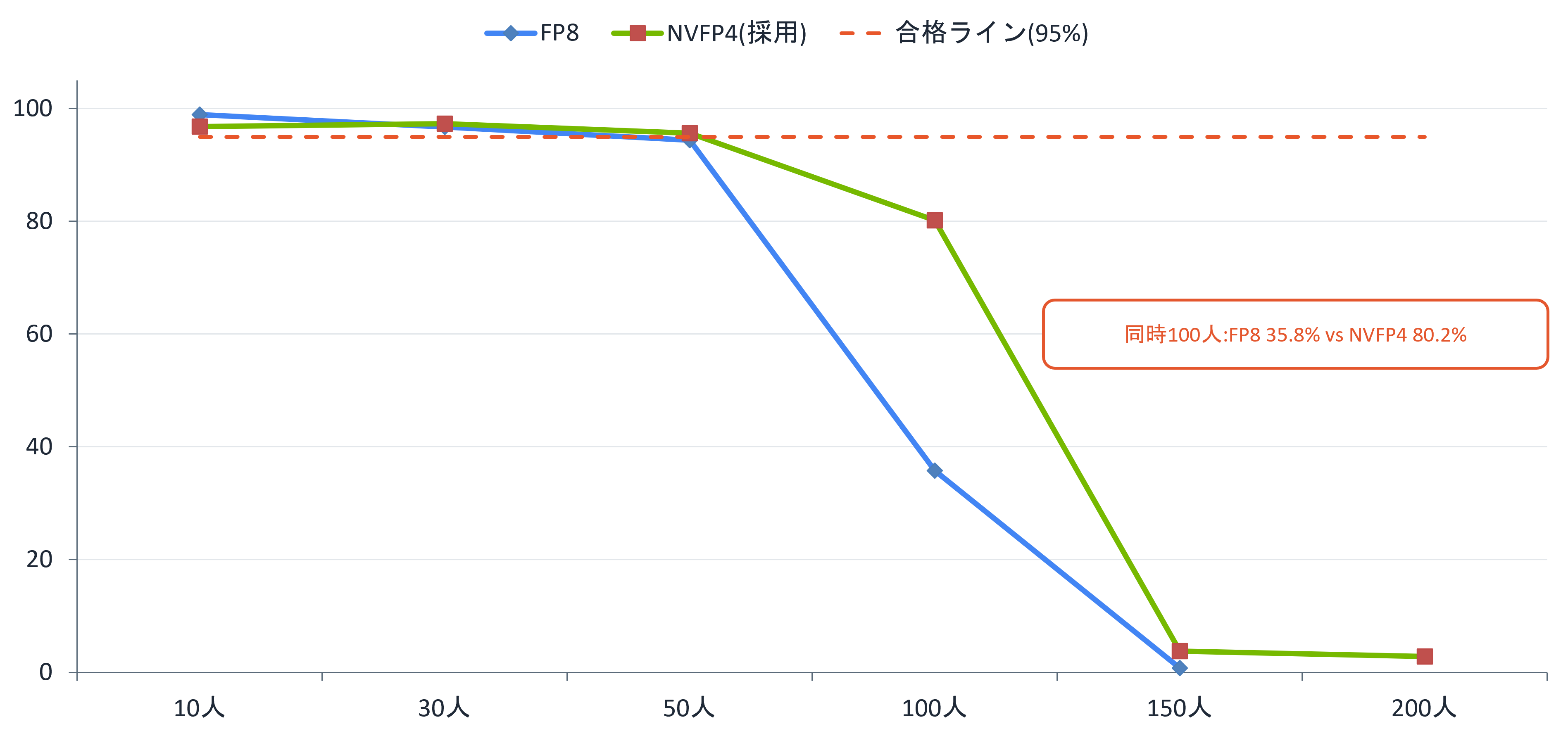
As a result of the comparison, NVFP4 We adopted this version. The reasons are as follows:
• Generation rate per person (median) is, with all people NVFP4 but FP8 The gap widens as the crowds get more crowded. (simultaneous 10 people +13%, 50 people +23%, 100 people +33%)
・ Simultaneously 100 The human comfort rate is FP8 of 8% against NVFP4 teeth 80.2%
This is just one example of comparing quantization formats. Serving configurations can be adjusted in various ways depending on the workload, such as the KV cache data type, parallel configuration (TP/DP), and batch strategy. Using techniques like Speculative Decoding, which generates candidate tokens with a small draft model and validates them with a larger model, can increase generation speed while maintaining output quality. Ultimately, the choice will depend on comparing multiple configurations for your specific workload.
Cost estimation calculation process
This section outlines the cost estimation calculation process presented in Episode 2. First, let's clarify the assumptions. The actual operational data includes approximately 30 users, approximately 4,300 requests per day (approximately 1.027 million per year), and token volume of approximately 131.7 billion inputs and540 million outputs per year. For comparison, we will use the API fees of Claude Opus 4.8, the previous generation Frontier model that received the same overall score as GLM-5.3-Flash from a third-party organization. The conversion assumptions are: 1 USD = 160 yen, 240 business days per year, initial investment (equipment such as GPU servers) of 100 million yen with 5-year fixed-rate depreciation (20 million yen / year) + running costs (our estimate) of 18 million yen, resulting in an annual on-premise cost of approximately 38 million yen (including depreciation, hereafter referred to as TCO). Since exchange rates and unit prices fluctuate, please check the assumptions and calculation formulas rather than the amounts themselves, and substitute them with your own company's figures.
Primary source of API pricing
These are the unit prices as confirmed on the official pricing page on September 15, 2026 [8].
|
item |
unit price |
|
Claude Opus 4.8 Input / Output |
$5 / $25 per MTok |
|
Cache read (hit) |
$0.50 per MTok |
|
5-minute cache write |
$6.25 per MTok |
|
1 hour cache write |
$10 per MTok |
We calculated the costs based on the unit prices listed above.
Formula for the actual operational simulation (Simulation in Episode 2)
For an annual input of 131,700 MTok / output of 540 MTok:
素(キャッシュ不使用): コスト[$] = Input × 5 + Output × 25 キャッシュあり(5分): コスト[$] = Input × (ヒット率×0.5 + (1−ヒット率)×6.25) + Output × 25 (1USD=160円)• Base price: Approximately 100 million 750 10,000 yen → 90%: Approximately 24.8 million yen (▲77 %)/ 95% (the 2 A value close to the actual measurement in the story): Approximately 18.8 million yen
- Formulas with caching will cache all errors. write($6.25) This is the expected payment method. Hit rate 0% Substituting this into the total Input of write You will have to pay the unit price, which is about the same as the base unit price. 1 hundred million 3,390 Please note that the amount will be in the millions of yen.
The calculation process under the same load as the benchmark extended over a long period of time (see Episode 2 for reference)
The original data AgentX simultaneous 50 people • NVFP4 edition • measurement 1,792 In seconds, the input is total 1 hundred million 9,803 Ten thousand tokens, total output 167.9 It was 10,000 tokens. The calculation is as follows:
• Rate per person: Input 2,210 tok/s, Output 7 tok/s (per conversation) 30 Approximately 37 Processing the request)
・×8 hours (28,800 seconds) × 240 Japan: Annual input per person: approximately 15.3 billion / Output Approximately 300 million tokens, approx. 14.2 10,000 requests
Cache 90% in 1 Approximately per person 315 10,000 yen / year → User 50 Approximately 1 hundred million 5,800 10,000 yen → On-premises TCO The difference from 38 million yen is approximately 1 hundred million 2,000 10,000 yen / year → initial investment 1 billions 1 Recovered in less than a year
Furthermore, expanding this to "24 hours a day, 365 days a year" (4.56 times), the average annual input per person becomes approximately 69.7 billion tokens / output of approximately 590 million tokens. With 90% cash, this amounts to approximately 14.4 million yen per person per year, or approximately 720 million yen with 50 users. This pace is about 3.5 times the pace of actual operation (approximately 4.4 billion tokens per person per year), so in Episode 2, it is treated as a benchmark for what will happen if agent usage expands.
Calculation results (reprinted from Episode 2)
The table of calculation results shown in Episode 2 is reproduced here for correspondence with the calculations.
|
Cash hit rate |
Annual APIequivalent |
Comparison with no cache |
|
None (for reference) |
Approximately 107.5 million yen/year |
− |
|
90% (standard) |
Approximately 24.8 million yen/year |
▲77% |
|
95% (a value close to the actual measurement in performance testing) |
Approximately 18.8 million yen/year |
▲82% |
In the case of a 90% cash hit rate (benchmark)
|
Number of users |
Number of simultaneous users (Peak simultaneous usage rate 30 ~ 50%Assumption) |
APIequivalent amount/year |
On-premisesTCO/year (Including depreciationfruit) |
Annual difference |
initial 1 The billion yenHarvest period * |
|
30 people (currently) |
10-15 people |
Approximately 24.8 million yen |
Approximately 38 million yen |
▲13.2 million yen |
Approximately 15 years (cannot be recovered within the 5-year service life) |
|
50 people |
15-25 people |
Approximately 41.4 million yen |
Approximately 38 million yen |
+3.4 million yen |
Approximately 4 years and 3 months |
|
60 people |
18-30 people |
Approximately 49.6 million yen |
Approximately 38 million yen |
+11.6 million yen |
Approximately 3 years and 2 months |
|
100 people |
30-50 people |
Approximately 82.7 million yen |
Approximately 38 million yen |
+44.7 million yen |
Approximately 1 year and 6 months |
|
150 people |
45-75 people |
Approximately 124.1 million yen |
Approximately 38 million yen |
+86.1 million yen |
Approximately 11 months |
If the cash hit rate is 95%
|
Number of users |
Number of simultaneous users (Peak simultaneous usage rate 30 ~ 50%Assumption) |
APIequivalent amount/year |
On-premisesTCO/year (Including depreciationfruit) |
Annual difference |
initial 1 The billion yenHarvest period * |
|
30 people (currently) |
10-15 people |
Approximately 18.8 million yen |
Approximately 38 million yen |
▲19.2 million yen |
Unrecoverable |
|
50 people |
15-25 people |
Approximately 31.3 million yen |
Approximately 38 million yen |
▲6.7 million yen |
Approximately 7 years and 7 months (unrecoverable within the 5-year service life) |
|
60 people |
18-30 people |
Approximately 37.5 million yen |
Approximately 38 million yen |
▲500,000 yen |
Approximately 5 years and 2 months (unable to recover within the 5-year service life) |
|
100 people |
30-50 people |
Approximately 62.5 million yen |
Approximately 38 million yen |
+24.5 million yen |
Approximately 2 years and 3 months |
|
150 people |
45-75 people |
Approximately 93.8 million yen |
Approximately 38 million yen |
+55.8 million yen |
Approximately 1 year and 4 months |
*The "Recovery Period for Initial 100 Million Yen" and "Annual Difference" in the table are calculated using different methods. Amounts are rounded to the nearest 100,000 yen.
Cash hit rate sensitivity analysis
This is the break-even point number of users, calculated by comparing the on-premise TCO of 38 million yen / year (including amortization) with the per-user API equivalent amount proportionally allocated based on actual usage of 30 users.
|
Cash hit rate |
1Per person APIequivalent amount / year |
Break-even point |
|
Plain (no cache used) |
Approximately 3.6 million yen |
Approximately 11 people |
|
80% |
Approximately 1.2 million yen |
Approximately 31 people |
|
85% |
Approximately 1 million yen |
Approximately 37 people |
|
90% (standard) |
Approximately 800,000 yen |
Approximately 46 people |
|
95% (a value close to the actual measurement in episode 2) |
Approximately 600,000 yen |
Approximately 61 people |
The higher the hit rate, the cheaper the external API becomes, and the higher the number of users required to break even. The 90% benchmark in Episode 2 is an assumption that favors on-premises solutions more than the actual performance measurements (93-96%) in the same episode.
Calculation of peak simultaneous usage rate (Episode 2)
The peak simultaneous usage rate is the percentage of users who are simultaneously using the service at peak times. LLM Percentage of people who have outsourced the work (Number of simultaneous users at peak time ÷ Number of users) That's it. A generous estimate. 50% Assuming this, we performed the conversion as follows:
・ Simultaneously 50 person passed ÷ 50% (Peak simultaneous usage rate)) = Approximately 100 users
・ Simultaneously 50 person passed ÷ 30% (Peak simultaneous usage rate)) = Approximately 170 users
When we look at this conversion by the number of users, 100 If it's a name, the number of simultaneous users at peak times is 50 people, 170 If it's a name, then approximately 50 people, 150 If it's a name 45 ~ 75 It's a person. 150 The name refers to the peak simultaneous usage rate. 30% Then it falls within the range that meets the criteria. Recently 1 It is also common for people to run multiple sessions in parallel at the same time. Therefore, when used by heavy users 1 The amount used per person will be higher than assumed, resulting in a lower number of people from whom the data can be recovered than the figures shown here.
For those who want to build the same environment
The setup procedure consists of two steps: starting the Switchyard server and changing the connection destination in Claude Code. Starting the server is done as described in the "Startup Method" section above.
Next, we'll point the Claude Code connection to Switchyard. Simply set three environment variables and start it.
export ANTHROPIC_BASE_URL=http://<Switchyardサーバー>:31001 export ANTHROPIC_MODEL="switchyard/auto[1m]" # ルートIDを指定(1Mコンテキスト) export ANTHROPIC_SMALL_FAST_MODEL="switchyard/fast" # 裏方処理をGLMに直行 claudeSetting the root ID in ANTHROPIC_MODEL is the easiest way to avoid the root name exact match problem. Alternatively, to prevent a 404 error even if it's not set, you can add a rescue root for the default model name, as shown in the configuration file mentioned earlier. The AIPerf benchmark is installed using uv as described above. The complete execution command is as shown in "Benchmark: AgentX MVP".
Summary
This article describes the configuration of our on-premises AI agent environment. The configuration distributes traffic from clients via Switchyard to our on-premises vLLM and Claude APIs. For routing, we use `stage_router`, which selects a model each turn based on signals in the tool history. Since the decision-making is done locally, both costs and failure risks are kept low. For benchmarking, we used a publicly available benchmark with fixed rules (AgentX MVP) to ensure consistent comparison and reproduction under the same conditions. We also show the cost estimation process, allowing you to substitute your own figures for the assumptions and perform your own calculations.
NeMo Switchyard and AIPerf, introduced in this article, are both actively developed open-source software (OSS), designed to be operated while being adjusted according to the workload. Macnica continuously conducts verification of such cutting-edge AI software, and the content of this series is based on the knowledge gained from that verification. Therefore, we can provide support based on actual verification, from pre-implementation verification (AI TRY NOW PROGRAM) to environment construction, hybrid inference environment configuration and tuning, and post-production operation. Please feel free to contact us when you are considering these solutions.
References
- [1] NVIDIA Technical Blog, “Route AI Agent Workloads Across Models with NVIDIA NeMo Switchyard”
- [2] NVIDIA-NeMo, “Switchyard” (GitHub)
- [3] ai-dynamo, “AIPerf” (GitHub)
- [4] NVIDIA, “InferenceX AgentX MVP Benchmark — NVIDIA AIPerf Documentation”
- [5] SemiAnalysis, “InferenceX by SemiAnalysis — Open-Source Agentic Inference Benchmark”
- [6] ai-dynamo, “InferenceX AgentX MVP — AIPerf Documentation (GitHub)”
- [7] SemiAnalysis, “cc-traces-weka-062126” (Hugging Face dataset, 393 Claude Code sessions)
- [8] Anthropic, “Pricing — Claude Platform Docs”
Inquiry