- Semiconductor BusinessHOME
- Products and Services of Macnica,Inc.
-
technical information

-
Events and Seminars
- Handling Manufacturer
- Support
- Inquiry
- Click here to purchase products
- Semiconductor business e-mail magazine registration


 Narrow down by specifying conditions
現在2236件がヒットしています。check

Nice to meet you, I'm Ozu, a 2025 new graduate FAE!
In this blog, I will frankly share the insights and failures I gained through my production training, as someone who studied electrical and electronic engineering at university but was not good at electricity, electronics, or engineering.
The production training is part of Macnica 's new graduate FAE training, and this year's theme was "Development of a maze escape machine." This is a competition commonly known as "micromouse" or "classic mouse," and in this training, participants designed the machine's body, selected sensors, designed the power supply, assembled the car body, and created a driving program over a three-month period.
In this first installment, I will introduce the power supply design, an area I particularly struggled with and repeatedly failed at, from component selection to implementation.
Power Supply IC Selection
The motor used here is rated at 6V, while the main power source is a 9V square battery.
In other words, it was necessary to step down the voltage from 9V to 6V. Furthermore, one of the conditions for the workshop was that "at least one step-down switching regulator must be used."
The selection criteria for the power supply device are as follows:
・Input voltage range is 9V
・Output current is 2 A or more (approximately 1.5 A for two motors and a motor driver)
・Few IC pins
・Simple peripheral circuitry and few components
・Package type is SOP, as it is mounted by hand soldering
・Availability
Therefore, we selected Analog Devices' high-speed synchronous rectification monolithic step-down switching regulator, the LT8609A.
・Input voltage range: 3.0V to 42V
- Maximum continuous output current: 3A
・Switching frequency: 200kHz to 2.2MHz
-Package: MSOP (10-pin)
This monolithic power supply IC has built-in switching FETs and protection circuits integrated into a single chip, so the only external components required are an inductor and input / output capacitors.After reading the datasheet and considering the required element constants and layout, I started to actually implement the circuit, but unexpected problems arose one after another.
This time, I'd like to share three failures I faced and the trial and error I went through to resolve them.
Mistake 1: Exposed Pad to GND Connection
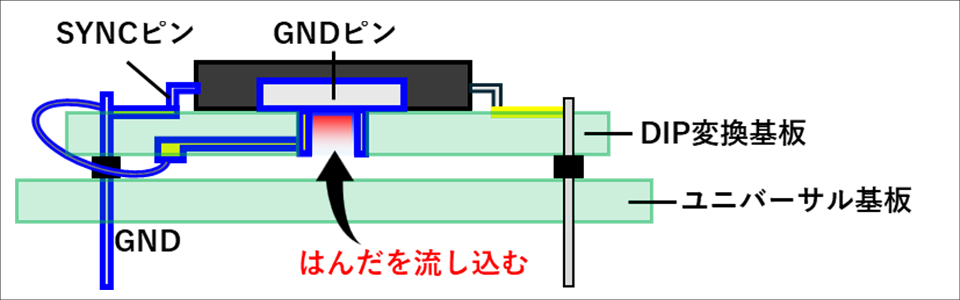
The LT8609A has an exposed pad on its bottom, which also serves as the GND pin. To mount it on a universal board, I used a DIP conversion board with a heat dissipation pad. Figure 1 shows the GND configuration for this project. Simply put, the LT8609A 's GND (exposed pad) is connected to the SYNC pin (external clock synchronization input/operation selection), which is intended to be grounded to GND, and the area framed in blue becomes GND. The difficulty here is pouring solder onto the back of the DIP conversion board and connecting it to the exposed pad. To ensure a secure connection, the solder needs to flow all the way into the groove. To do this, place the soldering iron on the land, heat it, and press the solder in, pressing down until it reaches the back.
However, this is where I made my first mistake: I applied too much pressure with the soldering iron. I was so focused on getting the solder into every corner that I didn't pay enough attention to heat damage. The 420 °C heat from the soldering iron tip was transferred to the IC body through the solder and exposed pad over a long period of time, ultimately damaging the IC. I only noticed something was wrong after I had mounted everything, including the peripheral circuitry. The output should have been 6V, but in fact it was only about 700mV. At first, I suspected an error in the wiring or constant design of the peripheral components, but when I measured the voltage of INTVcc, which outputs the 3.5V internal LDO, it was also only about 700mV. It was then that I realized the internal LDO itself was faulty.
I replaced the IC and reassembled it, and it finally worked properly.
However, the next problem we encountered was layout.
Mistake 2: The importance of being as close as possible
After replacing the IC, the power supply started to output normally, and I was relieved when I tried applying a load, but the output became distorted and could not maintain 6V.
I was puzzled as to why this was the case, even though I had followed the constants and layout exactly as specified in the datasheet.
So I consulted my senior colleague, who advised me that "it's not just about placing the components, but also about keeping the wiring short."
To be honest, I was surprised. Up until now, the circuits we'd studied in class had only been calculated on paper under ideal conditions. I understood that they needed to be small, but I never imagined that performance would be affected if we didn't pay attention to even a"distance of just 1mm."
Why do they need to be so close together?
In switching power supplies, high-speed switching of several hundred kHz to several MHz occurs around the SW pin, causing sudden current changes. When this happens, long wiring increases parasitic inductance, causing voltage fluctuations and noise. Furthermore, if the loop area through which the switching current flows is large, EMI (noise radiation) also increases. For this reason, it was essential to place the wiring "as close as possible" and to use thick, short wiring.
To improve this, we moved the components as close to the IC as possible and made the wiring around the SW pin thicker and shorter [Figures 2 and 3]. As a result, the output is stable even under load and noise is significantly reduced.
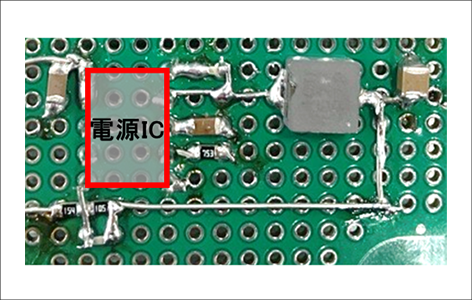

I learned firsthand that the "as close as possible" in the datasheet is not just a cautionary note, but an important guideline that determines performance.
Mistake 3: A small oversight
With the power supply stable and the chassis assembly complete, we were finally able to begin the test drive. However, our relief was short-lived as we suddenly encountered a problem where the motor would stop turning.
Upon checking, I found that the IC was broken. I couldn't think of any particular reason, but I wondered if the + and GND terminals of the 9V square battery had been connected in reverse, causing reverse voltage to be applied. So I left the peripheral circuitry as it was and replaced only the DIP conversion board on which the power supply IC was mounted, and operation recovered without any problems. However, after running it for a while, the IC suddenly broke again. Thinking that this time there must be some fundamental problem, I checked each component on the board one by one and noticed that the resist near the SW pin had peeled off.
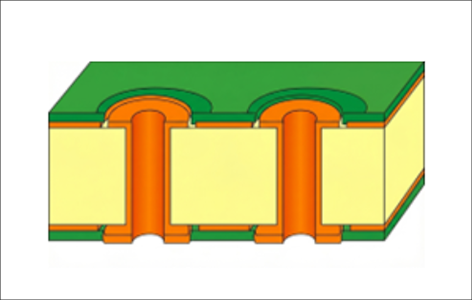
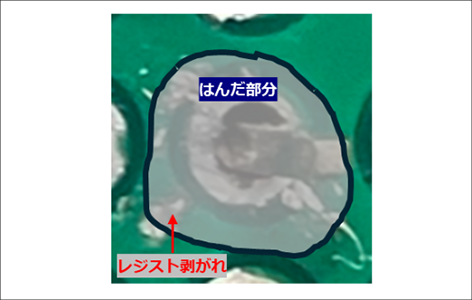
The universal board used in this project has a mesh-like pattern, and can be connected to the solid pattern underneath simply by peeling back the resist where necessary and creating a solder bridge [Figure 4]. This has the major advantage of easily securing a wide and short GND. I thought that by connecting the SYNC pin to GND on the backside, and GNDing the entire backside, I could achieve an efficient design. However, this "simplicity" turned out to be a disadvantage. There was unintentional peeling around the SW pin, and whenever tension was applied there, the SW pin would come into contact with GND. This ultimately caused the IC to break [Figure 5].
Summary
In the end, we were able to create a stable power supply, but the schedule was pushed back significantly due to repeated redoing.
I was prepared for the power supply design to be difficult, but when I actually got my hands dirty and started working on it, I struggled with the small details more than I had imagined, and it was a truly challenging experience. However, it was also true that I gained valuable experience by actually making something and learning through failure, something that cannot be gained from armchair theory alone.
In the next post, we'll cover "Building the Body." After the power supply stabilized, we designed the body and assembled it, and we'll show you the incredible machine that was completed!
Move, Run, My Machine Article List
・Power supply design edition
・ Driving