- Semiconductor BusinessHOME
- Products and Services of Macnica,Inc.
-
technical information

-
Events and Seminars
- Handling Manufacturer
- Support
- Inquiry
- Click here to purchase products
- Semiconductor business e-mail magazine registration


 Narrow down by specifying conditions
現在2247件がヒットしています。check


It's "Poki".
Enpirion® on Altera's MAX® 10 Evaluation Board.
Since then, I've been a little worried about it, and after doing some research, I found useful information for choosing a power supply, so I'll introduce it to you!
Power supply selection is important when designing a board.
Since power supplies are essential for FPGAs, we have to select from among many power supply manufacturers based on specifications and performance.
So how do you choose the right power supply for your FPGA?
Using the Pin Connection Guideline
Altera's website provides pin connection guidelines for each device family.
An example of the power supply configuration that shows what kind of power supply is required is posted in it.
For Cyclone® IV E devices, it is shown in Figure 1.
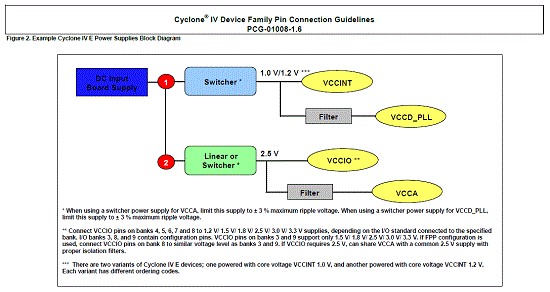
Figure 1: Example Power Supply Configuration for Cyclone IV E Devices
However, if you are using multiple I/O standards such as VCCIO, you will need a power supply that matches the voltage, so be careful!
Although it is an example, you can see what voltage is required graphically!
Utilization of EPE
However, it is still not clear what kind of power supply to choose.
That's where EPE (Power Play Early Power Estimator) comes into play!
EPE is explained by Ume Onigiri-senpai, so please refer to that article.
"You can choose! How to estimate power consumption -EPE version-”
"Eh? EPE? I'm sure you can estimate power consumption, but..."
From v13.1 you can not only estimate the power consumption, but also check the model number when using Enpirion's power supply!
This time, I will introduce how to import from the Quartus® II project using the design (Cyclone IV E) used in the production practice!
For details on how to download EPE, how to generate files for EPE with Quartus II, and how to import the generated files into EPE, please refer to the above article by Ume Onigiri-senpai.
By the way, EPE can be downloaded from the following site.
How to choose Enpirion
1. Main tab
After importing the Quartus II generated files into the EPE, change the Power Characteristics from Typical to Maximum so that you can select the Enpirion Device.
This is to convert from the maximum power when selecting a power supply.
Then change the Power Rail Configuration to Cyclone IV E.
With this change, the EPE adopts the power supply configuration example introduced in the Pin Connection Guideline.
In this case, the power supply configuration example in Figure 1 is selected.
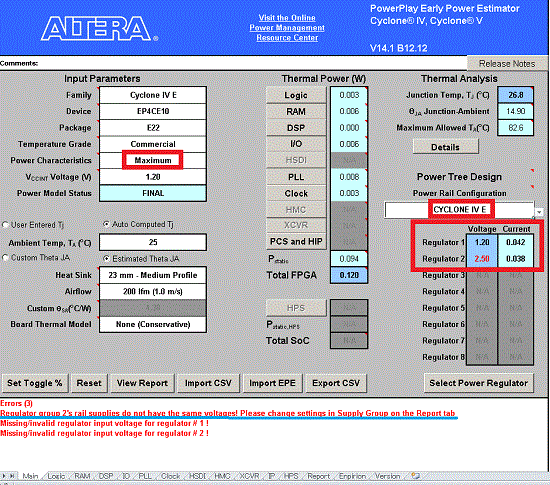
Figure 2: Change from Typical to Maximum
Then, as an Error, "The power supply of Regulator Group 2 is not supplied with the same voltage."
message is displayed. (The blue line in Fig. 2.)
This is because the 2.5 V power supply in Figure 1 supplies VCCIO and VCCA,
Because in my design VCCIO is using 3.3V.
Since VCCA is 2.5 V, such an error will be displayed.
Go to the Report tab to fix this Error.
2. Report tab
In this Report tab, you can check the result of power estimation and the static and dynamic current of each port that is the source of the calculation.
This time, change the Power Regulator Group to eliminate the previous Error.
Groups 1 and 2 listed above are taken from the block diagram in Figure 1.
It relies on the Power Rail Configuration configuration data in the main tab.
There is no Power Regulator Group for 3.3 V, so manually change the VCCIO Regulator Group to "3".
Power Rail Configuration is changed to Custom due to the increase in Regulator Group.
Now we have created Regulator Groups corresponding to 1.2 V (Group 1), 2.5 V (Group 2), and 3.3 V (Group 3), respectively.
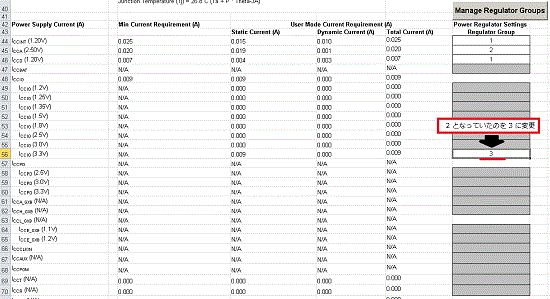
Figure 3: Change Regulator Group in Report Tab
Finally, move to the Enpirion tab.
3. Enpirion tab
On this Enpirion tab, each Power Regulator Group can be calculated with Enpirion based on the setting information so far.
In addition, Load Current Margin is the margin value for the load current,
You can change the regulator type and set the presence or absence of the Power OK (POK) terminal and reflect it in the selection.
This time, just specify the Input Voltage to each Regulator Group here!
Then, the model number will be automatically selected according to the previous settings.
If you want to make 1.2 V, 2.5 V, 3.3 V from the 5 V power supply of the board in the production practice, you can achieve it with the following model numbers!
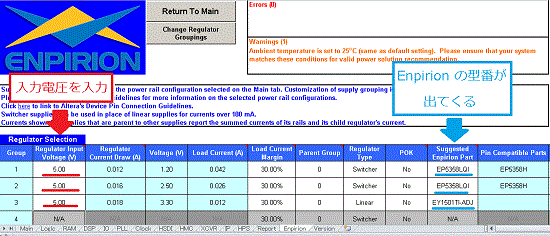
Figure 4: Enpirion tab showing model number
EP5358L is a low voltage power supply.
Those with L at the end have 7 preset voltages from 0.8 to 1.5 V, and it is possible to flexibly create the desired voltage by feedback with an external resistor.
It's amazing how easy it is to find the recommended power supply for an FPGA!
at the end
This time I introduced a simple example using a Cyclone IV E device.
When actually designing, you have to consider heat, current margin, and required functions, but even if you use another device, you can select Enpirion power supply with the same flow!
Why don't you use EPE to select a power supply Enpirion with a small mounting area and high efficiency?