- Semiconductor BusinessHOME
- Products and Services of Macnica,Inc.
-
technical information

-
Events and Seminars
- Handling Manufacturer
- Support
- Inquiry
- Click here to purchase products
- Semiconductor business e-mail magazine registration


 Narrow down by specifying conditions
現在2240件がヒットしています。check


Hello. It's the boss of the troublemaker.
I have an antenna for secret tricks to see if I can shorten the work.
After designing a circuit with Quartus® II, it is common practice to perform RTL simulation with an HDL simulator such as ModelSim®.
(Click here for the correct design procedure)
However, to run the simulation you will need a test bench file.
what is a testbench? ?
In a nutshell, the testbench is
"Using Verilog HDL or VHDL, give an input signal to the target circuit and observe the output signal"
something like.
Although it is located at the top of the circuit in the project, it is not subject to logic synthesis because it is a test bench.
However, in describing using HDL, it is necessary to set values for all input signals, including clocks and reset signals, so it is a bit cumbersome to write everything from scratch.
Good news for such troublesome people!
A gentle senior passing by taught me a "trick"!
Introducing it today! !
The material is only the design file! (Verilog HDL or VHDL)
As for tools, I prepared a personal computer and Quartus II.
This time, in order to explain the trick cooking method in an easy-to-understand manner, I will introduce it with a simple design.
module sample ( input clk, reset, output reg [3:0] count ); always @ (posedge clk or negedge reset) begin if (!reset) count <= 0; else count <= count + 1'b1; end endmodule
Let's start cooking♪
1. Start Analysis & Synthesis (Processing menu > Start) of the top-level design and synthesize it.
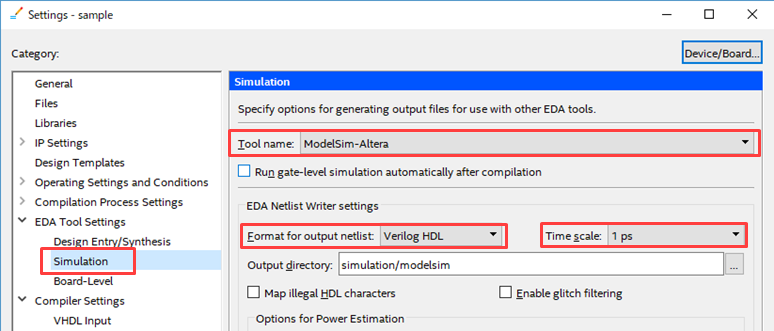
2. To generate the testbench, in the EDA Tool Settings select the tool to run the simulation, the language of the generated testbench, and the time scale.
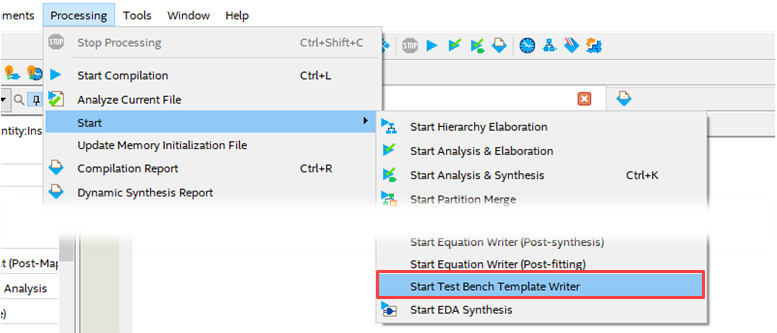
3. Run Processing > Start > Start Test Bench Template Writer.
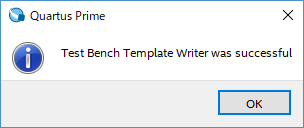
3. When complete, check the message window for "EDA Netlist Writer was successful."
Only this! !
It's faster than 3 minutes cooking! !
* The time required for logic synthesis and testbench generation depends on the customer's design.
The completed testbench file is in the directory /simulation/modelsim specified in 2.
Open it with the Quartus II text editor and show off the finished file.
Oh my God! The information necessary for the testbench is extracted from the top-level design and automatically reflected! !
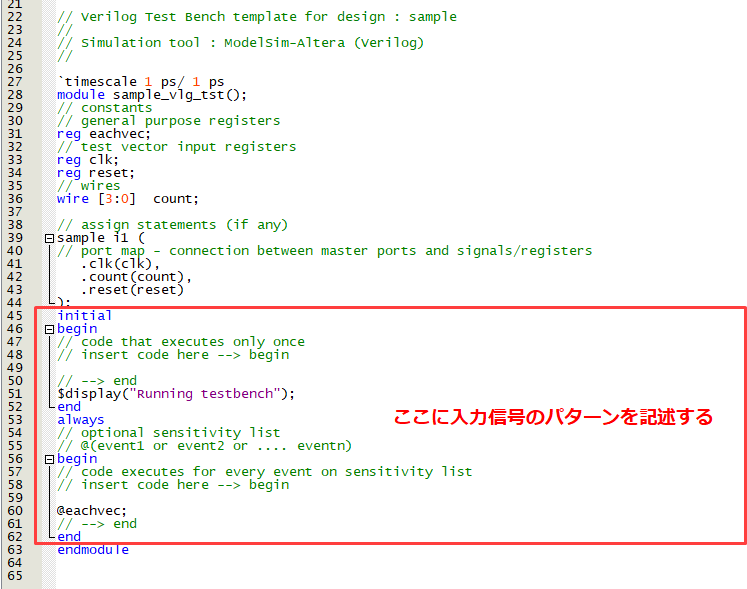
In this way, since the input and output of the design I made are connected to the port,
All you have to do is describe what the input signal should be.
In other words, it is a state of only inputting a test pattern.
This time it was only for a simple Verilog HDL file,
論理合成さえできていれば、もっと複雑なデザインのテストベンチも生成できる。
In other words, the bigger the design, the easier it is!
This time-saving function is perfect for engineers who are busy with deadlines!
これからも色んな機能を知って、仕事の効率化を追及していこう。
After all, I think of various ways to make things easier because I'm a "lazy person", so I'm always thinking about business improvement...
He was the boss who justified himself.