- Semiconductor BusinessHOME
- Products and Services of Macnica,Inc.
-
technical information

-
Events and Seminars
- Handling Manufacturer
- Support
- Inquiry
- Click here to purchase products
- Semiconductor business e-mail magazine registration


 Narrow down by specifying conditions
現在2263件がヒットしています。check

This time, we will briefly introduce the process from selecting the recommended power supply for each Altera FPGA to mass production in five steps.
Step 1: Download the Power Specification Estimator (EPE)
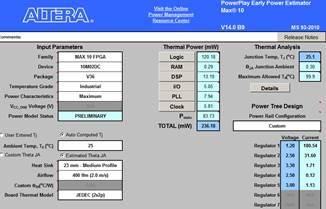
First, download the EPE (PowerPlay Early Power Estimator) from Altera's website, selecting the appropriate FPGA series and generation.
▼ EPE (Altera website)
https://www.altera.com/developers/epe-and-pa-power
Step 2: Enter FPGA Specifications into EPE
At EPE, the customer determines the FPGA conditions (Air Flow conditions, number of logics used, I/O, PLL, clock frequency, etc.).
* Of course, it is possible to select a device based on the current value, input voltage, and output voltage even at the stage where the FPGA conditions have not been determined.
Step 3: Consult with the contact person based on the EPE information
If you would like to discuss power supply circuits based on the power consumption calculated by EPE, please contact our sales representative and we will propose a power supply device that meets your specifications.
Step 4: Prototype and evaluate for mass production
The customer will conduct prototype production, device evaluation, and board evaluation, and our technical department in charge of power supply products will provide support for realization.
Step 5: Mass production
Start of mass production.
The above is the flow from rough power source selection to mass production.
In the following columns, we will introduce specific ways to use EPE, how to create other power trees, how to assemble sequences, etc.
Here's an overview of the μModule® used in the Altera evaluation board >>