product
Application for evaluation machine
Broadcast Network Switch Hands-on Seminar Lecture Report Part 1: Learning Network Fundamentals and the Characteristics of Broadcast Networks with White Box Switches - Network Fundamentals

Introduction
This article is based on a presentation given at the Broadcast Network Switch Hands-on Seminar held on February 10, 2026.
This guide provides a clear and easy-to-understand explanation of OcNOS, from its basic architecture to its command system, even for beginners.
If you would like to receive the presentation materials, please download them from the link below.
Network Fundamentals
How do networks communicate?
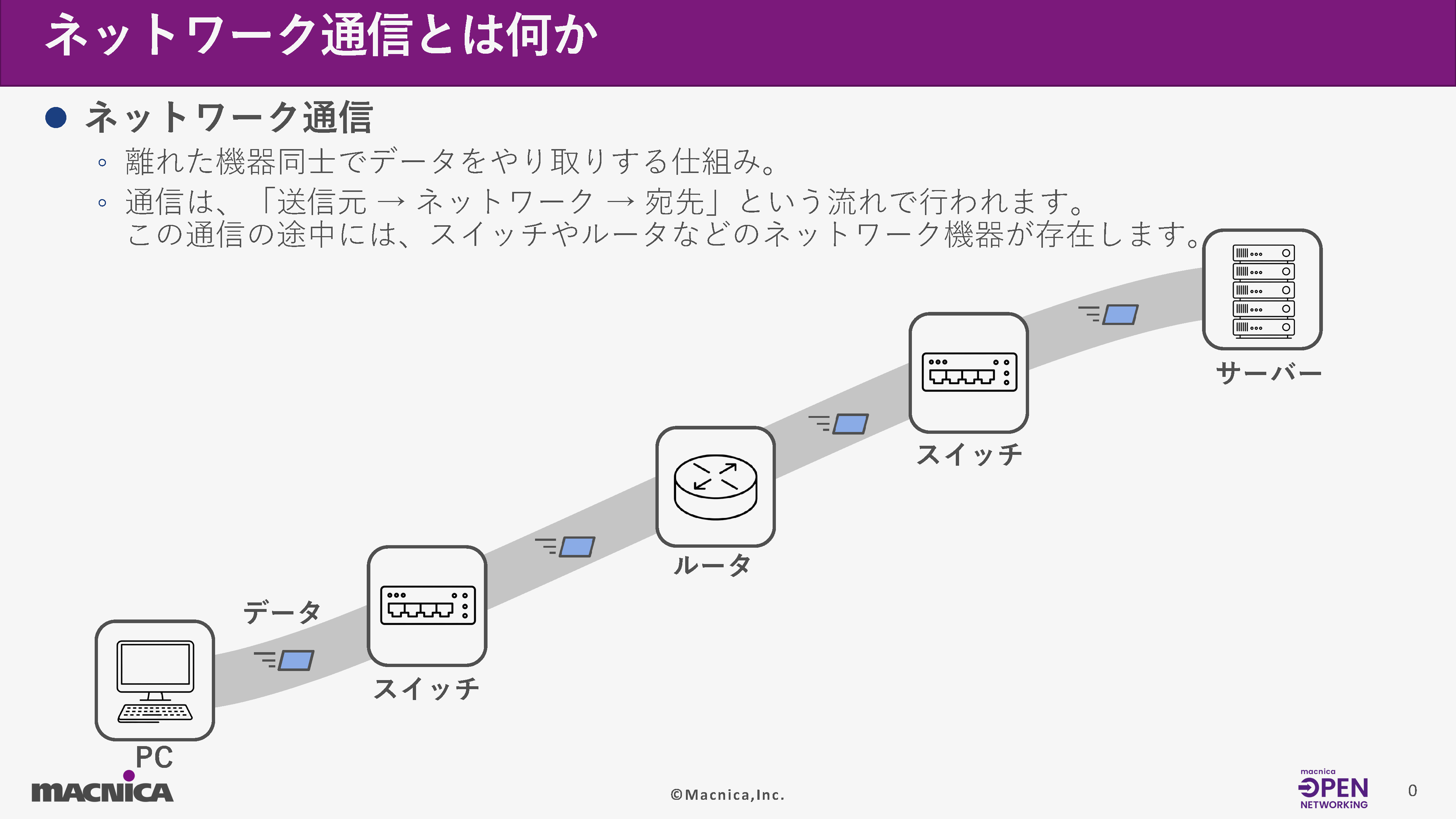
Network communication is a system that allows devices located far apart to exchange data.
Communication follows a flow of "source → network → destination". Network devices such as switches and routers are present along this communication path.
Two fundamental keywords within the network are the "OSI reference model" and "protocol."
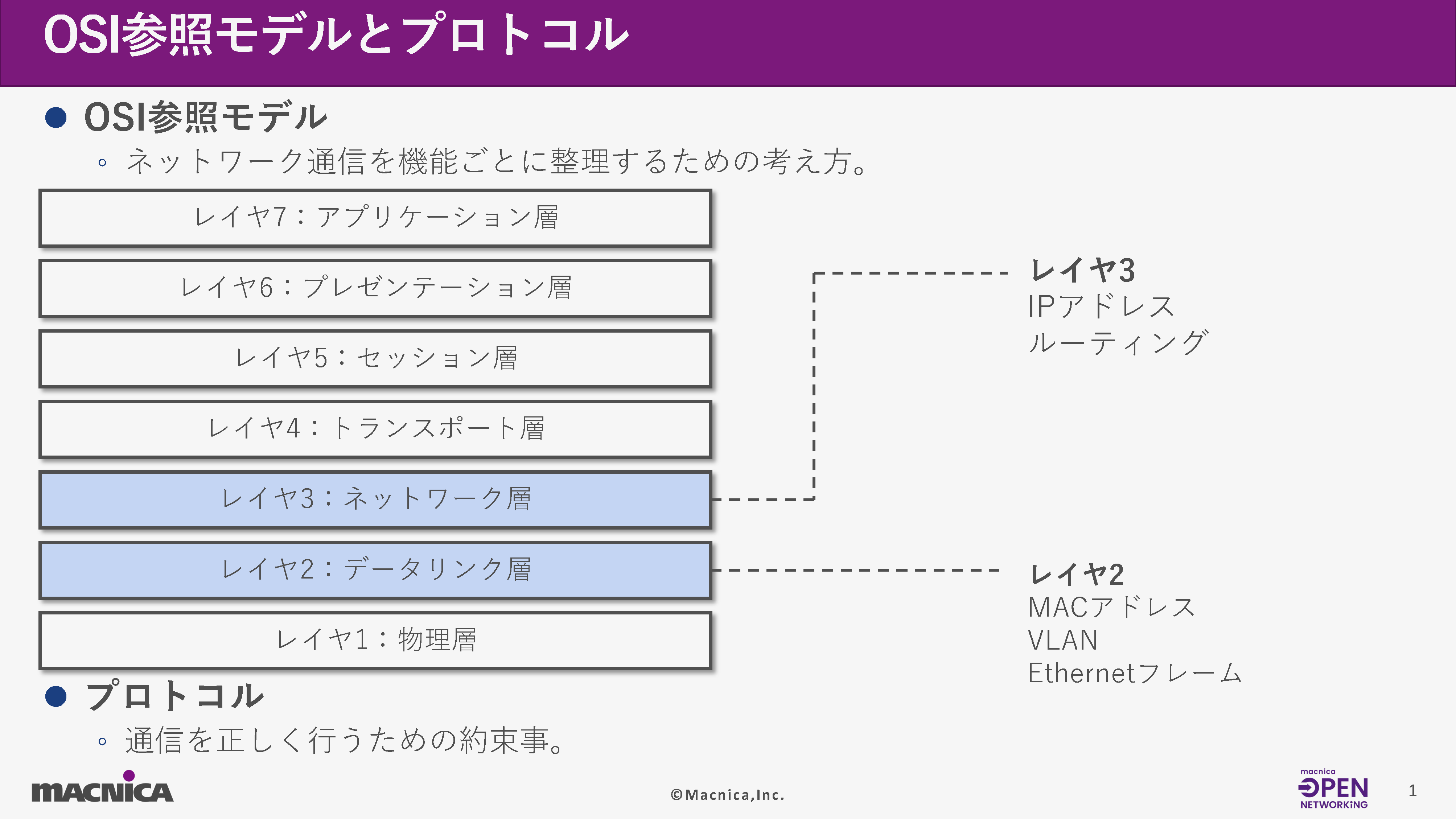
The OSI reference model is a framework for organizing network communication by function. Network communication is based on the OSI reference model. In this hands-on seminar, we mainly explained L2 and L3.
A protocol is a set of rules or agreements necessary for communication to function correctly.
Ethernet frame
Next, let's talk about Ethernet frames.
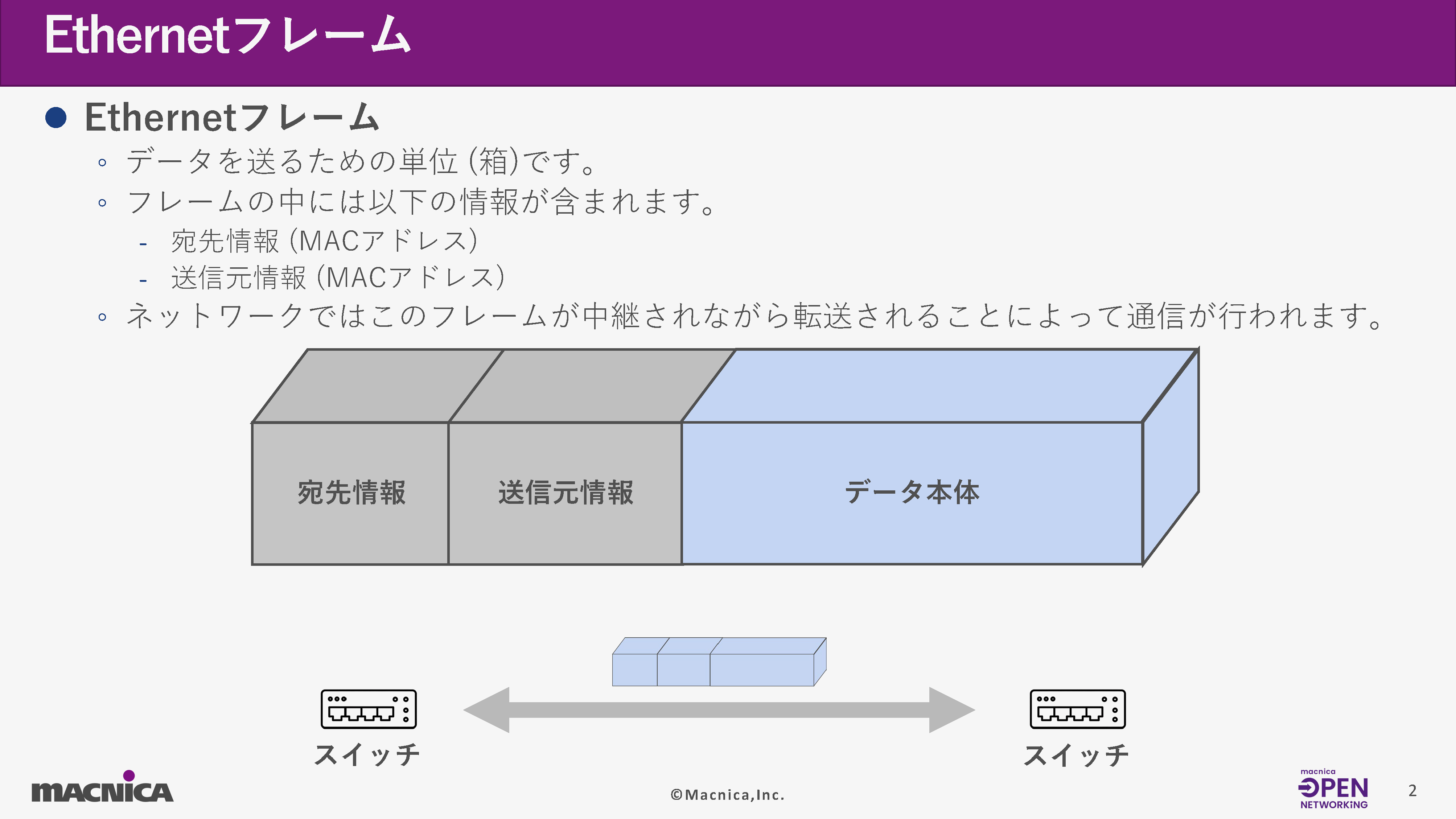
An Ethernet frame is a unit (a box) for transmitting data. A frame contains the following information:
• Destination information (MAC address)
- Sender information (MAC address)
In a network, communication takes place by relaying and transmitting these frames.
Operation of the virtual simulator GNS3, basic operation of OcNOS
OcNOS employs a hierarchical command mode.
Specifically, after logging in, the system is designed to transition to modes such as Executive Mode and Configure Mode, where you actually enter settings.
Furthermore, while Cisco switches and similar devices immediately apply settings after a command is entered, OcNOS requires the "commit" command to apply (activate) the entered settings, which means that even if there is a mistake in the entered command, you can revert to the previous state.
Next, let's look at commit-related commands.
commit related commands
commit: Apply the settings you have entered.
show transaction current: Displays the commands used before commit.
commit dry-run: Verifies whether the commands executed before commit can be committed without errors (they are not actually applied).
abort transaction: Deletes all commands before commit.
Confirmation command
show running-config: Check the running configuration.
show startup-config: Check the configuration file (startup-config) that is loaded at startup.
MAC Address Switching - VLAN
MAC address and switching
A MAC address is a unique number assigned to the NIC (Network Interface Card) of each device.
Specifically, this refers to the individual numbers assigned to the LAN cable ports on a laptop or the Wi-Fi interface.
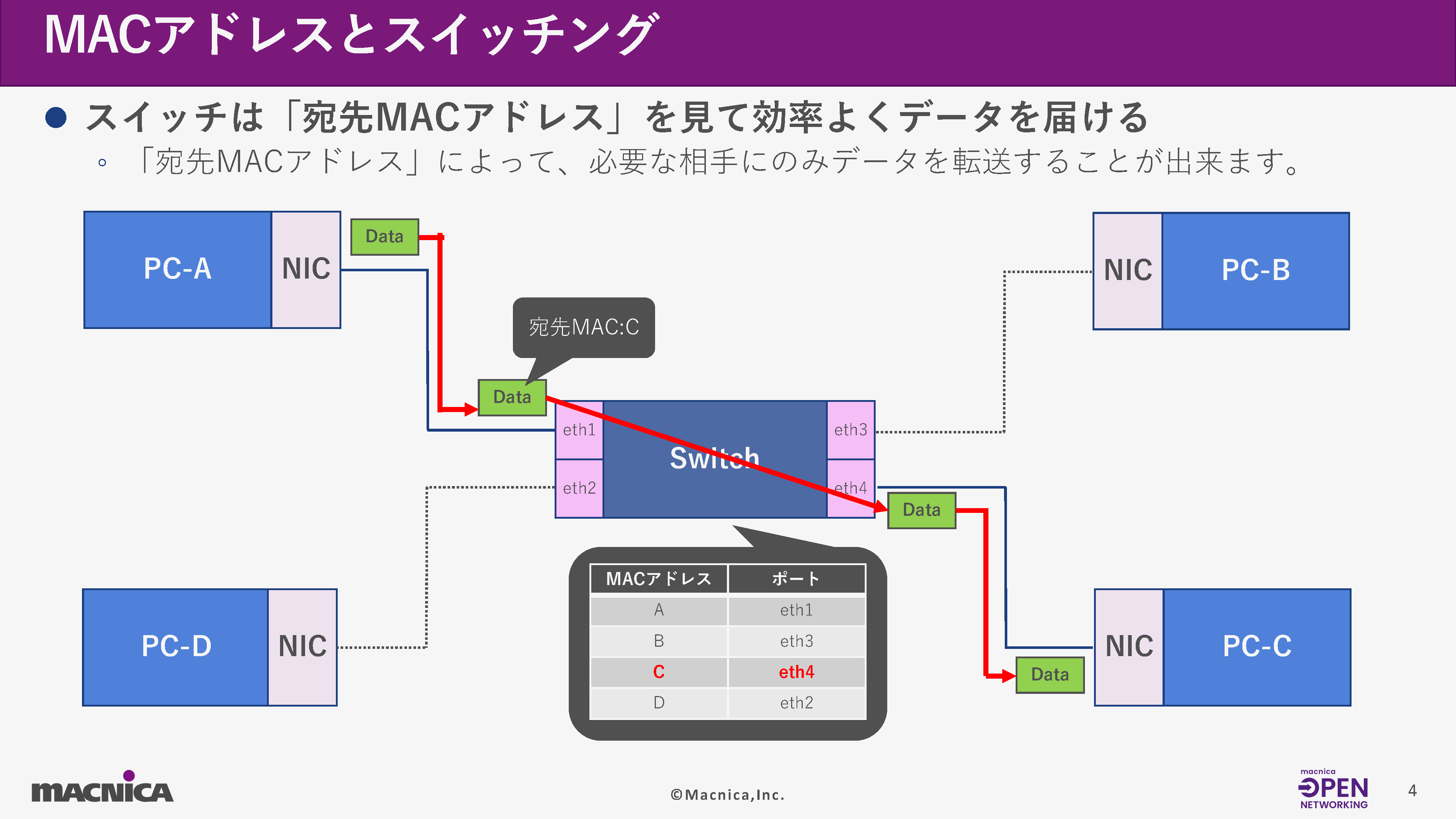
By using MAC addresses, switches can efficiently transfer data only to the necessary recipients. This communication method is called switching.
For example, in the diagram below, if you want to communicate from PC-A to PC-C, the switch that receives the data will refer to its internal database (FDB/MAC address table) to determine that if the destination MAC address of the transmitted data is "C", it will forward it to port "eth4". This mechanism ensures that the data is delivered efficiently to the intended recipient.
VLAN (Virtual LAN)
Next, let's talk about VLANs (Virtual LANs).
VLAN is a technology that separates "networks" using a single switch.
If two devices are on different VLANs, they are considered to be on different networks, and even if their MAC addresses are known, they cannot communicate with each other.
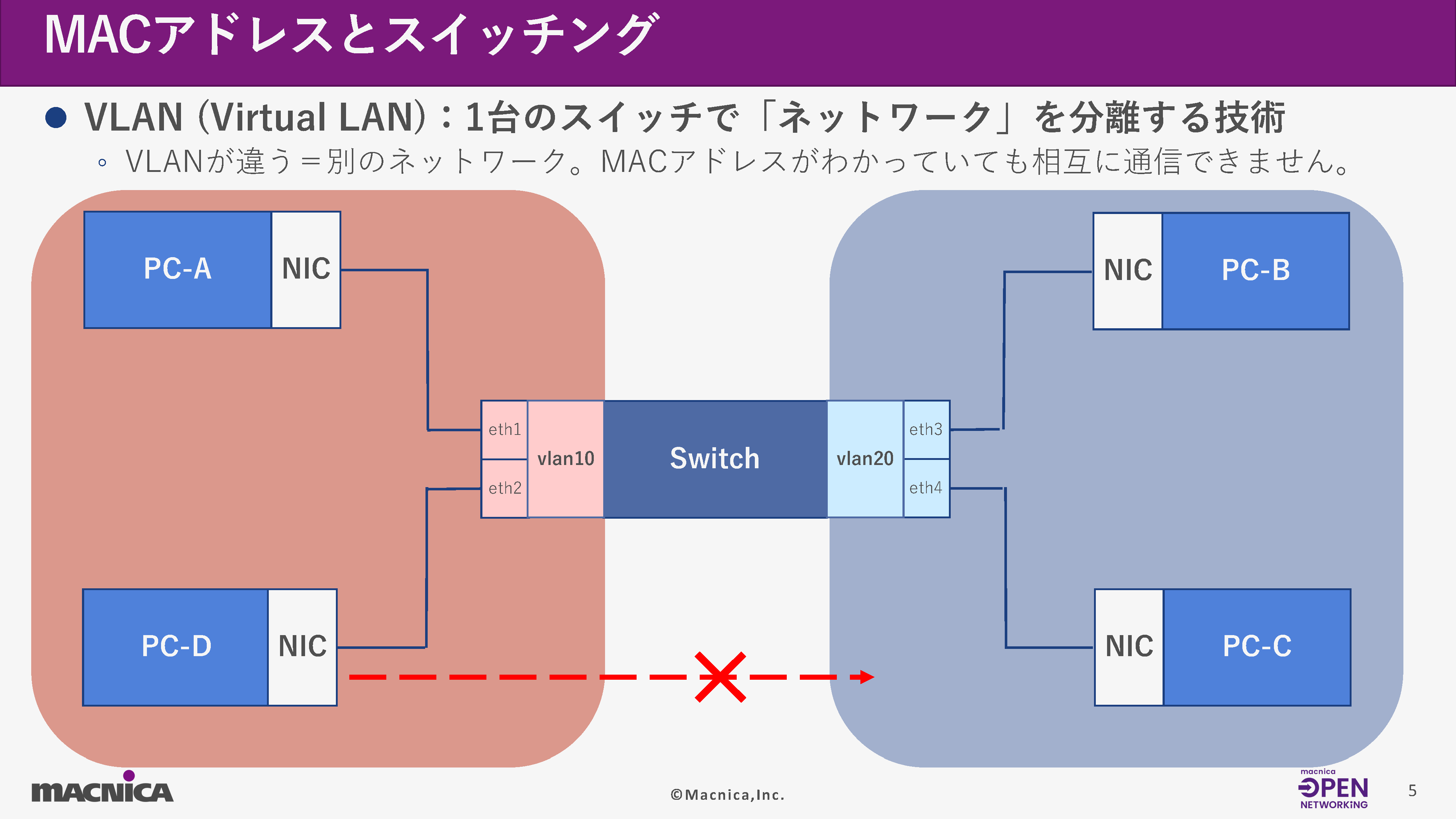
From here, we will introduce the commands for configuring and verifying VLANs.
*Prerequisite: Create a bridge using Spanning Tree Protocol (STP)
Bridge creation
(config)# bridge <bridge group ID> protocol ieee vlan-bridge
-<bridge group ID> specifies a number to be used within the range of 1-32.
- The protocol is specified as IEEE 802.1d Spanning Tree Protocol.
-vlan-bridge: Specifies "VLAN-aware bridge (VLAN-enabled bridge)".
Spantile Tree disabled
(config)#no bridge <bridge group ID> spanning-tree enable bridge-forward
Create a VLAN
(config)#vlan database
- Switch to VLAN configuration mode
(config-vlan)#vlan <VLAN range> bridge <bridge group ID> state enable
- Create a VLAN with <VLAN range>
-<VLAN range> can also be specified consecutively using "-" (hyphen) or "", (comma).
VLAN port assignment (access ports only)
(config)#interface IFNAME
- Switch to Interface mode
(config-if)#switchport
- Set the port to switch mode (L2)
(config-if)#bridge-group
- Assign the port to the bridge specified by
(config-if)#switchport mode access
-access: Configure the switch port as an untagged port {access port (port for port-based VLAN)}.
(config-if)#switchport access vlan <VLAN ID>
- Assign the access port to the VLAN specified by <VLAN ID>.
From here on, these are commands used on the PC used for testing on GNS3.
IP settings and verification commands on a virtual PC for communication verification.
# ip address add <IP Address>/<Mask> dev <IFNAME>
-<IP Address> specifies the IP address to be assigned.
-<Mask> specifies the mask to be assigned.
-<IFNAME> specifies the interface to be configured.
# ip link set up dev <IFNAME>
-<IFNAME> specifies the interface to be configured.
# ip address
- Displays the configured IP address and link status.
next, VLAN This is a confirmation command.
VLAN (Bridge creation)
Configuration command: Create bridge 1, and then create VLAN 5 on bridge 1.
OcNOS#configure terminal
OcNOS(config)#bridge 1 protocol ieee vlan-bridge
OcNOS(config)#no bridge 1 spanning-tree enable bridge-forward
OcNOS(config)#vlan database
OcNOS(config-vlan)#vlan 5 bridge 1 state enable
OcNOS(config-vlan)#exit
OcNOS(config)#commit
Verification command: show vlan brief
OcNOS#show vlan brief
Bridge  VLAN ID     Name         State   H/W Status             Member ports
                                                                     (u)-Untagged, (t)-Tagged
======= ======= ================ ======= ========== ==========================
1         1        default              ACTIVE  Success
1         5        VLAN0005            ACTIVE  Success
VLAN (VLAN port assignment settings and verification)
Configuration command:
Create bridge 1, and then create VLAN 5 on bridge 1. {See: VLAN (Bridge Creation)}
Configure the interface at L2 and assign the interface to bridge 1.
OcNOS#configure terminal
OcNOS(config)#interface eth1
OcNOS(config-if)#switchport
OcNOS(config-if)#bridge-group 1
Configure the interface to the access port and assign it to the VLAN.
OcNOS(config-if)#switchport mode access
OcNOS(config-if)#switchport access vlan 5
OcNOS(config-if)#exit
OcNOS(config)#commit
Verification command: show vlan brief
OcNOS#show vlan brief
Bridge  VLAN ID     Name         State   H/W Status      Member ports
                                                     (u)-Untagged, (t)-Tagged
======= ======= ================ ======= ========== ==========================
1       1       default          ACTIVE  Success
1       5       VLAN0005         ACTIVE  Success    eth1(u)
Next, here are the commands used to verify communication between PCs using a dedicated PC for communication verification.
Configuration command
IP address configuration: - ip address add <IP Address>/<Mask> dev <IFNAME>
Link-up configuration: -ip link set up dev <IFNAME>
localhost:~# ip address add 192.168.0.1/24 dev eth0
Localhost:~# ip link set up dev eth0
Verification command: ip address
localhost:~# ip address
1: lo: <LOOPBACK> mtu 65536 qdisc noop state DOWN qlen 1000
    link/loopback 00:00:00:00:00:00 brd 00:00:00:00:00:00
2: eth0: <BROADCAST,MULTICAST,UP,LOWER_UP> mtu 1500 qdisc pfifo_fast state UP qlen 1000
    link/ether 0c:ee:bc:a7:00:00 brd ff:ff:ff:ff:ff:ff
    inet 192.168.0.1/24 scope global eth0
       valid_lft forever preferred_lft forever
    inet6 fe80::eee:bcff:fea7:0/64 scope link
       valid_lft forever preferred_lft forever
Verification command: ping <IP address>
Check if ping connectivity is possible to the specified IP address.
localhost:~# ping 192.168.0.2
PING 192.168.0.2 (192.168.0.2): 56 data bytes
64 bytes from 192.168.0.2: seq=0 ttl=64 time=5.048 ms
64 bytes from 192.168.0.2: seq=1 ttl=64 time=4.825 ms
64 bytes from 192.168.0.2: seq=2 ttl=64 time=4.975 ms
64 bytes from 192.168.0.2: seq=3 ttl=64 time=4.724 ms
^C
--- 192.168.0.2 ping statistics ---
4 packets transmitted, 4 packets received, 0% packet loss
round-trip min/avg/max = 4.724/4.893/5.048 ms
IP address, Static Routing, Verification command
About IP addresses and static routing
Next, we will explain IP addresses and static routing.
An IP address is like a network address. Devices with the same network address can communicate directly with each other, but devices with different network addresses belong to different networks and cannot communicate directly.
Routing, using devices such as "routers" and "Layer 3 (L3) switches," acts as a bridge to connect these different networks.
These devices have a destination table called a routing table, which, when data arrives, looks at the destination IP address to determine which network to forward it to.
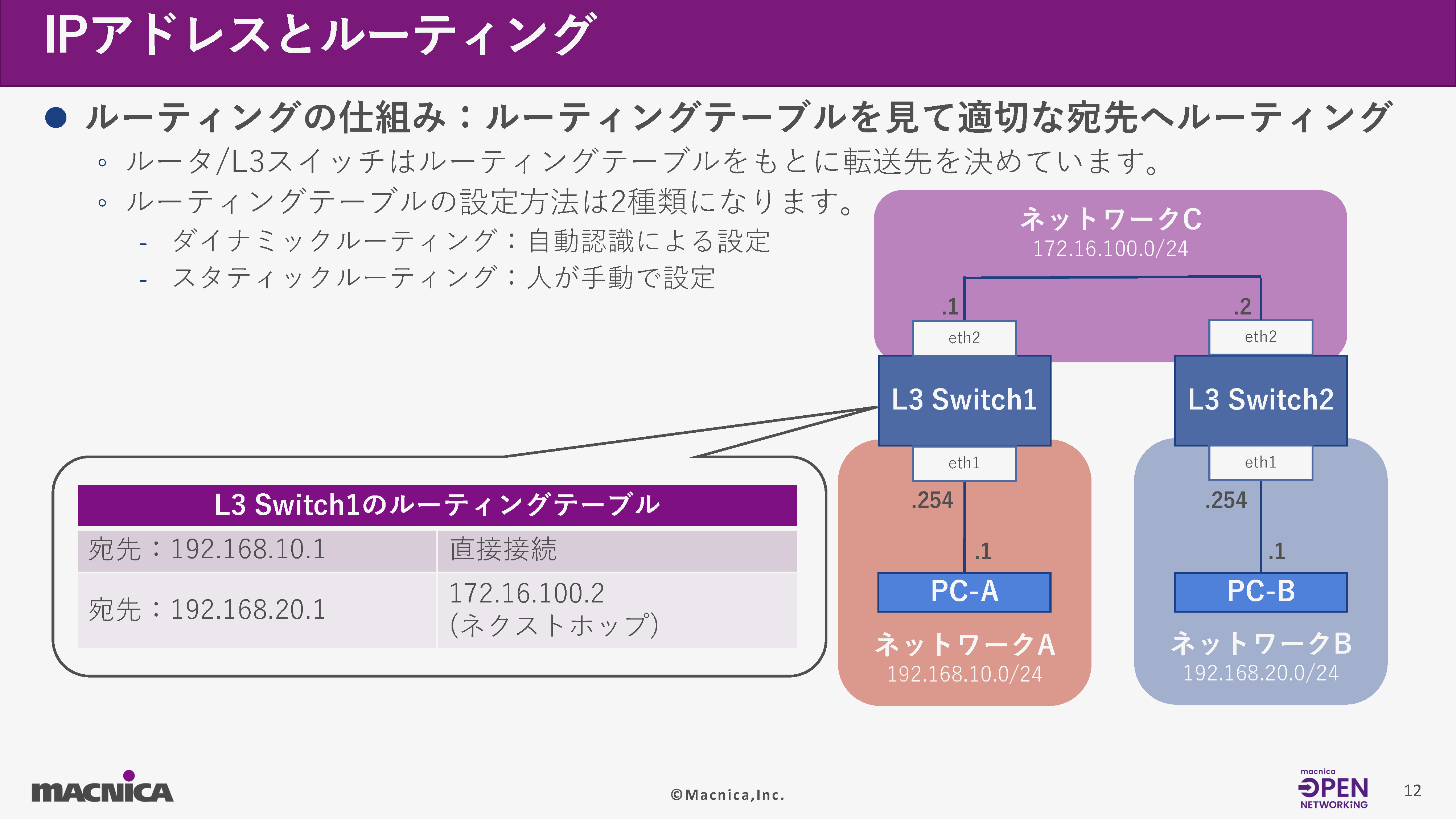
IP address configuration and verification command (show ip interface)
next, IP This article introduces the address configuration and verification command (show ip interface).
IP address for VLAN interface
(config)# interface vlan<bridge group ID>. <VLAN ID>
- Switch to Interface mode
-<bridge group ID> specifies the bridge you created.
-<VLAN ID> specifies the target VLAN.
(config-if)# ip address <IP Address>/<Mask>
-<IP Address> specifies the IP address to be assigned.
-<Mask> specifies the mask to be assigned.
Static Route
(config)# ip route <IP Address>/<Mask> <Gateway>
-<IP Address> specifies the IP address to be routed.
-<Mask> specifies the mask to be routed.
-<Gateway> specifies the IP address to be used as the gateway.
IP/GW configuration commands on a virtual PC for communication verification
# ip address add <IP Address>/<Mask> dev <IFNAME>
- <IP Address> specifies the IP address to be assigned.
- <Mask> specifies the mask to be assigned.
- <IFNAME> specifies the interface to be configured.
# ip link set up dev <IFNAME>
-<IFNAME> specifies the interface to be configured.
# ip route add default via <Gateway>
- Specify the default gateway
-<Gateway> specifies the IP address to be used as the gateway.
IPAddress settings (VLANinterface)
Configuration command: Set the IP address 192.168.0.1 to the VLAN interface.
OcNOS#configure terminal
OcNOS(config)#interface vlan1.5
OcNOS(config-if)#ip address 192.168.0.1/24
OcNOS(config-exit)#exit
OcNOS(config)#commit
OcNOS#show ip interface vlan1.5 brief
'*' - address is assigned by dhcp client
Interface            IP-Address      Admin-Status          Link-Status
vlan1.5              192.168.0.1     up                    up
Next are the commands for configuring and verifying routing tables (static routes).
In the route information displayed by the confirmation command, lines beginning with "C" are direct connect routes, while lines beginning with "S" are static routes (manually entered).
Configuration command: Set up a static route that sends packets destined for 192.168.1.0/24 to 192.168.0.2.
OcNOS#configure terminal
OcNOS(config)#ip route 192.168.1.0/24 192.168.0.2
OcNOS(config)#commit
OcNOS#show ip route
Codes: K - kernel, C - connected, S - static, R - RIP, B - BGP
O - OSPF, IA - OSPF inter area
N1 - OSPF NSSA external type 1, N2 - OSPF NSSA external type 2
E1 - OSPF external type 1, E2 - OSPF external type 2
i - IS-IS, L1 - IS-IS level-1, L2 - IS-IS level-2,
ia - IS-IS inter area, E - EVPN,
v - vrf leaked
* - candidate default
IP Route Table for VRF "default"
C 127.0.0.0/8 is directly connected, lo, installed 03:07:28, last update 03:07:28 ago
C 192.168.0.0/24 is directly connected, vlan1.5, installed 00:48:43, last update 00:48:43 ago
S 192.168.1.0/24 [1/0] via 192.168.0.2, vlan1.5, installed 00:48:43, last update 00:48:43 ago
Gateway of last resort is not setIP setting command on a virtual PC used for communication verification
IP address settings
-ip address add
- ip link set up dev
Verification command: ip address
localhost:~# ip address
1: lo: <LOOPBACK> mtu 65536 qdisc noop state DOWN qlen 1000
    link/loopback 00:00:00:00:00:00 brd 00:00:00:00:00:00
2: eth0: <BROADCAST,MULTICAST,UP,LOWER_UP> mtu 1500 qdisc pfifo_fast state UP qlen 1000
    link/ether 0c:ee:bc:a7:00:00 brd ff:ff:ff:ff:ff:ff
    inet 192.168.0.1/24 scope global eth0
       valid_lft forever preferred_lft forever
    inet6 fe80::eee:bcff:fea7:0/64 scope link
       valid_lft forever preferred_lft forever
Gateway settings on a virtual PC for communication verification
Specify 192.168.0.2 as the default gateway.
localhost:~# ip route add default via 192.168.0.2Verification command: ip route
localhost:~# ip route
default via 192.168.0.2 dev eth0
192.168.0.0/24 dev eth0 scope link  src 192.168.0.1
Summary
This article systematically introduces the fundamentals of network communication, the operation of the virtual simulator GNS3, and basic OcNOS operations in a way that is easy for beginners to understand.
In the next article, Part 2, we will explain the features of broadcast networks in detail. We plan to introduce essential broadcast network functions such as multicast and PTP.
If you're looking to acquire knowledge that will be useful for building and operating systems, please be sure to check out Part 2 as well.
Related information



Click here for list of materials

In addition to introducing products handled by Macnica,
We publish materials related to open networking, such as BGP cross network automatic construction files and network operation test evaluation reports.
Click here for details
Click here for the manufacturer's page.

Broadcom, Inc.
We are an industry leader in both semiconductor solutions and infrastructure software, and provide products in a wide range of areas including data centers, networks, broadband, wireless communications, storage, and security.

Edgecore Networks
We continue to be a pioneer in open networking by developing and selling products related to OpenNetworking/white Box switches.

IP Infusion
As a market leader among open networking providers, we provide reliable network solutions to over 600 customers, including carriers, service providers, and data centers.
Inquiry/Document request
In charge of Macnica Edgecore Networks
- TEL:045-470-9831
- E-mail:projectmonstar@macnica.co.jp
Weekdays: 9:00-17:00