- Semiconductor BusinessHOME
- Products and Services of Macnica,Inc.
-
technical information

-
Events and Seminars
- Handling Manufacturer
- Support
- Inquiry
- Click here to purchase products
- Semiconductor business e-mail magazine registration


 Narrow down by specifying conditions
There are currently 4342 results.
Altera: "The code cannot continue running because MSVCR120.dll is missing. Reinstalling the program may fix this problem." is displayed and the tool cannot be started.
Category: Tool
Tools: Questa- Altera® FPGA Edition
device:-
If this message appears when starting Questa - Altera® FPGA Edition or ModelSim* - Altera® FPGA Edition,
The msvcr120.dll (Microsoft Visual C++ Redistributable) file may be corrupted or may be a different version than required to launch the tool.
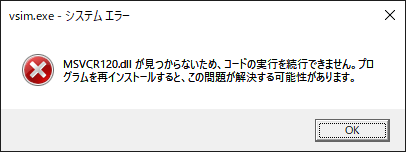
Please follow the steps below to repair msvcr120.dll.
1) Download the "Visual C++ Redistributable Package for Visual Studio 2013" published by Microsoft from the link below.
Visual C++ Redistributable Packages for Visual Studio 2013
* Download vcredist_x64.exe (for 64bit).
2) Run the downloaded file and install.
3) Restart your PC.
 Experienced FAE
Free consultation is available.
From specific product specifications to parts selection, the Company FAE will answer your technical concerns free of charge. Please feel free to contact us.