- Semiconductor BusinessHOME
- Products and Services of Macnica,Inc.
-
technical information

-
Events and Seminars
- Handling Manufacturer
- Support
- Inquiry
- Click here to purchase products
- Semiconductor business e-mail magazine registration


 Narrow down by specifying conditions
現在2240件がヒットしています。check

Implementing Large-Scale Language Models (LLMs) on Qualcomm Edge Devices
With the recent boom in generative AI, there has been a surge in requests to run large-scale language models (LLMs) on edge devices.
This article explains how to implement Meta's Llama 3.1-8B model on Qualcomm's embedded SoC "QCS8550" and run a text inference app on an edge device.
Qualcommhasreleased a platform forAI developers calledAI Hub, which implements a mechanism to optimizefamous large-scale language models such asLlama into models that can be executed on QualcommSoCs. Because developers can use models that Qualcommhas already verified to work, the implementation hurdle is lower than starting from scratch.
This time, we will implement the Llama3.1-8B model onthe Qualcomm QCS8550 SoCand run a text inference app.
Implementation flow
1.Request model permission fromHugging Faceto use the Llama weight file
2. Export the Lmama3.1-8Bmodel(Context Binary)usingQualcomm AI Hub Models
3. Prepare the libraries required to usethe LLM inference app ofQualcomm Genie SDK (SDK forgenerativeAI)
4.Runthe LLM inference app on Qualcomm 's edge device(QCS8550)
Equipment used
・Ubuntu PC (SL2environment can also be used)
・RB5 Gen2Development Kit (with QCS8550)
Implementation Steps
Preparation for using the Llama3.1-8B model
Request permission to use Llama3.1-8B model
This time, we will use the Hugging FaceLlamamodelas a base andoptimize it for on-device inference usingAI Hub.
To usethe Llama model family, you must first request permission onthe Hugging Facewebsite.
If you are making a request for the first time,This page from Thank you.
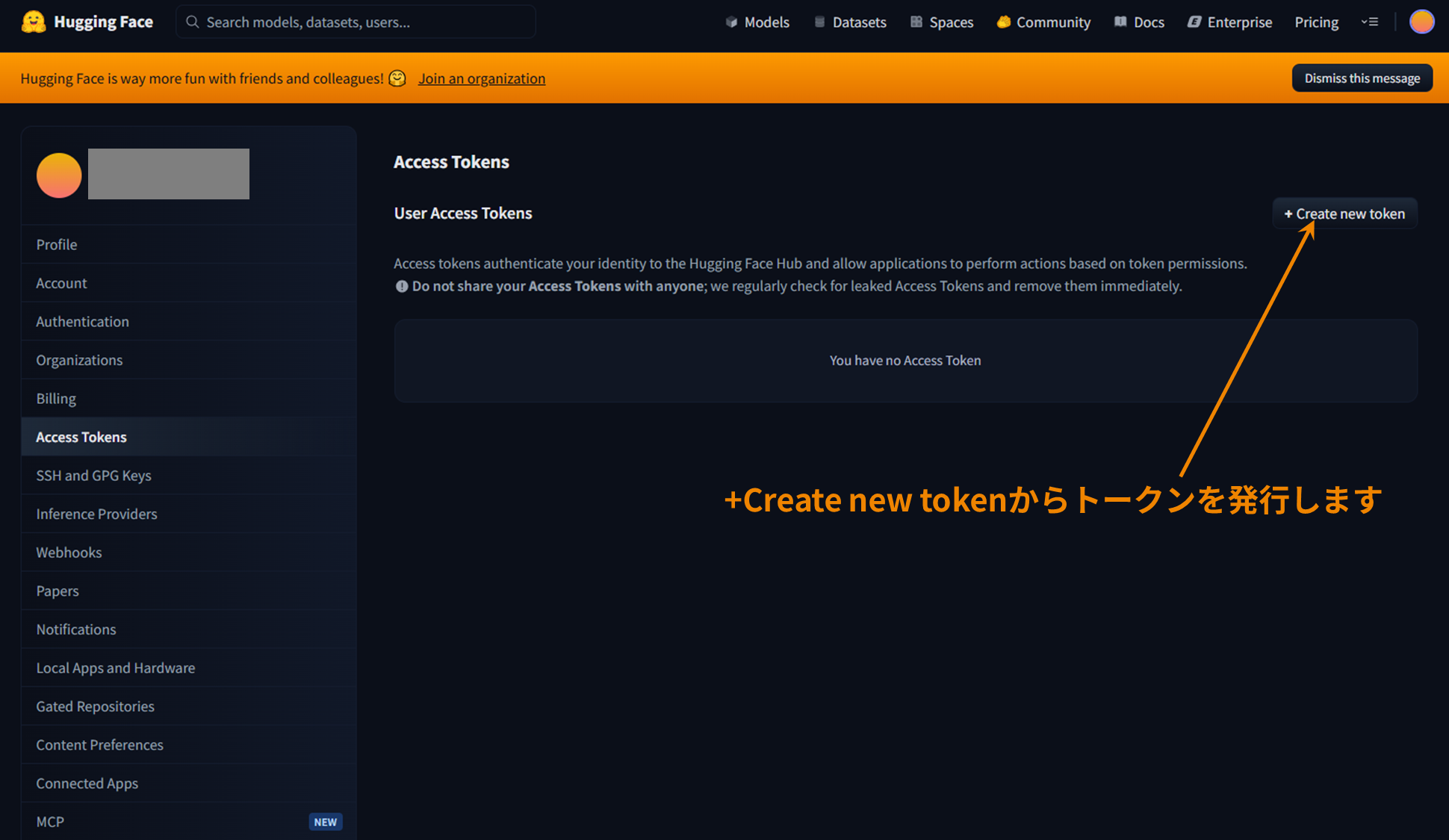
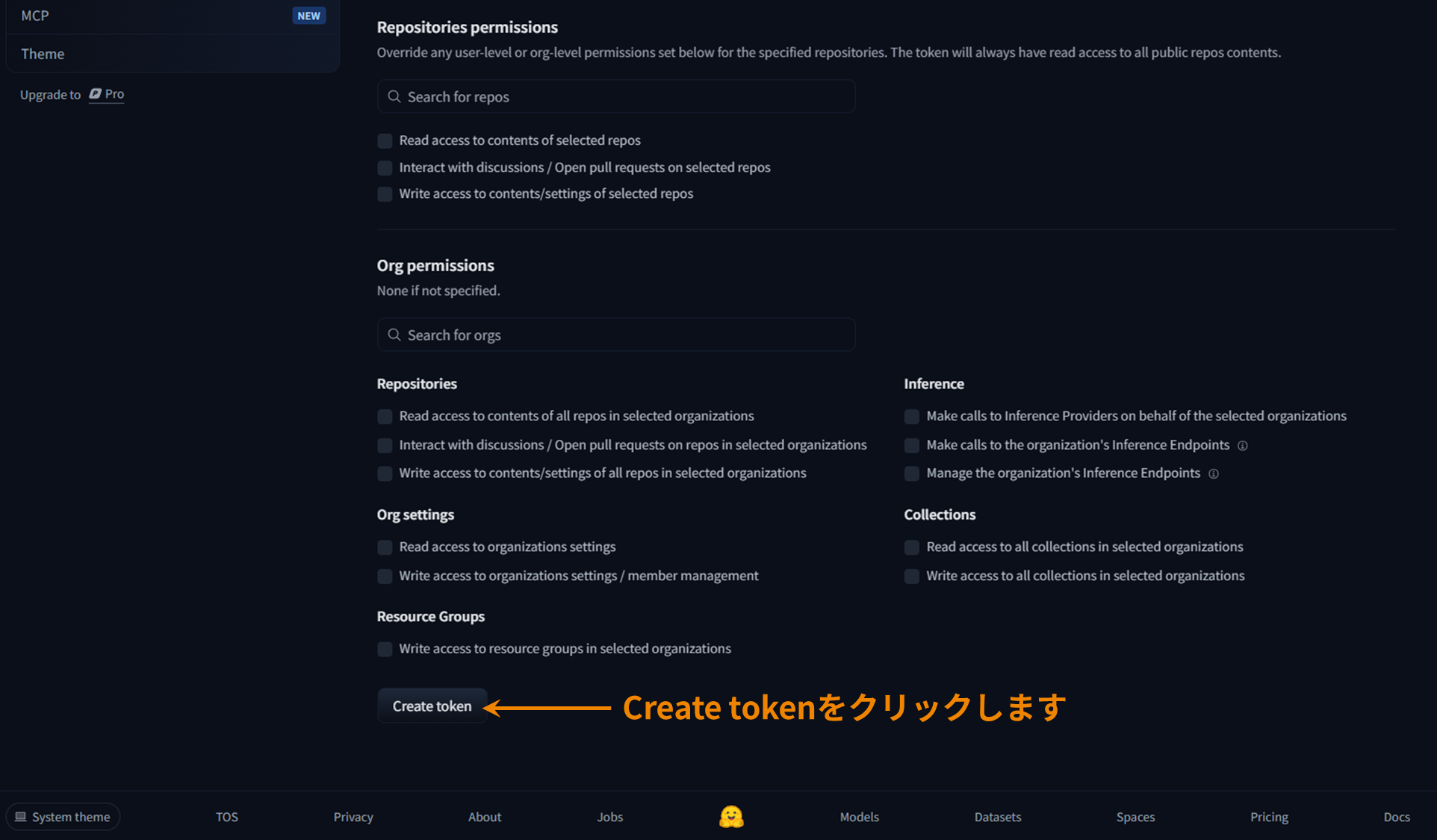
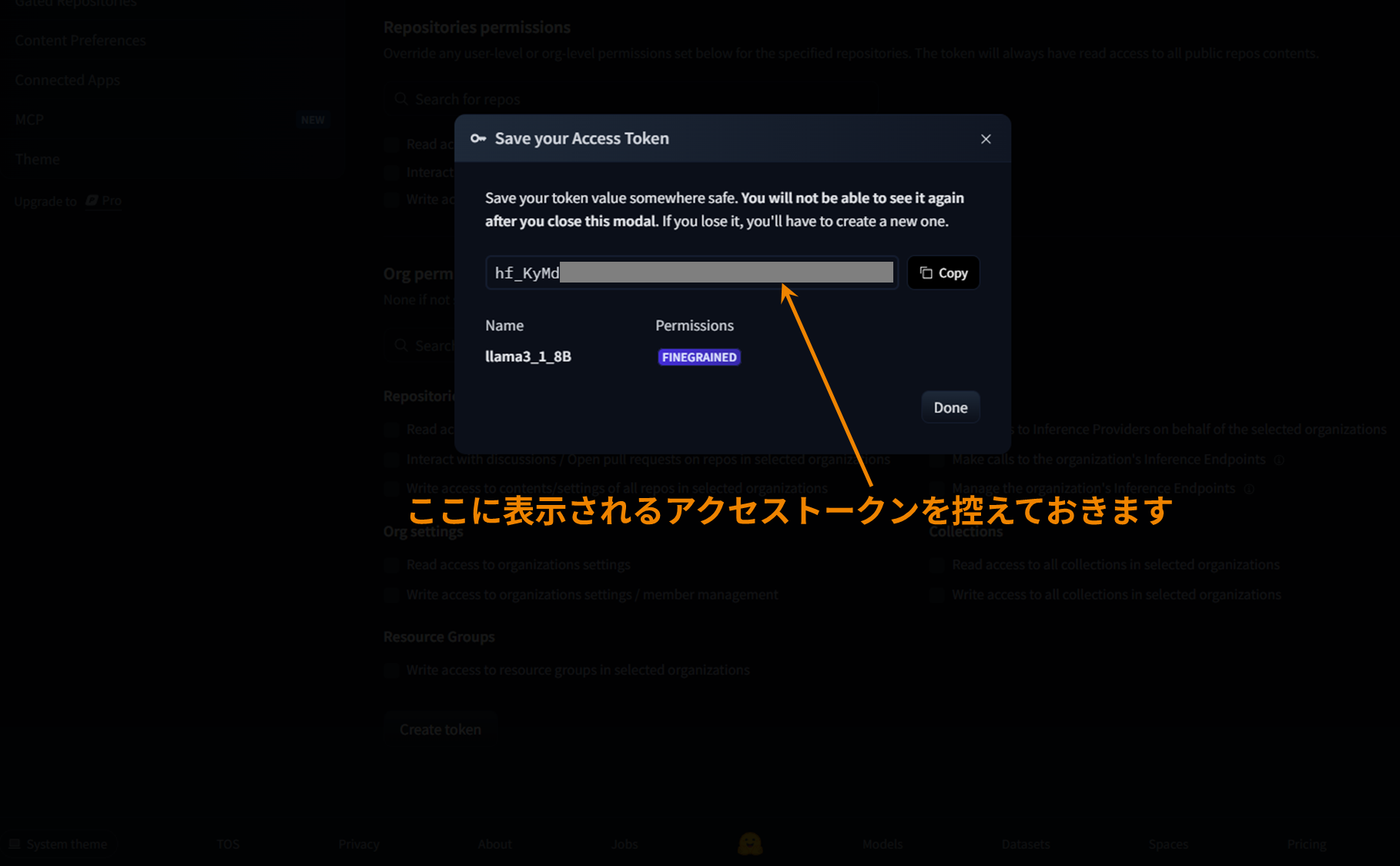
Issuing a Hugging Face access token
After authorization,you will need to set theHugging Face access token when accessing the model fromthe CLI.
Create an access token on this page in advance and make a note of it.
Host PC environment construction
Download Qualcomm QAIRT SDK (v2.29 or later recommended)
SDKteethQualcomm Package ManagerYou can download it at hostPCofUbuntuEnvironmentalSDKPlace the package.
The demo on this pageusesv 2.33.0.250327.
(supplement)
Qualcomm Package Manager How to use This page Please refer to ((Link to manufacturer's page)
Create a virtual environment (venv)
test@SDTEST:~$ python3 -m venv llama3_1_8B
test@SDTEST:~$ source llama3_1_8B/bin/activate
(llama3_1_8B) test@SDTEST:~$
Configure the QAIRT SDK environment
(llama3_1_8B) test@SDTEST:~$ source ~/qairtsdk/qairt/2.33.0.250327/bin/envsetup.sh
[INFO] AISW SDK environment set
[INFO] QNN_SDK_ROOT: /home/test/qairtsdk/qairt/2.33.0.250327
[INFO] SNPE_ROOT: /home/test/qairtsdk/qairt/2.33.0.250327
Install the packages required for the Llama3.1-8B model
You can install all the required packages at once by executing the following command.
(llama3_1_8B) test@SDTEST:~$ pip install "qai-hub-models[llama-v3-1-8b-instruct]" torch==2.4.1 torchvision==0.19.1 aimet-onnx==2.6.0Verifying that Git is installed
(llama3_1_8B) test@SDTEST:~$ git --version
git version 2.34.1
Checking memory capacity
You must haveat least80GBof memory(RAM Mem+Swap). If you do not have enough memory, an error will occur during the model export.
(llama3_1_8B) test@SDTEST:~$ free -h
                    total        used        free      shared  buff/cache   available
Mem:            27Gi       528Mi        16Gi       1.0Mi        10Gi        26Gi
Swap:           60Gi        74Mi        59Gi
Installing Hugging Face Hub
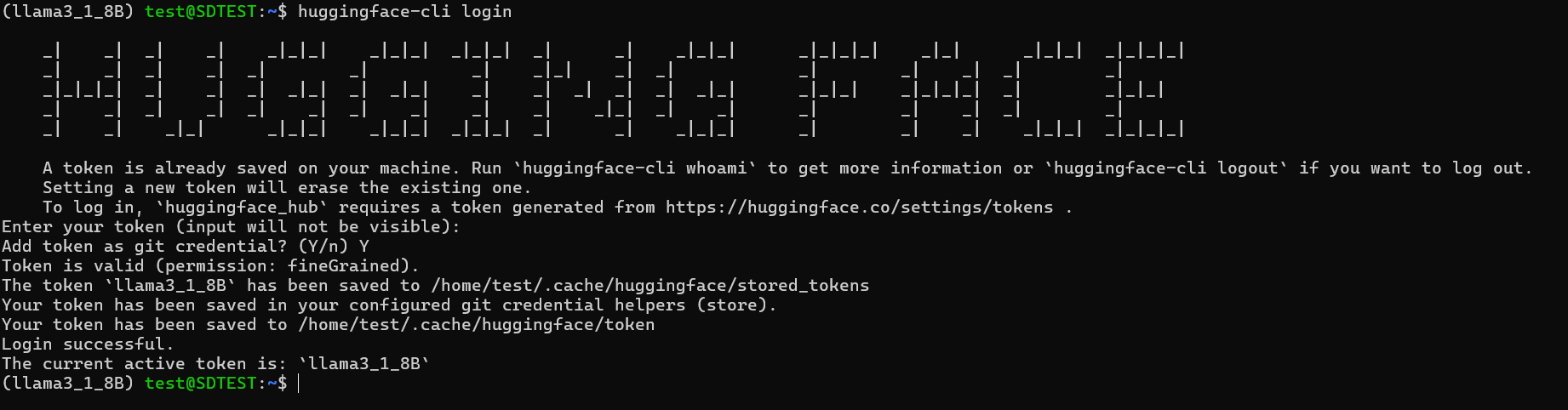
(llama3_1_8B) test@SDTEST:~$ pip install -U "huggingface_hub[cli]"Log in to Hugging Face CLI
(llama3_1_8B) test@SDTEST:~$ huggingface-cli login # Enter your token (input will not be visible): という表示が出るのでここに先ほど作成したアクセストークンを入力(ペースト可)しますIf the login is successful, you will see the output shown below.
Exporting the Llama3.1-8B model
Run the command to export AI Hub Models
This command will automatically perform the following steps:
・Download weight data for theLlama3.1-8B model fromHugging Face
・Uploading model datatoAI Hub and compiling it
・ Downloadthe compiledContext Binary
(llama3_1_8B) $ python -m qai_hub_models.models.llama_v3_1_8b_instruct.export --device "QCS8550 (Proxy)" --skip-inferencing --skip-profiling --output-dir genie_bundleWhen execution is complete, a Context Binary file corresponding to the modelwill be generated in the directory set in"output_dir" (genie_bundlein this case). Taking into account the memory size required for execution on the edge device, the modelis divided intofive during the conversion process, so fiveContext Binariesaregenerated.

Running LLM apps on edge devices
The aforementionedContext Binary, text inference app, various libraries, and configuration files are transferred to the edge device, and the app is executed.
The files to be transferred to the edge device are as follows.Please contact us for information on how to obtain files other thanthe Context Binary mentioned above.
[Context Binary (Model)]
llama_v3_1_8b_instruct_part_1_of_5.bin
llama_v3_1_8b_instruct_part_2_of_5.bin
llama_v3_1_8b_instruct_part_3_of_5.bin
llama_v3_1_8b_instruct_part_4_of_5.bin
llama_v3_1_8b_instruct_part_5_of_5.bin
[Text inference app]
genie-t2t-run
[Tokenizer]
tokenizer.json
[Configuration file]
genie_config.json
htp_backend_ext_config.json
[Library]
libGenie.so
libQnnHtp.so
libQnnHtpNetRunExtensions.so
libQnnHtpPrepare.so
libQnnHtpV73Skel.so
libQnnHtpV73Stub.so
libQnnSystem.so
Once the file transfer is complete, run the app.
genie-t2t-run is a text inference app included in Qualcomm'sSDKthat receives a configuration file and input prompts and returns a response.
LLM has different formats depending on the model, andto get meaningful output from each model, it is important to use the appropriate prompt format for that model. This can be found in the Hugging Face repository for each model. For example, for the Llama3.1-8B model we will use this time, enter the prompt in the following format:
■ Prompt format
<|begin_of_text|><|start_header_id|>system<|end_header_id|>
You are a helpful assistant.<|eot_id|><|start_header_id|>user<|end_header_id|>
What is the capital of Japan?<|eot_id|><|start_header_id|>assistant<|end_header_id|>
Now that we're ready, let's run the inference app. We'll show you how to run it in the video.
in conclusion
In this article, we implemented Meta's Llama 3.1-8B model on Qualcomm's embedded SoC "QCS8550" and introduced the steps to running a text inference app on an edge device. We hope you have seen how using Qualcomm AI Hub efficiently converts and optimizes large-scale language models obtained from Hugging Face, significantly lowering the hurdles compared to implementing them from scratch.
Going forward, we expect to see challenges in more advanced usage scenarios, such as further improvements in inference performance, on-device real-time processing, and multi-model operation.
Implementing AI on the edge brings benefits such as reduced communication latency and privacy protection, and its application is expanding in various industrial fields. We hopeyou will use it for your embedded development using Qualcomm processors.
Inquiry
If you have any questions about the contents of this page or would like detailed product information, please contact us here.