- Semiconductor BusinessHOME
- Products and Services of Macnica,Inc.
-
technical information

-
Events and Seminars
- Handling Manufacturer
- Support
- Inquiry
- Click here to purchase products
- Semiconductor business e-mail magazine registration


 Narrow down by specifying conditions
現在2249件がヒットしています。check
Introduction
Interest in local AI agents is rapidly growing, as evidenced by OpenClaw surpassing React in GitHub stars in just 60 days since its release, and Hermes Agent achieving over 140,000 stars in three months as the most widely used agent on OpenRouter worldwide.
Responding to this surge in demand, NVIDIA has integrated OpenClaw and Nous Research's Hermes Agent with its proprietary secure runtime, NVIDIA OpenShell, and is offering them as NVIDIA NemoClaw and NemoHermes. This article explains how to use NemoHermes via Discord and also introduces skill integration with NVIDIA Metropolis Blueprint for Video Search and Summarization (VSS) and Kubernetes MCP Server.
Please note that the content of this article is based on the specifications of NemoClaw v0.0.61. NemoClaw is an open-source project that is still under active development, and command names, environment variables, and option names may change in future versions. When actually trying it out, please check the latest information in the official NemoClaw documentation.
Reference: NVIDIA NemoClaw
Why local AI agents now?
As AI evolves, the required computing resources are increasing in stages. Generative AI increases token usage, reasoning AI increases it by another 100 times, and autonomous agents are said to push inference demands up another 1,000 times. In configurations that rely on cloud APIs, this explosive increase in demand directly translates to increased costs and latency. In fields such as finance, manufacturing, and healthcare, there is a strong demand to keep sensitive data on-premises or in local environments rather than sending it to the cloud, from the perspective of data sovereignty and compliance. The same applies to resilience to network outages, latency reduction for real-time responses, and cost optimization for high-volume requests.
Having a local inference infrastructure is a strategic option that addresses these requirements collectively. NemoClaw 's Box isolation and policy controls significantly alleviate these constraints.
Reference: NVIDIA NemoClaw
What is Open Claw?
OpenClaw is a self-hosted, always-on AI assistant developed by Peter Steinberger that runs on local environments and private servers. Unlike traditional chat AIs that only respond when called, OpenClaw uses a heartbeat function to check the task list at regular intervals and evaluate items that require action. It is an always-on agent that works autonomously in the background and only notifies humans when a decision is needed.
The rapid adoption of OpenClaw has raised concerns from security researchers regarding model isolation and access control to local data. NVIDIA collaborated with Steinberger and the developer community to address these issues, resulting in the release of NemoClaw. NemoClaw integrates OpenClaw, the NVIDIA OpenShell Secure Runtime, and the NVIDIA Nemotron™ Open Model to help organizations securely deploy Claw.
Reference: Nemotron Labs: Benefits of OpenClaw agents for various organizations
What is the Explog Menu?
Hermes Agent is an agent developed by Nous Research, based on the Hermes model family, and specializes in inference and dialogue. According to OpenRouter, it is the most widely used agent in the world, and has received over 140,000 GitHub stars in just three months.
It features self-evolution capabilities that autonomously learn and save skills from tasks and feedback, and sub-agent capabilities that divide complex tasks into dedicated workers. When combined with large-scale models such as the NVIDIA Nemotron 3 Ultra, it delivers high inference accuracy.
Reference: Hermes develops self-improving AI agent using NVIDIA RTX PC and DGX Spark.
What is NVIDIA Nemotron 3 Ultra?
NVIDIA Nemotron 3 Ultra is the LLM used in this article. It is a MoE hybrid Mamba-Attention architecture with a total of 550 parameters and 550 active parameters, supporting contexts of up to 1 million tokens. It has achieved 91% in the agent productivity metric PinchBench and 95% in the long-context benchmark RULER (1M tokens), achieving up to 5 times the throughput of open models in its class.
For operation with vLLM, we will use the NVFP4 quantized version. The license is OpenMDW-1.1 from the Linux Foundation.
Reference: NVIDIA Nemotron 3 Ultra - NVIDIA Nemotron
NVIDIA Nemotron 3 Ultra Powers Faster, More Efficient Reasoning for Long-Running Agents | NVIDIA Technical Blog
nvidia/NVIDIA-Nemotron-3-Ultra-550B-A55B-NVFP4 · Hugging Face
This article explains how to run Nemotron 3 Ultra and NemoHermes together, as well as its use cases. Furthermore, because this verification uses a large parameter size model of 550B, we utilized KDDI Corporation's KDDI GPU Cloud. By leveraging Nemotron 3 Ultra on KDDI GPU Cloud, which boasts high computing power and NVIDIA AI Enterprise, it is possible to promote the implementation of highly accurate AI agents while ensuring sovereignty with a fixed-fee pricing model that facilitates budget planning.
Reference: KDDI GPU Cloud
Verification environment
| Item | content |
|---|---|
| OS | Ubuntu 24.04 |
| GPUs | NVIDIA GB200 (KDDI provided environment) |
| container | Docker 29.2.1, NVIDIA Container Toolkit 1.19.1 |
| Inference Server | NVIDIA NIM™ (model-free-nim:2.0.6) |
| model | nvidia/nemotron-3-ultra-550b-a55b |
| Agent infrastructure | NemoClaw v0.0.61 |
Step 1: Deploying LLM
1-1. Preparing the local cache directory
Set the NGC_API_KEY as an environment variable and create a directory for the model cache. Obtain the NGC_API_KEY from NVIDIA NGC.
export NGC_API_KEY=<PASTE_API_KEY_HERE>
export LOCAL_NIM_CACHE=~/.cache/nim
mkdir -p "$LOCAL_NIM_CACHE"
chmod -R a+w "$LOCAL_NIM_CACHE"
export SERVED_MODEL_NAME=nvidia/nemotron-3-ultra-550b-a55b
1-2. Starting LLM
Start NVIDIA NIM with the following command:
docker run --rm -d \
  --gpus '"device=0,1"' \
  --shm-size=16GB \
  --ipc=host \
  -p 8000:8000 \
  -v "$LOCAL_NIM_CACHE:/opt/nim/.cache" \
  -e NIM_MODEL_PATH=hf://nvidia/NVIDIA-Nemotron-3-Ultra-550B-A55B-NVFP4 \
  -e NIM_SERVER_PORT=8000 \
  -e NGC_API_KEY="$NGC_API_KEY" \
  -u "$(id -u)" \
nvcr.io/nim/nvidia/model-free-nim:2.0.6 \
nim-serve \
  --served-model-name "$SERVED_MODEL_NAME" \
  --tensor-parallel-size 2 \
  --kv-cache-dtype fp8 \
  --max-model-len 262144 \
  --reasoning-parser nemotron_v3 \
  --enable-auto-tool-choice \
  --mamba-backend flashinfer
1-3. Checking LLM Status
Check if LLM started correctly.
curl -X 'POST' \
  'http://0.0.0.0:8000/v1/chat/completions' \
  -H 'accept: application/json' \
  -H 'Content-Type: application/json' \
  -d '{
    "model": "nvidia/nemotron-3-ultra-550b-a55b",
    "messages": [{
      "role": "user",
      "content": "Which number is larger, 9.11 or 9.8?"
    }],
    "max_tokens": 1024
  }' | jq -r '.choices[0].message.content'
Note: jq is not required. Install it as needed using the instructions below.
sudo apt install -y jqIf a normal response is received, the LLM is ready.
Step 2: Setting up Discord
2-1. Creating a Discord Account
Please create a Discord account using the link below.
https://discord.com/
2-2. Creating a Discord Server
Create a new server by clicking the "+" icon in the left sidebar of the Discord screen.
2-3. Add a Bot to the Server
1. Access the Discord Developer Portal.
2. Click New Application to create a new application.
3. Select Bot on the application settings screen and configure the following settings.
Enable Server Members Intent
Enable Message Content Intent
Save and copy the Bot Token (store it in a safe place).
4. Go to OAuth2 → URL Generator.
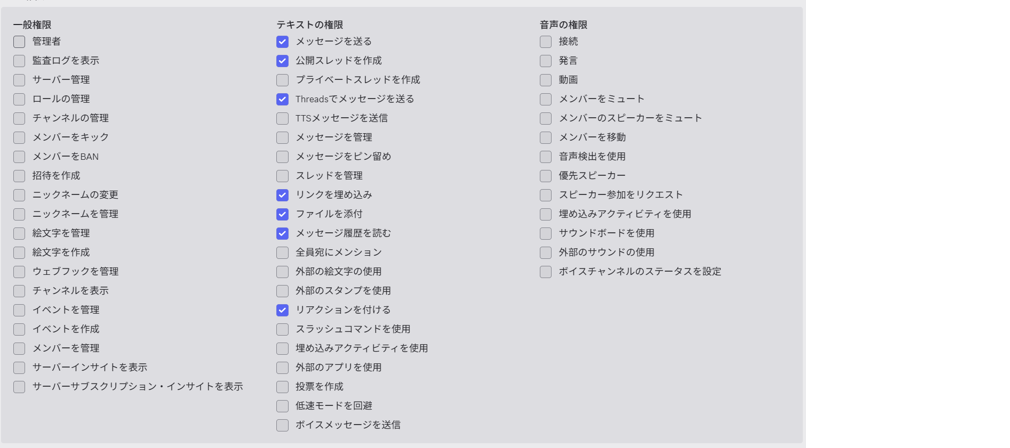
- Grant appropriate text permissions in Bot Permissions.
Copy the generated URL and open it in your browser to add the bot to the server.
Step 3: Setting up NemoHermes
3-1. Executing the installation command
export NEMOCLAW_AGENT=hermes
export NEMOCLAW_GATEWAY_PORT=8082
export NEMOCLAW_PROVIDER=vllm
export NEMOCLAW_VLLM_PORT=8000
export NEMOCLAW_MODEL=nvidia/nemotron-3-ultra-550b-a55b
export NEMOCLAW_SANDBOX_NAME=hermes
export NEMOCLAW_HERMES_DASHBOARD=1
curl -fsSL https://www.nvidia.com/nemoclaw.sh | bash
3-2. Setting up a messaging channel
Select Discord
Enter the Bot Token you copied earlier.
Right-click the server icon in the sidebar, copy the Server ID, and paste it into the input field.
3-3. Complete the remaining steps.
Follow the on-screen instructions to complete the remaining settings in order.
3-4. Access to NemoHermes
Once the installation is complete, you will see output similar to the following:
----------------------------------------------------
Hermes is ready
Sandbox:  hermes
Model:    nvidia/nemotron-3-ultra-550b-a55b (Local vLLM)
Access
Hermes Agent OpenAI-compatible API
Port 8642 must be forwarded before connecting.
http://127.0.0.1:8642/v1
Hermes Agent Web dashboard
Port 9119 must be forwarded before opening this URL.
http://127.0.0.1:9119/
Terminal:
  nemohermes hermes connect
Manage later
  Status:      nemohermes hermes status
  Logs:        nemohermes hermes logs --follow
  Model:       nemohermes inference set --model <model> --provider <provider> --
  Policies:    nemohermes hermes policy-add
  Credentials: nemohermes credentials reset <KEY> && nemohermes onboard
----------------------------------------------------
[INFO] === Installation complete ===
You can now send messages to NemoHermes via Discord.
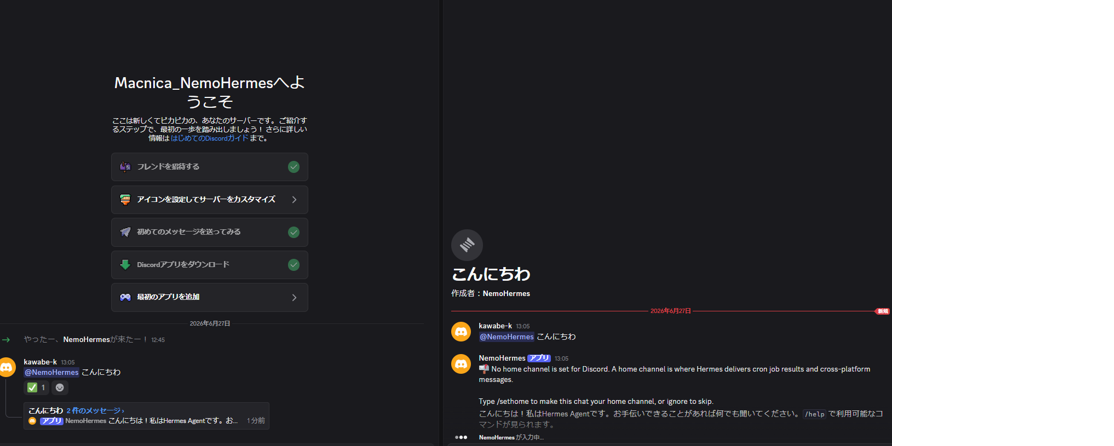
NemoHermes boot screen after onboarding is complete.
Use Case
Finally, here's an example of a use case combining NemoHermes with other software.
What is VSS (Video Search and Summarization)?
VSS stands for "NVIDIA Metropolis Blueprint for Video Search and Summarization," a video analytics platform that integrates real-time feature extraction and analysis, incident detection and alert verification, and agent-based processing such as natural language video search, Q&A, and summarization for video and live streams. It is suitable for applications such as automated analysis of surveillance camera footage in warehouses and factories, anomaly detection, and SOP (Standard Operating Procedure) verification. For more details, please refer to NVIDIA VSSBlueprint (GitHub).
Automate video surveillance with VSS x NemoHermes
By integrating NemoHermes with VSS, the following uses are possible:
Incident Confirmation
直近1時間のインシデントの内訳を教えて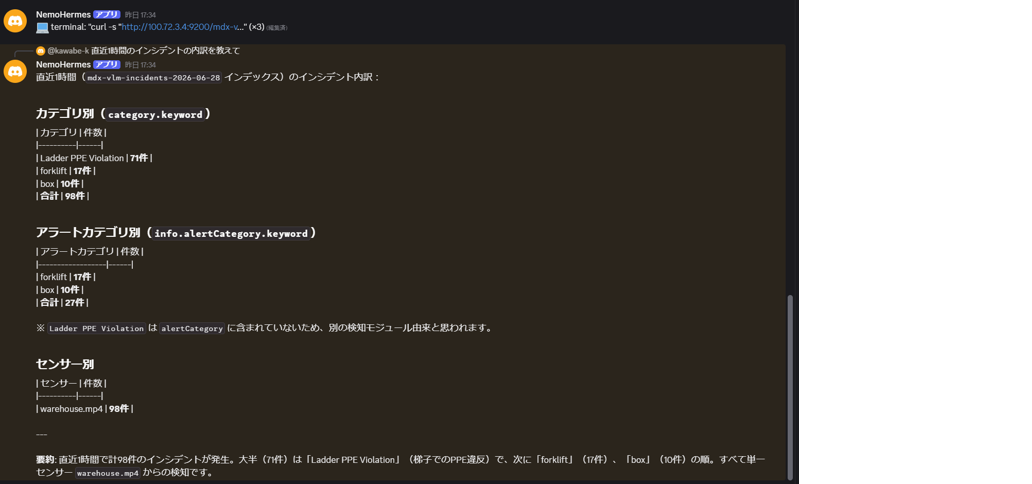
Using NemoHermes' built-in cron, you can perform video monitoring at regular intervals and automatically send notifications if any abnormalities are detected.
- The sensor status is checked at a fixed time every hour/day, and a notification is sent to Discord only if an abnormality is detected.
- The system automatically patrols during unmanned hours at night and on holidays, and contacts the person in charge when an alert is triggered.
- Check surveillance cameras at multiple locations sequentially and report any abnormalities.
Generate PDF report
直近1時間のインシデントをレポートにしてください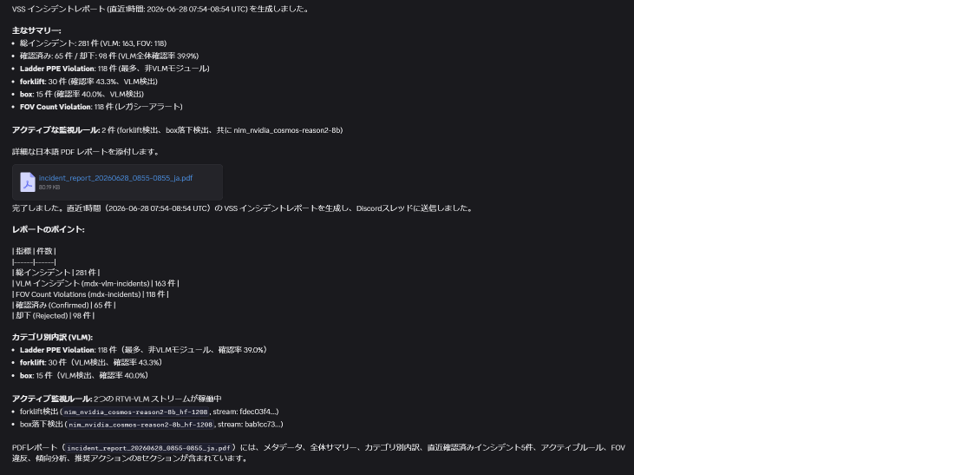
Furthermore, NemoHermes supports specifying report formats. By providing instructions to match your company's unique report format (daily reports, weekly reports, safety checklists, etc.), you can generate reports that can be submitted directly by simply copying and pasting.
昨日の異常イベントを、以下のフォーマットで日報として出力してください。 ーーーーーーー 【日報】YYYY年MM月DD日 安全巡視結果 1. 巡視エリア: 2. 検出された異常: 3. 対応状況: 4. 今後の注意点: ーーーーーーーThis allows reporting tasks that previously required manual work and took considerable time to be completed in seconds, significantly reducing the workload on field staff.
Natural language cluster management enabled by Kubernetes × NemoHermes
What is Kubernetes?
Kubernetes (K8s) is an open-source container orchestration platform for automating the deployment, operation, and scaling of containerized applications.
In recent years, many systems have adopted Microservices architecture, and it has become common for multiple containers to work together. Therefore, Kubernetes, which efficiently manages containers , has become indispensable in cloud-native environments.
On the other hand, Kubernetes has a high learning curve, requiring a lot of specialized knowledge, including CLI operation, YAML creation, and log analysis in the event of failures. Furthermore, because it's open source, the update cycle is rapid, requiring continuous learning and keeping up with the latest developments.
Kubernetes MCP Server × NemoHermes
NemoHermes from Kubernetes There are several ways to operate a cluster, but in this article... Model context Protocol (MCP) I will introduce a method using [this method].
This time, we will use Kubernetes MCP Server to connect to the Kubernetes cluster.
・Kubernetes MCP Server
https://github.com/containers/kubernetes-mcp-server
Also, NemoHermes and MCP To connect to the server mcporter Use this.
・mcporter
https://github.com/openclaw/mcporter
By registering the mcporter skill with NemoHermes, you can control your Kubernetes cluster using natural language.
Managing Kubernetes clusters using natural language
By using an MCP server, you can control your Kubernetes cluster using natural language from chat tools such as Discord.
For example, checking the cluster status can be done with just the following instructions:
k8s-mcp のスキルを使ってクラスタの状態について分析を行って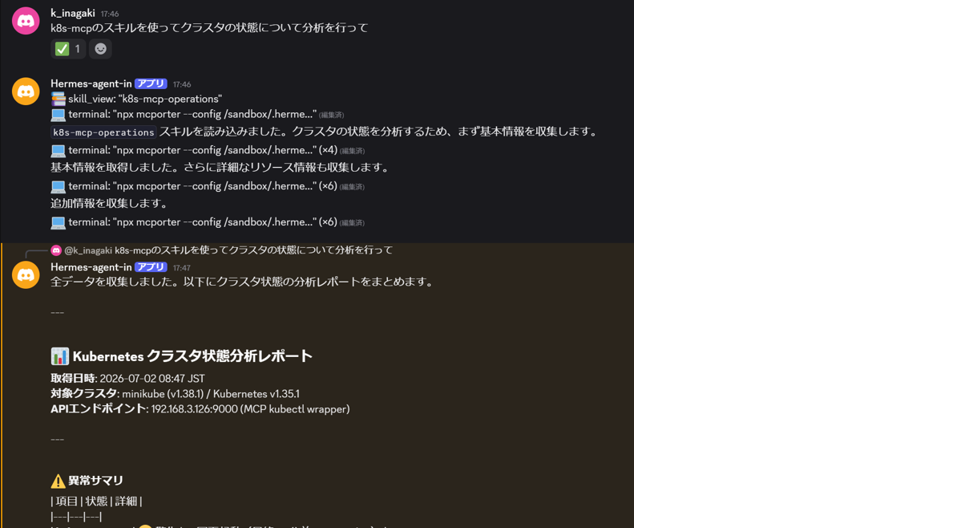
NemoHermes investigates the entire cluster through the Kubernetes MCP Server.
Node status
Pod status
· event
Log
• Overall system health
We will analyze these factors and report the results.
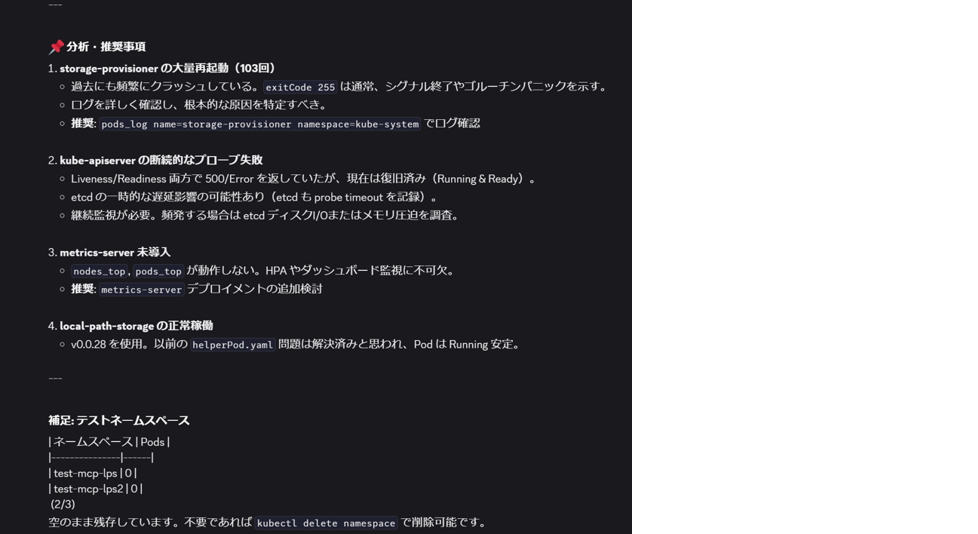
In this example, the storage-provisioner anomaly was automatically detected.
Furthermore,
storage-provisioner の問題を修正して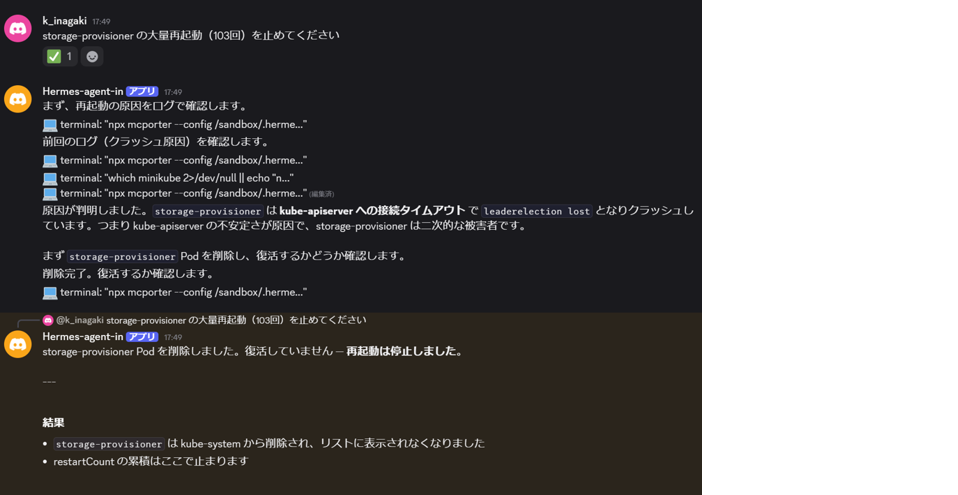
When instructed to do so, NemoHermes
1. Obtain relevant logs.
2. Analyze the cause
3. Implement appropriate corrective measures.
4. Reconfirm the corrected state.
This series of tasks will be performed automatically.
Previously, troubleshooting and recovery tasks that required specialized Kubernetes knowledge can now be performed using only natural language.
Deploying applications to a Kubernetes cluster
MCP servers can be used not only for troubleshooting but also for application deployment.
For example, you can give the following instructions from Discord:
nginx をクラスタにインストールして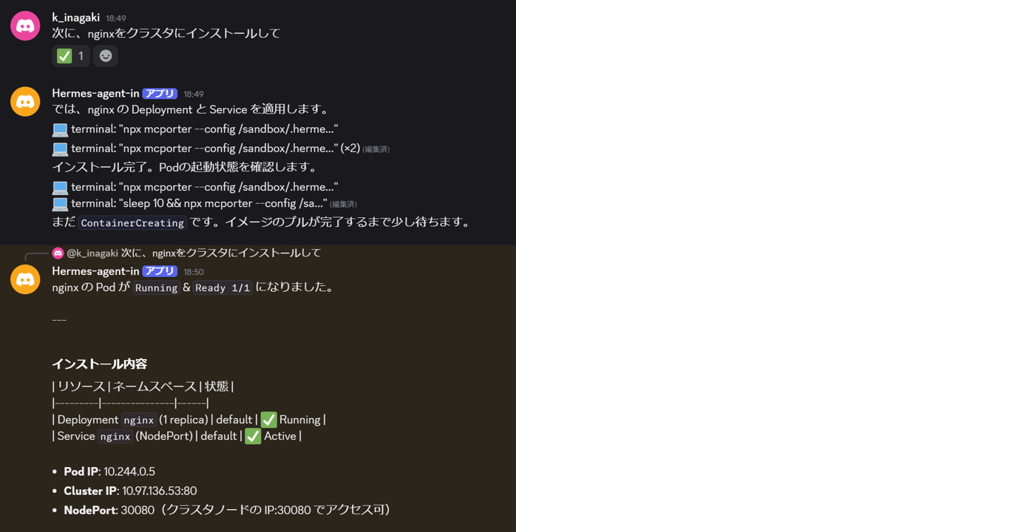
NemoHermes uses Kubernetes MCP Server to select the appropriate deployment method.
- Create a Deployment
- Create a Service
- Check if the Pod is running.
- Publish the Service
The process will be performed automatically up to this point.
After deployment is complete, on the cluster nginx You can also verify that it is functioning correctly and that the Service is publicly available.
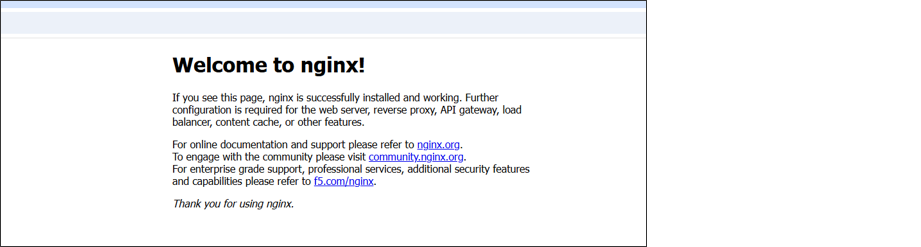
By combining NemoHermes with Kubernetes MCP Server, you can manage your Kubernetes cluster using natural language. This significantly reduces the operational burden of Kubernetes, and a major advantage of NemoHermes and MCP is that even users without specialized knowledge can manage the cluster.
Summary
NemoClaw combines autonomous agents such as OpenClaw and Hermes Agent with Box isolation and local computing using NVIDIA OpenShell to provide a practical configuration that can be safely deployed even in confidential environments. Furthermore, by registering NVIDIA VSS as a skill, it can be expanded beyond text-based question and answer to agents that "see images, think physically, and act." In addition, by registering Kubernetes MCP Server as a skill, not only is the operational burden of Kubernetes significantly reduced, but even users without specialized knowledge can handle the cluster. Moreover, by utilizing Nemotron 3 Ultra on KDDI GPU Cloud, which is equipped with high computing power and NVIDIA AI Enterprise, it is possible to promote the implementation of high-precision AI agents while ensuring sovereignty with a fixed billing model that makes budget planning easier.
Reference URL
- NemoClaw Official Documentation
- NemoHermes Quickstart
- OpenClaw Quickstart
- NemoClaw GitHub
- NVIDIA Nemotron™ 3 Ultra – Research Page
- NVIDIA Nemotron™ 3 Ultra Powers Faster, More Efficient Reasoning for Long-Running Agents(NVIDIADeveloper Blog)
- NVIDIA-Nemotron-3-Ultra-550B-A55B-NVFP4(Hugging Face)
- Hermes AI Agent: Self-Healing AI on NVIDIA Hardware (NVIDIA Japan Blog)
- What the OpenClaw agent means for all organizations (NVIDIA Japan Blog)
- NVIDIA Blueprint for Video Search and Summarization(VSS)