- Semiconductor BusinessHOME
- Products and Services of Macnica,Inc.
-
technical information

-
Events and Seminars
- Handling Manufacturer
- Support
- Inquiry
- Click here to purchase products
- Semiconductor business e-mail magazine registration


 Narrow down by specifying conditions
現在2204件がヒットしています。check

Contents of this time
In the first episode, we explained micro-based development and the NVIDIA NIM.
In episode 2, we will explain the specific software and hardware required, as well as how to deploy it.
[RAG Chatbot Development Using NVIDIA NIM]
Episode 1: RAG system development using Microservices
Episode 2: What is the required software/hardware configuration for a RAG system?
Episode 3: RAG System Sample Code
Required software/hardware setup for RAG
This time, we will explain how to build a chatbot with the minimum configuration shown in Episode 1.
In Microservices based development, the LLM, embedded model, and vector database are each prepared in a container.
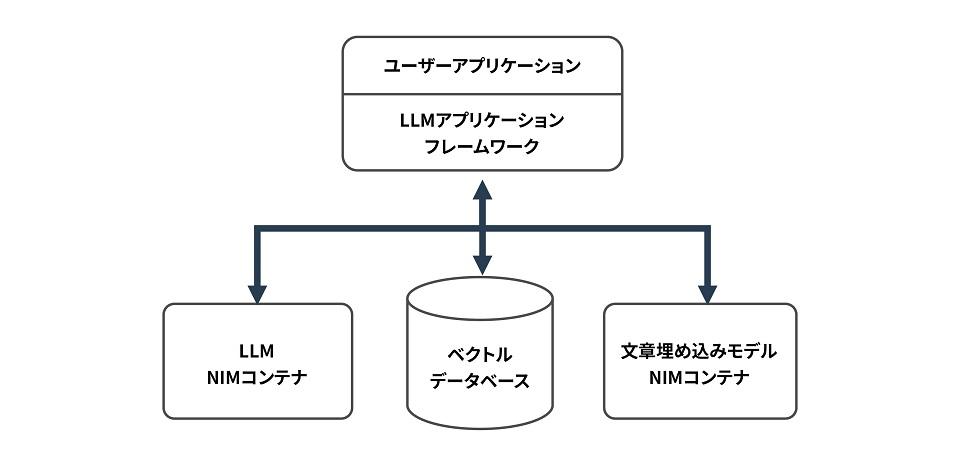
NIM Container
In the sample code shown in Part 3, the LLM uses meta/llama-3.1-70b-instruct and the sentence embedding model uses nvidia/nv-embedqa-e5-v5.
The latest information on the hardware resource requirements and software requirements for these models for which containers are provided by NIM can be found here.
Software requirements (Release 1.3.0, 2024/12/12)
・Linux operating systems(Ubuntu 20.04 or later recommended)
・NVIDIA Driver >= 560
・NVIDIA Docker >= 23.0.1
Hardware Requirements (Release 1.3.0, 2024/12/12)
meta/llama-3.1-70b-instruct(Release 1.3.0、2024/12/12)
|
GPUs |
Precision |
Profile |
# of GPUs |
Disk Space |
|---|---|---|---|---|
| H200 SXM | FP8 | Throughput | 1 | 67.87 |
| H200 SXM | FP8 | Latency | 2 | 68.2 |
| H200 SXM | BF16 | Throughput | 2 | 133.72 |
| H200 SXM | BF16 | Latency | 4 | 137.99 |
| H100 SXM | FP8 | Throughput | 2 | 68.2 |
| H100 SXM | FP8 | Throughput | 4 | 68.72 |
| H100 SXM | FP8 | Latency | 8 | 69.71 |
| H100 SXM | BF16 | Throughput | 4 | 138.39 |
| H100 SXM | BF16 | Latency | 8 | 147.66 |
| H100 NVL | FP8 | Throughput | 2 | 68.2 |
| H100 NVL | FP8 | Latency | 4 | 68.72 |
| H100 NVL | BF16 | Throughput | 2 | 133.95 |
| H100 NVL | BF16 | Throughput | 4 | 138.4 |
| H100 NVL | BF16 | Latency | 8 | 147.37 |
| A100 SXM | BF16 | Throughput | 4 | 138.53 |
| A100 SXM | BF16 | Latency | 8 | 147.44 |
| L40S | BF16 | Throughput | 4 | 138.49 |
nvidia/nv-embedqa-e5-v5(Release 1.2.0、2024/12/12)
|
GPUs |
GPU Memory (GB) |
Precision |
|---|---|---|
| A100 PCIe | 40 & 80 | FP16 |
| A100 SXM4 | 40 & 80 | FP16 |
| H100 PCIe | 80 | FP16 |
| H100 HBM3 | 80 | FP16 |
| H100 NVL | 80 | FP16 |
| L40s | 48 | FP16 |
| A10G | 24 | FP16 |
| L4 | 24 | FP16 |
How to deploy containers
Below is how to deploy meta/llama-3.1-70b-instruct.
First, log in so that you can pull containers from NGC.
$ docker login nvcr.io
Username: $oauthtoken
Password: <PASTE_API_KEY_HERE>
Next, pull the NVIDIA NIM container with the following command.
export NGC_API_KEY=<PASTE_API_KEY_HERE>
export LOCAL_NIM_CACHE=~/.cache/nim
mkdir -p "$LOCAL_NIM_CACHE"
docker run -it --rm \
    --gpus all \
    --shm-size=16GB \
    -e NGC_API_KEY \
    -v "$LOCAL_NIM_CACHE:/opt/nim/.cache" \
    -u $(id -u) \
    -p 8000:8000 \
    nvcr.io/nim/meta/llama-3.1-70b-instruct:latest
You have now deployed the NIM container.
You can also query your model using the curl command.
curl -X 'POST' \
'http://0.0.0.0:8000/v1/chat/completions' \
-H 'accept: application/json' \
-H 'Content-Type: application/json' \
-d '{
    "model": "meta/llama-3.1-70b-instruct",
    "messages": [{"role":"user", "content":"Write a limerick about the wonders of GPU computing."}],
    "max_tokens": 64
}'
You can deploy the sentence embedding model (nvidia/nv-embedqa-e5-v5) in a similar way.
Please check here for details.
Vector Database
We will use Milvus, an open source vector database built for generative AI applications.
Milvus provides containers, and this time we will deploy and use a container.
For more information about Milvus, please click here.
Software requirements (version 2.5.x, 2024/12/12)
| Operating system | Software |
|---|---|
| Linux platforms |
Docker 19.03 or later Docker Compose 1.25.1 or later |
Hardware requirements
| Component | Requirement | Recommendation |
|---|---|---|
| CPU |
Intel 2nd Gen Core CPU or higher Apple Silicon |
Standalone: 4 core or more Cluster: 8 core or more |
| CPU instruction set |
SSE4.2 AVX AVX2 AVX-512 |
SSE4.2 AVX AVX2 AVX-512 |
| RAM |
Standalone: 8G Cluster: 32G |
Standalone: 16G Cluster: 128G |
| hard drives | SATA 3.0 SSD or higher | NVMe SSD or higher |
How to deploy containers
Below is how to deploy a Milvus container.
If you set it up with this command, port 19530 will be used by default.
curl -sfL https://raw.githubusercontent.com/milvus-io/milvus/master/scripts/standalone_embed.sh -o standalone_embed.shYou can START, STOP, and DELETE containers with the following commands:
#Start the Docker container
$ bash standalone_embed.sh start
#Stop the Docker container
$ bash standalone_embed.sh stop
#Delete the Docker container
$ bash standalone_embed.sh delete
Sample code released next time!
This time, we explained the hardware configuration and software deployment when building a RAG chatbot using Microservices.
In the third episode, we will explain Microservices based development using sample code.
If you are considering introducing AI, please contact us.
For the introduction of AI, we offer a wide range of services, including the selection and support of NVIDIA GPU cards and GPU workstations, as well as algorithms for face recognition, trajectory analysis, and skeletal detection, and learning environment construction services. Please feel free to contact us if you have any questions.

