- Semiconductor BusinessHOME
- Products and Services of Macnica,Inc.
-
technical information

-
Events and Seminars
- Handling Manufacturer
- Support
- Inquiry
- Click here to purchase products
- Semiconductor business e-mail magazine registration


 Narrow down by specifying conditions
現在2149件がヒットしています。check

Hello everyone! I'm Power-chan, a new graduate FAE who joined in 2025.
I majored in biology in university and hadn't even taken basic physics in high school, so I had zero knowledge of electrical and electronic devices. I took on the challenge of building a robot in three months. In this blog, I'll share my struggles over the three months from scratch, as well as the typical mistakes and failures of a newbie!
The theme of this final episode is "interference between parts."
Creating clean HW
As I mentioned in the previous power supply article, I finally completed the power supply board and was finally able to start creating the hardware other than the power supply.
Because my concept this time was to "make a robot like a cheetah," I was very particular about the appearance and wanted to avoid any overhead wiring as much as possible. This time, the board had a two-tier structure, with the battery, sensors (infrared, ultrasonic) and motors on the bottom tier, and the Arduino, power supply board and dot matrix LEDs on the top tier.
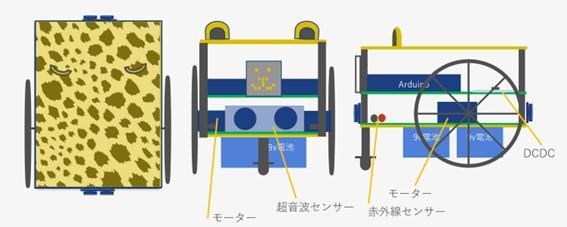
Image at the time of design
What was quite troublesome here was that in order to drive the sensors and motors on the bottom, they had to be connected to the Arduino on the top, and simply connecting them would result in a lot of wires in the air. With all the exposed wires, it would look too mechanical, which is far from the Cheetah I was aiming for.
So I racked my brains and came up with a way to use pin sockets and pin headers to send the wiring from the lower level to the upper level. Surprisingly, this was where the pin sockets that had caused the first power supply failure came to the rescue. If you're wondering what I'm talking about, be sure to check out the previous article on power supply design.
The way to do this is to gather the wires you want to connect to the Arduino in the center of the front side of the lower board and connect them to the pin sockets, then place pin headers in the corresponding parts on the upper board and wire each wire to the input parts of the Arduino.As an added twist, we also used pin headers for the input part to the Arduino, so that you can plug the Arduino in upside down.
It's probably hard to understand just from a verbal explanation, so please take a look at the photos below.
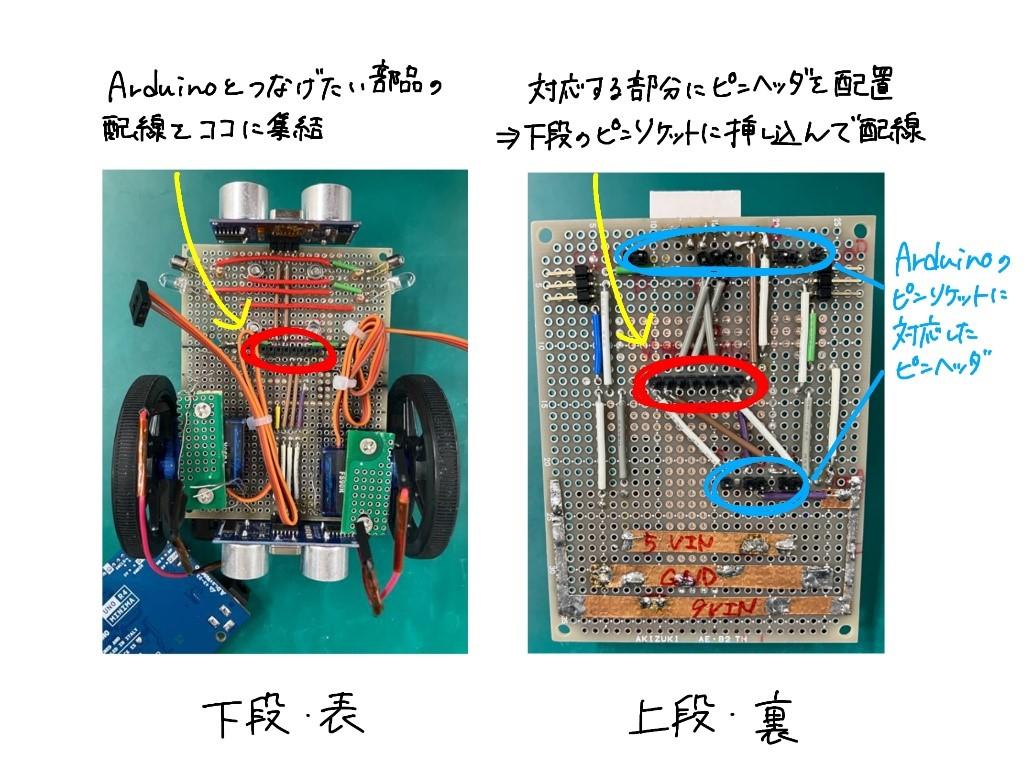
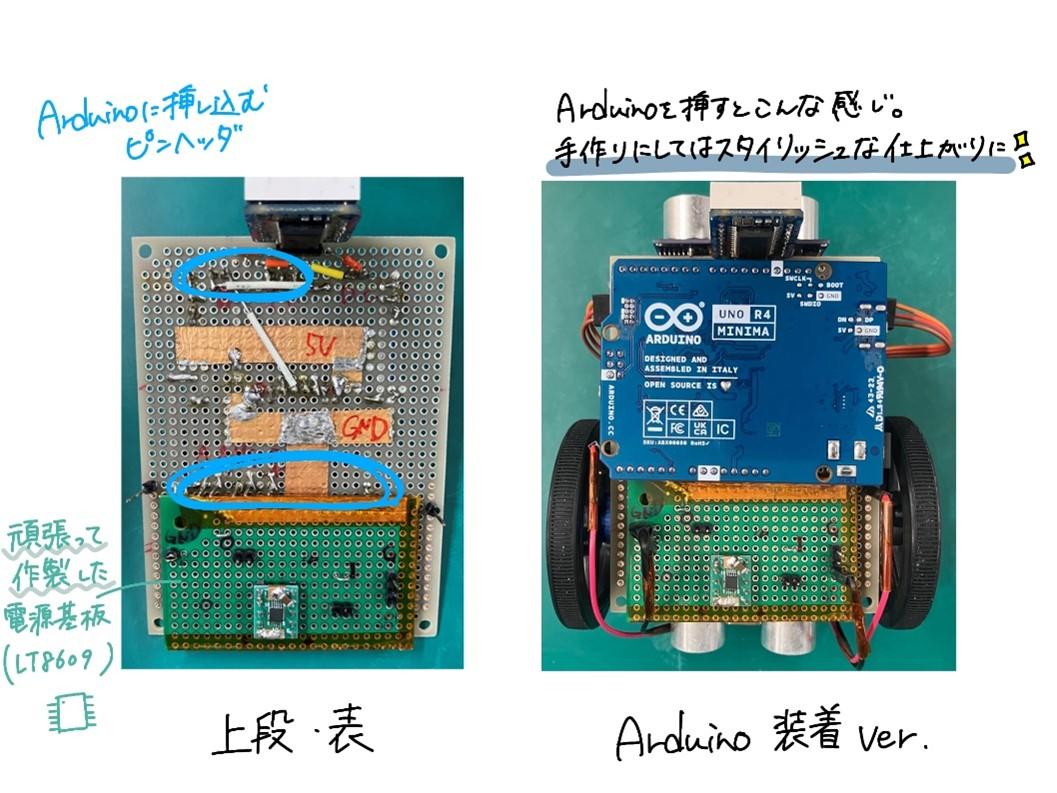
Thanks to this wiring, simply inserting the upper pin header into the lower pin socket brings the lower wiring to the upper one, and we were even able to input data to the Arduino without any airborne wiring! Furthermore, by positioning the pin socket as close to the center as possible, we were able to connect the upper and lower boards not only electrically but also structurally in a stable manner, allowing us to join the boards together without using spacers.
However, this is the pitfall in this case. Please keep this in mind.
Software creation in collaboration with Copilot
With the casing complete, we moved on to the next step, creating the software. This time, the task was to control components using Arduino, so we wrote the code using an app called Arduino IDE. I had no programming knowledge whatsoever and didn't know anything, so I first had to learn how to write Arduino code. Once I had a general understanding of the rules, I thought, "Let's try writing some code!" and opened Arduino IDE, but when it came to writing from scratch, I got stuck.
Because I had created a fairly detailed flowchart for the operation, I tried sending an image of the flowchart to Copilot and asking it to "output it as Arduino code," and it actually generated the rough outline of the code. Using this code as a base, I was able to specify detailed conditions and add functions, gradually working to achieve the desired behavior.
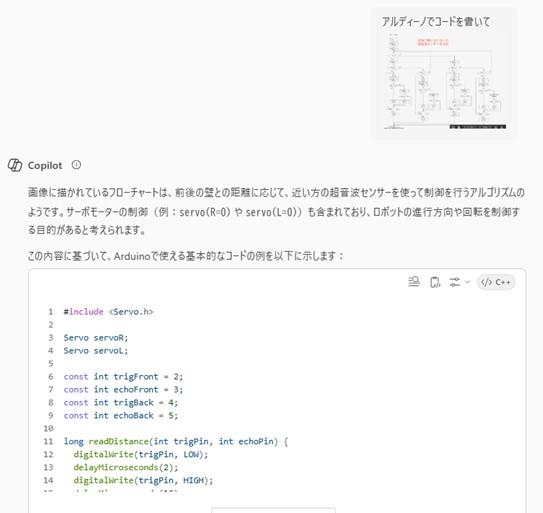
The outline of the code output by Copilot
AI is incredibly useful. However, you need to be very careful when using it, as it may not understand your intentions unless you provide very detailed prompts, and you may end up having to correct it multiple times.
I tried not to blindly accept the data Copilot output, but to make sure I understood the code before entering it. However, I often found Copilot 's stubborn side, and would not correct my mistakes no matter how many times I told it, and I would argue with it, saying, "I told you it wasn't right!" I am truly grateful to Copilot for not losing patience with us and working with us on the code, even though we argued like this. Thanks to Copilot, I was able to complete the software earlier than planned, and somehow managed to create a working Cheetah.
Cheetah suddenly loses momentum
The rough code was completed, and we entered the phase of fine-tuning to determine how quickly and accurately the goal could be reached. While the cheetah was steadily developing into a well-behaved robot, it suddenly became as slow as a turtle. An emergency occurred.
The task this time was to drive around a course made up of 4 x 4 squares, so in order to control it more precisely, we designed it to repeat the following actions: [move forward one square and check for a wall → turn right, go straight, turn left, or make a U-turn → move forward one square and check for a wall].
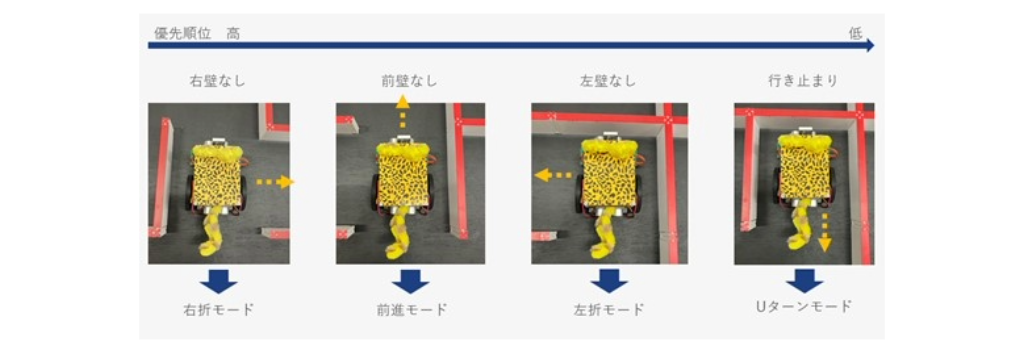
Operation image
The code was set up so that it would only operate after checking the presence of walls using ultrasonic sensors for the front walls and infrared sensors for the side walls, and this had worked without any problems until a certain point, but at a certain point the interval between moving forward one square and the next became very long, and the robot became a deliberate, cautious cheater.
In order to make it look even cuter, we also tried using a dot matrix LED to display the face and change the expression for each mode, but as soon as it switched to the contemplative mode, it would immediately adopt a poker face and nothing would be displayed on the face.
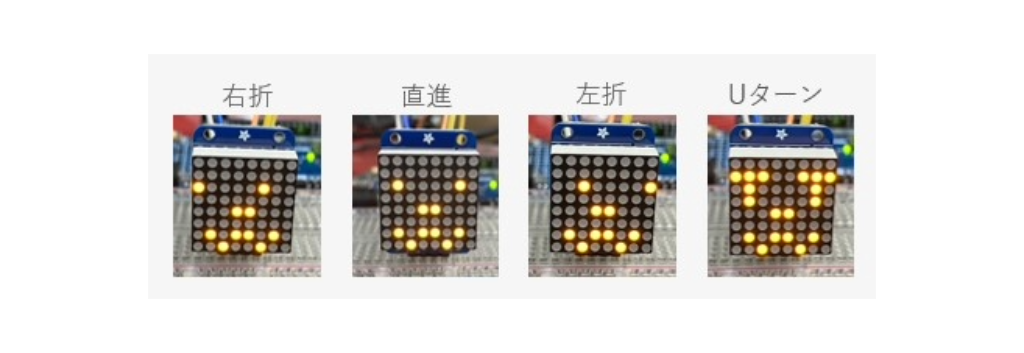
Cheetah Face
Thinking something was strange, I checked each component and found that the speed at which the ultrasonic sensor attached to the front received data had noticeably slowed down. Wondering if there was a bad connection, I reattached the upper board, which temporarily improved the situation, but it soon became a cheater again. Wondering if the soldering was poor, I removed the upper board and re-soldered it, then tried pushing the upper pin header as deep as possible into the lower pin socket, but there was no noticeable improvement.
While I was fiddling around with the circuit boards, wondering what the cause might be, I discovered something that piqued my interest. The dot matrix LED mounted on the upper board and the ultrasonic sensor mounted on the lower board each had exposed pins with solder piled up in close proximity to each other. Thinking that this might be the case, I tried moving the pin headers connecting the upper and lower boards without inserting them too deeply, and the board returned to its original, speedy behavior!!
I was worried about whether the connections were correct, so I inserted the pin header at the connection point too deeply, which caused the pins on the upper and lower components to come into contact and cause interference. It was such a simple cause, but it was an important point that had a major impact on the Cheetah's behavior, so I was really glad that I found this problem early. The solution was simple, but I made sure not to insert the pin header too deeply, and instead placed the exposed pins of the dot matrix LED on the edge of the ultrasonic sensor, making sure there was no interference before operating it.
The fateful race day
I haven't mentioned this until now, but I actually had two classmates who were building robots at the same time as me, and the three of us were going to race on the final presentation day. We were full of worries heading into the race, with the motor breaking a week before the race and the robot starting to behave strangely just before, but on the day of the race, we managed to run according to specifications and came in second place. Unfortunately, we didn't get first place, but we were very happy that we were able to create the smart cheetah we had hoped for!
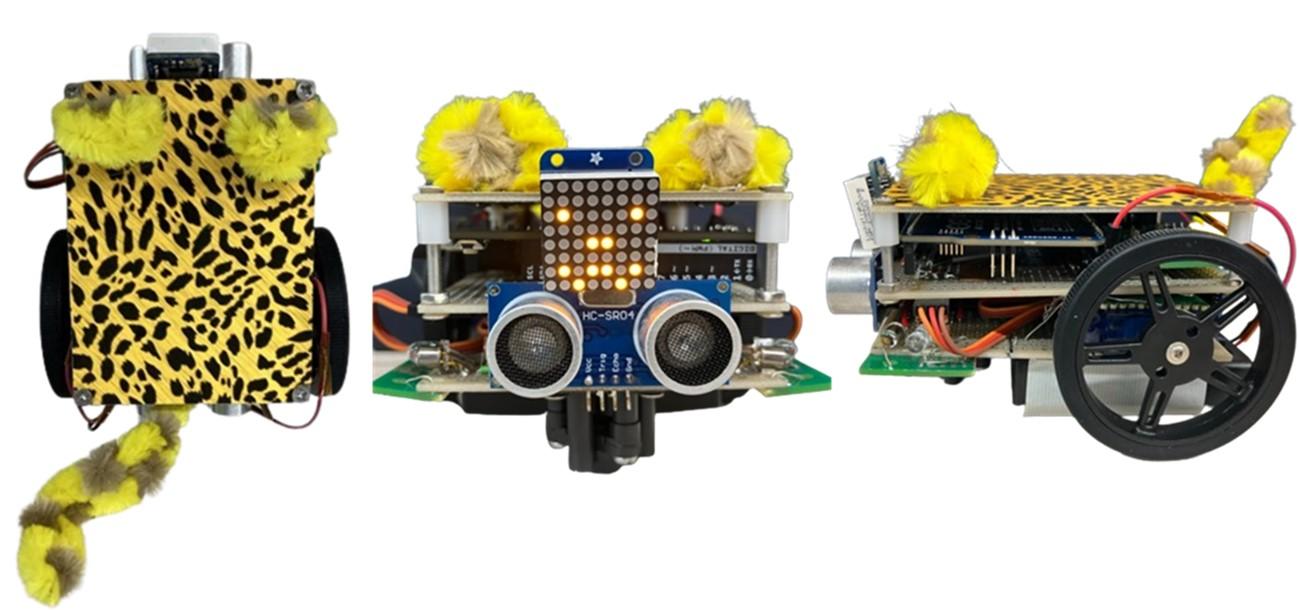
The finished cheetah
Summary
The reason something doesn't work as expected can be surprisingly simple, so I realized it's important to check each step and work to isolate the problem. I think I'll have opportunities to debug issues in my future work, so I'd like to use what I learned this time to isolate the cause!
Thank you for reading about Power-chan's struggles over the past three months! I would be happy if it could be of some help to people who make things! Even if it's not useful, I'd be happy if you enjoyed reading it ^ ^
There are also blogs by two classmates who raced together, so if you're interested, please take a look!
That concludes Power-chan's 3-month struggle record!!
Power-chan article list
・ Don't be fooled by appearances - Anode and cathode edition
・ Don't get caught up in short-term profits - Power supply design edition
・Be careful of exposed solder! ~Component interference edition~