- Semiconductor BusinessHOME
- Products and Services of Macnica,Inc.
-
technical information

-
Events and Seminars
- Handling Manufacturer
- Support
- Inquiry
- Click here to purchase products
- Semiconductor business e-mail magazine registration


 Narrow down by specifying conditions
現在2263件がヒットしています。check


Hello, I'm Mass Man.
Today, I will introduce how to check if the FPGA device is booted using JTAG connection.
About JTAG mode
JTAG (Joint Test Action Group) is a common name for the test access port standard IEEE 1149.1 used for integrated circuits and debugging.
JTAG consists of four signals (TCK, TDO, TDI, TMS). Altera FPGAs support the JTAG standard.
JTAG mode takes precedence over any device configuration mode.
For example, JTAG mode takes precedence even if the MSEL pins are set to AS mode. Figure 8-23 shows the JTAG schematic.
Connect the board and the programming tool (Alera® Quartus® Prime Programmer) using USB-Blaster and perform the configuration in JTAG mode.

The signal configuration for the USB-Blaster's 10-pin connector is described in the "Altera® FPGA Download Cable User Guide" (Figure 3, Table 3).
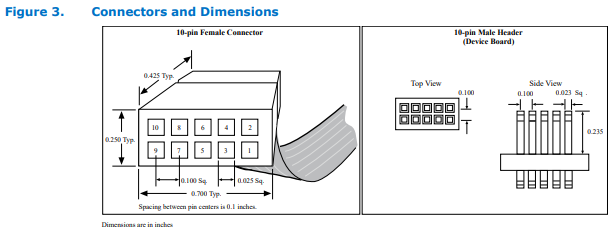

I designed the wiring for the JTAG circuit with reference to these materials.
Recognize the device with "Auto Detect"
You have now routed the JTAG circuitry on your board. I would like to check if I can access the device via JTAG.
Open Programmer => Click Auto Detect (Fig. 1).

Figure 1. Programmer screen
The message window shown in Figure 2 is displayed. In other words, it turned out that the JTAG wiring was done correctly and the device was booted.

Figure 2. When the device is recognized ○
On the other hand, if the JTAG signal wiring is faulty or the device is not booting, you will see the warning message in Figure 3.

Figure 3. When the device cannot be recognized ×
Configuration failed...
I was able to confirm that the JTAG wiring was correctly done with "Auto Detect" and that the device was started. However, when I run the JTAG configuration, the following Warning is displayed and the configuration fails...
Warning => "CONF_DONE pin failed to go high in device 1."
Mass man "What is the CONF_DONE pin?"
The answer was written in Hachi-senpai's column "Configuration Sequence". (Exactly the moment when a new engineer's blush blog is useful!)
According to Hachi-senpai's column, there are two main reasons why configuration fails.
・Mistakes during tool operation
・Substrate issues
Actually, Masuo's board sometimes configures successfully, sometimes it fails, it's very unstable, and it was a problem with the board. .