- Semiconductor BusinessHOME
- Products and Services of Macnica,Inc.
-
technical information

-
Events and Seminars
- Handling Manufacturer
- Support
- Inquiry
- Click here to purchase products
- Semiconductor business e-mail magazine registration


 Narrow down by specifying conditions
現在2249件がヒットしています。check


Introduction
Hello. It's guu.
This time, I've compiled an episode about ASCII code, one of the things you need to know when learning the C language.
One day during my training, I came across something called ASCII code.
Description: "Integer representation of numbers, letters, symbols, etc."
Guu "Hmm..."
When I learned about ASCII code for the first time, I had only this kind of impression.
However, I later found out that the ASCII code is actually very important.
Consider the following problem.
[Problem] Assign an integer to the variable num defined as a char type and output it with printf ( “ %d ” );
However, make sure that the output value is the same as the input value.
*Hint: Subtract ' 0 ' from num.
I don't really understand, so I made the following program for the time being.
#include <stdio.h> int main(void) { char num; // char型の変数 num を定義 printf (“ 整数を入力してください ”); //コマンドラインから整数を入力 num = getchar ( ); //入力した整数を num に代入 printf ( “ num : %d ” , num ); // 10進数で num を表示 return 0; }Now that you have a program, compile and run it!
I tried typing 1 from the keyboard.
What value will be output? ?
-------------------------------------------------- --- output result

-----------------------------------------------------
guu "????????????"
Why is the number 49 printed instead of 1...?
I panicked at once.
Commentary
The point this time is that "1" was input with getchar() and output with printf ("%d");.
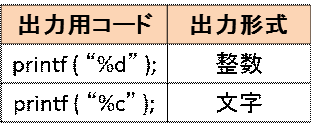
Printf ( “ %c ” ); is commonly used to print what is input with getchar( ).
%c outputs the input value (character) as a character.
But in this case we have to use printf ( “ %d ” ); as the output.
%d は入力された値を 10 進数表示(数字)で出力します。
in short…
If you enter "1" in the program below, "1" will be output as a character.
#include <stdio.h> int main(void) { char num; // char型の変数 num を定義 printf (“ 整数を入力してください ”); //コマンドラインから整数を入力 num = getchar(); //入力した整数を num に代入 printf ( “ num : %c ” , num ); // 文字として num を表示 return 0; }In this problem, I input "1" with getchar() and output it in decimal using printf ("%d");.
The input and output values did not match because the input and output formats were different.
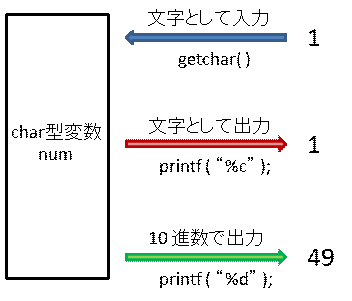
Guu "But why did 49 come out when I input 1?"
This is where ASCII code comes into play.
But! !
Up to here for this time.
In the next blog of Guu, I will clarify the reason "Why 49 was output"!
Look forward to it (^^)
Summary
When assigning a number to a variable of type char via getchar( ), it is treated as a "character".
When I output what I input as a character with printf ( “ %d ” );
Guu's tweet
I didn't know much about the format of input and output, but it was very important.
Let's be conscious and look at the code in the future!
bridge to next time
Let's take a look at the ASCII code table! ASCII code table is here (^o^)