- Semiconductor BusinessHOME
- Products and Services of Macnica,Inc.
-
technical information

-
Events and Seminars
- Handling Manufacturer
- Support
- Inquiry
- Click here to purchase products
- Semiconductor business e-mail magazine registration


 Narrow down by specifying conditions
現在2249件がヒットしています。check


Hello, I'm Mass Man.
Starting this week, I will be writing a series on “timing analysis”.
The most difficult part of the new employee training was the lecture on timing analysis.
In this column, I would like to summarize the lecture materials and notes on timing analysis and introduce the points where I stumbled.
Today we are going to talk about SDC files.
What is timing analysis?
Timing analysis is to verify whether the FPGA operates correctly at a certain operating frequency.
See Timing Analysis Concepts for more information.
SDC file required for timing analysis
In the timing analysis training, I found it difficult to describe SDC (Synopsys Design Constraints).
What is a Synopsys Design Constraint File?
The SDC file is the standard format for timing constraints in the ASIC industry and has been adopted by the FPGA industry as well.
An SDC file is required for timing analysis. First, I will show you how to create a new SDC file.
1. Launch TimeQuest Timing Analyzer after compiling the design
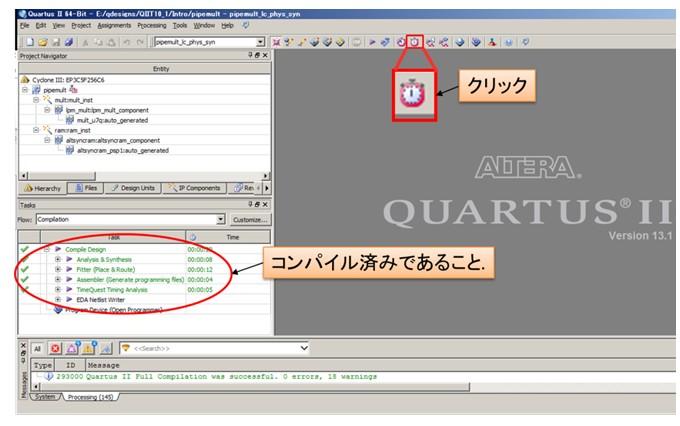
Quartus® II screen
2. Netlist generation
Click Netlist > Create Timing Netlist ….
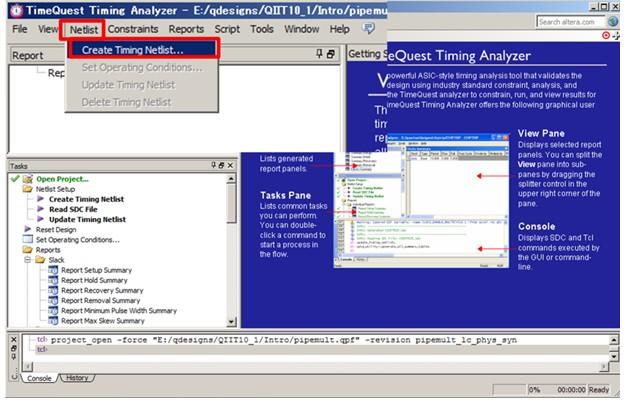
TimeQuest Timing Analyzer screen
Click OK on Create Timing Netlist to complete Netlist generation.
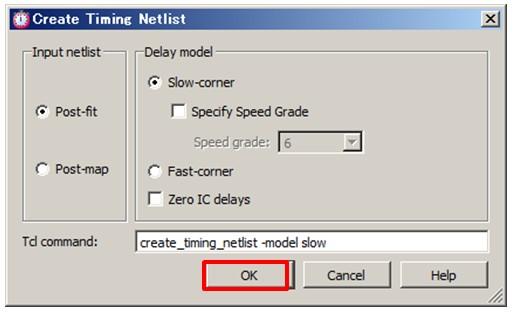
Create Timing Netlist screen
3. Create SDC file
Click File > New SDC File.
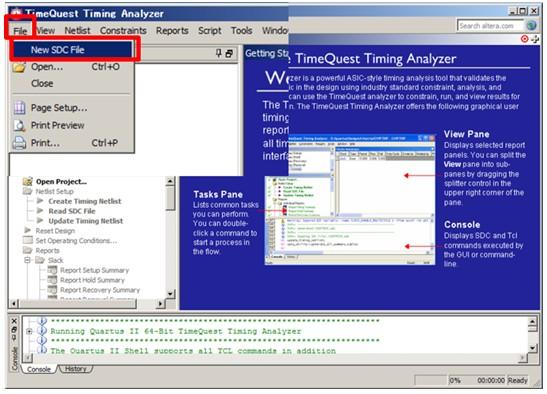
Write SDC constraints text-based.
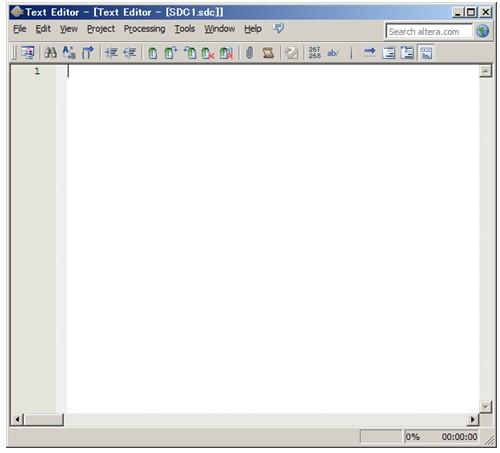
SDC file screen
What should be written in the SDC file?
The URL below is an example of an SDC description.
SDC description example in TimeQuest
In short,
・Describe the operating frequency
・Input/output I/O describes the external timing of the FPGA such as board delay information.
By describing these two pieces of information in SDC, it is possible to analyze whether the FPGA operates without problems.
Quartus® II has information on "delay time due to wiring" and "register output delay time" inside the FPGA.
However, the "operating frequency" and "input/output I/O delay information" external to the FPGA must be given to the Quartus II by the user, and that is the SDC file!
SDC is easy to write with TimeQuest Timing Analyzer
No need to learn the SDC description language. (← Peace of mind!)
It can be described easily with the TimeQuest Timing Analyzer GUI.
4. Launch SDC command GUI
Click Edit > Insert Constraint from the newly created SDC file.
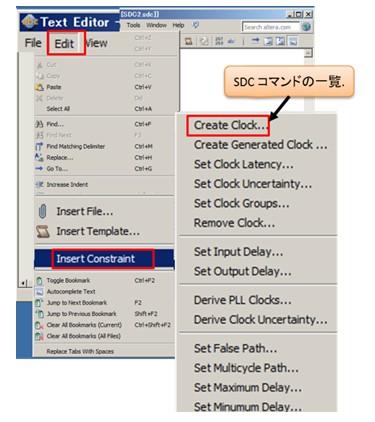
SDC file screen
Five. SDC Command Description of Operating Frequency
Here, the clock constraint description is introduced as an example. Select Create Clock...
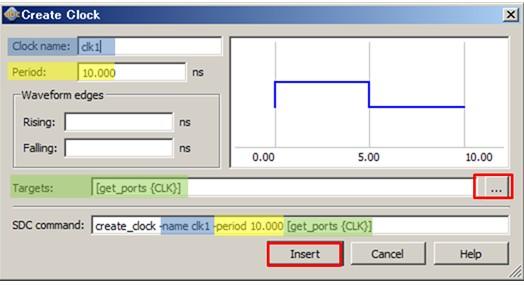
・ Clock name : Enter any name
・ Period : Enter the operating frequency
・ Targets : Select the clock signal name defined in HDL
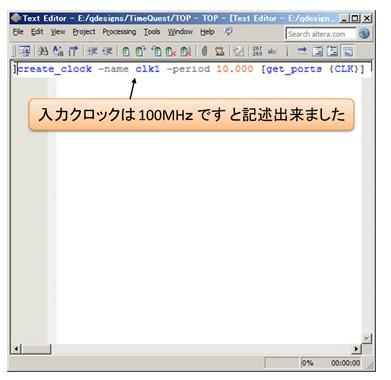
Summary
・SDC is required for timing analysis.
・SDC is a text file that describes the delay information outside the device.
・SDC commands can be easily written using the TimeQuest Timing Analyzer GUI.