- Semiconductor BusinessHOME
- Products and Services of Macnica,Inc.
-
technical information

-
Events and Seminars
- Handling Manufacturer
- Support
- Inquiry
- Click here to purchase products
- Semiconductor business e-mail magazine registration


 Narrow down by specifying conditions
現在2240件がヒットしています。check



Hello, I'm Duck.
Last time, I introduced how to represent signed numbers. This time it's about floating point numbers.
A floating point number is a number represented without a fixed decimal point. It can represent very large to very small numbers.
There are many ways to represent floating point numbers, but here we will deal with 32-bit single-precision floating point numbers conforming to the IEEE754 method. This is what we mean when we simply refer to floating point in this article.
Floating point structure
Since the position of the decimal is not fixed, the representation is similar to the representation of the decimal exponent.
It is represented as follows.

Similarly, it is represented by this "sign", "mantissa", and "exponent" bits. Floating point divides 32 bits into 3 as follows:
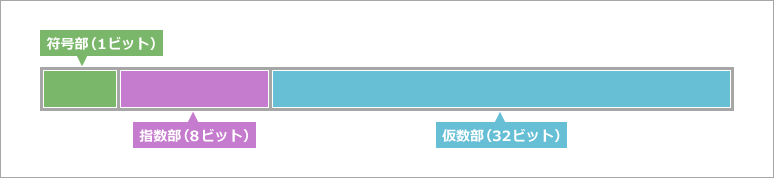
Let's put the numbers in this diagram and see how each one is represented.
As an example, let's express -10.25 in bits.
How to represent the mantissa part
The mantissa is the part that represents the actual number. In binary numbers, increasing digits represent powers of 2, while decimal numbers represent powers of 0.5 (2 to the negative power) as decreasing digits.

Since we add 2 to the power of minus one at a time, we may not be able to express it exactly. In that case, it will be expressed by approximation with a close value.
Let's look at the case of -10.25. First of all, how do you express the 0.25 part after the decimal point?
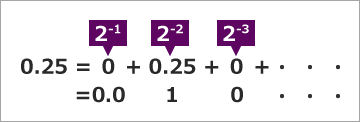
The mantissa is the sum of the fractional part and the integer part. The integer part is 10, so you can easily convert it to binary. The conversion method that combines these is shown in the figure below.
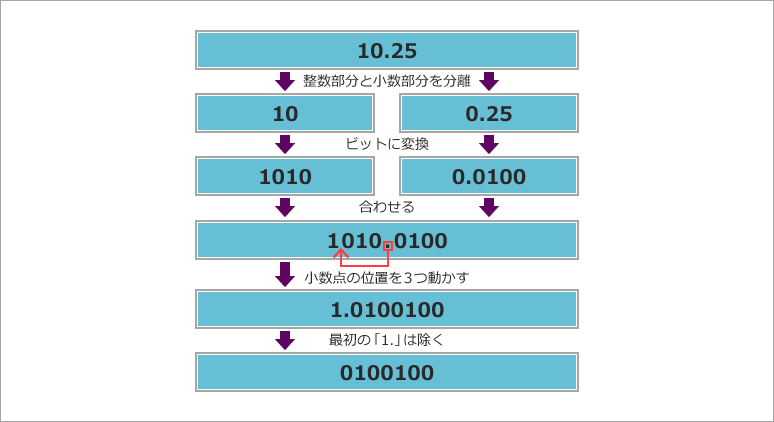
Convert the integer and fractional parts to bits and combine them. Then move the decimal point so that the integer part is “1” and becomes a single digit.
Then the integer part will always be 1 as a bit. Therefore, 0100100… excluding the first 1 is the mantissa digit. The remaining digits are filled with 0.

When the place with the highest number of bits is filled, the goal is finally in sight. It will be a while after I come here.
How to find the exponent part
The exponent represents the number of decimal points moved, just like in decimal numbers. Since 3 digits were moved when obtaining the mantissa, the exponent is 3.
Therefore, we would like to set the exponent to 0000 0011, but it's not that simple. This exponent is represented as a number in offset binary format. The bias value is 127.
Therefore, the exponent is 1000 0010 by adding the bias value of 127 as shown in the figure below.
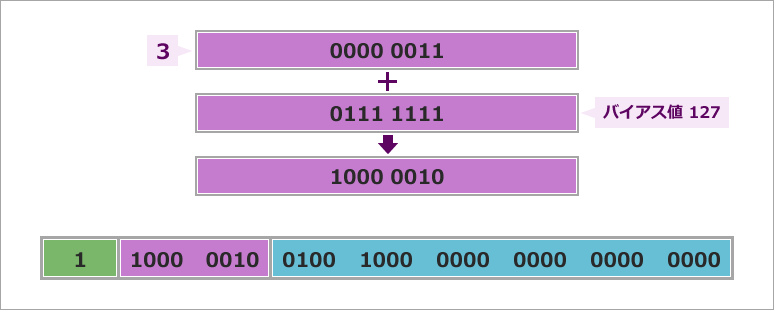
Now we can represent-10.25 in floating point.
As a supplement, I said in the explanation of the mantissa that the highest digit should be 1. But there is one exception. It's time 0. Therefore, when it is 0 exceptionally, all bits are 0 even in floating point.
I want to remember + α
With the contents of this time, we were able to represent positive numbers, negative numbers, decimals, and exponents. However, calculations using floating point numbers are complicated, such as aligning the decimal point position of each number and checking for overflow. Therefore, a dedicated arithmetic processing unit is often incorporated.
Furthermore, Altera® FPGAs incorporate digital processing (DSP) blocks, enabling floating-point arithmetic. Additionally, floating-point arithmetic is implemented in hardware in SoC devices and FPGAs from the Arria® V SoC, Cyclone® V SoC, and later.