
This article is a Japanese translation of the following technical blog post from the manufacturer.
Please see the original text below.
https://unstructured.io/blog/simpler-faster-and-more-powerful-way-to-transform-documents-in-unstructured (Published November 11, 2025)
In this text, "we" refers to Unstructured, the company that originally wrote the text.
Furthermore, the original text's pricing structure is not included in this blog.
For information regarding pricing, please contact our product representative.
For product inquiries, please contact: unstructured-sales@macnica.co.jp
A simpler, faster, and more powerful way to convert documents with Unstructured
Unstructured has consistently focused on providing clean, high-quality data for downstream AI systems.
We connect to a very wide range of enterprise-grade data sources and partners, and our powerful data transformation capabilities allow us to extract critical textual information and metadata from over 70 types of unstructured data.
With its flexible DAG-based workflows, advanced chunking capabilities, seamless integration with embedding, and high-level security required for enterprise use, it covers the entire unstructured data preprocessing process, allowing customers to focus on developing innovative generative AI systems.
We are pleased to announce a series of updates to Unstructured that will take enterprise-grade document conversion to the next level.
These updates make it easier, faster, and more intuitive than ever to convert complex data into an AI-friendly format.
Now, let's take a look at the new features!
From login to processing your first document, it takes just 3 clicks.
We have completely revamped the initial user experience so that you can immediately experience the power of Unstructured.
After logging in, you can immediately drag and drop files from the start page. Once uploaded, your documents will be automatically processed using Unstructured's best-in-class workflow.
Once processing is complete, in addition to high-precision output results, you can view a parallel preview with the original document, see bounding Box, and download the full text in JSON format.

This new experience makes the process simpler:
- High-precision document processing is available immediately.
Uploaded documents are processed by an automated workflow that performs a highly accurate conversion process. - Simple operation
The interface is specialized for file conversion, allowing you to see results immediately without being bothered by excessive customization options. - Enhanced preview function
By displaying the original document on the left and the converted output on the right, you can check the accuracy at a glance. - Visualization using bounding Box
Bounding Box visually show how Unstructured recognizes and divides each element within a document. - Interactive navigation
Clicking on any element in the document or transformation results will highlight the corresponding location on the other side. This makes it easy to compare the correspondence between the original data and the structured results. This allows for an accurate and simple comparison of how each element is mapped from the original data to the structured data. - Access to complete JSON data
Full access to JSON: You can download or review the complete JSON output as needed. - Seamless Workflow Migration
Once you're happy with how Unstructured handles your documents, you can move to Workflow Builder with the same workflow settings pre-configured, with just one click. You can then add data sources, destination connectors, chunking strategies, and embedding models, and deploy at scale.
This start page supports files up to 10MB and is ideal for quick evaluations. Easily test your own documents with Unstructured, visually check the output, and then proceed to build a scalable workflow for production use.
Refinement process by generational AI
Simply drag and drop your files onto the Start page to access a new, highly accurate document transformation workflow enhanced by generative AI-powered refinement and enrichment. This new approach combines cutting-edge document segmentation techniques with targeted post-processing powered by the Vision Language Model (VLM) to deliver performance far superior to traditional methods and other VLM-based document parsers.
Here, we'll introduce the features of the new workflow while comparing it to the traditional "High Res Partitioner" provided by Unstructured.
Higher content reproducibility
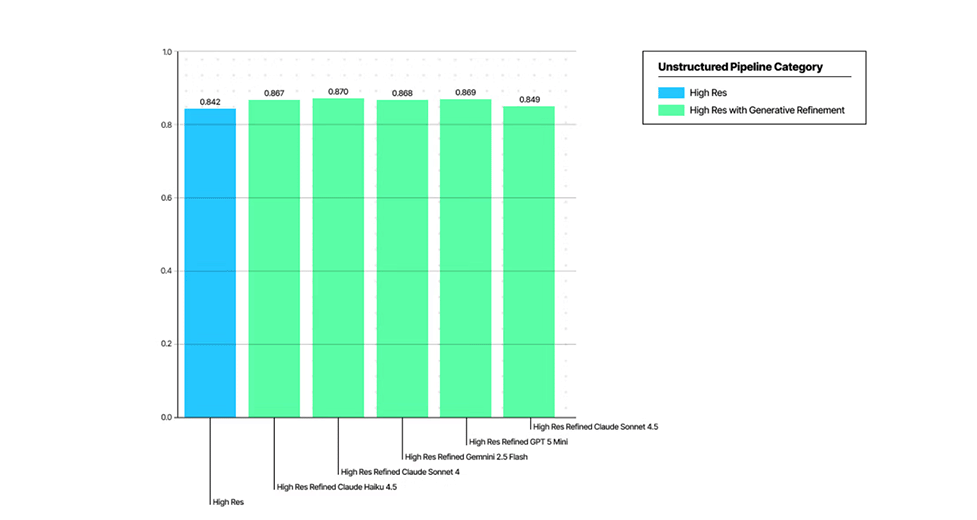
Improved table content and structure retention performance.
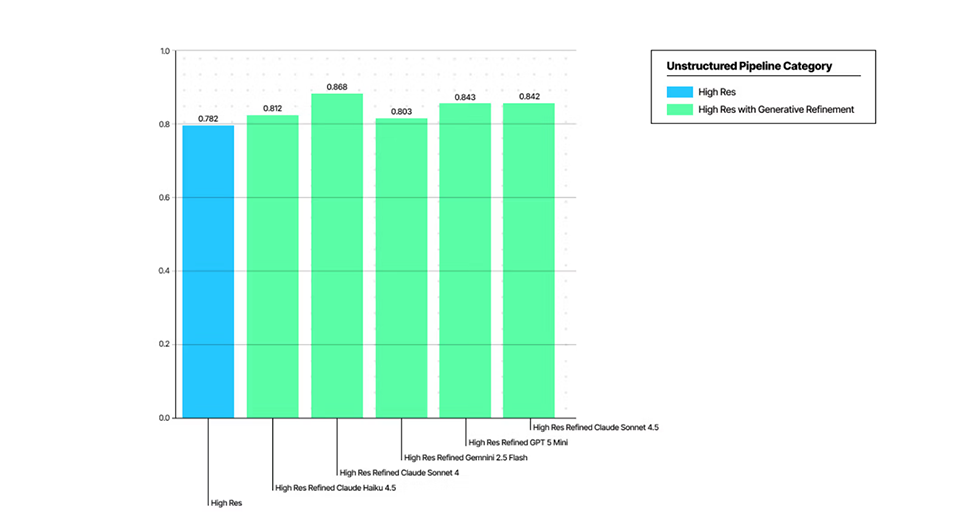
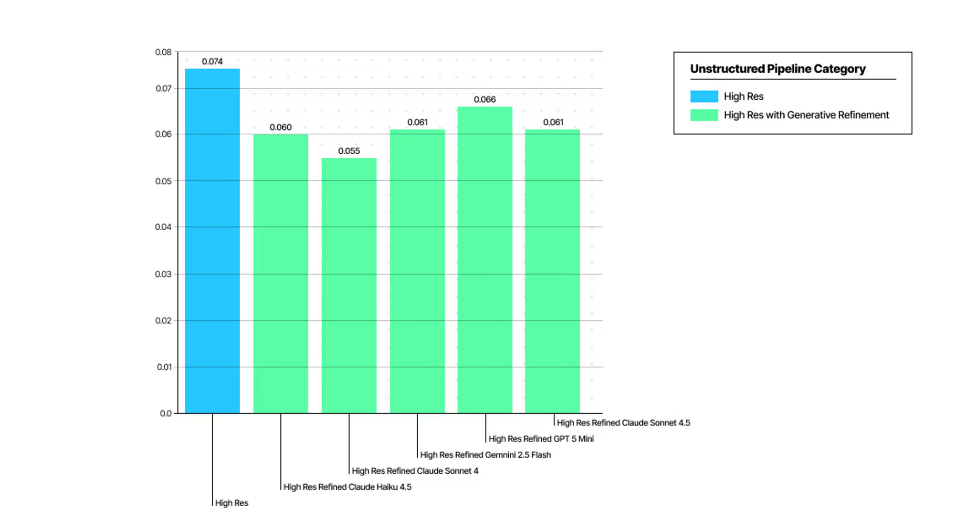
Reduction of hallucination
This level of fidelity was achieved, in part, by addressing the limitations of conventional OCR evaluation methods. These older methods failed to adequately consider the diversity of content representation and the hallucination that arises from generative document analysis. (See recent papers for details.)
We are confident that this approach will yield the best results in the market, and we will be sharing additional benchmarks soon.
Why is it important?
Performing high-resolution document analysis followed by refinement processing using generative AI is key to obtaining accurate, well-structured, and low-hallucination output in subsequent RAG/Agentic systems.
High accuracy
- By correcting errors that traditional OCR might miss, the final output becomes significantly cleaner and more reliable. This is achieved by using VLM to extract semantic content from individual text elements, rather than relying solely on OCR output or sending the entire page to VLM.
Structural consistency
- Images, tables, and text are all processed using a dedicated tool that leverages VLM (Visual Memory Management), ensuring that critical structural information is fully preserved. This is extremely important for complex financial reports, legal documents, and various forms.
Minimal hallucination
- The improved process significantly reduces the likelihood of VLM generating incorrect or fabricated content, increasing data reliability.
Rapid migration to production environment
- This will reduce the time spent on revision work, allowing you to dedicate more time to building a GenAI system that functions accurately for actual business documents.
Through refinement processing by generational AI, the quality of document conversion evolves from a "passing grade" level to truly enterprise-ready quality. This provides confidence that the data is accurate, complete, and ready for immediate use by AI.
Internal processing mechanism
The high-fidelity transformation workflow is a clear and powerful processing configuration that combines a High Res partitioner with three generative AI-powered refinement and enrichment processes. This entire workflow runs automatically when you drop your document into the new Transform tab.
① High Res Partitioner
First, the High Res partitioner processes the data. This uses advanced object detection techniques to precisely identify and separate each element, such as text blocks, tables, and images, and obtains the precise bounding Box position for each.
② Refinement process by generation AI
Once the partitioner has finished processing, a series of dedicated enrichment processes utilizing VLM are applied to refine the content of each element type.
- Generative OCR [New Feature]
By inputting all text elements into VLM, content that is more faithful to the original document is extracted. Compared to using VLM on the entire page or using traditional OCR alone, this element-by-element optimization significantly improves the accuracy of text output. - Table to HTML
Table elements are converted to HTML format by VLM. This preserves the structural relationships of the table and retains information essential for accurate understanding by subsequent AI. - Image Description
Image elements are converted into high-quality descriptive text by VLM and can be embedded with searchable text.
This approach integrates the results from the initial High Res partitioner with the high-precision results obtained through three refinement processes. When you drag and drop a document on the start page, the partitioning results are displayed first, followed by the final output after the refinement process is complete.
Even more importantly, once you're satisfied with the results, you can move to the Workflow Builder, where this high-precision workflow is ready to use, pre-configured. All you need to do is connect the data sources and output destinations, and it can run scalably in your production environment.
 Latest Information
 Case Study
 Blog
Blog Document List