- Semiconductor BusinessHOME
- Products and Services of Macnica,Inc.
-
technical information

-
Events and Seminars
- Handling Manufacturer
- Support
- Inquiry
- Click here to purchase products
- Semiconductor business e-mail magazine registration


 Narrow down by specifying conditions
現在2249件がヒットしています。check

Introduction
This time, TCP/UDP using Quectel's communication moduleAn example of a communication evaluation procedure. Let me introduce you to you.
Procedures for powering on the device and connecting to the network via a carrier line are explained in a separate article below.
(▶For more details, please refer to the "Quectel Communication Module Connection Guide.")
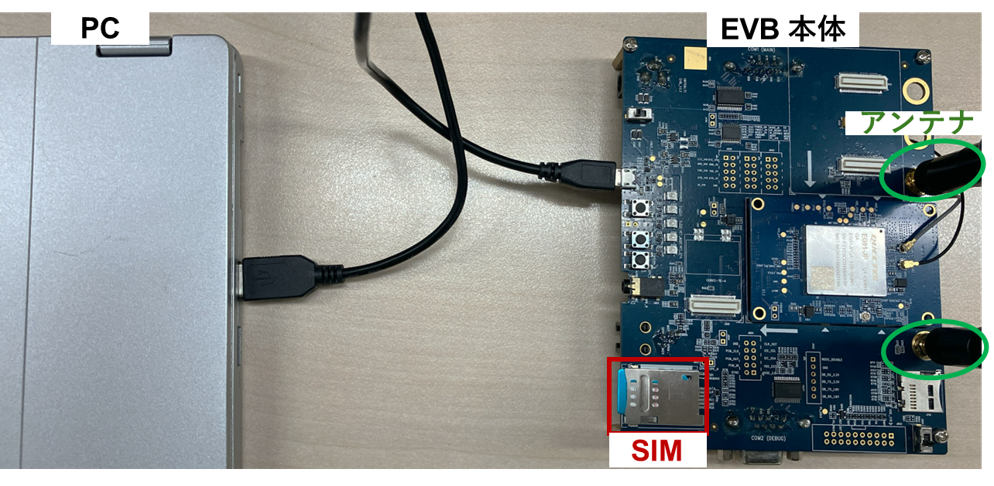
Introduction of equipment used
• Quectel UMTS & LTE_EVB Kit (Main board / EG95-JP TE-A board / Compatible antennas)
• USB cable (USB-A to micro-B)
• Notebook PC (for connecting the evaluation kit and controlling AT commands)
+ Compatible USB driver (Please contact us for availability)
+ AT command tools (TeraTerm, Quectel's QCOM tool, etc.)
NTT docomo 5G nanoSIM card
Checking Network Connectivity
AT+CEREG?
+CEREG: 0,1
AT+CGATT?
+CGATT: 1
+CEREG: 0,1: Indicates that the device is registered with the network.
+CGATT: 1: The device is already attached to the network.
TCP/UDP communication procedure (responses up to "OK" for each command are omitted).
Assigning IP addresses to communication modules
AT+QIACT? AT+QIACT=1 AT+QIACT? +QIACT: 1,1,1,"xx.xxx.xxx.xxx"// IPアドレス割当確認From the start of TCP/UDP communication to sending, receiving, and ending of communication.
// TCP/UDP接続 AT+QIOPEN=1,0,"TCP","[IPアドレス]",[ポート番号],0,0 /*TCPの場合*/ AT+QIOPEN=1,0,"UDP","[IPアドレス]",[ポート番号],0,0 /*UDPの場合*/ +QIOPEN: 0,0 /*接続成功*/ // 文字列送信 AT+QISEND=0,5 /*←例:5文字以内に設定*/ >[任意の文字列] SEND OK AT+QISENDEX=0,"48656C6C6F20576F726C6421" /*ASCII文字列の送信*/ SEND OK /*ASCII文字:48656C6C6F20576F726C6421 = Hello World!!*/ // 受信動作 AT+QIRD=0,1500 +QIRD: 0 // TCP/UDP切断 AT+QIDEACT=1 AT+QIACT=1 AT+QICLOSE=0In this example, we demonstrated the procedure for connecting to a server with a specified IP address and port number, and sending and receiving data.
in conclusion
Inquiry
For inquiries regarding Quectel products and communication modules, please use the link below.
Quectel Manufacturer Information Top
To return to the Quectel manufacturer information top page, please click below.