- 半導体事業HOME
- マクニカの製品・サービス
-
技術情報

-
イベント・セミナー
- 取扱メーカー
- サポート
- お問い合わせ
- 製品購入はこちら
- 半導体事業のメルマガ登録


 条件を指定して絞り込む
現在2191件がヒットしています。check


こんにちは。
マクニカで Altera® FPGA 製品の技術サポートをしている アルテラ ハナコ です。
今回は、Quartus® Prime の有償ライセンス形態の FLOAT ライセンス に関して、
他メーカーの開発ソフトウェアのライセンスと どのように共存運用するか、その管理方法をご紹介します。
なお、いずれのメーカーも FLEXlm ソフトウェアでライセンスを管理するものとします。
FLOAT ライセンスは、ライセンスを管理するパソコン (通称 ライセンスサーバー) に FLEXlm ソフトウェアをインストールして、稼働・運用します。
FLEXlm は、EDA (Electronic Design Automation) 分野において各社のソフトウェアで標準的に採用されているライセンス管理ツールで、Quartus® Prime の FLOAT ライセンスでもこのツールが採用されています。
同様に別メーカーの開発ソフトウェアでも FLOAT ライセンスの管理にこの FLEXlm が採用されていることが多くみられます。
ライセンス管理ツールが同じであれば、複数社のライセンス管理を1台のライセンスサーバーで運用することができます。
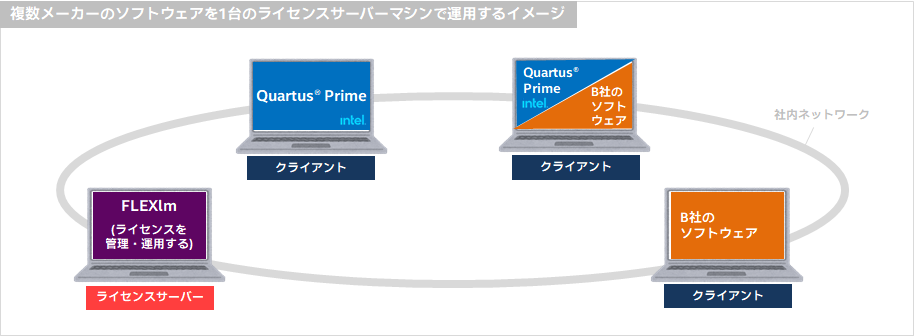
FLEXlm の管理・運用に必要なファイル
ライセンスサーバー PC の管理者は、以下のファイルを入手し、各種ファイルに対して設定や編集を行います。
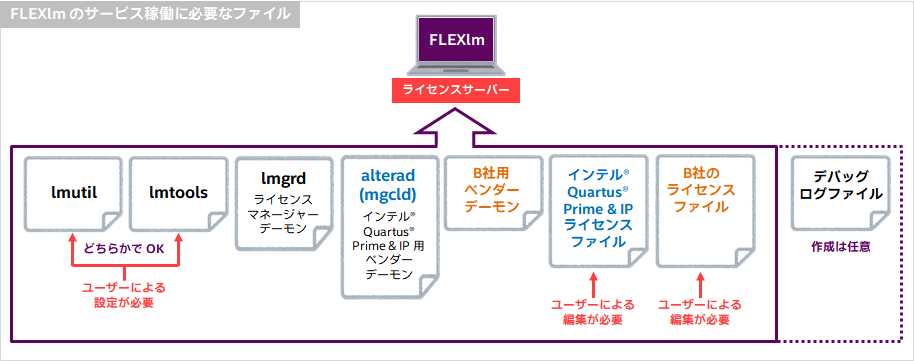
lmutil、lmtools、lmgrd、alterad は、
クライアント PC にインストールされた Quartus® Prime のインストールフォルダーに保存されていますので、コピー&ペーストでライセンスサーバー PC に保存します。
もしサーバー PC とクライアント PC のプラットフォームが異なる場合には、メーカーのホームページから入手してください。
各ファイルを保存するライセンスサーバー PC のフォルダーパスに決まりはありませんが、管理しやすいよう一つのフォルダーに保存することをおススメします。
(注意!保存するフォルダーパスは、全角およびスペースは使用しないでください。)
ここでは、OS を Windows、保存フォルダーパスを C:\FLEXlm とした例でご案内します。
Quartus Prime ライセンスファイル(*.dat)は、
ライセンスご契約時に登録した管理者専用の Self-Service License Center で申請および取得ができます。
詳細は、下記コンテンツをご覧ください。
・ Quartus® Prime、IP および Questa* - Altera® FPGA Edition の新規ライセンスを取得する方法
・ 取得済みの Quartus® Prime、IP および Questa* - Altera® FPGA Edition のライセンスファイルを再発行する方法
他者のベンダーデーモンおよびライセンスファイルの入手方法は、各メーカーにお問い合わせください。
以下に、各ファイルの役割をざっくり説明します。
|
ファイル |
概要 |
| lmutil | コマンドラインを使用してライセンスサーバーの管理を行うユーティリティ。 |
| lmtools | Microsoft Windows 向けの GUI(グラフィカル・ユーザー・インタフェース)を使用してライセンスサーバーの管理を行うユーティリティ。 |
| lmgrd |
ライセンスマネージャーデーモン。 メーカー各社のベンダーデーモンの起動や停止を促し、ライセンスを管理、発行する。 |
| alterad |
Altera® FPGA 開発ツール、および IP 用ベンダーデーモン。 クライアント PC に対して Quartus® Prime Standard Edition、Pro Edition、IP (intellectual property) などの使用権利を管理、発行する。1台の PC で稼働できる alterad は1つのみ。 |
| B 社用ベンダーデーモン |
B 社の開発ソフトウェア用ベンダーデーモン。 クライアント PC に対して B社のソフトウェアの使用権利を管理、発行する。1台の PC で稼働できB社用ベンダーデーモンは1つのみ。 |
| ライセンスファイル(*.dat) |
保守契約によりメーカー各社が発行するテキストファイル。 ライセンスサーバーの情報、使用できる製品や機能、使用期限などが明記されている。サーバー名やベンダーデーモンのパスなどの編集が必要。 |
| デバッグ・ログファイル(*.log) |
FLEXlm システムにおける各デーモンのステータスやエラーメッセージが記録されるため、稼働状況のデバッグに役立つファイル。 lmutil または lmtools 設定時に任意で指定し、自動的に生成される。 |
管理方法は2つ
では、それぞれの特徴を見てみましょう。
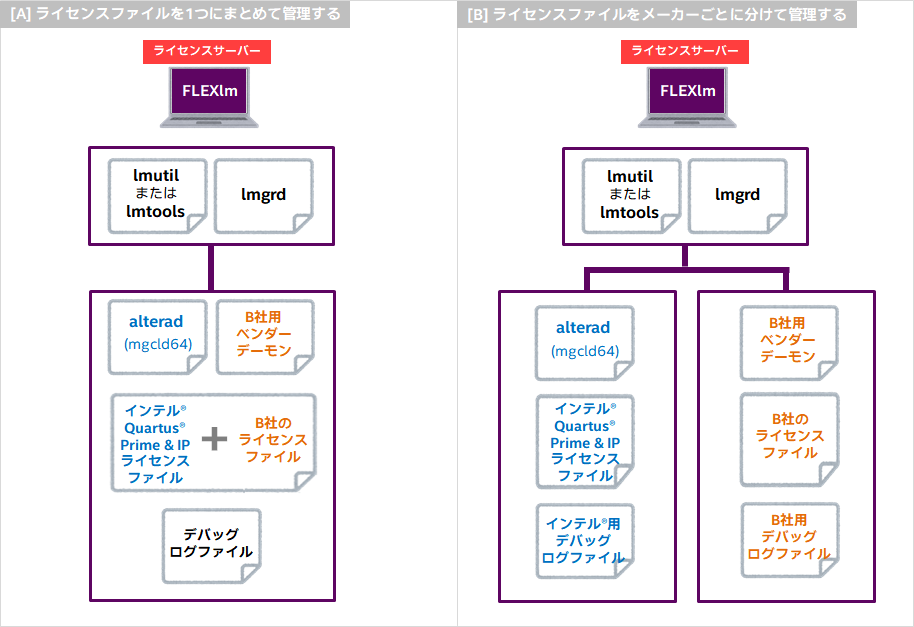
<Notes> "[B] ライセンスファイルをメーカーごとにわけて管理する方法" において、lmgrd をベンダーごとに用意・管理することも可能です。(イメージ図)

[A] ライセンスファイルを1つにまとめて管理する
Quartus® Prime 用ライセンスファイルと、B社のソフトウェア用ライセンスファイルを1つに合成して、運用も1つで管理する方法です。
<メリット>
・ ライセンスファイルの編集など、作業が簡単!
(FLEXlm によるライセンス管理がはじめての人におススメの方法。)
<デメリット>
・メンテナンスなどで ある1社のサービスを停止する場合に、同時管理している全メーカーのソフトウェアの運用も停止する必要がある。
(メンテナンスと無関係のソフトウェアを使用するユーザーにとっては、迷惑かも。)
◆ 方法[A] におけるライセンスファイルの統合方法は
こちらのコンテンツ の "[A] ライセンスファイルを1つにまとめて管理する場合の統合方法" をご覧ください。
◆ 方法[A] における lmtools の設定方法は
こちらのコンテンツ の "[A] ライセンスファイルを1つにまとめて管理する場合の lmtools 設定方法" をご覧ください。
[B] ライセンスファイルをメーカーごとに分けて管理する
Quartus® Prime 用ライセンスファイルとB社のソフトウェア用ライセンスファイルを別々で管理し、運用も別々に管理する方法です。
<メリット>
・管理がメーカーごとに独立しているため、他社のライセンスを稼働させたまま、ある1社のライセンスを停止することができる。
(ライセンスファイルやベンダーデーモンの更新などのメンテナンス時に有効)
<デメリット>
・メーカーごとにライセンス管理ツールの設定が必要
・ライセンスサーバー PC の管理者は、FLEXlm の仕組みを理解していること
なお Quartus® Prime 用ライセンスファイルには、
Questa* - Altera® FPGA Edition のライセンス機能 と AXI BFM IP ファンクション (IP Base Suite ラインナップの一つ) のライセンス機能も含まれて発行されます。
いずれのライセンス機能もシーメンス社のベンダーデーモン mgcld (mgcld64) で管理されるため、Quartus® Prime 用ライセンスファイルは alterad ベンダーデーモンと mgcld (mgcld64) ベンダーデーモンとにさらに細分化して運用することができます。
◆ 方法[B] におけるライセンスファイルの分離方法は
こちらのコンテンツ の "[B] ライセンスファイルをメーカーごとに分けて管理する場合の分離方法" をご覧ください。
◆ 方法[B] における lmtools の設定方法は
こちらのコンテンツ の "[B] ライセンスファイルをメーカーごとに分けて管理する場合の lmtools 設定方法" をご覧ください。
――――――――
続いて、ライセンスファイルの編集方法や LMTOOLS の設定方法 を説明します。