- 半導体事業HOME
- マクニカの製品・サービス
-
技術情報

-
イベント・セミナー
- 取扱メーカー
- サポート
- お問い合わせ
- 製品購入はこちら
- 半導体事業のメルマガ登録


 条件を指定して絞り込む
現在2189件がヒットしています。check


こんにちは、ダックです。
さて、テキストファイルの扱いはこちらの記事で覚えました。 C 言語ではファイルの種類をテキスト形式以外にもバイナリー形式のファイルを扱うことがきます。
文字列の出力
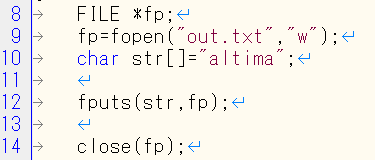
まずテキストファイル形式で、 「altima」 という文字列を、 「out.txt」 というファイルに出力してみることにします。
出力結果 (out.txt)
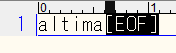
正しく表示されました。ではバイナリー形式ではどうでしょうか。同じようにして出力してみます。
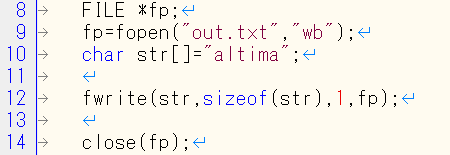
ファイルモードを 「wb」 とするとバイナリー形式でファイルを開くことができ、出力関数を fwrite に変更することで、バイナリー形式でデータを書きこむことができます。
出力結果 (out.txt)
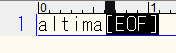
正しく出力されましたが、これではテキストファイルと何が違うのでしょうか。
数字を直接扱う
バイナリー形式では int 型などの数値を直接扱うことができます。先ほどのサンプルでは、char 型の配列でしたが、int 型の配列にして試してみます。また、文字ではなく数値を入力してみます。
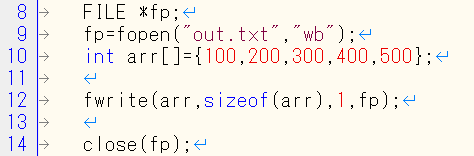
出力結果 (out.txt)

なぜか、うまく表示されません。どうしたのでしょうか?
なにか間違えたのかと思い、先輩に相談してみました。
そうすると「バイナリエディタで確認してごらん」と言われました。
調べてみると、バイナリエディタを使用すると、ファイルを16進のビットの並びで見ることができるそうです。では早速バイナリエディタで出力結果を見てみましょう。

このエディターでは 2 桁で 1 Byte を表します。 ここでは int 型は 4 Byte なので、8 桁がひとかたまりになります。
ちょっと分かりづらいですが、図のように 4 Byte ずつ色分けすれば分かりそうです。最初の青線の部分を見てみます。
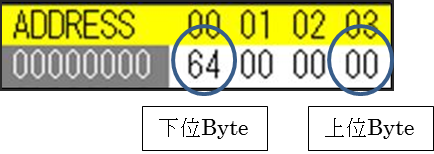
通常は下位バイトから先に格納されます。そのためこの 4 Byte を並べ替えて見てみると以下のようになります。
64 00 00 00 → 0000 0064 (16進) = 100 (10進)
しっかり入力した 100 という数値が反映されていますね。
同様に読むと 200, 300, 400, 500 と入力したデータが入っていることが分かります。
数値を入力したバイナリーファイルはデータをそのまま入力するので、テキスト形式では読めないのですね。
また、どのような型の数値なのかを把握していないと正しくデータを扱うことができません。
今回の例でもバイナリーの数値が入った out.txt ファイルを見たときに、 int 型の数字が 5 つあるということが分かっていなければ読むことができません。
バイナリーファイルを読み込むときには、そのフォーマットに注意が必要ですね。
ちなみに
一つ疑問が残りました。冒頭、文字列を扱った場合では、なぜ変わらなかったのでしょうか。
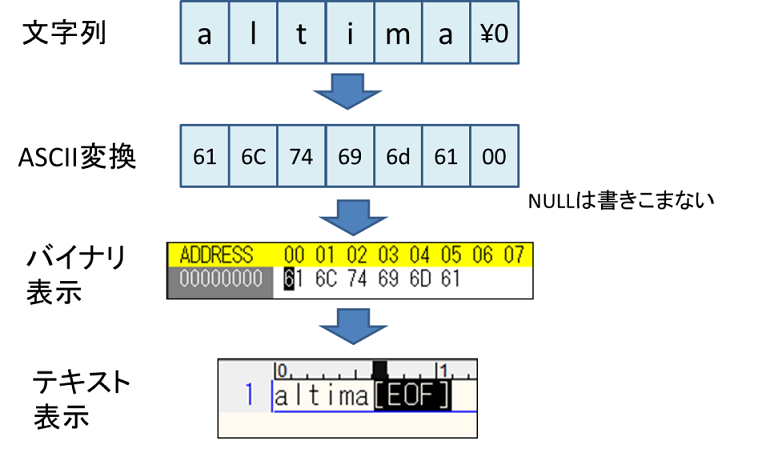
文字列を書きこむときは下の図のように、文字が ASCII に変換され、その値が書き込まれます。これをテキストエディターで開けば同じように文字として読むことができます。
そのため、バイナリー形式で書きこんでもテキスト形式で書きこんだときと何の変化もなかったのです。
バイナリー形式で書きこむメリットは int 型などの数字を書きこむときに発揮されるようです。